bomonike
Create Spec-Driven Development (SDD) of apps running in AWS







Overview
- What’s Kiro? Why?
- Implications
- My projects
- Socials
- Get Support from AWS
- Prerequisites
- A. Install Kiro IDE
- Hooks
- Tools
- Sample app
- Kiro Tasks
- Kiro Enterprise
- Pricing: Credits Monthly Subscriptions
- Agentic
- Requirement markdown files
- What Can Be Built
- AWS Transform (from IBM Mainframes)
- Property-Based Testing (PBT)
- Kiro Powers on demand
- When to Load Steering Files
 This article defines how to create apps on the AWS cloud using Kiro, step-by-step.
What’s Kiro? Why?
But when “Reasoning” capabilities emerged in Generative AI LLMs (Large Language Models), several frontier AI firms began offering “Spec-driven” development of code where prompts created specifications which in turn were run to generate code more precisely then ever.
On July 14th, 2025, when Kiro was first released (at AWS re:Invent), was “the day artificial intelligence stopped being a tool and became a colleague”.
Spec and code generation

Kiro is described as a “Spec-Driven GenAI Agentic Reasoning” platform. Let me explain what that means.
-
The “Traditional approach” to creating applications code is for programmers to write or implement code based on ideas in their heads.
When Generative AI (GenAI) was released by OpenAI in November, 2022 it was installed by the most people ever in a month because it answered prompts from a “model” created from much of what has been written down over time.
-
In past years, many tools created to create custom application code have been called “No Code” or “Low Code”. Before AI and Kiro, such early tools provided a set of GUI forms which limited what could be created.
-
Early in 2025, developers tweaked verbose prompts to “Vibe” (free form natural language) to request the generation of code.
But this approach got mixed results because code often needed to be re-edited since the same prompt can be answered differenly each time.
- And since several people are usually involved, several rounds of changes can occur before agreement can be reached.
-
Also notice that code with this approach is edited directly by programmers.
- Coding work includes scripts that define how each application works.
- Coding work also includes .terraform directives (or other ways) to define infrastructure that run applications in a datacenter.
- Earlier versions of Generative AI that appeared in 2023 enabled developers to write prompts for the AI to write code. But engineers often had to edit the generated code to incorporate software development best practices frameworks.
- AI Vibe coding capabilities that appeared in 2025 (such as Kiro) enabled prompts to define design specs.
- Each Kiro repo contains a folder full of hooks that take action automatically when triggered.
-
Within the Kiro specs folder folder specify what features to build through three phases of software development:
-
requirements.md - user stories with acceptance criteria.
-
design.md - technical architecture and implementation considerations.
-
tasks.md - implementation (coding) steps.
These files are committed into the same github repo as the code generated.
-
-
Kiro maintains consistency across projects by referencing its steering folder which contain “always on” standards and conventions about how to code specific features:
-
product.md describes the product’s purpose, target users, key features, and business objectives. This helps Kiro understand the “why” behind technical decisions and suggest solutions aligned with your product goals.
-
structure.md outlines the Project Structure - file organization, naming conventions, import patterns, and architectural decisions. This ensures that generated code fits seamlessly into your existing codebase.
-
tech.md documents the Technology Stack - frameworks, libraries, development tools, and technical constraints. This is so when Kiro suggests implementations, it will prefer your stack choices over alternatives.
-
-
Kiro references best practices logic used to generate specifications for steering.
NOTE: Other spec-driven AI such as Anthropic Claude have different names for the markdown files they create.
-
IMPORTANT: The revolution enabled by recent AI is that procedural programming code are changed indirectly by the AI. Prompts are now used to change specs which change programming code.
- To create programming and infrastruction code, prompts make requests to run tasks defined.
- The AI automatically references sample code in the background.
- IMPORTANT: Because all assets can now be re-created with testing included, the impact of seemingly small changes can iterate quickly and surely.
Implications
KEY POINT: Kiro (and other “spec-driven” offerings) enable a fundamental revolution in how applications are created and maintained.
??? backdrop from Amazon that (like with Anthropic’s Claude Code) is obsoleting “Software Engineer/programming” jobs … by the end of 2026..
- VIDEO “Kiro Has Changed How I Build Software”
- VIDEO “Spec-Driven Development with Kiro: From Requirements to Production in 6 Hours”
Specs in Kiro captures into “Organizational Intelligence” fragmented “tribal memory” by individual development team members throughout the AI systems development lifecycle (from Faiyaz:
My projects
What can you build using this?
Effort toward higher-level requirements are amortized over several projects.
“The people who are going to build the most interesting things over the next few years aren’t necessarily the ones with the deepest skill in a domain but the ones who move among multiple domains at once and point the right tools at the right problems.” – NateBJones
Here is what we’re working toward:
A. A MCP server to return the value of a variable stored in an encrypted location (macOS Keychain). This is instead of keeping all secrets in plain text in .env files. This has a mechanism like temporarily assumming an AWS role. This provides a way to centrally manage (and log) what permissions are given to whom.
B. Track events such as new resources being invoked (the project above) to remind the developer the cost of resources continuing to be used, and provide an easy way to remove the resources and the permissions which created them.
C. Add MCP agent to dynamically retrieve and display from an API weather data from individual Ambient Weather stations, based on code and tutorials to use MCP to retrieve utility data from open weather API.
D. aggregating events from Google Gmail and Microsoft Outlook into a single “Single Pane of Glass” view using https://github.com/Rani-01/Calendar_Merge.git
E. An app to make it easier for people to restrict their diet of salt, sugar, potassium, etc. The app can keep shopping lists and track inventory for freshness, then provide ideas for planning meals with variety.
F. For monitization, make use of “Stripe for payments” agent interfaces.
G. An MCP service that returns the lowest-cost cloud region within multi-region clouds (AWS, Azure, GCP, Oracle, etc.)
Socials
- https://www.linkedin.com/search/results/all/?keywords=%23kiro&origin=GLOBAL_SEARCH_HEADER
- https://kiro-community.github.io/book-of-kiro/ (from Chinese)
- https://github.com/kiro-community
- https://discord.com/invite/kirodotdev (by Jay Raval)
- https://www.linkedin.com/showcase/kirodotdev (follow)
- https://www.instagram.com/kirodotdev
- https://x.com/kirodotdev
- https://bsky.app/profile/kiro.dev
- https://www.twitch.tv/kirodotdev/videos (Follow & turn on notifications of live and recorded meetings)
- https://marketplace.visualstudio.com/search?term=kiro&target=VSCode&category=SCM%20Providers&sortBy=Relevance
PROTIP: Set your calendar:
- Twitch.tv Bi-Weekly Show “Design to Code” by Nikhil Swaminathan, Head of Product @AWS Kiro.
Learning literature search:
- https://www.youtube.com/results?search_query=%23kiro
- https://learning.oreilly.com/search/?q=kiro&rows=100&language=en
- https://aws.amazon.com/search/?searchQuery=kiro
- https://medium.com/search?q=kiro
- https://www.reddit.com/r/KiroDevs/ “the official community for developers building with, customizing, and contributing to Kiro IDE.”
- https://www.reddit.com/r/kiroIDE/ “The AI IDE for prototype to production, by AWS”
Introductory articles:
- https://ai.plainenglish.io/aws-just-released-its-cursor-killer-meet-kiro-fe0818e4736c
Get Support from AWS
-
https://support.aws.amazon.com/#/contacts/kiro says “For technical support, please submit an issue on Github
Issues with Kiro overheard
- Kiro was intended to support a VS Code-style ${input:} system that would prompt users to enter API keys at runtime rather than storing them anywhere, but this feature is currently not working as documented. Cleveland Scene For now, environment variables are the recommended workaround.
Prerequisites
- Obtain an email account to use on other accounts below.
- Use your emailxd to obtain an account on github.com.
- Obtain a personal Amazon Builder ID at builder.aws
-
Obtain an AWS IAM account with the permissions needed.
Kiro runs locally (macOS, Windows, Linux). Unlike cloud-base Claude.ai, which can only see what is pasted into the chat window, Kiro has full read/write access to read and write files locally, call APIs, and run bash commands autonomously without you having to copy/paste anything.
-
Open your default Terminal app for macOS or Linux, NOT another AI CLI app (such as OpenAI or Warp.dev), which cause this error reported by doctor:
✘ Kiro CLI terminal integrations: WarpTerminal is not supported
- Navigate to the OS user - the current user.
- Use my mac-setup approach and install shell script which installs:
- Install XCode (for command utilities), Homebrew
- Use Homebrew to install Chrome browser, KeePassXC password manager, VSCode and extensions, GPG, GitHub, Python, uv, uvx, Docker, aws-cli, Q Developer CLI, Aurora DSQL, NodeJs, Supabase CLI, etc.
- Configure ~/.zshrc (or ~/.bash_profile) (and optionally ~/.bashrc) to include in the PATH and Variables
- Use custom automations.
-
Configure GitHub access with SSH, verified email that appears as “Verified”.
- Under your own github.com account, create a repo (repository).
- Follow standards to create a README.md file describing the technologies.
- Create a .gitignore file specifying the folders and files to block from uploading to GitHub for each technology that will be associated with the repo.
-
Buy a USB to take a full backup as a recoverable checkpoint.
CLI and IDE Component Install
Install Kiro two ways:
A. Install the Latest release of Kiro IDE (Integrated Development Environment) run by clicking a mouse as well as keyboard.
B. Install the latest release of Kiro CLI (Command Line Interface) running inside a Terminal app; and
Let’s start with installing the IDE.
A. Install Kiro IDE
PROTIP: We don’t use
brew install --cask kiroHomebrew to install Kiro because Kiro has its own update mechanism. - Open the Google Chrome internet browser, set as your default browser.
-
Visit the history of Kiro IDE releases:
-
Visit the Kiro product landing page:
-
Click to see the “View Demo” video.
PROTIP: This article aims to take you on a logical and thorough step-by-step sequence through install, configuration, and usage.
- Click “Sign in” using your AWS Builder ID email and password.
- On the Account page,
click the purple “Download for macOS” (or Linux). -
Select “Apple Silicon” if you have the newer M-series machines. Select “Intel” for older models.
File such as “kiro-ide-0.11.28-stable-darwin-arm64.dmg” appears in the pop-up dialog.
- Select “Downloads” folder on the left menu if you are at a different folder.
- Click “Save” to begin download.
- Click the download icon and wait for the download to finish.
- Drag the purple Kiro and drop it in the Applications folder.
- Switch to the Finder app to verify that in the ~/Applications folder Kiro.app is among the files.
- Click on “Kiro.app” to open it.
- Hold command and press Tab to rotate through apps open. Release on the purple Kiro app icon.
-
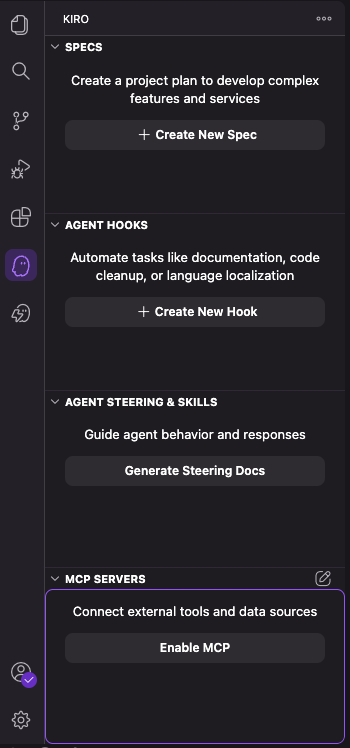 Click the Kiro “purple ghost” icon at the center of the vertical left menu (shown to the right here).
Notice the major components of Kiro:
- SPECS “Build complex features with structured planning”
- AGENT HOOKS “Automate repetitive tasks with smart triggers”
- AGENT STEERING & SKILLS “Guide agent behaviro and responses”
- MCP SERVERS “Connect external tools and data sourced”
- POWERS is revealed when the ghost icon with the thunderbolt is clicked.
REMEMBER: The Kiro.app is a clone (fork) of Microsoft’s Visual Studio Code IDE.
Kira IDE Extensions
These add functionality to Kira IDE:
-
Click the gear at the lower-left of the Kira IDE left menu and select “Extensions”.
-
PROTIP: Add the extension “EARS Syntax” (from https://bluedotbrigade.com sourced at https://github.com/BlueDotBrigade/ears-syntax-vscode) for syntax highlighting and code completion when writing EARS requirements. It highlights EARS patterns and keywords to improve readability and focus. It doesn’t generate code itself, but pairs well with Copilot or Cursor in the same editor. It uses intelligent snippets to quickly insert EARS patterns, such as “When [trigger], the system shall [response].”
-
Other Kira IDE Extensions to consider:
CAUTION: DO NOT install Kiro Git Commit Message Generator (FREE by dadop) to Generate intelligent, conventional commit messages using Kiro’s AI based on your code changes. Its https://github.com/davorpeu/kiro-git-message-gen/ is no longer on GitHub.
- “GitCom - AI Commit Assistant. This extension for Kiro that helps developers create meaningful, structured, and consistent commit messages using AI analysis. Features: - Git Diff Analysis: Uses simple-git to analyze staged/unstaged changes, file paths, and diff. Its developer Blessing Tutka responded from Belgium. It references https://github.com/blessingtutka/gitcom
From the Marketplace:
- Instead of open Kiro.app
/Users/johndoe/Applications/Kiro.app/Contents/Resources/app/bin/code -
Click the purpose “Sign in” to have your default browser open a window at:
https://app.kiro.dev/signin?state=12345678-f169-4738-8872-ae6831c67663&code_challenge=U1O4CtWNaDu8YIwY5_tcOJKLTnrGTr6s_IG5ikUqjgI&code_challenge_method=S256&redirect_uri=http://localhost:3128&redirect_from=KiroIDE
-
VIDEO: Download within the Kiro IDE skills folder, Claude Superpowers, referenced as Kiro powers.
https://github.com/obra/superpowers
VIDEO: Kiro Bi-Weekly Show | Design to Code with Figma by Nikhil Swaminathan, AWS Kiro Product Lead & Akbar Mirza at Figma
Nikhil Swaminathan says in BLOG “Introducing Kiro powers” December 3, 2025: “We’re building toward a future where powers work across any AI development tool—Kiro CLI, Cline, Cursor, Claude Code, and beyond.”
B. Install Kiro-CLI
REMEMBER: Processing of Amazon Q AI chatbot prompts was moved into Kiro.
- Saurabh Dahal is Sr Dev Advocate VIDEO
- https://aws.amazon.com/blogs/machine-learning/build-aws-architecture-diagrams-using-amazon-q-cli-and-mcp/
- To set up Kiro CLI and Docker on an Ubuntu system:
sudo apt update && sudo apt upgrade -y

# Install Docker Engine:
curl -fsSL https://get.docker.com -o get-docker.sh
sudo sh get-docker.sh
sudo systemctl enable docker --now
sudo usermod -aG docker $USER
# Install Docker Compose V2:
sudo apt-get install docker-compose-plugin

# Install Node.js
curl -fsSL https://deb.nodesource.com/setup_18.x | sudo -E bash -
sudo apt-get install -y nodejs

# Install Kiro-cli
curl -fsSL https://cli.kiro.dev/install | bash
PROTIP: On macOS, instead of using curl following Kiro CLI docs at https://kiro.dev/docs/cli, use Homebrew for better upgrade in the future:
brew install kiro-cliResponse:
==> Downloading https://desktop-release.q.us-east-1.amazonaws.com/1.24.0/Kiro%20CLI.dmg
######################################################################################## 100.0%
==> Installing Cask kiro-cli
==> Moving App 'Kiro CLI.app' to '/Users/johndoe/Applications/Kiro CLI.app'
==> Linking Binary 'kiro-cli' to '/opt/homebrew/bin/kiro-cli'
🍺  kiro-cli was successfully installed!
- ??? Restart your session or apply Docker group changes by running:
newgrp docker - Drag the Terminal window’s right edge to widen it for viewing the response:
Device authorized
Logged in successfully

⠀⠀⠀⠀⠀⠀⠀     ⢀⣴⣶⣶⣦⡀⠀⠀⠀⢀⣴⣶⣦⣄⡀⠀⠀⢀⣴⣶⣶⣦⡀⠀⠀⢀⣴⣶⣶⣶⣶⣶⣶⣶⣶⣶⣦⣄⡀⠀⠀⠀⠀⠀⠀⢀⣠⣴⣶⣶⣶⣶⣶⣦⣄⡀⠀⠀⠀⠀⠀⠀⠀⠀⠀
⠀⠀⠀⠀⠀⠀⠀    ⢰⣿⠋⠁⠈⠙⣿⡆⠀⢀⣾⡿⠁⠀⠈⢻⡆⢰⣿⠋⠁⠈⠙⣿⡆⢰⣿⠋⠁⠀⠀⠀⠀⠀⠀⠀⠀⠈⠙⠻⣦⠀⠀⠀⠀⣴⡿⠟⠋⠁⠀⠀⠀⠈⠙⠻⢿⣦⠀⠀⠀⠀⠀⠀⠀
⠀⠀⠀⠀⠀⠀⠀    ⢸⣿⠀⠀⠀⠀⣿⣇⣴⡿⠋⠀⠀⠀⢀⣼⠇⢸⣿⠀⠀⠀⠀⣿⡇⢸⣿⠀⠀⠀⢠⣤⣤⣤⣤⣄⠀⠀⠀⠀⣿⡆⠀⠀⣼⡟⠀⠀⠀⠀⣀⣀⣀⠀⠀⠀⠀⢻⣧⠀⠀⠀⠀⠀
⠀⠀⠀⠀⠀⠀⠀    ⢸⣿⠀⠀⠀⠀⣿⡿⠋⠀⠀⠀⢀⣾⡿⠁⠀⢸⣿⠀⠀⠀⠀⣿⡇⢸⣿⠀⠀⠀⢸⣿⠉⠉⠉⣿⡇⠀⠀⠀⣿⡇⠀⣼⡟⠀⠀⠀⣰⡿⠟⠛⠻⢿⣆⠀⠀⠀⢻⣧⠀⠀⠀⠀
⠀⠀⠀⠀⠀⠀⠀    ⢸⣿⠀⠀⠀⠀⠙⠁⠀⠀⢀⣼⡟⠁⠀⠀⠀⢸⣿⠀⠀⠀⠀⣿⡇⢸⣿⠀⠀⠀⢸⣿⣶⣶⡶⠋⠀⠀⠀⠀⣿⠇⢰⣿⠀⠀⠀⢰⣿⠀⠀⠀⠀⠀⣿⡆⠀⠀⠀⣿⡆
⠀⠀⠀⠀⠀⠀⠀    ⢸⣿⠀⠀⠀⠀⠀⠀⠀⠀⠹⣷⡀⠀⠀⠀⠀⢸⣿⠀⠀⠀⠀⣿⡇⢸⣿⠀⠀⠀⠀⠀⠀⠀⠀⠀⠀⠀⣠⣼⠟⠀⢸⣿⠀⠀⠀⢸⣿⠀⠀⠀⠀⠀⣿⡇⠀⠀⠀⣿⡇
⠀⠀⠀⠀⠀⠀⠀    ⢸⣿⠀⠀⠀⠀⠀⣠⡀⠀⠀⠹⣷⡄⠀⠀⠀⢸⣿⠀⠀⠀⠀⣿⡇⢸⣿⠀⠀⠀⠀⣤⣄⠀⠀⠀⠀⠹⣿⡅⠀⠀⠸⣿⠀⠀⠀⠸⣿⠀⠀⠀⠀⠀⣿⠇⠀⠀⠀⣿⠇
⠀⠀⠀⠀⠀⠀⠀    ⢸⣿⠀⠀⠀⠀⣾⡟⣷⡀⠀⠀⠘⣿⣆⠀⠀⢸⣿⠀⠀⠀⠀⣿⡇⢸⣿⠀⠀⠀⠀⣿⡟⣷⡀⠀⠀⠀⠘⣿⣆⠀⠀⢻⣧⠀⠀⠀⠹⣷⣦⣤⣤⣾⠏⠀⠀⠀⣼⡟
⠀⠀⠀⠀⠀⠀⠀    ⢸⣿⠀⠀⠀⠀⣿⡇⠹⣷⡀⠀⠀⠈⢻⡇⠀⢸⣿⠀⠀⠀⠀⣿⡇⢸⣿⠀⠀⠀⠀⣿⡇⠹⣷⡀⠀⠀⠀⠈⢻⡇⠀⠀⢻⣧⠀⠀⠀⠀⠉⠉⠉⠀⠀⠀⠀⣼⡟
⠀⠀⠀⠀⠀⠀⠀    ⠸⣿⣄⡀⢀⣠⣿⠇⠀⠙⣷⡀⠀⢀⣼⠇⠀⠸⣿⣄⡀⢀⣠⣿⠇⠸⣿⣄⡀⢀⣠⣿⠇⠀⠙⣷⡀⠀⠀⢀⣼⠇⠀⠀⠀⠻⣷⣦⣄⡀⠀⠀⠀⢀⣠⣴⣾⠟
⠀⠀⠀⠀⠀⠀⠀    ⠀⠈⠻⠿⠿⠟⠁⠀⠀⠀⠈⠻⠿⠿⠟⠁⠀⠀⠈⠻⠿⠿⠟⠁⠀⠀⠈⠻⠿⠿⠟⠁⠀⠀⠀⠈⠻⠿⠿⠟⠁⠀⠀⠀⠀⠀⠈⠙⠻⠿⠿⠿⠿⠟⠋⠁

Jump into building with Kiro:
- Ask a question or describe a task
- Use /context add
to provide Kiro with additional info - Connect to external tools with by using /mcp Use /help for more information and happy coding! Model: claude-sonnet-4 (/model to change)
</pre>
- The first time kiro-cli is run, click “Allow access” to the browser window that appears.
/coVerify the install:
kiro-cli versionkiro-cli 1.27.1
-
Since Kiro does not display releases on its GitHub, view the history of releases at:
-
To update Kiro-CLI, run brew install kiro-cli again.
- Summarize the content of the current Kiro CLI release:
kiro-cli version --changelogChangelog for version 1.27.1: Version 1.27.1 (2026-03-05)
- Fixed: Prevent bash commands from hanging when processes access the terminal (SIGTTIN) </pre>
Kiro-cli login/logout
```
- Fixed: Prevent bash commands from hanging when processes access the terminal (SIGTTIN) </pre>
- Login to Kiro using a login method: AWS Builder ID or IDC (IAM Identity Center) account:
kiro-cli loginIf you select “GitHub”, the response is like:
“Google will allow kiro-prod-us-east-1.auth.us-east-1.amazoncognito.com to access this info about you” - To logout:
kiro-cli logoutKiro-CLI doctor
- Know Kiro commands:
kiro-cli --help╭────────────────────────────────────────────────────╮ │ chat Chat with Kiro CLI │ │ agent Manage AI agents │ │ doctor Debug installation issues │ │ settings Customize appearance & behavior │ │ quit Quit the app │ ╰────────────────────────────────────────────────────╯
- Analyze (like with Git):
kiro-cli doctor???
- Know Kiro commands:
kiro-cli --help-alldebug Debug the app settings Customize appearance & behavior setup Setup cli components update Update the Kiro application diagnostic Run diagnostic tests init Generate the dotfiles for the given shell theme Get or set theme issue Create a new Github issue login Login logout Logout whoami Prints details about the current user profile Show the profile associated with this idc user user Manage your account doctor Fix and diagnose common issues launch Launch the desktop app quit Quit the desktop app restart Restart the desktop app integrations Manage system integrations translate Natural Language to Shell translation dashboard Open the dashboard chat AI assistant in your terminal mcp Model Context Protocol (MCP) inline Inline shell completions agent Agent root commands help Print this message or the help of the given subcommand(s) Options: -v, --verbose... Increase logging verbosity --help-all Print help for all subcommands --agentLaunch chat with specified agent -h, --help Print help -V, --version Print version </pre> ### Global ~/.kiro folder Either way, the Kiro installer creates in the current user's home folder (represented by ~) the global Kiro workspace folder tree for reference by all Kiro projects: ~/.kiro
NOTE: A.kiro
folder tree is also in each Kiro project root to control that repo only. - To see what folders and files are within the ~/.kiro global repo created by the Kiro installer, using the tree utility:
!tree ~/.kiroREMEMBER: Use an exclaimation prefix to invoke OS-level commands.
|-- .cli_bash_history   # file
|-- agents
|   `-- agent_config.json # from agent_config.json.example
|-- argv.json           # file
|-- extensions
|   `-- extensions.json
|-- powers
|   `-- installed.json
|   `-- registries
|   `-- registry.json
|   `-- registry.json.v1.backup
|-- settings
|   `-- cli.json
|   `-- mcp.json
|-- skills
`-- steering
The internal file .cli-bash_history kiro updates to track every command it processes. TODO: history commands
Automation Types
Use for: When loaded: Best for: Always-on instructions Every session Codebase guardrails MCP server Session start External gateways File-based instructions Pattern / description match Area-specific rules Prompts / commands one-shot workflows Custom agents Droptdown OR subagents Constrained workflows Skills On demand Reusable capabilities Hooks On lifecycle trigger Contexual automation – From VIDEO: Customize Your VS Code Agents
REMEMBER: Kira IDE is a fork of Microsoft’s VSCode, so assets from github.com/github/awesome-copilot may work within Kiro IDE.
Each VSCode subagent runs in its own context window and returns just the response, so the main agent’s context stays clean. Subagents receive an input prompt from the orchestrator.
agent_config.json
{
   "name": "example",
   "description": "This is an example agent config (and will not be loaded unless you change it to have .json extension)",
   "prompt": null,
   "mcpServers": {},
   "tools": [
      "read",
      "write",
      "shell",
      "aws",
      "report",
      "introspect",
      "knowledge",
      "thinking",
      "todo",
      "delegate",
      "grep",
      "glob",
      "@mcp_server_name/mcp_tool_name",
      "@mcp_server_name_without_tool_specification_to_include_all_tools"
   ],
   "toolAliases": {},
   "allowedTools": [],
   "resources": [],
   "hooks": {},
   "toolsSettings": {},
   "useLegacyMcpJson": true,
   "model": null
   }
agent_config.json
??? Default configuration read every time you chat with Kiro CLI:
{
  "resource": [
    "file://README.md",
    "file://AGENTS.md",
    "file://AmazonQ.md",
    "file://.amazonq/rules/**/*.md",
    "file://.kiro/steering/**/*.md",
    "file://~/.kiro/steering/**/*.md"
  ]
}
Q CLI (command-line interface) is now named Kiro CLI. Amazon Q Developer features remain unchanged.
See https://kiro.dev/docs/cli/steering/
https://aws.amazon.com/blogs/industries/from-spec-to-production-a-three-week-drug-discovery-agent-using-kiro/
.env file
my-server.env ??? unencrypted
- PROTIP: The API_KEY value is replace with “your-api-key” values shown above with variable name which are replaced with values ???.
-
PROTIP: The AMBIENT_API_KEY value is replace with variable name which are replaced with values ???.
settings.mcp.json
REFERENCES:
Kiro IDE serves as a MCP client supporting MCP integrations. The official Registry of MCP clients are listed at
modelcontextprotocol.io/clients and include ChatGPT from OpenAI, Claude Code, Cline, OpenAI Codex, etc.registry.modelcontextprotocol.io from
https://github.com/modelcontextprotocol/servers - Create and edit mcp.json file within settings.
{
   "mcpServers": {
      "my-server": {
         "command": "npx",
         "args": ["-y", "@modelcontextprotocol/server-name"],
         "env": {
         "API_KEY": "$MCP_SERVER_API_KEY"
         },
         "autoApprove": ["tool_name1"],
         "disabled": false
      }
      "ambient-cloud": {
         "url": "https://your-mcp-endpoint.com",
         "headers": { "Authorization": "Bearer your-token" },
         "env": {
            "AMBIENT_API_KEY": "$AMBIENT_CLOUD_API_KEY",
            "AMBIENT_APP_KEY": "$AMBIENT_CLOUD_APP_KEY"
         },
         "disabled": false
      }
      "local-server": {
         "command": "python3",
         "args": ["/absolute/path/to/server.py"],
         "env": {
            "AMBIENT_API_KEY": "$AMBIENT_CLOUD_API_KEY",
            "AMBIENT_APP_KEY": "$AMBIENT_CLOUD_APP_KEY"
         },
         "disabled": false
      }
   }
}
PROTIP: I always put “disabled”: false on each section so all other lines can have a comma at end of line.
-
PROTIP: Variables are replaced ???
MCP servers available
https://github.com/github/awesome-copilot/blob/main/plugins/project-planning/README.md Tools and guidance for software project planning, feature breakdown, epic management, implementation planning, and task organization for development teams.
Kiro “frontier” Agents
Announced Dec 2025, Kiro has “frontier” agents which act like paid human team members who can maintain large context across sessions for hours or days to independently complete tasks requiring complex planning and coding (implementation) across multiple codebase repos in enterprise-level team workflows.
The initial frontier Kiro agents (used by Western Governors University):
- AWS Security Agent NEWS
- AWS DevOps Agent that’s focused on transforming the software development lifecycle. NEWS
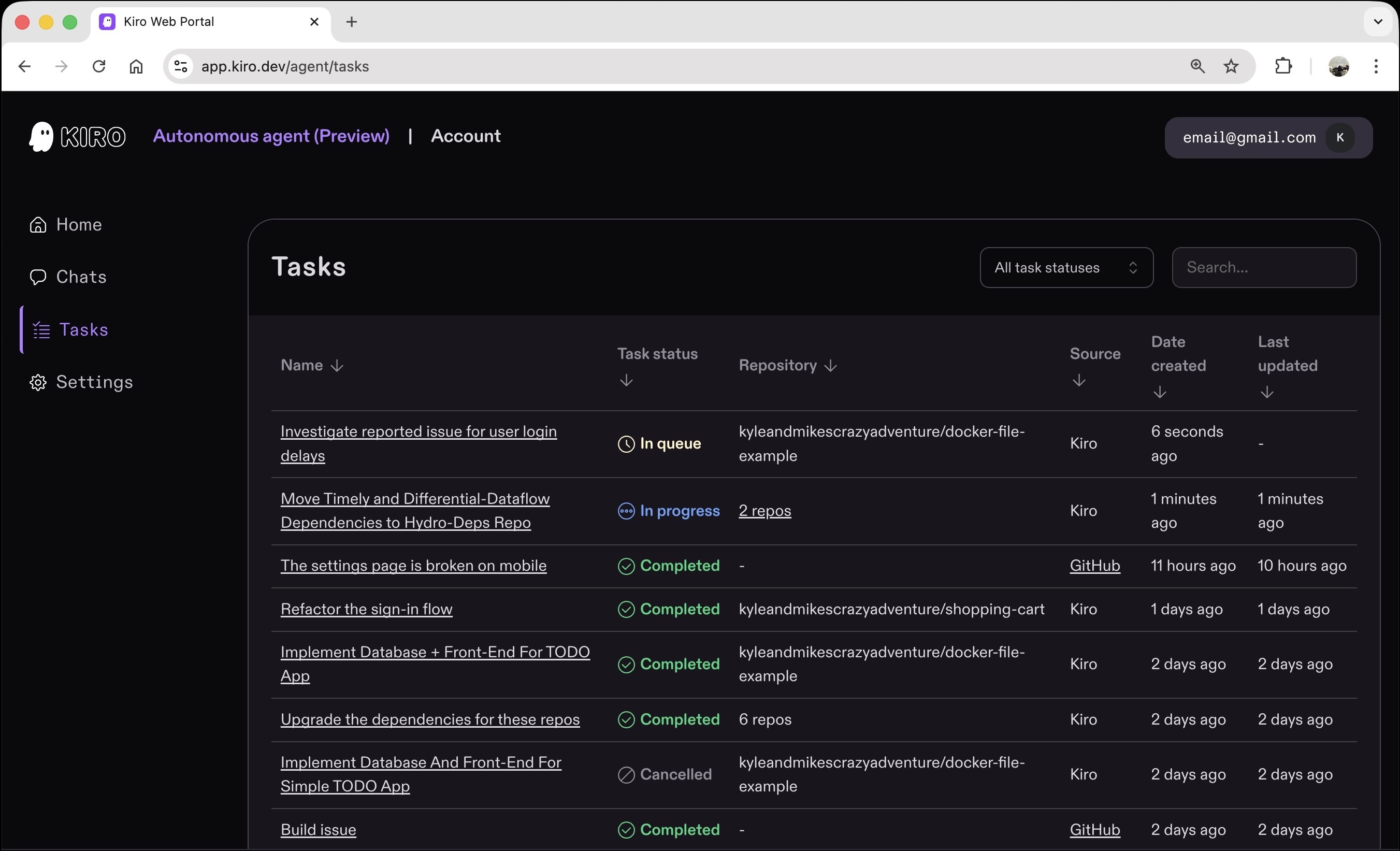
- Kiro autonomous agent
For each task, the agent clones the authorized repo into an isolated sandbox environment and can work across multiple repositories in a single task, maintaining context and coordinating changes. Kiro autonomous agents use a two-layer access model:
- organization owners control which repos the Kiro Agent GitHub app can access,
- individual users can only assign tasks to repos they personally have write access to.
References:
- https://github.com/kiro-community/kiro-autonomous-agent-power
- https://kiro.dev/blog/introducing-kiro-autonomous-agent/
Hooks
Kiro creates data flow diagrams, TypeScript interfaces, database schemas, and API endpoints—like the Review interfaces for its review system.
Kiro’s Hooks are event-driven automations that executes tasks in the background when you save, create, delete files, or on a manual trigger. Hooks delegate tasks to a collaborator.
- When a React UI component is saved, Kiro hooks update the test file.
- When an API endpoint (URL) is modified, hooks refresh README files.
- Upon a git commit, security hooks scan for leaked credentials.
Kiro Hooks enforce consistency. Set up a hook once, and Kiro handles the rest.
Tools
QUESTION: TOOL: To convert a repo ingestible by AI, change “github.com” to “gitinjest.com” and paste it in Claude.
Sample app
Dynatrace Astroshop
Voice-driven development
As of Feburary, 2026, Kiro does not have built-in voice input yet, unlike Cursor which has a microphone button in the chat window to let developers speak instructions instead of typing them. Upvote the feature requests on Kiro’s GitHub to help prioritize it:
- Issue #830 – Voice Interaction
- Issue #1344 – Speech to Text
Since Kiro is built on VS Code, try installing the VS Code Speech extension (ms-vscode.vscode-speech) — it may work for the chat input panel.
On macOS:
- Position cursor, then press and hold Right command after brew install –cask superwhisper has the best quality. Applications/superwhisper.app uses NVIDIA’s small Parakeet model.
- Use your OS built-in speech-to-text: System Settings > Accessibility > Voice Control or press Fn Fn to dictate
- VoiceInk is a free option On Linux:
- Nerd Dictation is Whisper-based and free
- Install whisper-ctranslate2 On Windows 11 OS, use voice dictation (speech to text) by pressing Windows key + H to open voice typing.
- Whisper
VIDEO: See https://github.com/aws-samples/sample-kiro-steering-studio which references file .kiro/steering-studio/state.json to Vibe code an entire NodeJs app in TypeScript (.ts) using voice commands (without typing) in Kiro using browser Web Audio API support backed by the amazon.nova-2-sonic-v1:0 robust Speech-to-Speech multi-modal model on Amazon Bedrock in the AWS Cloud. VIDEO Key Components:
- NovaSonicClient: Manages bidirectional streaming with Amazon Bedrock, handling audio input/output and tool calling
- SteeringStore: Maintains in-memory state of steering files with atomic file writes and session recovery
- SessionManager: Tracks Socket.IO session state including audio readiness and keepalive timers
- Tool System: Zod-validated tools for AI-controlled steering file updates
Kiro Tasks
Kiro generates code by processing a TASKS.md file such as this from AWS Transform:
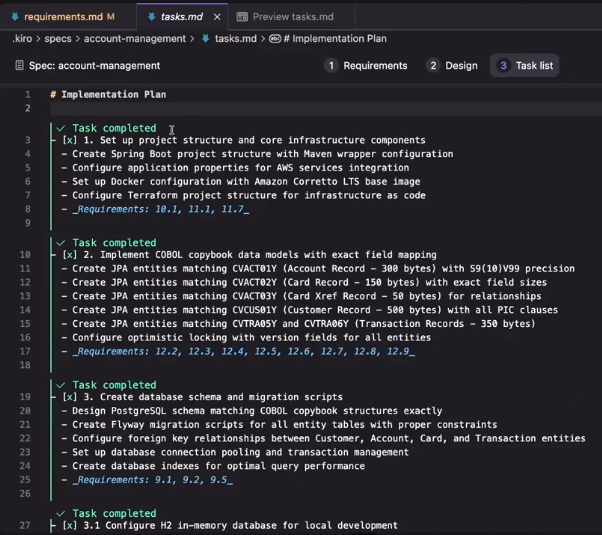
Kiro builds code from spec (design) requirements, which Kiro can generate by analyzing a codebase.
Kiro Enterprise
https://kiro.dev/enterprise Kiro “autonomous agent for teams” integrates with Jira, Confluence, GitLab, GitHub, Teams, and Slack. Enterprise features: Safety and Compliance:
- Firewall whitelist configuration - Configuring access control for enterprise network environments
- VPC Endpoint Support - Internal network access where data traffic does not leave the public network.
- Chat auditing feature - complete conversation logs and audit trail
- SSO Integration - Seamless integration with enterprise identity management systems
Management and Control:
- User Management - Centralized management of team members and permissions
- Usage statistics - detailed usage analysis and reports
- Policy Control - Enterprise-level Security Policies and Compliance Requirements
- Unified Billing - Simplified Enterprise-Level Billing and Cost Management
PROTIP: Frame problems effectively for AI analysis:
- Validate AI suggestions against real-world constraints.
- Maintain clear boundaries between AI capabilities and human responsibilities.
- Accelerate learning through systematic AI-guided exploration.
- Focus on high-value human skills while AI handles routine complexity – NotbookLM expert Mihailo Zoin. Amazon Kiro: First Contact - When AI Becomes a Colleague (OUT OF THE BOX PROGRAMMING Book 1) (p. 3). (Function). Kindle Edition.
“Your browser version is unsupported.”
Referencs:
- <a target=”_blank” href=”https://www.youtube.com/watch?v=8k1g-E1qGyQ “How To Use Kiro, the New Agentic IDE” (in preview 2025) by Syntax
-
PROTIP: Open another Terminal tab for doing other work, so you can quickly ask questions.
REMEMBER: To the right of the “>”, type a chatbot question.
- REMEMBER: Built-in commands such as this verify whether the Xcode MCP server is connected:
/toolsTrial prompt
- Type a trial prompt:
What is the time in NYC. ???PROTIP: A question mark is not needed.
Exit Kiro
-
To exit kiro-cli, press control+c twice.
-
Consider prompt templates uses “steering files” to guide AI behavior with project-specific instructions. Steering files are markdown documents in .kiro/steering/ that provide context, workflows, and constraints. When you work in Kiro, these files automatically shape how the AI assistant responds - no manual prompting required.
https://github.com/jasonkneen/kiro/blob/main/spec-process-guide/prompting/templates.md
https://github.com/aws-samples/sample-kiro-cli-prompts-for-product-teams
Kiro outputs standalone HTML files that open directly in any browser - no build step or server required. That enables you to share them with stakeholders by simply sending the files.
Kiro-cli chat & context
- Start using Kiro Chat: view parameters using help:
kiro-cli chat --helpContext tokens used and pricing
- View the current context usage:
/usage --contextPROTIP: Kiro doesn’t publish a single hard token number. However,
- the total context window appears to be roughly 200K tokens by back-calculating from:
/contextIt breaks down token usage by category (steering files, tools, responses, prompts).
REMEMBER: Credits are metered to the second decimal point, so the least number of credits a task can consume is 0.01 credits.
REMEMBER: Unlike traditional MCP servers which load all tools upfront and consuming tokens, Kira loads and activate tools dynamically when relevant to the current task.
-
PROTIP: Multiply the percentage by the tokens used. For example, if 10,000 tokens shows as 5% used, the total window is ~200K.
Pricing: Credits Monthly Subscriptions
All subscriptions have overage of $0.04/credit.
Subscribers pay $0.02 per credit: REMEMBER: Unused credits don’t roll over to the next month. Use it or lose it.
NOTICE: But it’s currently only for users who paid for a monthly subscription. The https://kiro.dev/pricing page says “Get 500 bonus credits usable within 30 days when you first sign up using social login or Builder ID.”
- Free users get 50 credits/mo.
- $20/mo for 1,000 credits/mo on Kiro Pro (after 500 credits at $0.04)
- $40/month for 2,000 credits/mo on Pro+ (after 1,000 credits at $0.04)
- $200/month for 10,000 credits/mo on Power subscriptions (after 5,000 credits at $0.04)
Credit usage updates at least every 5 minutes.
PROTIP: If you are strapped for cash, make an appointment on your calendar to use Kiro free credits every month. Or create several AWS accounts. “I have cloudecode pro, then use kiro pro+ after 5 hour limit, so I can continue non stop.”
One user experienced errors in charges.
REMEMBER: Kiro credits reset on the 1st of every month, regardless of when you signed up.
Kiro CLI models
- Kiro CLI commands ???
/modelThe “Auto” model is the default.
REMEMBER: Different models consume credits at different rates. A prompt executed via Sonnet 4 cost more credits than executing it with Auto. For example, a given task that consumes X credits to execute in Auto, will cost you 1.3X credits to execute via Sonnet 4.
PROTIP: Changes within models can result in different output generated. That’s why outputs should be stored in GitHub, which provides a way to “time travel” back to the state of all files at the point of each git commit and make comparisons.
Load another model ???
Compress & Clear
REMEMBER: Context files are capped at 75% of the model’s context window — files exceeding this are automatically dropped.
When a conversation reaches 80% of the model’s context window limit, Kiro automatically summarizes previous messages to bring usage back below the limit.
-
Kiro CLI automatically compresses the context if the session goes out of context.
- To clear the context manually:
/clear - If you forget to save your session, resume the last session Kiro automatically put in the current folder:
kiro-cli chat --resume`restore` - To save the session into file “xxx.json”:
/save xxx - To load a previously saved session named “xxx”:
/load xxx.json - Exit the chat using any one of the following methods:
- Press Ctrl+C twice in a row
- Press Ctrl+D twice in quick succession
- Enter /quit
- Enter /exit
Supabase database power
- Among https://kiro.dev/powers is “Build a backend with Supabase”.
-
Click “+ Add to Kiro”.
Supabase is a full backend in one platform. It’s the fastest way to go from zero to a production-ready backend without sacrificing the power of a real relational database. Supabase CLI runs locally within a Docker Desktop container powered by NodeJs.
Supabase is popular because it’s built not on a proprietary DB like Google’s Firebase (NoSQL with vendor lock-in), but on the full open source PostgreSQL database. So you get SQL, foreign keys, ACID compliance, and can always migrate away if needed. It supports complex data relationships and real-time features that Firebase simply can’t match.
Supabase handles all the behind-the-scenes work that AI code generation tools need to create fully functional apps. Tools like Bolt, Lovable, Cursor, and Kiro all have native Supabase integrations.
Every project gets a full Postgres database, authentication, instant APIs, Edge Functions, Realtime subscriptions, Storage, and Vector embeddings — all integrated together. Instead of wiring up five separate services, you get them all out of the box.
- http://localhost:54321 — REST API
- http://localhost:54322 — Postgres database
- http://localhost:54323 — Supabase Studio (the dashboard UI)
- http://localhost:54324 — Mailpit (local SMTP for auth emails)
Running supabase start spins up a complete local environment with Docker, including the database, auth server, and edge functions runtime. Schema migrations are version-controlled and deploy consistently across environments.
Running supabase start spins up a complete local environment with Docker, including the database, auth server, and edge functions runtime. Schema migrations are version-controlled and deploy consistently across environments.
Supabase.com offers a generous free tier. Users get 500MB DB storage, 5GB bandwidth, and more — completely free with no credit card required — enough for hobbyists or small side projects, with painless scaling to paid tiers as usage grows.
This tutorial describes the prompts to make use of it without coding.
brew install supabase/tap/supabase
# or npm install supabase --save-dev
supabase --version   # 2.75.0
# Start Docker:
pgrep -x "OrbStack" > /dev/null && echo "running" || echo "not running"
open -a OrbStack  # to use Ubuntu plucky for arm64
docker ps --filter "name=supabase"
docker compose up -d
docker info
supabase status --debug
# Initialize a new project:
supabase init
# Start the local stack:
supabase start
docker compose up -d
supabase stop           # stop all containers
supabase db reset       # reset local database
supabase status         # show local URLs and keys
To sync with production in the cloud:
supabase db pull        # pull remote schema locally
supabase db push        # push local migrations to production
supabase db diff        # see what changed
Tasks ???
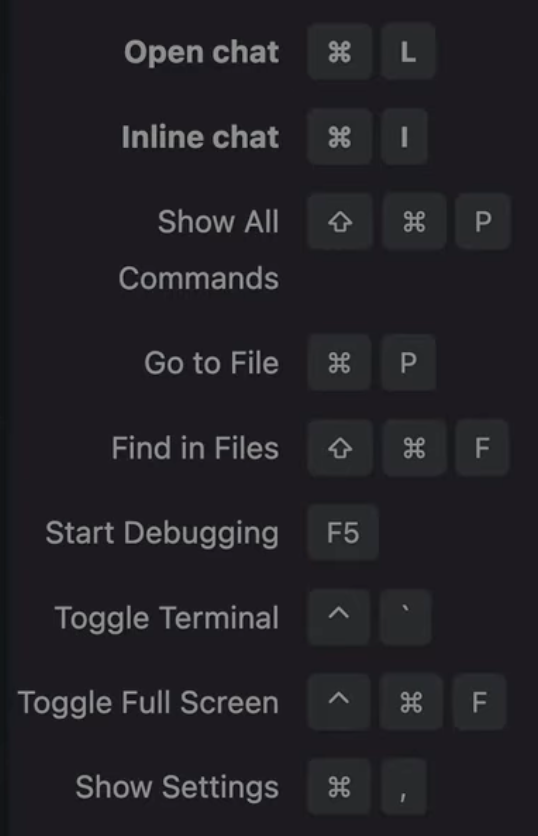
Kiro’s Keyboard Shortcuts
-
Switch between the Kiro IDE and CLI, press ^ and ` (hold down shift and the 6 key for ^ then the ` to the left of 1). Other shortcuts:
Agentic
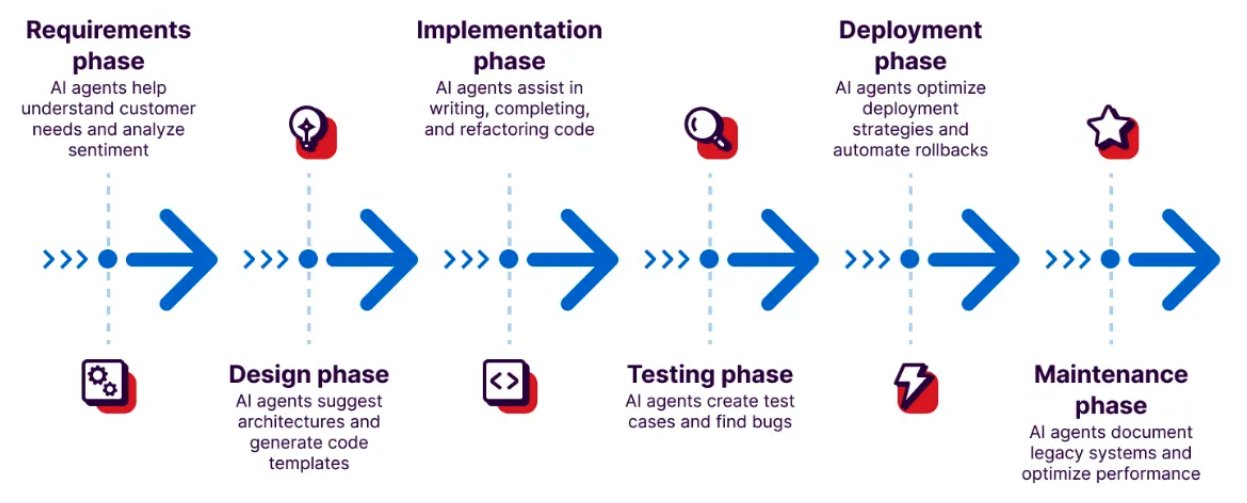
Kiro builds “Agentic AI” using MCP and A2A protocols.
Apple XCode IDE
Additionally, Apple’s XCode IDE can be used to create iOS apps using Kiro CLI and Xcode Agentic Coding Tools. by https://www.linkedin.com/in/cmanikandan/”>Mani Chandrasekaran</a> See Apple’s Coding Intelligence setup guide
- Install the latest XCode (26.3+ has MCP support) and open Xcode.app.
- From the upper-left select Xcode, then Settings.
-
Select Intelligence in the sidebar. If you don’t see that, you don’t have the correct version.
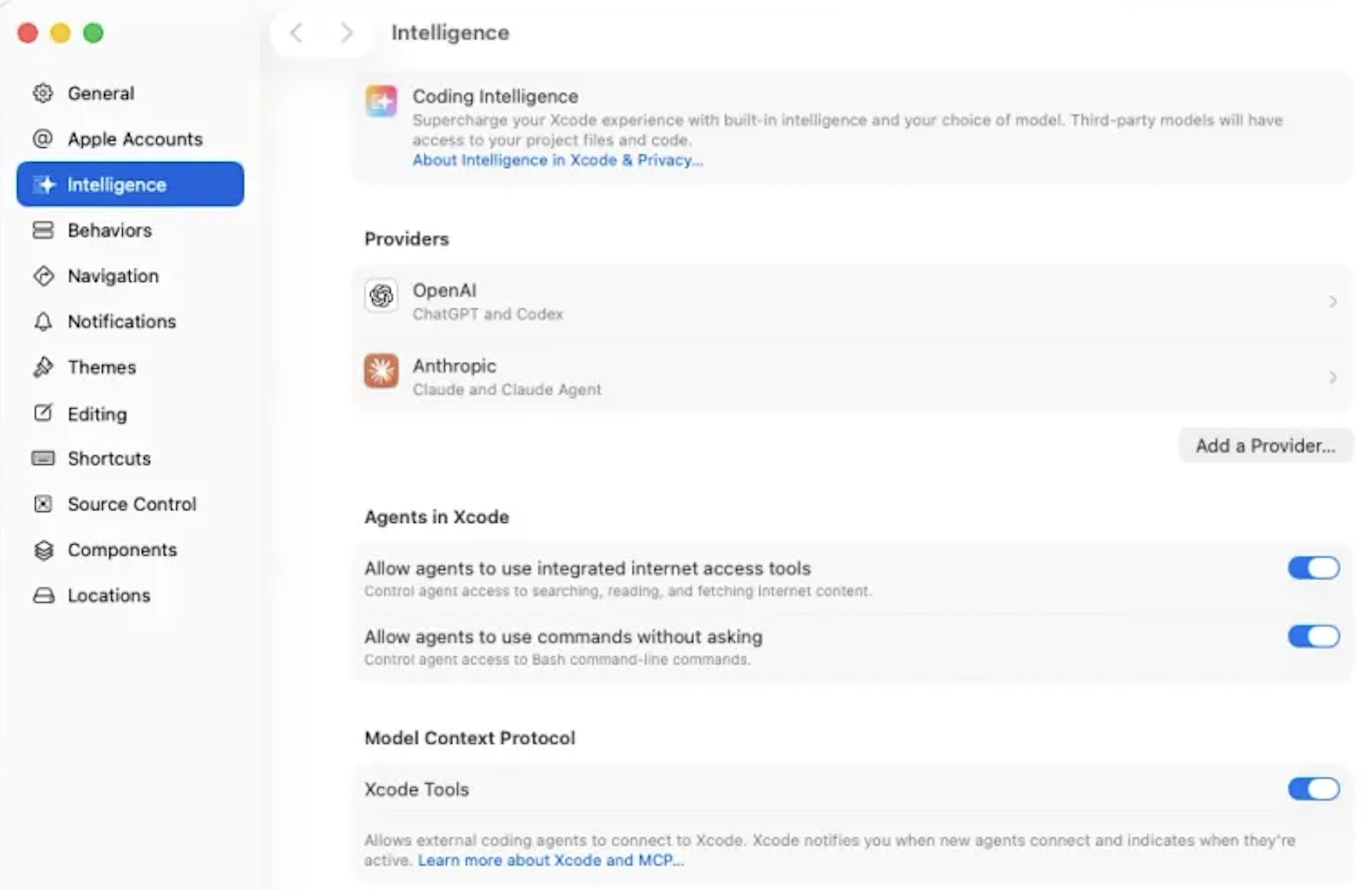
- Switch “Xcode Tools” on (under “Model Context Protocol”) to enable MCP connections from external tools.
Requirement markdown files
In Spec mode, Kiro goes beyond responding to requests for “Vibe coding” from unconstrained natural language (NL), which is inherently imprecise, which forces Kiro to make too many assumptions.
Kiro Spec Mode optimizes for structure through a top-down engineering flow:
Requirements → Design → Tasks → Implementation
Spec mode means “Design-First” – making design choices explicit rather than hidden in program code implemented and in the heads of developers.
Achieving agreement on documents everyone can review has been found to reduce the waste of time and money recovering from misunderstandings, especially near the end when things are “baked in concrete”.
REMEMBER: The wonderful thing about using AI is the hope that the whole system can be rebuilt quickly after changes in specs. That completely changes how work can proceed.
### EARS Requirement markdown files
REMEMBER: Kiro processes requests for creating apps by creating requirements markdown (.md) text files that enables reproducible delivery of sound and correct software, including verification and testing.
Requirements files are made precise and parseable by following EARS: the Easy Approach to Requirements Syntax, a lightweight template for writing unambiguous, machine- and human-friendly requirements, authored by Allistair Maven (Mav), an independent requirements specialist based in the UK. He is known internationally for his 2-day training, coaching, and consulting.
REMEMBER: Following the EARS standard enables the use of Requirements Engineering algorithms and software that has been refined since EARS was first published in 2009, such as automated correctness checking.
PROTIP: Some enterprises use the Jama Connect requirements management system for traceability. So there is less hallucinations from use of LLMs (neuro-symbolic reasoning tool).
Other requirements management systems include IBM DOORS, Siemens Polarion, Perforce Helix, and Visure. QUESTION: Does Amazon provide equivalent capabilities for traceability than these legacy Requirements Engineering products?
“Requirements engineering (RE) is about coordinating expectations about what can be achieved. Once the solution is built, you need to check that it does what the people asked for. This sounds simple but is not necessarily easy. RE is a cross-discipline activity and includes both soft skills and technical aspects. No two developments are the same; the scale, complexity, risk, novelty, and the composition of the project team all vary between projects. When developing new products, systems or services, there is much that is unknown and must be discovered. Because of these and many other factors, RE is not an exact science; it is not a completely systematic and repeatable “engineering process.” Successful RE follows a reusable approach for efficiency but is not a copy-exact process. RE processes must be adapted or customized for the nuance of each individual development program.”
EARS Requirements
The syntax and keywords closely match common usage of English and are therefore intuitive.
REMEMBER: Requirements are always active (so there is no EARS keyword). The basic structure of an EARS requirement are keywords shall, while, when, if. A small number of keywords are used to denote the different clauses of an EARS requirement.
Here are examples and clarifications:
The mobile phone <strong>shall</strong> have a mass of less than 15 grams.
- “shall” is a ubiquitous keyword which drives all requirement parsing.
- To the left of “shall” is the system name “mobile phone”.
- To the right of “shall” is the system response.
While there is no card in the ATM, the ATM shall display "insert card to begin".
- “while” drives state-driven requirements parsing.
- To the right of “while” is the optional pre-condition.
- To the right of “when” is the optional trigger.
- Again, to the left of the “shall” is the system name.
- Again, to the right of “shall” is the system response.
REMEMBER: Clauses are always in the same order, following temporal logic. So state-driven requirements are active as long as the specified state remains true and are denoted by the keyword While.
WHEN "mute" is selected, the laptop SHALL suppress all audio output.
- “WHEN” drives event driven requirements parsing. Event driven requirements specify how a system must respond when a triggering event occurs and are denoted by the keyword When. This is the basis for Kiro Agent Hooks.
- To the right of “WHEN” is the triggering event.
WHERE the car has a sunroof, the car SHALL have a sunroof control panel on the driver door.
- “WHERE” drives optional feature requirements parsing. Optional feature requirements apply in products or systems that include the specified feature and are denoted by the keyword Where.
- To the right of “WHERE” is the feature included.
IF an invalid credit card number is entered, then the website SHALL display "please re-enter credit card details".
- “IF” drives unwanted behaviour requirements parsing.
<strong>WHILE</strong> the aircraft is on ground, <strong>WHEN</strong> reverse thrust is commanded, the engine control system <strong>SHALL</strong> enable reverse thrust.
- Use of several keywords drives complex requirements parsing.
- To the right of “WHILE” is the optional pre-condition.
- To the right of “WHEN” is the triggering event.
- To the left of the “SHALL” is the system name.
- To the right of “SHALL” is the system response.
References about this sub-topic of EARS:
- See the demo video by Al Harris, Kiro Lead Developer at AWS Seattle. Shows use of Asana calling MCP server https://github.com/alharris-at/nobel-mcp
-
VIDEO: How I Code With AI Agents (Spec-Driven Development) by Owain Lewis
- https://www.youtube.com/watch?v=pa8C449yhCg&pp=ugUEEgJlbg%3D%3D”>EARS - The Basics</a>
- https://github.com/SagnikGos/hack-ai-bharat-spec-design/tree/main by https://www.linkedin.com/in/sagnikgos06/
- https://dev.to/sebastian_dingler/ears-the-easy-approach-to-requirements-syntax-39a5
- https://reqassist.com/blog/ears-requirements-syntax
- How granular should your specs be?
What Can Be Built
The hardest part of AI adoption isn’t the tools — it’s figuring out what to use them for.
Function-specific use case libraries give employees a map instead of a mandate, and they dramatically reduce the “I don’t know what to use this for” problem.
-
Learn how to use Kiro by completing tasks in the codebase for a sample video game called Spirit of Kiro at https://kiro.dev/docs/guides/learn-by-playing/
-
ARTICLE: Build a Kiro app referencing DocumentDB for fitness center management.
AWS Transform (from IBM Mainframes)
Kiro is used as a component of AWS Transform AI service used to modernize legacy IBM Mainframe coding:
- from COBOL (Common Business-Oriented Language aka CBL) and related CPY (Copybooks) to Java Spring Boot,
- JCL (Job Control Language) and JCL Procedures (PROC) to Groovy by the Blu Age Velocity,
- CICS System Definitions (CSD)
- Z/OS to containers in EC2,
- WebSphere .war files to Tomcat,
- BSM (Basic Mapping Support) map sets
- Db2
- VSAM (Virtual Storage Access Method) data files to Aurora PostgreSQL (via SQL)
- IBM MQ (Message Queue) to Amazon MQ messaging
- IMS (Information Management System) TM (Transaction Manager)
The “tech.md” file defines the project’s chosen frameworks, libraries, development tools, and technical constraints which Kiro generates. Sample:
Technology Stack & Implementation Standards

Backend (LTS versions):
- Java: Eclipse Temurin LTS (Java 17)
- Spring Boot: Latest LTS 3.x
- Database: H2 (testing), Aurora PostgreSQL (production)
- Build: Maven wrapper (./mvnw) only

Frontend:
- Framework: React + TypeScript
- State Management: Redux Toolkit
- API Client: Axios with error handling
- Styling: AWS Cloudscape Design System

AWS Infrastructure:
- Database: Amazon RDS Aurora PostgreSQL
- Compute: ECS Fargate
- Load Balancing: ALB
- Registry: Amazon ECR
- Monitoring: CloudWatch
- CI/CD: AWS CodeBuild
- IaC: AWS CDK (v2)
NOTE: Character-level encoding on mainframes are in various code pages of EBCDIC vs. UTF-8 on Linux, macOS, Windows.
Transform aims to reduce project timelines when “Reimagining” apps. Tasks are invoked by Administrators writing natural language prompts (objectives, jobs, tasks) to perform: codebase analysis to extracts business logic and tech doc generation, Decompose the monolithic application into functional domains. It refactors, decomposes, define dependency mapping, validation to improve the quality of refactored code.
Jobs
Analysis of each job (each containing a max of 3,000,000 lines of code) results in organized using these folders:
-
“business‑documentation” – extracted business logic for the entire application, in a zip archive.
-
“data_analysis” – data‑lineage visibility for data modernization to generate data dictionaries with business meanings.
-
“decomposition” – workloads grouped into business domains as identified by the BLE agent.
-
“documentation” – technical documents that explain the mainframe application.
-
“inputs” - The inputs folder stores the original source artifacts of the mainframe application—COBOL code, JCL scripts, copybooks, and related configuration files.
Transform plans waves for code modernization transformation planning because there is a hard 150 server quota (limit) to each wave. A sample product.md file that defines your product’s purpose, target users, key features, and business objectives:
Product Requirements — COBOL/JCL Business Rules Only

CRITICAL PRINCIPLE: COBOL/JCL BUSINESS RULES ONLY

ABSOLUTE REQUIREMENT: Implement ONLY the business rules explicitly defined in COBOL/JCL programs for CustomerAccountManagement Business Function ONLY.
- NO industry standards
- NO assumptions about validation logic
- NO inferences from incomplete COBOL/JCL rules
- ONLY explicit COBOL/JCL business rule specifications

COBOL/JCL Business Rule Implementation

Rule Discovery & Implementation
1. Locate Entry Points: ApplicationLevelAnalysis/*/entrypoint-*/
2. Locate Program Paths: Search cbl/ jcl programs mentioned in the Entry point files. cbl/jcl programs are located at program_paths.
3. Locate COBOL Program Rules: Search carddemo-v2-main/app/cbl/*.json
4. Locate JCL Program Rules: Search carddemo-v2-main/app/jcl/*.json
5. Extract Components: Rule_Id, Rule_Name, Rule_Description, Acceptance_Criteria, Rule_Type
6. Implementation: Group related COBOL/JCL rules into single methods with exact specification

MANDATORY Code Documentation:
/**
 * <Rule_Id>COBOL_OR_JCL_RULE_ID_1</Rule_Id>
 * <Rule_Description>Brief description from COBOL/JCL rule</Rule_Description>
 * <Acceptance_Criteria>Given/When/Then criteria from COBOL/JCL rule</Acceptance_Criteria>
 *
 * <Rule_Id>COBOL_OR_JCL_RULE_ID_2</Rule_Id>
 * <Rule_Description>Brief description from related COBOL/JCL rule</Rule_Description>
 * <Acceptance_Criteria>Given/When/Then criteria from related COBOL/JCL rule</Acceptance_Criteria>
 */
Code and Test Quality are boosted with Kiro Hooks.
VIDEO: Objectives are written in natural language.
Property-Based Testing (PBT)
Use of formal specifications following EARS enables labor-saving automation of validation of actual behavior against requirements defining what should occur,
at the most precise “property” level. Example:
* After a list is sorted, its length should not have changed.
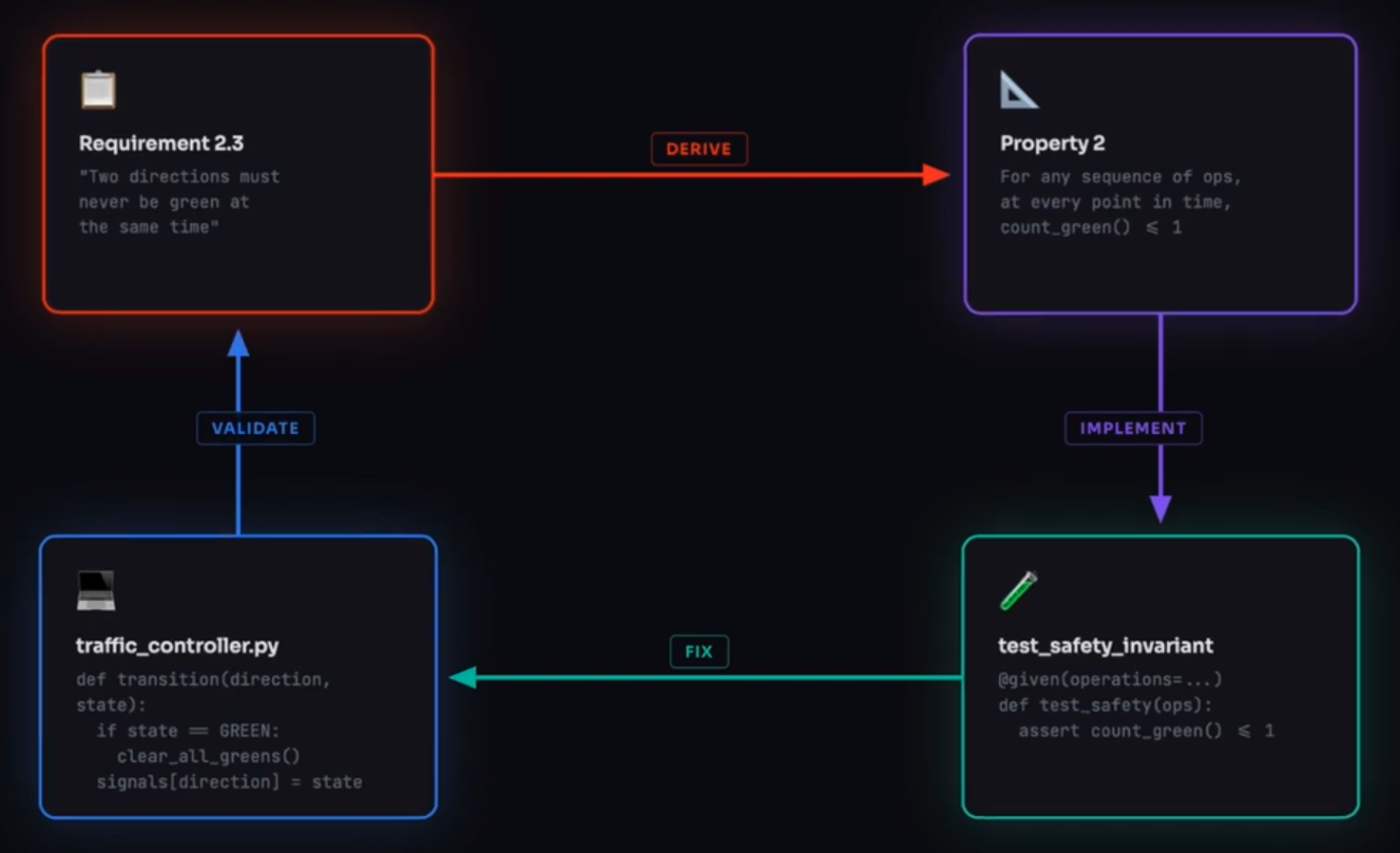
Automation is not limited by the number of people working 8 hours a day, so can yield complete coverage of edge cases if a human determines it’s not a spec error.
A demo of the Hypothesis library for Python to derive Requirements from Properties which are implemented as test code. Kiro can “shrink” issues found to what needs auto-fix. – from VIDEO: “What is Property Based Testing & How it Works in KIRO” from by Adventures in Generative AI shows generation from https://github.com/kirodotdev/spirit-of-kiro
References about EARS:
- VIDEO by Visure Solutions.
Kiro Powers on demand
Kiro powers provide a unified approach to enable a broad range of development and deployment use cases: MCP tools, and framework expertise, packaged together and loaded dynamically (rather than everything upfront).
DEFINITION: VIDEO: Kiro Powers inject specialized context knowledge and tools into Kiro agents on-demand when needed.
Resources about Kiro Powers:
- https://github.com/kiro-community/powers
- https://github.com/kiro-community/kiro-knowledge-power
- https://github.com/kiro-community/kiro-powers-power The Kiro Power to build Kiro Powers
- https://dev.to/kirodotdev/analyzing-react-best-practices-with-kiro-powers-4i1f but https://github.com/salihgueler/react-best-practices is gone. https://vercel.com/blog/introducing-react-best-practices
- https://github.com/kirodotdev/powers/blob/main/power-builder/POWER.md
- https://github.com/kirodotdev/powers/blob/main/power-builder/steering/interactive.md
- https://github.com/kirodotdev/powers/blob/main/power-builder/steering/testing.md
- https://dev.to/aws/how-i-used-kiro-to-optimize-its-own-mcp-configuration-4mdg
- Build Kiro Powers by first adding Power Builder from the Vercel agent-skills repository.
Unlike Claude skill knowledge packages, Kiro (standalone IDE) can more comprehensively combine documentation, workflows + best practices, and executable capabilities in one package bundle for MCP servers and tools. Kiro Powers activate specific capabilities dynamically.
- Define the power name in place of “{power-name}” referenced below.
- Create a folder for the power:
mkdir -p powers/{power-name} cd powers/{power-name} - Create a “POWER.md” file within the new power folder:
edit POWER.md -
Within the editor, add Metadata location such as from “.claude-plugin/marketplace.json”:
- Write (or paste into the file text extracted from the Claude SKILL.md folder, if there is one)
a sample heading frontmatter in this format:--- name: "power-name" displayName: "Human Readable Name" description: "Clear description (max 3 sentences)" keywords: ["keyword1", "keyword2", "keyword3"] author: "Your Name" ---Frontmatter rules:
- name: lowercase kebab-case with dashes.
- displayName: Title Case for display
- description: What the power does and why it’s useful
- keywords: 5-7 specific terms for discovery (avoid generic words like “help”, “tool”)
- author: Creator name
In the YAML front matter (between “—”) at the top of each steering file, configure inclusion directives for loading, to optimize performance and ensures relevant context is available when needed.
---
title: Invoked in all runs
inclusion: always
---
For example, steering for Typescript files use this conditional:
---
title: Typescript steering
inclusion: fileMatch
fileMatchPattern: "components/**/*.tsx"
---
Other fileMatchPatterns:
- “*.tsx” - React components and JSX files
- “app/api/*/” - API routes and backend logic
- “*/.test.*” - Test files and testing utilities
- “src/components/*/” - Component-specific guidelines
- “*.md” - Documentation files
- Write (or paste into the file (text extracted from the Claude README.md, if there is one)
Attribution metadata such as:## License & Attribution **License:** [Original License] **Power Author:** [Your Name] **Original Work:** This power is inspired by [original-skill](https://github.com/...) by [Original Author]. **Source Version:** Based on [version/commit reference]. **Update Frequency:** This power will be updated periodically. - Write (or paste into the Kiro POWER.md file
a list of available steering files in this format:\## Available Steering Files - **file-name** - Description of what this file covers - **another-file** - Description of contentGet file names from the steps below.
- Edit POWER.md to add conditions for “# When to Load Steering Files”. This keeps context focused. Instead of loading all Supabase patterns upfront, the agent loads only what’s relevant to its current task. For example:
```
When to Load Steering Files
- Setting up a database →
database-setup-workflow.md - Writing or formatting SQL code →
supabase-code-format-sql.md - Creating or modifying RLS policies →
supabase-database-rls-policies.md - Creating PostgreSQL functions →
supabase-database-functions.md - Working with declarative schema (
supabase/schemas/directory) →supabase-declarative-database-schema.md - Setting up or modifying Next.js authentication with Supabase SSR →
supabase-nextjs-supabase-auth.md - Implementing realtime features (broadcast, presence, channels, subscriptions) →
supabase-use-realtime.md``` DEFINITION: RLS (Row Level Security) is a database feature — most commonly used in PostgreSQL (and Supabase, which builds on it).
- Setting up a database →
- Copy all files in Claude’s reference folder into the Kiro Power’s steering folder deep-dive content that Kiro loads on-demand:
cp references/*.md steering/Files in the references folder can be docx, pdf, json, and other documentation:
- testing-frameworks.md
- module-patterns.md
- development-guide.md
- maintenance-notes.md
- contributing-guidelines.md
- etc.
The folder can also contain multimodal assets (mp3 sound, mp4 video, and other binary formats).
REMEMBER: Claude keeps executable scripts (.js, .py, etc.) for each SKILL.
- Create file “contributing-guidelines.md” in the “steering” folder:
edit contributing-guidelines.md - Paste into the file (extract from the Claude CLAUDE.md, if there is one):
- Content philosophy (what belongs, what doesn’t)
- Writing style guidelines
- Quality standards checklists
- Update criteria
zzz
Project-specific Steering specs
- https://www.youtube.com/watch?v=Ap0tXXvyn3k by Allie Fortman, GTM
REMEMBER: Agentic AI is goal-driven. Programming code is procedure-driven.
-
In the “steering” folder .md (markdown) files foundational steering files from the Steering section in the Kiro panel. Click the Generate Steering Docs button, or click the + button and select the Foundation steering files option
Additionally:
- AGENTS.md provides steering directives. This does not support inclusion modes and are always included.
-
Add into the “steering” folder .md (markdown) files that define your team’s own standards and conventions (context) for building apps. So master it.
-
Strategies (Installed): Framework-based strategies from the library
-
Custom: Team-specific custom steering documents
“KIRO automatically shows which steering documents are being included in your conversation, giving you full visibility into the context being applied.*”
-
-
Load steering files from Vivek Velso cataloged by https://www.promptz.dev/library/kiro-best-practices:
- aws-cli-best-practices.md —no-cli-pager and AWS integration patterns
- cdk-best-practices.md - Project structure, testing, and deployment patterns
- development-standards.md - Dependency management, code quality, documentation
- docker-best-practices.md - Container security and optimization
- git-best-practices.md - Conventional commits, branching, and security
- mcp-best-practices.md - Model Context Protocol server configuration and usage
- python-best-practices.md - Code style, virtual environments, and testing
- react-best-practices.md - Component patterns, hooks, and accessibility
- security-best-practices.md - Code security, dependency management, data protection
- testing-best-practices.md - Minimal verbosity, output management, performance
- typescript-best-practices.md - Code style, type safety, and testing guidelines
-
Load steering files described in https://kiro.dev/docs/steering/ from ???
- https://github.com/awsdataarchitect/kiro-best-practices boilerplate
- https://github.com/gotalab/cc-sdd builds a Photo Album app.
- https://github.com/cremich/promptz.lib
- https://github.com/5capeg0at/kiro-tdd-workflow-files
- https://github.com/mikeartee/kiro-steering-docs
- https://github.com/cremich/promptz.lib
- https://github.com/mbonig/kiro-steering-docs
Files
- well-architected-context.md
- terraform_best_practices.md
- minimal-engineering-approach.md
- git_commit_rules.md
Others: QUESTION: Where do we find these???
- troubleshooting_app.md
- sam-deployment-bucket.md
- react_best_practices.md
- python_best_practices.md
- custom-nova-act.md
- aws_cli_usage.md
- automation-notes.md
- architecture_diagram_rules.md
- approved-model-for-building-agentic.md
- amazon-q-resources-reference.md
-
CloudFront_S3_setup_for_UI_app_website.md
-
api-standards.md - Define REST conventions, error response formats, authentication flows, and versioning strategies. Include endpoint naming patterns, HTTP status code usage, and request/response examples.
-
testing-standards.md - Establish unit test patterns, integration test strategies, mocking approaches, and coverage expectations. Document preferred testing libraries, assertion styles, and test file organization.
-
code-conventions.md - Specify naming patterns, file organization, import ordering, and architectural decisions. Include examples of preferred code structures, component patterns, and anti-patterns to avoid.
-
security-policies.md - Document authentication requirements, data validation rules, input sanitization standards, and vulnerability prevention measures. Include secure coding practices specific to your application.
-
deployment-workflow.md - Outline build procedures, environment configurations, deployment steps, and rollback strategies. Include CI/CD pipeline details and environment-specific requirements.
- API design standards
- deployment-procedures
- security-policies
- css-standards
- javascript-standards
- product
- project-structure
- tech-stack
- testing-approaches
- troubleshooting-guide
This is how consistency is automatically enforced.
These files can be generated or refactored by AI.
software development best practices frameworks
-
Import legacy frameworks for installation as VS Code extensions to steer Kiro’s behavior, from Patrick Liekhus:
Framework Category Description TDD/BDD Testing Strategy Testing Test-driven and behavior-driven development practices with testing-plan.md requirements SABSA Security Strategy Security Security architecture, threat modeling (STRIDE), and compliance (GDPR, HIPAA, SOC2) C4 Model Architecture Architecture When and how to use C4 diagrams in specs (System Context, Container, Component, Dynamic) AWS Hosting Strategy Cloud AWS service selection, Well-Architected Framework (6 pillars), and hosting patterns Azure Hosting Strategy Cloud Azure service selection, Well-Architected principles, and hosting patterns DevOps CI/CD Strategy DevOps Continuous integration/deployment, DORA metrics, and deployment strategies Infrastructure as Code (Pulumi) Infrastructure IaC patterns and best practices with Pulumi (real programming languages) Domain-Driven Design (DDD) Architecture Strategic and tactical DDD patterns for complex business domains .NET Best Practices Development .NET 8.0 development standards for performance, security, and maintainability 4D SDLC + SAFe Work Management Work Management Define-Design-Develop-Deploy phases with SAFe practices and WSJF prioritization Enterprise Architecture (TOGAF/Zachman) Architecture Strategic planning questions for product and feature design
Agent Hooks
Kiro hook files contain JSON-format code that specify automation actions. reach APIs.
Hook files include clear, specific prompts.
### “when: fileEdited” hooks run automatically
when a file matching one of the “patterns”, the “prompt” is displayed. Vivek’s example:
   {
      "enabled": true,  // Change to false to disable
      "name": "Descriptive Hook Name",
      "description": "Clear description of what this hook does",
      "version": "1",
      "when": {
         "type": "fileEdited",  // or "manual"
         "patterns": ["**/*.ext"],  // or "button_text" for manual
      },
      "then": {
         "type": "askAgent",
         "prompt": "Clear, specific instructions for the AI agent..."
      }
   }
- auto-test-on-save.kiro.hook - Runs tests with minimal verbosity when code changes
- lint-and-format-on-save.kiro.hook - Auto-formats and lints code following project standards
- security-scan-on-dependency-change.kiro.hook - Audits when package files change
- cdk-synth-on-change.kiro.hook - Validates CDK code and runs synthesis
- validate-docker-on-change.kiro.hook - Checks Docker files for best practices and security
- mcp-config-validation.kiro.hook - Validates MCP server configurations
- env-file-validation.kiro.hook - Checks .env files for security issues
- api-schema-validation.kiro.hook - Validates OpenAPI/GraphQL schemas and generates types
🔘 Manual Hooks (Button Triggers) run on-demand from the Kiro Agent Hooks panel:
- commit-message-helper.kiro.hook - Creates conventional commit messages
- readme-spell-check.kiro.hook - Fixes spelling and grammar in documentation
- mcp-server-test.kiro.hook - Tests all configured MCP servers
- dependency-update-check.kiro.hook - Finds outdated packages and security issues
- code-coverage-check.kiro.hook - Analyzes test coverage gaps
- performance-analysis.kiro.hook - Identifies optimization opportunities
🎛️ Optional Hooks are disabled by default
Because these hooks are performance-sensitive, enable as needed:
- accessibility-audit.kiro.hook - Checks React components for accessibility issues
- update-documentation.kiro.hook - Updates docs when code changes
- translation-update.kiro.hook - Syncs translation files
Competition
VIDEO: Here is where Amazon Kiro fits with other AI spec-driven tools:
Kiro competes with these other spec-driven tools:
- AgentOS
- Anthropic Claude Code - Claude’s hallmark is its large context window and strong reasoning — it’s the tool you’d use to generate code from a high-level spec, possibly producing multiple files at once or analyzing a whole codebase. You can feed it your entire EARS .md file directly and instruct it to generate code from each requirement. It understands the WHEN/WHILE/IF/SHALL patterns naturally.
- Cline
- Cursor
- Microsoft GitHub Spec Kit at https://github.com/github/spec-kit generates tons of files VIDEO
- Google Antigravity
- OpenAI Opus
- Roo Code
- Trae IDE
- WarpAI
- Windsurf https://www.educative.io/courses/advanced-windsurf-ai-for-professionals
- OpenSpec.dev “lightweight”
-
BMAD (Breakthrough Method for Agile AI Development) at https://github.com/bmadcode/BMAD-METHOD created by Brian and his YouTube channel.
VIDEO: define PRD (Product Requirement Document), build in small chucks, and ship them incrementally. Its “*branstorm” command asks clarifying questions. VIDEO
IMPORTANT: They all make use of some variation of the EARS requirements specification format (see below).
Evaluations:
- Cursor vs Antigravity vs Kiro vs Windsurf: The Real Results (2026) says Kiro “couldn’t parse requirements”.
- BMAD vs. Spec Kit vs. Open Spec: Which AI Coding Methodology is Best? by The Grey Cat
https://www.youtube.com/watch?v=cQv3ocbsKHY
https://www.youtube.com/watch?v=RhaF4LVAVng&t=323s How I Code With AI Agents (Spec-Driven Development) by Owain Lewis using Claude
https://www.youtube.com/watch?v=pey9u_ANXZM How I Tamed Claude - Emmz Rendle - NDC London 2026
In November 2025, an internal memo from two of Amazon’s most powerful executives – Peter DeSantis, VP of AWS utility computing, and Dave Treadwell, VP of eCommerce Foundation – directed that “80% of you will use AI for coding at least once a week.” But Kiro is Amazon’s AI-native development tool. PROTIP: Adoption, measured by access and frequency, is no longer a meaningful signal of progress. So use KPIs about use cases worth using. Expose use cases with monthly use case spotlight in team meetings to expose AI wins and hold quarterly review where team leads share the highest-impact use cases from their function. See https://www.sectionai.com/ai/the-ai-proficiency-report
The executives say “We do not plan to support additional third-party AI development tools.” (OpenAI Codex). Anthropic’s Claude Code briefly got the shade before the designation was reversed after 1,500 Amazon employees endorsed the formal adoption of Claud. VIDEO: Unlike AWS, Anthropic doesn’t want US to use its AI to wage war.
The complication is that Amazon has invested $8 billion in Anthropic, the company behind Claude Code. Yet Amazon signed a $38 billion cloud computing deal with OpenAI.
Kiro vs. Anthropic Skills
“Kiro feels like working with a disciplined senior engineer who insists on doing things the right way.” “Kiro: The AI IDE That Actually Gets How Software Should Be Built”.
- Comparison of Kiro vs. established frameworks are at https://github.com/pliekhus77/pr-suit-for-kiro/wiki by Patrick Liekhus
| Concept | Kiro | Claude Skills |
| Packaged instructions/behavior | Rules / steering | Skill instructions config |
| Scripts / automations | MCP tools, hooks, external CLIs | Skill scripts |
| Domain docs / resources | Project docs + MCP data tools | Files inside Skill folder |
| Dynamic loading per task | Agentic chat + MCP, spec context | Auto-loaded Skills |
| Cross-tool reuse | MCP servers shared with Kiro/Q | Skills across Claude/Code |
Kiro doesn’t (yet) expose a first‑class “Skills” object, but it offers pieces that cover the same needs.
Anthropic created Agent Skills at https://agentskills.io (https://agentskills.io/home) to define their an open format for adoption across agent products to provide a simple, open format for giving agents new capabilities and expertise. are folders of instructions, scripts, and resources that agents can discover and use to perform better at specific tasks. Write once, use everywhere.
- https://www.theverge.com/ai-artificial-intelligence/800868/anthropic-claude-skills-ai-agents Anthropic turns to ‘skills’ to make Claude more useful at work
a) Rules / steering for persistent behavior
Kiro has steering rules to guide AI behavior across projects, shaping how the agent works globally (coding standards, review rules, architectural preferences).
This maps to the instruction part of a Claude Skill: reusable behavior that’s always in effect, or scoped to a workspace/project.
Use this for: “Always write tests this way, follow these patterns, use our logging wrapper” etc.
b) MCP tools as the “scripts/resources” layer Kiro supports Model Context Protocol (MCP) to connect specialized tools and external systems into the IDE.
MCP servers can expose commands, data sources, and workflows that the agent calls as tools—very similar to having scripts/resources inside a Claude Skill.
Use this for: “Here are our deployment scripts, DB admin tools, internal APIs—call them via MCP when coding or refactoring.”
c) Agent Skills via MCP (cross‑platform bridge)
There’s AWS guidance on using Anthropic’s Agent Skills with Amazon Q Developer and Kiro through an MCP server, essentially making Claude Skills consumable from Kiro.
In practice, you can host an MCP server that fronts your Claude Skills / Agent Skills, then plug that server into Kiro as a tool provider.
| Concept | Claude Skills (the verge) | Kiro (kiro+2) |
|---|---|---|
| Packaged instructions/behavior | Skill instructions | Rules / steering config |
| Scripts / automations | Skill scripts | MCP tools, hooks, external CLIs |
| Domain docs / resources | Files inside Skill folder | Project docs + MCP data tools |
| Dynamic loading per task | Auto‑loaded Skills | Agentic chat + MCP, spec context |
| Cross‑tool reuse | Skills across Claude/Code | MCP servers shared with Kiro/Q |
Strands MCP Agents
- strandsagents.com
- https://www.youtube.com/watch?v=9ryQ4Nb32zk How to Build your first Agent with AWS Strands Agents (Part 1) by Arindam Majumder
- https://www.youtube.com/watch?v=cvmC29cu0Gg&pp=ugUEEgJlbg%3D%3D Build Stateful AI Agents with AWS Strands Sessions (Part-2)
- https://www.youtube.com/watch?v=j2wYT6jqXZY Beginner-Friendly Amazon Bedrock AgentCore & Strands Agents Tutorial
- https://www.youtube.com/watch?v=dn3G9jvB98k&pp=ugUEEgJlbg%3D%3D AWS Strands Agents SDK – Agents as Tools Explained - Multi AI Agent System at Scales #aiagents
- https://www.youtube.com/watch?v=vqdXVz5lxbk Building Multi-Agent Systems: Agents as Tools with Strands SDK
- https://www.youtube.com/watch?v=m0sRdeM9RZE&pp=0gcJCXwKAYcqIYzv Strands Agents (AWS): Build An Agent with Persistent Memory
- https://www.youtube.com/watch?v=Q-tYIAuv9WI Deploy Production-Ready Agents in 22 Minutes with AgentCore Runtime by AWS Developers
- https://www.youtube.com/watch?v=dT89C2MuYj4&pp=ugUEEgJlbg%3D%3D AWS Strands vs Bedrock Agents Explained Simply with Demo Cloud With Raj
References
BLOG: https://prpm.dev/blog
- https://www.crn.com/news/cloud/2025/aws-kiro-5-key-features-to-amazon-s-new-ai-coding-tool AWS Kiro: Five Key Features In Amazon’s New AI Coding Tool
https://www.youtube.com/watch?v=40vTCH0Iaac&pp=2AaCAg%3D%3D videos by Rasmus Widing
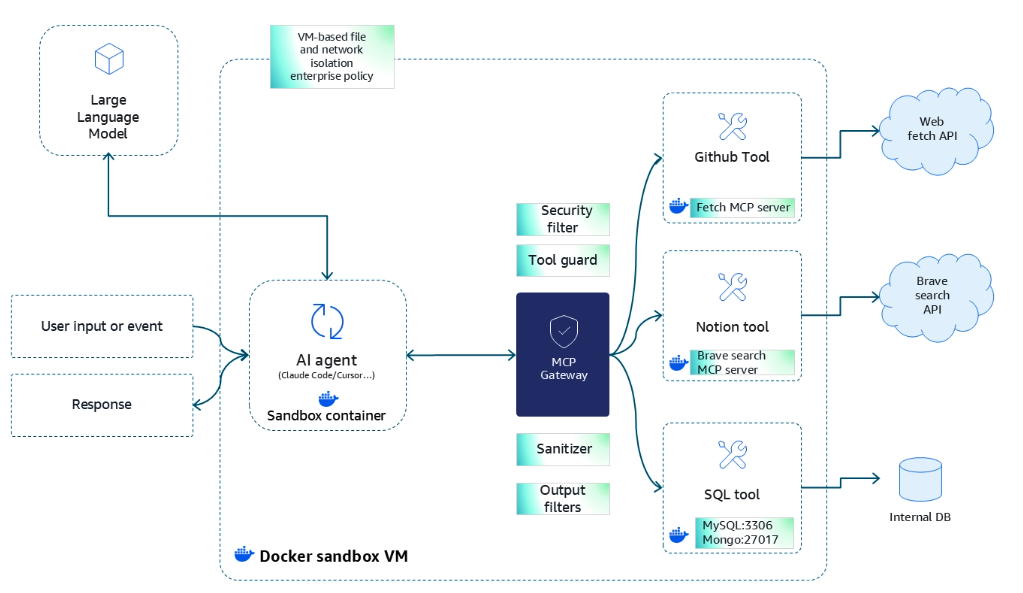 VIDEO: AWS Marketplace Solution brief (DevOps Solution Demo from [11:24]) : Docker and Kiro MCP sandboxes from Docker MCP catalog at https://awslabs.github.io/mcp/ from https://github.com/awslabs/mcp
(for scalability, governance, security, isolation, portability, velocity)
by Abhi Karode, Sr. Solutions Architect.
VIDEO: AWS Marketplace Solution brief (DevOps Solution Demo from [11:24]) : Docker and Kiro MCP sandboxes from Docker MCP catalog at https://awslabs.github.io/mcp/ from https://github.com/awslabs/mcp
(for scalability, governance, security, isolation, portability, velocity)
by Abhi Karode, Sr. Solutions Architect.
O’Reilly Live Event: AWS AI Frontier Agents: Kiro, AWS Security, and AWS DevOps Agents Apr 22, 2026 references https://github.com/brightkeycloud-external/aws-ai-frontier-agents
https://www.amazon.com/dp/B0GMDD3995?crid=2HJA8T6YKU4NU&sprefix=adventures+with+kiro+and+claude%2Caps%2C189&sr=8-1 Kindle book: “Adventures with Kiro & Claude: How AI-Assisted Development Turns Ideas Into Reality Without Coding” by Chris Munley at AWS
https://www.educative.io/projects/deploy-a-web-application-over-kubernetes-using-kro For $196/year, “Deploy a Web Application Over Kubernetes Using Kro In this project, we’ll containerize a Flask app, push it to Docker Hub, and deploy it to a Kubernetes cluster using Kro. Kro is a tool that simplifies Kubernetes resource management through graph-based configuration.
https://www.coursera.org/learn/aws-generative-ai-essentials/home/module/1 AWS Generative AI Essentials course
Issues encountered:
- “Kiro’s context window is too small. isn’t enough for me”.
Questions
QUESTION: Since Kiro uses a closed model, what are mechanisms for explainability of decisions made?
QUESTION: How is bias and fairness evaluated (to maintain trust)?
VIDEO: Can Kiro be as amazing as https://github.com/msitarzewski/agency-agents of 51 specialized AI agents just exploded to 13,000 stars in 5 days after going viral on Reddit. These aren’t basic chatbots - they’re specialized personas for every business function you can imagine. I break down what Agency-Agents is, why it blew up so fast, and which agents could literally replace entire departments. Whether you’re building with Claude, Cursor, or any AI coding tool, this collection is insane.
Kiro development in 2025 was led by Deepak Singh, Vice President of Developer Agents and Experiences at Amazon. ???
26-03-13 v035 Automation Types :aws-kiro.md created 2026-01-25