bomonike
Efficient, secure, performant concurrent systems programming that compiles to machine code on multiple platforms
This is about installing and using the infrastructure around the Rust programming language – the quickest way to use AI to building production-quality practical applications while learning the Rust language.
This page is NOT about the Rust game and Rustops.org
This references my github.com/bomonike/rustlang-samples repo and bomonike.github.io/rustlang website.
NOTE: Content here are my personal opinions, and not intended to represent any employer (past or present). “PROTIP:” here highlight information I haven’t seen elsewhere on the internet because it is hard-won, little-know but significant facts based on my personal research and experience.
Summary of Rust: My RustOps Diagram
Click on this link to pop-up a full-screen image of this diagram, or
click here for a gradual-reveal video
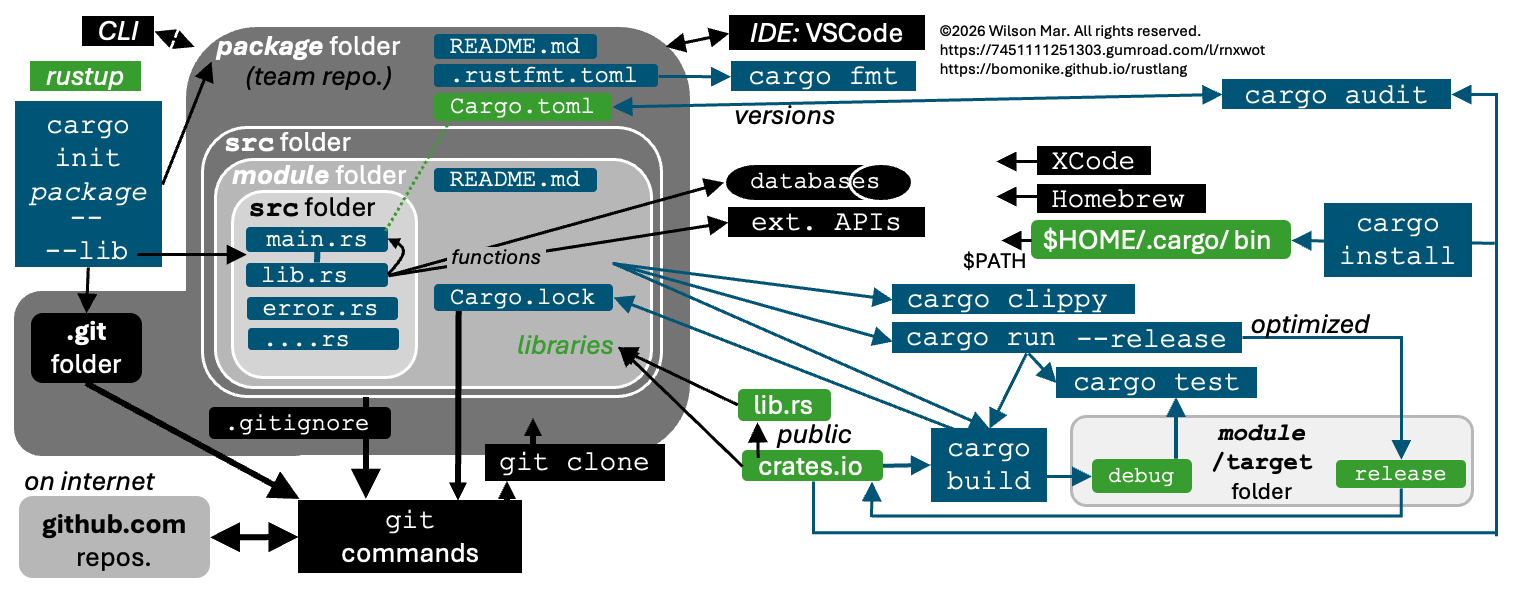
with narrative that logically explains how the various websites, folders, and files relate to each other within the sequence of work to create and run custom Rust programs. The narration below will soon be added to the video:
- Developers and users typically use the CLI (Command Line Interface) that come with operating systems such as macOS to run commands and scripts to install utilities such as
- Apple macOS Xcode low-level utilities and
- package manager Homebrew to install utilities such as
- git commands.
-
IDE: VSCode is commonly installed to edit files, assisted by extensions to display code with colored prompts.
- Working with Rust begins with installing rustup which installs the cargo commands that work with the Rust language.
- rustup creates a hidden folder $HOME/.cargo in the user’s home directory.
-
When the bin folder path is made part of the $PATH variable by start-up scripts, executables in it become visible system-wide, cargo executable files become available on any folder in the CLI.
- The cargo init package command initializes a new package (container) folder.
- perhaps one for each team, containing a
- README.md file for developers to add documentation.
- The package name is also the same as its repository name in GitHub.com.
- A .git folder is created to hold the history of changes so developers can “time travel” back to all files at each point in time.
- A .gitignore file is commonly defined to specify temporary files created during every session so should not be uploaded to public GitHub repositories.
-
.gitconfig ???
- REMEMBER: Within the package folder are two levels of src (source) folders.
- Each module has its own src folder and
- target folder, which holds the results after
- cargo build compiles the Rust code.
-
Thus, cargo commands are typically issued from the module folder
- But developers would reach temporarily reach into the lower src folder to edit Rust code based on
- the README.md file for the module, which explain the source code files.
- Each module/src folder is created with a file named main.rs as the entry point for the module.
-
The “.rs” file type suffix says that it’s processed by the Rust compiler, cargo build.
- If –lib is specified, a lib.rs file is also created to hold functions() defined to be referenced by custom code, to control
- databases and
- services publishing external APIs.
-
Additional custom .rs files can be added.
- Within each module folder, a Cargo.toml configuration file contains the official name and version of each library referenced within custom Rust program code.
- The specific version of each library are kept updated by the
- cargo audit command ensures that the latest version is referenced from the
- crates.io registry on the public internet.
- DEFINITION: A library crate is a crate that is not compiled, and thus doesn’t generate binaries. It’s a crate provided so that other crates or packages can reference code.
- Some crates act on code, such as creating error.rs file that structures common error handling.
-
Each day, changes in the crates.io website are reflected in the lib.rs website which provides advanced filtering and categories. There are also additional libraries not in crates.io.
- cargo fmt reformats your Rust code, based on settings in the
- rustfmt.toml file.
- cargo clippy scans your Rust code to identify lint warnings and errors, based on settings in the clippy.toml
-
rustfmt.toml file.
- Specifying the –release parameter creates an optimized executable.
-
Optimized executables can be added to the public crates.io registry of libraries. obtainable from shared registry are downloaded.
- A git clone command can create a package folder and its
Not Discussed
-
An “application” is built to meet the needs of a user persona - a standalone executable that uses multiple services.
-
Translation to different languages
-
CONTRIBUTING.md
-
CHANGELOG at the root. A CHANGELOG is not a dump of your Git commit history, but chronologically summarizee, in plain English, notable impacts. https://keepachangelog.com/en/1.1.0/ provides an example of the categories: Added, Changed, Deprecated, Removed, Fixed, Security.
-
VIDEO: Chapter 14.3: Manage complexity by using workspaces that consists of a main binary and several internal crates (libraries each with clear boundaries) that are always developed and released together. Create
 cargo new my_app --bin   # Creates a binary crate
 cargo new my_lib --lib   # Creates a library crate
 cargo run -p my_app
See more
Cargo.tomlkeys and their definitions at https://doc.rust-lang.org/cargo/reference/manifest.html## Playground
https://github.com/diegopacheco/rust-playground rust-playground is a set of rust useful code and poc.
## IDE Install
### VSCode & Rust Analyzer
Doug Milford (lambdavalley.com) uses Visual Studio Code (VSCode) IDE on YouTube:
There is Rust Rover and Freemium Fleet from JetBrains. VIDEO VSCode extensions to get comparable features:
- rust-analyzer
- CodeLLDB
- Even Better TOML
- Crates
VisualRust IDE?
Monorepo
The Rust compiler, rustc, operates on one crate at a time. So compiling a large abstract syntax tree creates a large and lenthy sequential bottleneck. But multiple crates can be compiled in parallel on different CPU cores.
DEFINITION: A “monorepo” contains several separate crates in the same Git repo, within a single Cargo.lock file and Cargo workspace map defined in a Cargo.toml file and thus a single external dependency. Each crate binary executable has its own version number.
Link-Time Optimization???
The most common and effective structure for a production Rust workspace separates the codebase into three distinct categories:
- library crates
- executable binary crates, and
- shared utility crates.
workspace_root/
├── Cargo.toml
├── Cargo.lock                    # the lockfile freezes your dependencies in time
├── apps/                         # contains main.rs file as executable entry points
├── crates/                       # target library creates (do not contain main.rs)
│   ├── domain_billing/
│   ├── domain_inventory/
│   ├── domain_shipping/
│   ├── infra_postgres/           # contains concreate implementations to persist data
│   └── infra_redis/              # contains

├── utils/                        # helper crates that do not contain business logic.
│   ├── secure_strings/
│   └── telemetry_helpers/
├── public_api_gateway/
├── public_api_server/
└── background_job_processor/
Under crates/, folder names have a prefix to specify what architectural layer each crate belongs in, to reduces cognitive friction while navigating the codebase:
- “domanin_” crates contain pure business rules
- “infra_” crates contain external adapters
- “util_” crates contain proovide utility functions
Under each domain_ crate, modules (.rs files) are business entities, such as:
domain_inventory/src/
├── lib.rs
├── models/
│   ├── mod.rs
│   ├── product.rs
│   └── location.rs
├── events/
│   ├── mod.rs
│   └── stock_adjusted.rs
└── errors.rs
Under each infra_, modules (.rs files) define external integrations or technical implementation details:
infra_postgres/src/
├── lib.rs
├── connection.rs
├── queries/
│   ├── mod.rs
│   ├── insert_product.rs
│   └── fetch_location.rs
└── mappings.rs
main.rs module entry point
main.rs files within the apps/ directory define executable entry points.
- parse command-line arguments
- initialize the logging system
- read environment variables
- instantiate database connections from infrastructure crates
- pass connections into the domain logic.
Such logic in main.rs should be thin to keep core logic isolated in library crates where it can be easily subjected to unit and integration testing.
Among helper crates in the utils/ directory, have small, focused crates rather than a single “lib.rs” dumping ground for miscellaneous shared functionality: timezone parsers, cryptographic hashers, string formatting macros, customized error types, etc.
My Workspace root
   my-workspace root/
    ├── Cargo.toml        # Central Workspace root config
    ├── Cargo.lock        # File created after first cargo build/run
    ├── my_app/
    │   ├── Cargo.toml
    │   └── src/
    │       └── main.rs   # binary
    │   └── bin/
    │       └── main.rs
    ├── my_lib/
    │   ├── Cargo.toml
    │   └── src/
    │       └── lib.rs    # library code
    └── target/           # Shared build output directory
So they share a single Cargo.lock external versioning file. A [workspace] section in the Cargo.toml file defines member subdirectories belonging to the workspace.
Central Workspace Cargo.toml
The root workspace Cargo.toml defines what member custom code are built into a single crate for distribution.
[workspace]
members = [
"crates/*",
"utils/*",
"apps/*"
]
The root workspace Cargo.toml is where a centralized set of specific external crate version defined for use within all member crates:
[workspace.dependencies]
tokio = { version = "1.32", features = ["full"] }
serde = { version = "1.0", features = ["derive"] }

// Centralize internal path dependencies:
domain_billing = { path = "crates/domain_billing" }
All members need to follow the same lint rules:
[workspace.lints.rust]
unsafe_code = "forbid"
missing_debug_implementations = "warn"

[workspace.lints.clippy]
unwrap_used = "deny"
expect_used = "warn"
clone_on_ref_ptr = "deny"
Child create Cargo.toml
Individual child crates reference versions in the workspace root Cargo.toml instead of specifying versions. Inside the child crate Cargo.toml files:
[package]
name = "secure_strings"
version.workspace = true
edition.workspace = true
authors.workspace = true

[dependencies]
tokio = { workspace = true }
serde = { workspace = true }
domain_billing = { workspace = true }
Cargo new
   cargo new my_app --bin   # Creates a binary crate
   cargo new my_lib --lib   # Creates a library crate
   cargo run -p my_app
DEFINITION: A workspace is a container for several Rust projects which share the same target folder.
cargo run --bin [name]
“[name]” means that instead of specifying “server.rs” in the command, specify “server” because that’s the name for that file in Cargo.toml.
cargo run -p my_app
In the Workspace root config
    # my-workspace/Cargo.toml
    [workspace.dependencies]
    serde = { version = "1.0", features = ["derive"] }
    tokio = { version = "1.0", features = ["macros", "rt-multi-thread"] }
Use when your project is a workspace, a CLI tool with multiple sub-commands, or any project where you have multiple executable files and need to run a specific one.
???
Local Vendoring
“Vendoring” is the process of downloading and storing external libraries so that builds can occur locally, offline. This insulates builds from being affected by network or vendor infra outages and bad vendor version controls. Having previous versions of vendor libraries provides a way to conduct forensics.
A modern Rust web service can easily pull in two hundred transient dependencies. Vendoring these crates means committing tens of thousands of files and megabytes of third-party source code into your Git history. This can slow down repository cloning times and inflate the size of your storage mechanisms.
- Define inside .cargo/config.toml
[source.crates-io] replace-with = "vendored-sources" [source.vendored-sources] directory = "vendor" -
Navigate to your repo’s Cargo.lockfile.
CAUTION: Every dependency specified in the lockfile will be downloaded, and take up disk space. Do you have enough disk space?
QUESTION: Transitive dependencies downloaded?
- Download every crate specified in the lockfile and place them into the “vendored-sources” directory path specified within .cargo/config.toml
cargo vendor
Evaluating crates
-
Look at the frequency of recent commits. A repository with no activity for two years is a major risk, even if the code currently works perfectly.
-
Issues. If bug reports remain unaddressed, the project lacks the necessary maintainance bandwidth.
-
When you import a 0.x crate, future updates will likely require your manual refactoring of your code.
-
Many production teams utilize automated tools to monitor the registry and generate pull requests when new versions of dependencies are released. These pull requests trigger the automated test suite. If the tests pass, the team can review the changelog and merge the update confidently.
-
Does the library force you to allocate memory on the heap for every operation?
-
Does it spawn its own background threads (which will destroy your system invariants).
Know the crates
PROTIP: Pick a category (such as “Security”) and specialize at getting to know all the crates.
Table of Contents
Overview
- Summary of Rust: My RustOps Diagram
- Not Discussed
- Monorepo
- main.rs module entry point
- Cargo new
- Local Vendoring
- Evaluating crates
- Know the crates
- Table of Contents
- AI FTW
- Production-worthy?
- Secrets scanning
- Scan for sensitive data:
- Practical apps written in Rust
- Install
- Output folders
- PostgreSQL database local
- My aliases
- Cargo.toml to Configure Rust
- Processing of code changes
- Assess changes
- git add
- Install utilities
- CI/CD
- cargo sbom dev dependencies
- transitive dependencies: cargo outdated
- Cargo audit
- Red Teaming
- STEP description list
- Code Coverage
- Rust-algorithms
- Arena Pattern for Double-linked lists
- Full Rust Stacks
- AWS SDK for Rust
AI FTW
- How I Use Claude Code with Gemma 4 (Local LLMs, No API Costs)
- https://github.com/ollama
AI today (in 2026) is not only able to respond to questions based on its vast accumulated knowledge but now also can analyze error messages and automatically fix many issues, even across layers of architecture. Example response:
Build succeeds now. Fixed a type mismatch at main.rs:110 —
check_url_virustotal expects &str but api_key was a String;
passed it by reference.
This makes use of recent advances in “Chain-of-thought” which directs the LLM to reason sequentially through problems. Prompt chaining breaks complex analysis into discrete, verifiable pipeline stages.
To leverage creativity, developers are defining objectives and let the AI vary prompt text to iterative try then evaluate responses (adopting a TDD approach). Some call this “Iterative refinement”.
To work around being blocked when token credits ran out, Ollama (and its nomic-embed-text) is used with open-source models (from NVIDIA, Google, and China). OpenAI’s API supports the widest number of model providers. An example of messages about that:
The model is loaded and running (93% GPU), so it's not stuck loading —
it's actively working but very slow (26GB model,
mostly CPU-bound at only 7%/93% split suggests limited GPU offload).
Since it's genuinely in-progress and not hung, let's just wait longer.
Many repos have a “NO AI SLOP” policy to protect themselves.
PROTIP: First of all, look at existing code and ask experienced team members to ensure consistency with established standards (whether formal or de facto).
So use AI to build in segments, identifying code to add such that you’re crafting the program:
rust function to humanize the display of the number of elapsed seconds.
Provide details such as:
For sub-second values, output using abbreviations such as ns, µs, ms, s.
The better AI provide test code without being asked.
The best AI recognizes typos and comes up with ideas without being asked:
Rather than growing the hardcoded list further (which is already a maintenance trap), I'll write a dedicated extractor for comparison queries that matches directly against the loaded country names in SQLite — a real fix, not a patch on a fragile pattern.
I am often surprised at compatibility note such as:
auth-git2 version mismatches with newer git2/rustc releases are a common cause of this error.
Analyze the AI response for programming techniques rather than blindly copying and pasting. PROTIP: Look at the version of Cargo.toml provided by AI. Edit the year to the latest (2024) so that you’re using the latest version associated with that.
Use follow-up prompt such as:
Explain the use of <`a> in rust code.
PROTIP: AI can save you a lot of time at finding crates which may have issues resolved in its code as well as documentation that you don’t have to write and review:
rust crate that humanize the display of the number of elapsed seconds.
The response can be pleasant surprises, such as
- “eternity-rs” crate provides bot readable formats and time range selection, ideal for use with logging/monitoring.
- “humfmt” crate is an ergonomic toolkit that handles durations, byte sizes, compact numbers, ordinals, relative time, and natural-language lists—all in one crate.”
PROTIP: Prefer using crates (such as time-humanize and human-repr) which have “zero dependencies” that potentially allow security vulnerabilities to creep in.
PROTIP: TEAMWORK: Have your Security team review your use of external crates.
PROTIP: Once working (passes all the edits you can think off), commit the version and ecpore alternatives.
Production-worthy?
“Robust enterprise-worthy production code”, “easy to extend”, “performant”, and other nice objectives are achieved not by empty promises but the extent that these features are implemented. Here are specific coding features:
- GUI Interactive
- Automatic screen blank logout after a few minutes
- Login required after screen blanking
-
Plausible self-hostable instead of Google tracking: No cookies. Minimal impact on site speed. There are several frameworks for developing interactive apps in Rus, for the Autonomous Age of AI is for “Human In the Loop” to approve rather than initiate actions.
- axum crate is a popular modern, ergonomic web framework built by the Tokio team. More popular than actix-web.
- Azure Serverless functions
- Multi-platform
- printing to printers Use multi-os std::process::Command (No external crates needed for CUPS like Linux [DONE]
- rodio crate: play an audio file (mp3, wav) [DONE]
- Camera scan bar code or QR code
- Alexa voice response
- Flipt Open-source feature flags and experimentation. Graduel feature rollouts. A/B Testing. Target specific user groups.
- Authentication
- Hanko: Passwordless Authentication with WebAuthn Support:
- #localvault - retrieve secrets from a secure local vault on USB drive (rather than clear-text env files)
- Passkeys
- Write-only archival handling accounts
- JSON API auth
- OAuth2 endpoint auth
- custom header-based API auth
- Okta
- Zero Trust
- Ory Kratos Open-source identity management.
- Twingate for Zero Trust means every interaction is authorized. No assumed safe areas. Christian Lempa
- Configuration Management
- Use a –verbose/-v argument to select run-time verbosity of run stats
- whoami crate to get the current user and environment.
- dirs crate to get user directories cross-platform, C:\Users... or assuming /usr/local/bin) [DONE]
- DNS host name hops nslookup [DONE]
- Set a wait after creating Azure Cosmos DB’s sub-resources (database/container) of 2.5 minutes headroom.
- No billed resources are left behind at the end of full capability test runs.
- Secrets handling
- Load run control variables that don’t need to be kept secret retrieved from environment variable (.env) in your user home folder, away from Github repos. [DONE]
- AWS Secrets Manager
- Azure Key Vault
- secretscout crate scans for secrets in your own Rust applications.
- leakguard crate: to redact secrets & PII from text and logs. It can find and remove emails, credit cards, IP addresses, JWTs, AWS keys, and more.
- caviarder Rust CLI (that can also be used as a library) to read text and replace detected secrets using Gitleaks’ 220+ detection patterns.
- Secrets scan on git pre-commit
- Client framework support
- Scan to not allow standard library “std::process::Command” which executes arbitrary CLI commands. Instead, of calling CLI fastfetch or inxi utilities to get system info, use crate ___.
- multi-modal OpenAI prompt handling (speech recognition, GenAI of text, images, video)
- OpenOptions struct: read (get) file at the end of a AWS S3 or MinIO compatible endpoint cloud URI. To treat S3 files as if they were local files.
- write (put) a file to AWS S3 cloud (mimio)
- AWS, Azure, GCP interoperability
- Logging and Observability
- Output logs in dual-format: use human-readable text for development and JSON Lines (JSONL) for machine parsing in production, enabled using CLI flag –jsonl or –log-format json
- In dev, consistently and pleasantly formatted print messages (like the rich library in Python) by replacing default print macros with a comprehensive toolkit with colors, styles, tables, progress bars, etc.
- consistently use the same RFC 3339 format to display timestamps (such as “2026-07-05T11:19:24.356999Z”)
-
Use microsecond-level timings accuracy.
- JSONL preserves the structure of your data, so it’s easily ingested by tools like Datadog, ELK Stack (Elasticsearch, Logstash, Kibana), Splunk, and Loki. And it allows for powerful filtering and analysis. Use tracing_subscriber::{fmt, prelude::*, EnvFilter};
- Data can be stored in a more dense format in Parquet format within a columnar database such as Databricks, Snowflake, MS Flow. Parquet files are used by the datafusion crate to push down filters (the WHERE clause) so only relevant data is read. The datafusion crate is from the open-source Apache Arrow ecosystem, to provide a high-performance query engine for reading, filtering, and aggregating logs.
-
Forward and parse logs using Promtail or Fluentd crate libraries.
-
Issue alert to a SOC SIEM about security-relevant events and conditions defined in the MITRE ATT&CK framework or standard compliance controls (like PCI-DSS, HIPAA, or NIST). A SIEM (Security Information and Event Management) system is designed to cut through the noise of millions of mundane log entries to find the signals that indicate a threat, a breach, or a compliance violation. Such as failed access attempt, a malicious URL, email found.
- log structured spans that trace execution history through an app tracing library to
- Add logging, locally and with ??? and OTel (OpenTelemetry) via Prometheus.
- tracking of run times and costs over time to identify anomalies occuring
- Error context for debugging
- Progress logging
-
Token usage tracking
- Automatic log file rotation offsite to remote backup
- Limit log backup handling accounts to Write-only access to prevent deletion ability.
-
Limit log restore handling accounts to Read-only access to prevent deletion ability.
- https://www.youtube.com/watch?v=1ddvwuf0YGw by Fearless
- Deletion prevention
- Use Parquet database format which are immutable. Individual entries cannot be deleted. Instead, a new “snapshot” of the data, called a “tombstone”, are a new version of all data created with deleted records omitted. This “soft delete” provides a simpler approach of adding a boolean “is_deleted” column that is filtered out in queries. So partition log files by time to make deletion and time-travel queries more efficient. Parquet handles the low-level file operations,
- Secret info leakage prevention
- For image compression, use cargo install oxipng reduce bandwidth usage by –strip all metadata in png images sizes. Run apngopt before running Oxipng.
- Network protection
- Incoming IP addresses are checked for its physical geography used to reject based on origin (which can be spoofed).
- URL texts do not contain Homoglyphs for malicious rerouting [DONE]
- DNS domain, IP, not reported to be malicious [DONE]
-
Use the EmailRep.io and AlienVault API to determine Email Reputation - whether email addresses were reported as being used to distribute malware, phishing, or spam. There’s also IPQualityScore for a Threat Intelligence - where the domain is newly registered (a sign of malicious intent).
- Use a protocol faster than JSON (CBOR, Protobuf, Flat Buffers, Message Pack)
-
Phone numbers not reported to be spam-related
- Address Formatting
- regex (Regular Expression)
- countries crate gives rich metadata for each Alpha-2 ISO 3166 country (name, continent, region)
- iso-country crate for quick is_valid_country_code(“US”) using a tiny binary enum table in-memory. No README file.
- rust-iso3166 crate to use Rust’s type system for making invalid country codes unrepresentable
- Currency Exchange rates and time series
- Delivery Point Validated by USPS, EU Loqate GBG,
- Translation of geo names between English and French names
- Error handling
-
actix-web-prometheus crate to easily add a metrics middleware.
- Custom error type using thiserror
- error.rs custom module serves as a central hub for all error types used within that crate. Thefile that defines a project’s core error-handling logic. This is a common and structured error handling. standard convention. Automated
- thiserror crate for modeling errors in errors.rs instead of multiple trait implementations. Declining in usage over time.
- Handles rate limiting with retry logic
-
Timeout handling
- Generation of property-based tests
- Generation of tests that exercise user GUI functional workflow
-
- Data validation
- Use uom (unit of measure) crate so the Rust compiler will not allow conversion errors between metric & imperial. The API’s raw f64 elevation is wrapped immediately via Length::new::
(result.elevation), so the "this number means meters" fact is encoded in the type, not just a variable name. So there's no way to accidentally treat one as the other, since Length doesn't expose a bare numeric value without picking a unit. [DONE] - sqlx is a safe ORM
- proptest library to make property-based tests
- Use uom (unit of measure) crate so the Rust compiler will not allow conversion errors between metric & imperial. The API’s raw f64 elevation is wrapped immediately via Length::new::
- Honeytaps
- Plant a decoy among secrets so that alert is triggered to the SOC when an attacker uses them. (AWS only) To avoid alert fatigue, only one email notification per honey token every 24 hours even though all trigger events are recorded and viewable in the event log.
- Streaming Support
- serde crate for serialization/deserialization
- Real-time token-by-token response
- Flushes output immediately for better UX
- rayon crate for parallel computing with complicated synchronization
- YouTube uploading & casting
- Database interaction support
- csv
- UUID for NoSWL documentDB [DONE]
- TSDB (Time Series DataBase) a la Prometheus
- PostgSQL, MariaDB
- GraphDB
- Parquet to hold logs
- Supabase managed PostgreSQL real time
- Airbyte to move data between many sources (ELT)
- RAG embedding
- Parquet format from Databrick & Snowflake
- object_store crate provides an tokio async API works for interacting with a trait object storage services and local files via the ObjectStore trait. The same binary and code can run in multiple clouds and local test environments, via a simple runtime configuration change. From InfluxData and subsequently donated to Apache Arrow for governance. futures = “0.3” # for iterating over list streams. bytes = “1”
Interaction to change storage backends by changing “aws” to “gcp”, “azure”, or “fs” (filesystem) as needed (AWS S3, Google Cloud Storage, Azure Blob Storage, local filesystem, etc.) object_store = { version = “0.10”, features = [“aws”]
- Retry Logic with Exponential Backoff
- Automatically retries failed requests
- Implements exponential backoff (2s, 4s, 8s…)
- Special handling for rate limits
- Payment
- ACH transfer via Lead.Bank API
- Paypal
- Use Telegram’s crypto-pay-api to create crypto invoices and handle payment flows to a return payment URL. [release]
- Web3 DeFi micropaymenets in Stablecoin ( USDC on Base Sepolia)
- Dioxus cross-platform or web, desktop, and mobile.
- Base axum backend web framework which serves the frontend. Or using a server-driven approach with HTMX.
- See https://github.com/tokio-rs/axum (built with Tokio and Hyper Tower-http) VIDEO
- https://www.youtube.com/watch?v=usYYJSUsfjg = “Are we there yet”
- coinbase
-
The x402-reqwest client library supports custom payment selectors for complex multi-chain scenarios. It automatically intercepts 402 responses. It signs the payment requirement with a wallet, includes the signature in a Payment-Signature header, and retries the request.
-
the x402-axum Tower middleware layer intercepts HTTP requests to check if they include a valid payment header.
-
The Server (Payment Receiver) protects its API routes using middleware (like x402-axum). When a client requests a protected resource, the server responds with a 402 status and a Payment-Required header detailing the cost. Once payment is verified, access to the resource is granted. If no valid payment is detected, the API returns a 402 status code accompanied by a cryptographically signed payment request payload.
-
x402-rs workspace provide client and server-side libraries, with the latter offering a more modular, multi-chain support.
-
The x402-facilitator service handles the blockchain settlement with Base or Solana, running in Docker for easy setup.
-
The rust-x402 crate also provides a standalone facilitator binary. The rust-x402 crate supports frameworks like Actix Web and Warp.
- The Facilitator (Settlement Layer) is optional but a recommended service to verify client signatures and settles payments on the blockchain. This lets your API server focus on its core logic without handling complex blockchain interactions.
- Scalability testing
- playwright-rs crate leverages Playwright from Microsoft. Cross-browser: Chromium, Firefox, WebKit. https://github.com/microsoft/playwright-rs (site: https://playwright-rust.dev/
Secrets scanning
We look for secrets leaking at EACH step in the development process:
Scan for sensitive data:
-
Within the IDE, anomalies are instantly highlighted by extensions installed:
Type - Count - Severity - Description
- Sensitive file extensions - 2,053 - Medium - .pem, .key, .p12 files
- Connection strings - 1,146 - High - Credentials in URLs
- Backup files - 412 - Low - Editor or config backups
- Private key headers - 233 - Critical - Actual private keys
- Database URLs - 184 - Critical - Exposed DB credentials
- AWS access keys - 20 - Critical - AWS API keys
- GitHub tokens - 7 - Critical - Access tokens
- Stripe keys - 4 - Critical - Payment API keys
-
For a fast, simple pre-commit hook to prevent committing secret keys into source code.
ripsecrets is known for being extremely fast (reportedly 95 times faster than other tools). It detects secrets by looking for variable assignments with names like “token”, “secret”, or “password” that contain random-looking strings.
security-harness-kit: A Rust CLI that scans for secrets, PII, and sensitive data. It can scan project paths and Git-staged files across many file types, including source code, Markdown, and even Office documents.
-
On MCP agents:
leakferret: An MCP-native secret scanner written in Rust. A key feature is that it can call the provider to verify which detected secrets are actually live and can rewrite the leak in your code to read from an environment variable instead.
-
On git push, more comprehensive scans:
SecretScout: A “blazingly fast, memory-safe CLI tool” for detecting secrets in git repositories. It’s a complete Rust rewrite of the popular gitleaks project, offering 10x faster performance with 60% less memory usage.
Kingfisher: An open-source secret scanner built in Rust by MongoDB. It features live secret validation and ships with over 950 built-in rules to detect and triage leaked credentials.
For scanning in CI/CD pipelines, use a pre-built GitHub Action guibranco/github-infisical-secrets-check-action
-
Use batch scanner on whole repos which may contain secrets already committed
argus: A high-performance batch security scanner that uses Shannon entropy analysis and multi-pattern matching to identify both known and unknown credentials.
infisical to “continuously” scan repositories, builds, and runtime artifacts for leaked secrets and misconfigurations.
- secretsniff: A source-code secret scanner that finds AWS keys, GitHub tokens, JWTs, and high-entropy strings. It has a Rust core and a Python frontend.
Beware of crates
Unless otherwise noted, crates mentioned above have signs of quality:
-
increasing downloads over time (are gaining in popularity)
-
updates within the last 6 months (has not been abandoned)
-
multiple maintainers
Please connect with me to join our code explaination and refactoring sessions.
– https://linkedin.com/in/wilsonmar
Practical apps written in Rust
RANT: I think it’s a terrible idea to spend time writing another editor or operating system using Rust. Here I showcase creation of enterprise-worthy apps rather than basic/toy examples on the internet.
We are working on integrating here other code examples from GitHub.com:
- wilsonmar/Rust-algorithms
- AnasImloul/Leetcode-Solutions contains codin for Algorithms, Database, Shell, Concurrency in various languages.
Examples in Python:
- https://hackathon-starter-1.ydftech.com/api Node.js webapp based on code at
https://github.com/sahat/hackathon-starter - provides sample code for a wide range of authentication options and API connections as well as AI Examples and Boilerplates. -
https://github.com/arunprabusamy/course-explainer-app/tree/starter-template
-
https://www.youtube.com/watch?v=EUmK2tFAQfE = The Simplest AI Coding CLI in Pure Rust 50 Lines
-
grafana/augurs = Time series analysis for Rust, with bindings to Python and Javascript
-
https://github.com/RustScan/RustScan = Rust Scan - finds all open ports faster than Nmap.
-
https://github.com/dani-garcia/vaultwarden/ = Vaultwarden - unofficial Bitwarden compatible server written in Rust.
-
https://github.com/starship/starship = Starship - the cross-shell prompt written in Rust.
- Rust in 100 Seconds @Fireship
-
https://github.com/rustybuilder/rust-faces = Face Detection in Rust with Python Bindings
- Vector.dev (by Datadog) is a lightweight agent running on the app server to send logs to the central server without slowing down the app after updating XCode CLI:
 sudo rm -rf /Library/Developer/CommandLineTools
 sudo xcode-select --install
brew trust --formula vectordotdev/brew/vector brew tap vectordotdev/brew && brew install vectorIncredibly fast, low memory footprint, and handles both collection, parsing (transform), and routing logs. Recommended over Fluent Bit written in C and Filebeat written in Go. Vector does not block your application’s main thread. Instead of your app waiting for a network round-trip to the central server, your app writes logs to a local buffer (e.g., stdout, a local file, or a Unix socket). Vector reads from these local sources asynchronously. The app continues processing requests while Vector handles the network I/O in the background.
Install
Kitty CLI options
The Terminal program that comes with Operating Systems such as macOS are rather primitive compared to AI-enabled CLI Terminals. For one, legacy Terminal (including VS Code Terminal) cannot display images such as QR codes.
- Kitty - True 24-bit color depth, high resolution
-
iTerm2 - Full color (macOS)
- Windows Terminal - Sixel support (from version v1.22+)
- WezTerm - Full support
- GNOME Terminal - Sixel support via patch
- Konsole Terminal - Sixel support via patch
- xTerm - Sixel support With -ti vt340
Sixel (short for “Six-bit elements”) is a graphics protocol that allows terminals to display bitmap images directly within the terminal window. It was originally developed by DEC (Digital Equipment Corporation) in the 1980s for their VT-series terminals.
- Check if your terminal supports Sixel. This returns colored blocks if supported:
echo -e "\ePq#0;2;0;0;0#1;2;100;100;0#2;2;0;100;0#1~#2~#3~\e\\"
viuer automatically falls back to ASCII art rendering. This ensures your PNG still displays something readable:
Output folders
What folder should rust programs output files to from within the main.rs?
POLICY: ❌ Don’t hardcode filepath to just ./output.txt which this dumps files wherever the user runs the program – messy and unpredictable.
POLICY: The output folder (designated by a /) should be in .gitignore so that they are never pushed up to GitHub.
POLICY: ❌ Don’t write to the target/ folder — it’s for build artifacts, not your program’s output.
Use my __ function which puts outputs based on the OUTPUT_DIRPATH variable in .env file. If that is not specified, runs in Test environment output to hard-coded:
- target/tests/ (which get cleaned by cargo clean)
POLICY: ❌ Do not output to target/release and /debug folders the only cargo should output to:
- ../target/debug/ for debug builds (cargo build)
- ../target/release/ for release builds (cargo build –release)
If that is not specified in production, the standard practice is to
- macOS: ~/Library/Application Support/com.mycompany.myapp/
- Linux: ~/.local/share/myapp/
- Windows: C:\Users<em>You</em>\AppData\Roaming\MyCompany\MyApp\data\
Use the ProjectDirs::data_dir() method to return a platform-specific path intended for your application’s persistent data files. https://docs.rs/envpath/0.0.1/x86_64-apple-darwin/envpath/struct.ProjectDirs.html ??? write to the user’s OS-specific data directory by using the directories crate to get the right path:
   let output_filename = "a-very-fine-file.pdf"
   let test_dir = std::path::Path::new(output_filename);
   std::fs::create_dir_all(test_dir).unwrap();
rustup cargo installer
-
PROTIP: Add to startup .bash_profile/.zshrc to update Rust utilities so have the latest version of the installer when you open a Terminal. This takes a few seconds.
REMEMBER: If you used Homebrew to install rustup, instead of rustup command to upgrade itself, use:
brew upgrade rustup-initThat’s instead of
curl --proto '=https' --tlsv1.2 https://sh.rustup.rs -sSf | shThe response:
Warning: Formula rustup-init was renamed to rustup.
Warning: rustup 1.29.0_2 already installed
- Check the version of the Rust toolchain manager and rustc compiler:
rustup --version
rustc --version
On Windows:
rustc.exe --versionrustup 1.29.0 (2026-03-05) info: This is the version for the rustup toolchain manager, not the rustc compiler. info: the currently active `rustc` version is `rustc 1.96.0 (ac68faa20 2026-05-25)`
Alternately, for just the rustc version:
rustc --versionFUN FACT: Rust is released every 6 weeks
- Where is that installed?
whereis rustcrustc: /opt/homebrew/opt/rustup/bin/rustc /opt/homebrew/share/man/man1/rustc.1
whereis cargocargo: /opt/homebrew/opt/rustup/bin/cargo /opt/homebrew/share/man/man1/cargo.1
-
Read rustup.rs
DEFINITION: “toml” (Tom’s Obvious Minimal Language) contains “[]” section headers.
Inside the file, version=”0.1.0” is updated manually based on semver.org (Semantic Versioning) conventions.
edition=”2024” is described at
- https://doc.rust-lang.org/cargo/reference/specifying-dependencies.html
- https://www.youtube.com/watch?v=o8aLar7eTFQ&t=3m32s
- To find the version history of a crate such as “backup”
cargo info backupThe response at time of this writing:
     Updating crates.io index
   Downloaded backup v0.1.0
   Downloaded 1 crate (85.6KiB) in 0.39s
 backup #backup #cli #restore
 create encrypted backups
 version: 0.1.0
 license: BSD-3-Clause
 rust-version: unknown
 documentation: https://github.com/nbari/backup
 homepage: https://github.com/nbari/backup
 repository: https://github.com/nbari/backup
 crates.io: https://crates.io/crates/backup/0.1.0
IDE install
For code completions, documentation on hover, etc.
VS Code is the most widely used editor for Rust.
-
VSCode users: install rust-analyzer (not “rust-lang.rust”). https://code.visualstudio.com/docs/languages/rust
IDEs are visual frontends for underlying debuggers like LLDB (on macOS/Linux) or GDB (on Linux) or the MSVC debugger (on Windows).
-
To enable breakpoints in VSCode, install the CodeLLDB extension by Vadim Chugunov by clicking this, then “Install”, “Continue”, “Allow”, “Trust publisher”:
https://marketplace.visualstudio.com/items?itemName=vadimcn.vscode-lldb
https://github.com/vadimcn/vscode-lldb
-
To set a breakpoint, click in the gutter (the empty space to the left of the line numbers) to place a red dot (your stop point). Then you press F5 (or go to Run -> Start Debugging). It will compile your code and stop execution exactly at that line, allowing you to inspect variables, view the call stack, and step through code line-by-line.
Dynamic Linking (Default):
By default, Rust dynamically links to your system’s C library (usually glibc on Linux). If you compile a binary on Ubuntu 22.04, it might refuse to run on an older server running CentOS 7 because the older server is missing the newer glibc version. (Low binary portability).
Static Linking (musl): You can tell Rust to compile against musl libc (e.g., cargo build –target x86_64-unknown-linux-musl). This bakes the C library directly into your executable. The resulting binary is a single file that will run on almost any Linux distribution from the last 15 years. (High binary portability)
Windows Binaries: By default, Rust statically links the Microsoft Visual C++ runtime into Windows executables. This means a Rust .exe is highly portable across different Windows versions and usually doesn’t require the user to install “VCRedist” packages.
- Assuming you have the CLI utilities (XCode, git, VSCode, rustup, etc.) to use Rust installed, to get this repo on your machine:
git clone https://github.com/bomonike/rustlang-samples --depth 1
cd rustlang-samples
The repo currently has code for these sample Rust (.rs) program source packages:
-
useful-rust at https://github.com/bomonike/rustlang-samples/blob/main/src/useful-rust/src/main.rs
-
nato-phonetic-audio is an example of what to submit to crates.io
-
openai-chat between a front-end client talking with a chat bot.
-
started around Nov 2022
??? https://rust-analyser.github.io
nato-phonetic-audio
I created it partly with assistance from Claude’s AI help.
Its Rust code is within a lib.rs file because the package is structured for upload to crates.io as a library for use by others.
-
- Navigate to the examples directory provided to execute it like clients would:
cargo run --example speak_sentence -- "KLQ9" -vThe example file .rs name is auto-discovered.
Observe that the letters have a note to ensure proper pronounciation.
useful-rust
- To work on it, first navigate to:
cd src/useful-rust
pwd
ls -al
At that folder, read the README.md for running useful-rust.
REMEMBER: Unlike Python and other languages, your working folder with Rust is a folder up from the main.rs file which is what all Rust code files are named.
PostgreSQL database local
PostgreSQL (pronounced “post-gres”) is the most popular SQL database, especially on local.
- Install
brew install postgresqlInstall creates user “postgres” with permission to create and delete all databases..
- DBeaver (pronounced “dee-beaver”)
brew install --cask dbeaver-community - Use a tool for connecting to PostgreSQL from the terminal to manage databases or send queries.
psql -U postgresSuccessful response means seeing:
psql (15.0)
Type "help" for help.
postgres=# _
- In KeepassXC create an account “axum” and generate a password.
- Create a new user axum for our backend service. Use the following commands to create the new user axum in the database and change the password to ‘1234’: ``` CREATE USER axum; CREATE ROLE ALTER USER axum PASSWORD ‘1234’; ALTER ROLE
- Create database:
postgres=# CREATE USER axum; CREATE ROLE postgres=# ALTER USER axum PASSWORD '1234'; ALTER ROLE - Then change the database owner to the axum user. Now you can create tables and modify data when logged in as the axum user.
ALTER DATABASE axum OWNER TO axum; - Log in as the axum user. Previously, you saw postgres=# on screen, but now you see axum=#. This shows which user you’re currently logged in as.
$ psql -U axum axum
psql (15.0)
Type "help" for help.
axum=#
-
Use SeaORM
-
Read: https://www.postgresql.org/download/
My aliases
In my repo is an aliases.sh
- Edit your ~/.bash_profile to invoke that file:
source ~/aliases.shSee my https://github.com/wilsonmar/mac-setup/main/blob/aliases.sh
This tutorial explains use of these aliases:
Cargo.toml to Configure Rust
PROTIP: Many enterprise teams host starter files like in this repo to provide the team a consistent starting point, which reduces endless discussions when new people join the team.
-
Edit the Cargo.toml file for its sample settings.
- The location of Cargo.toml is where cargo commands should be run. So to resolve the path relative to the compiled binary’s known location ( current working directory ) at compile time using
CARGO_MANIFEST_DIR="$HOME/.config"https://doc.rust-lang.org/cargo/reference/environment-variables.html
PROTIP: Coordinate the creation and maintenance of an install utility that enforces a consistent work environment among developers. This gets new team members productive much quicker, especially for pair programming. This also makes for easier testing, troubleshooting, and upgrades.
Processing of code changes
Several steps of processing is needed
- Assess changes
- git add
- Install utilities
- cargo fmt (to format code according to rules)
- git commit with a message
- GitHub Actions before git push
- git push to the team’s GitHub repo
Invocation steps for developer intervention when an error is identified along any of the steps.
CAUTION: It takes a few seconds to type and run commands, which distracts the concentration of many developers.
PROTIP: When developers manually control when utilities are run, they can invoke the operation before stepping away for a few minutes (to take a break, get a drink, go to the bathroom, etc.).
- To run, use alias for “rust git process” from among my aliases:
rgpUse of this alias avoids typos from typing longer number of characters.
See https://git-scm.com/book/en/v2/Customizing-Git-Git-Hooks See https://github.com/Nutlope/aicommits for using AI to draft commit message text.
Assess changes
The script is careful to keep the scope of process to specific named files rather than any files which has changed.
“$CHANGED_ITEM”
Named files which have not actually been changed are not processed.
Different processes can occur on different types of files, using different utilities. Changes to .rs Rust code are processed using cargo utility commands.
git add
PROTIP: When an undo is possible, we can confidently take automatic actions.
Capturing the state of code before processing it.
git add "$CHANGED_ITEM"Install utilities
using the latest version of utilities
## Cargo fmt & rustfmt.toml
The cargo fmt command reformats code controlled by about 80 rules that have defaults which can be overridden by settings in a rustfmt.toml file.
REMEMBER: cargo fmt can be run (perhaps along with other utilities):
- by manual entry (typing) in the CLI terminal, using an alias,
- by CLI commands that execute the git-commit script,
- by a GitHub Actions runner controlled by declarative yml upon every git push, and
- by a sweep of all code within all .rs files in the repo (to apply changes in formatting rules)
WHY? Reformatting is largely to keep code more readable.
PROTIP: The cargo fmt command is run for the sake of team consistency. Automatic code formatting reduces the need for debates (and stress) that erupt when a rogue team member arranges code in a way that violates standards. Automatic code formatting fixes rogue changes even before others find out about them.
CAUTION: There is a chance that cargo fmt causes compilation or run-time errors. There is also a chance that the team (as a whole) does not like the impact of a particular reformatting rule.
### git-commit script
The git client works by looking for a file named “git-commit” (without a suffix like .sh, within the repo’s .git/hooks folder) to see if there are instructions before executing the git action. See my https://wilsonmar.github.io/git-hooks
PROTIP: Check whether there is a new version of the utility on every use. Things can change quickly in today’s world. And it only take a second.
cargo fmt is NOT built into Cargo, but is an optional component that requires additional installation as an external command distributed with the Rust toolchain.
Within a CLI script:
rustup component add rustfmt
Within GitHub Actions yml:
      # Install Rust toolchain with rustfmt:
      - uses: dtolnay/rust-toolchain@stable
        with:
          components: rustfmt
https://github.com/dtolnay/rust-toolchain
-
Force everyone to format code according to the same rules by always running the cargo fmt command before every push to the team github.
WHY? Running as a GitHub Actions runner controlled by declarative yml upon every git push
The lowest cost is you have a MacMini,
- in the .gitHub/workflow yml file:
# Check formatting (fail if anything is not formatted): fmt: name: Rustfmt runs-on: ubuntu-latest steps: - uses: actions/checkout@v4 - name: Install the Rust toolchain uses: actions-rust-lang/setup-rust-toolchain@v1 with: components: rustfmt - name: Enforce formatting run: cargo fmt -all - PROTIP: Capture the state of code before invoking the Github Action.
run: cargo fmt all -- --check
.github/workflows/fmt.yml:
-
runs-on: ubuntu-latest to run the action on a self-hosted
-
TODO: specify use of a rustfmt.toml file in the GitHub Action request.
-
Each developer would run cargo fmt on his/her own.
-
CAUTION: PROTIP: immediately before the above cargo fmt command, save a copy of the target (using git) so that you can fall back if needed.
The utility has a set of default settings it uses.
Configuration options for each version https://rust-lang.github.io/rustfmt/ https://github.com/rust-lang/rustfmt Each configuration option is either stable or unstable. Stable options can always be used, while unstable options are only available on a nightly toolchain and must be opted into. To enable unstable options, set unstable_features = true in rustfmt.toml or pass –unstable-features to rustfmt.
- Generate default settings to a rustfmt.toml file, which specifies limits enforced when cargo rustfmt is run. They reduce the need for human interaction (and stress) within a team.
rustfmt --print-config default >default-rustfmt.tomlPROTIP: In the rustfmt.toml file, only specifies overrides (non-default) setting values. Its faster for the program to ignore a comment.
-
Raname file default-rustfmt.toml to “rustfmt.toml”
The “rustfmt.toml” in my rustlang-samples repo was generated using the rustfmt-expand.awk script at https://github.com/ravyne/rustfmt-expander
-
remove “#” in front of lines to activate changes from the default.
TODO: Changes to fmt rules would need to be applied to all code in the repository?
cargo update
- To update your dependencies to the latest allowed versions, run:
cargo update - PROTIP: Clean the Build Cache: A corrupted build cache can cause weird errors. To resolve these issues:
cargo clean cargo build - PROTIP: To have Cargo capture timeings to an HTML report at target/cargo-timings/cargo-timing.html. See https://docs.rs/crate/cargo/latest/source/src/doc/src/reference/timings.md
cargo build --timingsThe “Unit Graph” visualizes the duration of each compiler invocation and the dependency chain, to identify bottlenecks.
The “Concurrency Graph” shows how many units are waiting, active, or inactive over time, for insight into parallelization efficiency.
Build (Compile) and run
- REMEMBER: The name of the program worked on is inferred from the folder name of the pwd (present working directory).
pwdExample:
/Users/johndoe/bomonike/rustlang-samples/src/useful-rust
- REMEMBER: Compile in release mode only after all reviews are done:
cargo run --releaseThe Rust compiler aggressively optimizes the code – rearrange lines, inline functions, and remove unused variables, making it impossible for the debugger to map your stop points to the actual executing machine code.
- After each edit, just compile (build):
cargo buildSuccess means a message such as:
Finished `dev` profile [unoptimized + debuginfo] target(s) in 0.24s
- REMEMBER: Rust’s compile/run command has an extra – before run parameters:
RUST_LOG=debug cargo run -- -v -sParameters for each program should be defined in the program’s README
RUST_LOG=debug makes use of coding in the program to do logging. It can be removed.
Alternately, with JSON logs:
RUST_LOG=info cargo run 2>&1 | jq2>&1 routes STDERR to screen.
CI/CD
### cargo on file change
Many find this annoying. But see for yourself.
- Install cargo-watch to automatically kick off cargo whenever a file is saved.
cargo install cargo-watch - Set cargo to run several tasks in sequence:
cargo watch -x check -x test -x runcargo sbom dev dependencies
- Navigate to your project’s root directory (where your Cargo.toml is located) and run:
cargo install cargo-udeps
cargo +nightly udeps 2>&1 | tail -60
This command requires the rustc nightly build or get an error. Example output:
`csv-rag-system v0.1.0 (/Users/johndoe/bomonike/rustlang-samples/src/csv2rag)`
└─── dependencies
   ├─── "openai-api"
   ├─── "qdrant-client"
   ├─── "reqwest"
   ├─── "text-splitter"
      └─── "tokio"
This has limited usefulness to me, but an SBOM is useful.
TODO: This alternative is not working: cargo install tomlq RUSTPKG=”$(tq -r ‘.package.name’ Cargo.toml)”
-
Save a full indented dependency tree of crates and their versions for potential forensics later.
TECHNIQUE: Extract from Cargo.toml its name (RUSTPKG). Count rows in the SBOM and include that in the TREEFILE and at the bottom of the SBOM.
RUSTPKG="$(cargo pkgid | cut -d'#' -f2 | cut -d':' -f2)"
RTREE_ROWS="$(cargo tree | wc -l | xargs)"
TREEFILE="$RUSTPKG-$(date -u +%y%m%dT%H%M%SZ)-SBOM-$RTREE_ROWS.txt"
cargo tree >"$TREEFILE"
echo "$RTREE_ROWS" >>"$TREEFILE"
code "$TREEFILE"
Example TREEFILE: “csv-rag-system@0.1.0-260728T145928Z-SBOM-877.txt”
TECHNIQUE: xargs removes blank spaces from system variables.
TODO: Procedure to archive run history for forensics.
TODO: Incorporate the commands in the alias “rtree” defined within my alias in $HOME/aliases.sh.
csv-rag-system v0.1.0 (/Users/johndoe/bomonike/rustlang-samples/src/csv2rag)
├── anyhow v1.0.103
├── csv v1.4.0
│   ├── csv-core v0.1.13
│   │   └── memchr v2.8.3
├── openai-api v0.1.4
│   ├── derive_builder v0.9.0 (proc-macro)
│   │   ├── darling v0.10.2
│   │   │   ├── darling_core v0.10.2
│   │   │   │   ├── fnv v1.0.7
│   │   │   │   ├── ident_case v1.0.1
...
    867
PROTIP: This is the “supply-chain” SBOM (Software Bill of Material) attestation (like a “food label”) that some customers ask to be delivered and retained with each release of software. It’s requested by US White House Executive Order 14028 signed by President Biden on May 12, 2021 but rescinded during the second Trump administration.
transitive dependencies: cargo outdated
- To get a count of how many transitive dependencies you have:
cargo install cargo-outdated
cargo outdated --aggressive | wc -l
–aggressive requests reporting of libraries with transitive dependencies
Specify –root-deps-only instead of –aggressive for just the named crates.
The count includes two lines for the heading:
530
- Create a line for each transitive dependency:
cargo outdated --aggressiveAdd –offline if you’re offline (as in no wifi).
Expect to see a table listing your dependencies, their current version, the latest compatible version, and the absolute latest version:
- Widen your CLI window and/or set the font smaller.
warning: Feature rustls-tls of package reqwest has been obsolete in version 0.13.4
Name                                             Project                        Compat   Latest   Kind         Platform
----                                             -------                        ------   ------   ----         --------
ahash->cfg-if                                    1.0.4                          ---      Removed  Normal       ---
ahash->getrandom                                 0.3.4                          ---      Removed  Normal       ---
ahash->once_cell                                 1.21.4                         ---      Removed  Normal       cfg(not(all(target_arch = "arm", target_os = "none")))
ahash->version_check                             0.9.5                          ---      Removed  Build        ---
ahash->zerocopy                                  0.8.54                         0.8.55   0.8.55   Normal       ---
Cargo audit
- Run cargo audit to scan the Cargo.lock file (generated by cargo run) against the RustSec Advisory Database, which tracks known vulnerabilities (including CVEs) and security advisories for published crates.
cargo auditAt time of running, it displayed “Vulnerable crates found!” within openai-client calling async-openai transitively calling backoff calling instant:
Version:   0.4.0
Warning:   unmaintained
Title:     `backoff` is unmaintained.
Date:      2025-03-04
ID:        RUSTSEC-2025-0012
URL:       https://rustsec.org/advisories/RUSTSEC-2025-0012
Dependency tree:
backoff 0.4.0
└── async-openai 0.24.1
   └── openai-client 0.1.0

Crate:     instant
Version:   0.1.13
Warning:   unmaintained
Title:     `instant` is unmaintained
Date:      2024-09-01
ID:        RUSTSEC-2024-0384
URL:       https://rustsec.org/advisories/RUSTSEC-2024-0384
Dependency tree:
instant 0.1.13
└── backoff 0.4.0
   └── async-openai 0.24.1
      └── openai-client 0.1.0
REMEMBER: As they say, “with Rust, you get the hangover before”. Use Clippy whinning as learning opportunities to write safer code.
- https://github.com/divviup/janus/issues/3725
├ Advisory: https://rustsec.org/advisories/RUSTSEC-2025-0012
├ The [backoff](https://crates.io/crates/backoff) crate is no longer actively maintained. For exponential backoffs/retrying, you can use the [backon](https://crates.io/crates/backon) crate.
├ Announcement: https://github.com/ihrwein/backoff/issues/66
├ Solution: No safe upgrade is available!
- If you decide to wait for fixes, so that the same error doesn’t appear, silence them by setting unmaintained crates to “warn” instead of “deny”:
cargo deny -
Migrate backoff to backon https://github.com/divviup/janus/pull/3769 shows a resolution on Apr 14, 2025
-
I asked AI “how to fix this” and got back:
The most sustainable solution is to update async-openai to a version that no longer depends on backoff. The latest version (0.41.1) still lists backoff as a dependency, but the maintainers may address this in a future release.
cargo update async-openai --verboseClippy scans
https://github.com/rust-lang/rust-clippy A bunch of lints to catch common mistakes and improve your Rust code. Book: https://doc.rust-lang.org/clippy/
- PROTIP: Run the built-in clippy code scanner utility different ways. First, get a summary:
cargo clippy --manifest-path Cargo.toml 2>&1 | grep -E "warning:|error:|Finished" | sort -uTODO: Define the commands above as my alias in $HOME/aliases.sh so you can invoke the command easily and frequently.
PROTIP: In the command above, “grep” creates a summary of one line per message. The “sort -u” presents only unique lines:
-
warning: called
map(<f>).unwrap_or_else(<g>)on anOptionvalue -
warning: called
map(<f>).unwrap_or(false)on anOptionvalue -
warning: non-binding
leton an expression with#[must_use]type -
warning: variables can be used directly in the
format!string
</pre>
Learn!
If you’d rather be a pro than a mindless poser, do the work now to reap rewards in the years to come.
- The command to get the full details into a file so you can take notes on the response:
timestamp=$(date "+%Y%m%d_%H%M%S");clear;cargo clippy --manifest-path Cargo.toml --all -- -D warnings 2>"clippy-$timestamp.txt"
code "clippy-run-$timestamp.txt"
PROTIP: A clear command would enable you to quickly reach the top of a long output by pressing command+up arrow.
PROTIP: 2>”clippy_$timestamp.txt” sends the output to a file named with a ISO8601 UTC date/time stamp.
-
REMEMBER: Bookmark the link to Rust error codes
Each error has both bad example and good example code.
-
REMEMBER: To view on a browser from a Terminal app, hold down command to click on Clippy Lints for each of 809+ messages, such as:
https://rust-lang.github.io/rust-clippy/rust-1.96.0/index.html#collapsible_if
- PROTIP: Open another Terminal window to read the output about messages, such as:
rustc --explain E0502Press q to exit to the CLI prompt.
- If you have AI tokens to spend:
explain errorsThen:
explain fixesAn AI with an understanding of prior context would understand.
-
PROTIP: Take notes such as my:
https://bomonike.github.io/rustlang
-
cannot borrow * as mutable because it is also borrowed as immutable. CAUSE: an active immutable borrow when you try to create a mutable borrow. - Restructure your code. Ensure the immutable borrow is no longer used before the mutable borrow occurs. Sometimes, you can end the borrow earlier by limiting its scope with a block {} or by cloning the data if performance allows.
-
does not live long enough. CAUSE: A value is dropped (goes out of scope) while it’s still being borrowed. - Fix the lifetime. You may need to extend the lifetime of the value, take ownership (return an owned String instead of a &str), or add explicit lifetime annotations to your functions.
-
mismatched types. CAUSE: A variable or return value is of the wrong type. - Convert the type. Use .into(), as, or another method to convert the value to the expected type.
Forgetaboutit
-
-
The Cargo.toml and clippy.toml files can contain specifications about what check to igore. Location is the ~/.cargo folder would apply to all Rust runs in any folder. Annoying examples:
warning: doc paragraphs should end with a terminal punctuation mark
-
https://doc.rust-lang.org/stable/cargo/ = The Cargo Book
Red Teaming
https://github.com/joaoviictorti/RustRedOps TODO: Repository for advanced Red Team techniques focused on Rust
STEP description list
- Obtain a list of comment lines containing “STEP” the developer added as a comment or println, and strip out text ahead of it:
sed -n 's/.*\(STEP .*\)/\1/p' main.rsTECHNIQUE: STEP numbers are zero-filled to ensure consistent vertical positioning.
STEP sequences : azure-rust @main.rs"
STEP 01 - SILENT: TODO: Initialize logging.");
STEP 02 - SILENT: Snapshot start time, memory, and disk as the baseline for deltas.");
STEP 03 - SILENT: Collect variables in .env file:");
STEP 04 - SILENT: Run objectstore.");
STEP 05 - SILENT: parse CLI program invocation flags:");
STEP 06 - SILENT: Display ENV_TYPE from env file (loaded above).");
STEP 07 - Print local and UTC timestamps.");
STEP 09 - For production environments, logs need to be machine-readable.");
STEP 10 - Print [package] variables in Cargo.toml.");
STEP 11 - Display environment variables:");
STEP 12 - Display OS Environment Variables:");
STEP 13 - SECRET: OS name, user name (multi-os).");
STEP 14 - SECRET: The first MAC address may be spoofed within .bash_profile");
STEP 15 - SECRET: Networking SSID.");
STEP 16 - SECRET: location info only when --secret / -s is passed.");
STEP 17 - Set AzureRegionRegistry::new()");
STEP 18 - Map nearest Azure region to Latitude/Longitude:");
STEP 19 - Load configuration:");
STEP 20 - Azure: Create credentials:");
STEP 21 - Azure: Resource group (control plane)",
STEP 22 - Azure: Provider registration (control plane)",
STEP 23 - Azure: Storage account (control plane)",
STEP 24 - Azure: Storage RBAC",
STEP 25 - Azure: Key Vault (control plane)",
STEP 26 - Azure: Key Vault RBAC",
STEP 27 - Azure: Key Vault",
STEP 28 - Azure: Service Bus namespace (control plane)",
STEP 29 - Azure: Cosmos DB account (control plane):");
STEP 30 - Azure: Cosmos DB account (control plane)");
STEP 31 - Azure: Cosmos DB database/container (control plane)",
STEP 32 - Azure: Cosmos DB RBAC",
STEP 33 - Azure: Cosmos DB key -> Key Vault",
STEP 34 - Azure: Cosmos DB section",
STEP 35 -Azure:  Delete Cosmos DB account",
STEP 36 - Azure: Delete storage account",
STEP 37 - Azure: Delete Service Bus namespace",
STEP 38 - Elapsed wall-clock time for the custom code section only.");
STEP 39 - TODO: Log run results off this machine.");
STEP 40 - Print end-of-run memory and disk deltas vs. the snapshot.");
STEP 41 - Total elapsed wall-clock time since program start.");
- For a dynamic view of what’s actually called when the program runs.
cargo install cargo-modules cargo-call-stack ctags universal-ctags rust-code-analysis-cli
cargo modules generate graph --bin azure-rust 2>&1 | head -100
cargo modules dependencies --bin azure-rust --no-modules --no-types --no-traits --no-externs --no-sysroot 2>&1 | head -150
Code Coverage
It takes time to define tests and run code coverage (identifying what portions of the codebase passes quality checks). But automation can help.
- Use AI to create tests.
- Install a cargo subcommand developed by Taiki Endo:
rustup component add llvm-tools-preview
cargo install cargo-llvm-cov
Installing /Users/johndoe/.cargo/bin/cargo-llvm-cov Installed package `cargo-llvm-cov v0.8.7` (executable `cargo-llvm-cov`)
- Compute coverage:
cargo llvm-cov --helpThat command explains how to upload code coverage metrics to popular reporting services like Codecov or Coveralls.io.
 test result: ok. 20 passed; 0 failed; 0 ignored; 0 measured; 0 filtered out; finished in 0.21s

 Filename                                                             Regions    Missed Regions     Cover   Functions  Missed Functions  Executed       Lines      Missed Lines     Cover    Branches   Missed Branches     Cover
 --------------------------------------------------------------------------------------------------------------------------------------------------------------------------------------------------------------------------------
 /Users/johndoe/bomonike/rustlang-samples/src/csv2rag/src/main.rs        1320               155    88.26%          72                 1    98.61%         741                69    90.69%           0                 0         -
 --------------------------------------------------------------------------------------------------------------------------------------------------------------------------------------------------------------------------------
 TOTAL                                                                   1320               155    88.26%          72                 1    98.61%         741                69    90.69%           0                 0         -
-
To run code coverage within this sample GitHub Action .yml:
coverage:
   name: Code coverage
   runs-on: ubuntu-latest
   steps:
   - uses: actions/checkout@v4
   - name: Install the Rust toolchain
      uses: actions-rust-lang/setup-rust-toolchain@v1
      with:
         components: llvm-tools-preview
   - name: Install cargo-llvm-cov
      uses: taiki-e/install-action@cargo-llvm-cov
   - name: Generate code coverage
      run: cargo llvm-cov --all-features --workspace --lcov --output-path lcov.info
   - name: Generate report
      run: cargo llvm-cov report --html --output-dir coverage
   - uses: actions/upload-artifact@v4
      with:
          name: "Coverage report"
          path: coverage/
Rust-algorithms
# clone Rust-Algorithms as a peer of
cd /Users/johndoe/github-wilsonmar/rustlang-samples/src
git clone https://github.com/wilsonmar/Rust-algorithms.git Rust-algorithms 2>&1 | tail -20
echo "---"
ls /Users/johndoe/github-wilsonmar/rustlang-samples/src
- zstd crate for high-performance Zstandard compression. The most popular crate.
- zip crate for reading and writing zip archives
- Ciphers (Cryptography)
- Conversions
- Data Structures
- Financial
- General Logic
- Graph
- Hashing
- Navigation
- Searching
- Signal analysis
QUESTION: How to call functions in the Algorithms repo?
Arena Pattern for Double-linked lists
This may be a popular trivia question that everyone may not know:
VIDEO Rust cannot handle double-linked lists, aka self-referential structs and cyclic graphs.
The workaround is the Arena Pattern which has a 36% performance penalty to maintain the sequence number.
Full Rust Stacks
VIDEO: Modern All Rust Stack - Dioxus, Axum, Warp CLI, SurrealDB to create a Notebook app running on a web browser.
- UI framework
- Dioxus from https://dioxuslabs.com React-like coding batches virtual DOM operations. Cross platform. Future Dioxus Deploy paid cloud platform. Hosted.
- Yew uses a virtual DOM. Gentlest learning curve.
- Laptos fastest, uses fine-grained reactivity like SolidJs. no tree walking.
- Sycamore
- HTTP server API
- Axum is maintained by the developers of the Tokio asynchronous runtime, has rapidly become the preferred choice for new projects. Axum is built directly on top of tower, a foundational library for defining robust network services. Because Axum utilizes standard tower::Service traits, it allows you to compose your application using generic middleware that works across completely different networking protocols. Axum also relies on standard Rust functions and the type system for state extraction, minimizing macro usage and making the control flow significantly easier to debug.
- Actix Web is a mature, highly optimized framework built around its own specialized ecosystem and asynchronous runtime extensions. It utilizes a heavily macro-driven approach to route definition and state extraction.
- Rocket
- Poem
- Local Database
- Sqlite
- PostgreSQL
- Cloud Databases written in Rust
- SurrealDB.com cloud “document-graph” database. Some say it’s slow.
- Neon serverless PostgreSQL (psql) storage layer
- Meilisearch like ElasticSearch
-
Qdrant vector database for semantic search
- Azure Cosmos global db
- https://github.com/tikv/tikv “Distributed transactional key-value database”
- AWS
VIDEO: Unlike web apps using Electron, Rust Tauri or Iced or Floem,
VIDEO: Rust uses WGPU layer, a cross-platform abstraction for backends Vulkan, Metal, DirectX on Windows. That allows manipulatio of Floem and Makepath directly on the GPU. So Rust runs fundamentally faster bypassing the DOM and CSS engine (the most expensive part).
Dioxus GUI Framework
- https://dioxuslabs.com/learn/
- https://www.youtube.com/watch?v=WgAjWPKRVlQ&pp=ygUPcnVzdCBndWkgRGlveHVz]
- https://www.youtube.com/@DioxusLabs
- https://www.youtube.com/watch?v=icNqrEVyKsU&list=PLMnB0j0TXECg5Q8sV5RiPHtyuZtEKPJPy = Syed Hussim Dev
VIDEO: Why WASM? It runs in a sealed sandbox. 16 GB on browser. A WASM module is just code, not like a Docker container which contains a whole operating system like Ubuntu. So it starts in 1ms vs 300ms. Thus, Akamai bought Fermyon (serverless WASM). Sopify swapping containers for WASM. However, JavaScript still boots the app, fetches .wasm, paints every pixel.
kubectl apply -f wasm-workload.yaml
Dioxus WASM for browser
rustup target add wasm32-unknown-unknown
   rust-std installed

cargo install dioxus-cli
https://www.youtube.com/shorts/fpcS7kifs1I
dx new hello-dioxus
cd hello-dioxus
ls   # assets
cargo add dioxus      # core
cargo add dioxus-web  # renderer
.cargo/config.toml
[profile.release]
opt-level = "z"
lto = true
codegen-units = 1
panic = "abort"
strip = true
dx --help
Execute a binary from npm or jsr, like npx
https://dioxuslabs.com/learn/0.4/getting_started/wasm/?phantom=usage#usage
dx serve --hot-reload
dx serve --platform web --release  # For a more optimized build (crucial for smaller WASM binaries)
AWS SDK for Rust
Why? Rust is the lowest-cost language to use on AWS Lambda service.
- https://aws.amazon.com/sdk-for-rust/ is the marketing landing page.
- https://aws.amazon.com/blogs/developer/announcing-general-availability-of-the-aws-sdk-for-rust/ began with samele code for crate: aws-sdk-dynamodb = “1”
- https://github.com/smithy-lang/smithy-rs generated from
- https://docs.aws.amazon.com/code-library/latest/ug/ docs for each servicez.ai
- https://docs.aws.amazon.com/sdk-for-rust/latest/dg/welcome.html
- https://smithy.io/2.0/languages/rust/index.html defining services for generator
- https://docs.aws.amazon.com/sdk-for-rust/latest/dg/rust_code_examples.html points to
- https://github.com/awsdocs/aws-doc-sdk-examples/tree/main/rustv1
- https://github.com/awsdocs/aws-doc-sdk-examples/tree/main/rustv1/examples for each aws svc
- https://docs.rs/releases/search?query=aws-sdk-
-
https://github.com/awsdocs/aws-doc-sdk-examples/blob/main/rustv1/run_all.sh
- https://awslabs.github.io/aws-sdk-rust/ has a link to the crate for each AWS service
- https://github.com/awsdocs/aws-doc-sdk-examples/blob/rust_dev_preview/rustv1/README.md
- https://github.com/awsdocs/aws-doc-sdk-examples/tree/main/rust_dev_preview by David Souther
Rust on AWS use tracing_subscriber with env_filter to print information about various information as the example runs. Because the AWS SDK for Rust and many crates used in these examples use tracing for structured logging, it is important to have an understanding of the RUST_LOG variable.
RUST_LOG controls the tracing environment logger level, allowing fine-tuned control of what log messages to display.
- info will show all common output for the program.
- {crate_name}=debug will show some useful per-action details.
- aws_smithy_http_tower::dispatch=trace will print the full HTTP request of every call to an AWS SDK.
- aws_smithy_http::middleware=trace will print the full HTTP response of every call to an AWS SDK.
Environment variables:
- RUSTFLAGS=”-D warnings”
- APP_ENVIRONMENT=”test” specific to using the AWS SDK for Rust running in Amazon Elastic Container Service (Amazon ECS). See AWS SDKs and Tools - Container Credentials
- AWS_CONTAINER_CREDENTIALS_FULL_URI specifies the full HTTP URL endpoint for the SDK to use when making a request for credentials.
- AWS_CONTAINER_CREDENTIALS_RELATIVE_URI specifies the relative HTTP URL endpoint for the SDK to use when making a request for credentials.
- AWS_CONTAINER_AUTHORIZATION_TOKEN specifies the Authorization header on HTTP requests.
Environment variables specify how Instance Metadata Service (IMDS) provides data about your instance when using the AWS SDK for Rust running in Amazon EC2. See AWS SDKs and Tools - IMDS Credentials
- AWS_EC2_METADATA_DISABLED specifies whether or not to attempt to use IMDS to obtain credentials.
- AWS_EC2_METADATA_SERVICE_ENDPOINT specifies the endpoint for IMDS.
- AWS_EC2_METADATA_SERVICE_ENDPOINT_MODE specifies whether to access IMDS using IPv4 or IPv6.
Environment variables are specific to the AWS SDK for Rust.
- AWS_SDK_UA_APP_ID specifies an additional app name that will be present in the User-Agent header for every SDK request.
https://docs.aws.amazon.com/AmazonECR/latest/userguide/what-is-ecr.html Docker image
Tutorial: AWS Builder Center: With a Coursera subscription (~$400/year), earn a career certificate you can add to your LinkedIn profile, resume, or CV. Share it on social media and in your performance review. AI Tooling Specialization: Build and deploy production AI systems using Rust on AWS. Master 20 courses with projects spanning foundation models, prompt engineering, security in 75 hours of videos:
- 3 hr LLM Security and Vulnerabilities
- 1 hr LLM Foundations and AI Application Security
- 1 hr LLM Security Vulnerabilities and Defense
- 1 hr Capstone Project
- 3 hr CLI Automation with Amazon Q and CloudShell (Kiro)
- 3 hr AI-Powered Analytics and Performance Engineering
- 4 hr Deterministic LLM programming
- 3 hr Building deterministic MCP Agents
- 3 hr Enterprise AIOps with Amazon Q Business
- 3 hr Multi-modal AI
- 3 hr Prompt Architecture and NLP on Amazon Bedrock
- 5 hr Privacy-Conscious Development with AI Assistants
- 4 hr Agentic AI: Actor Models and Subagent Architecture
- 4 hr Build a Production SaaS Application with AI
- 3 hr AI Tooling Capstone: Serverless Multi-Model Systems
- 4 hr AI Debugging and Test-Driven fixes
- 5 hr AI Orchestration: From local models to cloud
- 4 hr AI Security and Governance on AWS
- 5 hr AWS Generative AI and Foundation Models
- 4 hr AWS Intelligent Applications with Amazon Bedrock
- 4 hr AI Code Review Automation with GitHub Actions
- 4 hr Conversational Bot Architecture with Rust and Deno
- 3 hr AI-Powered Data Pipelines with Deno
- 1 hr Deno Foundations and AI-Driven Development
- 1 hr Data Engineering and Task Systems
- 1 hr Production Deno Tooling
https://www.coursera.org/specializations/building-cloud-computing-solutions-at-scale The Duke University Building Cloud Computing Solutions at Scale Specialization is a four-course foundation covering serverless, containers, data engineering, and MLOps on AWS:
- Secrets Manager - Store and rotate passwords, tokens, credentials.
- Lambda / Serverless - Run code without managing servers.
- VPC - Secure, isolated cloud network environment.
- Load Balancer - Distributes incoming traffic across servers.
- NAT Gateway - Lets private subnets access the internet.
- API Gateway - Manages, secures, and routes API requests.
-
IAM - Control access with roles, policies, and permissions.
- S3 - Object storage for files, logs, media, and backups.
- DynamoDB - Ultra-fast NoSQL key-value store.
- EC2 - Virtual servers for running applications.
- RDS - Managed SQL databases (MySQL, PostgreSQL, MariaDB).
-
Auto Scaling Groups - Automatically scale compute up or down.
- SQS - Queue-based decoupling for async tasks.
-
SNS - Publish/subscribe messaging for alerts and notifications.
- WAF - Protect apps from attacks like SQLi and XSS.
- CloudWatch - Monitoring metrics, logs, and alerts.
- ECS / EKS - Container orchestration for Docker workloads.
- Route 53 - DNS routing and domain management.
- Kinesis / PubSub - Real-time streaming data ingestion.
- CloudFront (CDN) - Deliver content from edge locations.
Emailrep.io Enum
{
  "email": "test@test.com",
  "reputation": "high",
  "suspicious": false,
  "malicious": false,
  "credentials_leaked": true,
  "data_breaches": ["LinkedIn", "Adobe"],
  "first_seen": "2015-01-01",
  "last_seen": "2023-10-24"
}
Phone number
-
WhoCalled.us: One of the oldest and most straightforward databases. Just type in the number to see comments from other people who received calls from it.
-
800Notes.com: Highly active forum-style site. You type in the number and read a thread of comments from other users detailing exactly what the scammer said or wanted.
-
ShouldIAnswer.com: Originally a popular app, their website (shouldianswer.com) allows you to search numbers and see a “trust rating” based on community feedback.
-
RoboKiller Lookup: RoboKiller is a major spam-blocking app, but they have a free web lookup tool where you can type in a number to see if it’s in their scam database.
https://github.com/grafana/pyroscope-rs/blob/main/build.rs profile
v038 whereis @rustops.md created 2021-10-03