bomonike
Efficient, secure, performant concurrent systems programming that compiles to machine code
NOTE: Content here are my personal opinions, and not intended to represent any employer (past or present). “PROTIP:” here highlight information I haven’t seen elsewhere on the internet because it is hard-won, little-know but significant facts based on my personal research and experience.
This article, here at https://bomonike.github.io/rustlang, and its companion repo at github.com/bomonike/rustlang-samples, describe the quickest way to use AI to build practical and working computer applications while learning the Rust language.
Overview
- History
- Who Uses Rust?
- Glossary of terms
- Why Rust?
- Social ecosystem
- Certification
- TODO: Rust online Playground
- Comparison of programming languages
- Sample Code: Algorithms
- Observability & Visualizations
- Game dev
- Speed with databases
- Learning Sequence
- Install locally
- My rustlang-samples
- Create new project
- Hello World program
- Comments in code
- Using KeePassXC secrets vault
- Data: Polars from Pandas
- Numbers
- Ranges
- Nothing - Return result object
- Data Types
- Match
- CLI output formatting:
- Observability
- test
- Mutability
- GUI Web programming
- Async
- Observability Frameworks
- Parallel/Async: Wrk framework
- Functions & Macros
- Module System
- Thread Safety
- Lifetimes
- Strings
- Scaler types Primitives in Stack
- Control Flow
- Mistaken
- Enums
- Error Handling: Result Enum
- Traits for inheritance
- Option types
- Create a GUI
- Databases GraphQL API
- Tutorials
- References
- Performance Tuning
- Clippy suggestions
History
 rust-lang.org is the home page for the language.
 The mascot for the Rust language is a 🦀 red :crab: emoji named Ferris (like “ferrous”)
because ferrous oxide is the chemical name for rust from iron.
Rust is named after the rust family of parasitic fungi causing plant diseases with its brown spores?
The mascot for the Rust language is a 🦀 red :crab: emoji named Ferris (like “ferrous”)
because ferrous oxide is the chemical name for rust from iron.
Rust is named after the rust family of parasitic fungi causing plant diseases with its brown spores?
Wikipedia notes that the Rust language begun in 2006 as a personal project by Graydon Hoare while an employee of that browser company Mozilla.
2009: Mozilla recognized the potential of Hoare’s project and officially became its sponsor. Graydon was able to work on Rust full-time with a growing team.
On July 7, 2010, Rust was officially announced to the public by Mozilla at
In 2013 Graydon Hoare stepped away from the project to join Apple (to work on their Swift language).
On May 15, 2015, Rust 1.0 is released (under open-source MIT license) as the “official” birth of the language, when it became stable enough for developers to confidently use in production.
Rust maintainers have a 6-week rapid release process even though they support a large number of platforms.
Who Uses Rust?
During the pandemic in August 2020, Mozilla laid off most of the Rust team (along with completely disbanding the Servo parallel browser team). The event raised concerns about the future of Rust.
On Feburary 2021, the “Rust Foundation” [Linkedin] was formed with AWS, Huawei, Google, Microsoft, and Mozilla, who all use Rust as a systems programming language:
- TensorFlow and ONNX libraries use Rust’s FFI to wrap underlying C implementations.
Linkerd creator Oliver Gould, says the Future of the Cloud will be Built on Rust CNCF
- Amazon Web Services (AWS) has used Rust since 2017 for its serverless computing offerings, AWS Lambda and AWS Fargate. With that, Rust has gained further inroads. The company has written the Bottlerocket OS and the AWS Nitro System to deliver its Elastic Compute Cloud (EC2) service.[3] See “How our AWS Rust team will contribute to Rust’s future successes,” http://mng.bz/BR4J
- Google, on April 6, 2021, announced support for Rust within Android Open Source Project as an alternative to C/C++. Google develops parts of Android, such as its Bluetooth module, with Rust. Rust is also used for the crosvm component of Chrome OS and plays an important role in Google’s new operating system, Fuchsia. http://mng.bz/ryOX
- Microsoft writes components of its Azure platform, including a security daemon for its Internet of Things (IoT) service, in Rust. See https://github.com/Azure/iotedge/tree/master/edgelet.
-
Facebook uses Rust to power Facebook’s web, mobile, and API services, as well as parts of HHVM, the HipHop virtual machine used by the Hack programming language. See “HHVM 4.20.0 and 4.20.1,” https://hhvm.com/blog/2019/08/27/hhvm-4.20.0.html.
- Solana, Polkadot, Etherium foundry, lightning dev kit, are completely built in Rust
- New Android work is being done on Rust.
- Scythe Robotics
- Tangram vision
- github.com/ros2-rust/ros2-rust
One in three new native PyPI packages is Rust. Popular Python packages ruff, uv, orjson, polars, pydantic are all written in Rust. maturin packages it as a wheel and publish it.
- Discord is switching from Go to Rust
- Figma rewrote TypeScript servers to Rust
- Dropbox
Rust uses LLVM to generate a language compiler/debugger, so performance improvements in LLVM would also benefit Rust.
Jobs asking for Rust skills
Rust jobs on Linkedin by Alex Garella in Turkiye
LinkedIn Jobs in Rust (Remote)
Glossary of terms
- FFI = Foreign Function Interfaces (extern symbols in Python, C, etc.) –@Gjengset
Packages vs Crates vs Modules
| Feature: | Package | Crate | Module |
| Analogy: | bookshelf (holds everything together) | individual book | Chapters in the book |
| Definition: | a wrapper that contains one or more crates | the root of modules | branches inside that root |
| How many per level? | 1 package per project | 1+ per package | Many per crate |
| What is it? | A distribution unit | A compilation unit | A namespace/organizer |
| Defined by: | Cargo.toml | main.rs or lib.rs | mod keyword or file tree |
| Purpose: | Manage dependencies, build settings, and publishing | Group code that compiles together | Control visibility and scope |
| Example: | cargo new my_app | serde, rand, tokio | std::fs, std::io |
VIDEO:
In the “src” folder along with main.rs there can be a module such as “bank.rs”.
The first line within bank.rs would be “mod bank”.
Alternately, that code can be in a mod.rs under a folder named “bank”.
In the “src” folder along with main.rs a module called “lib.rs” contain functions that can be accessed by several modules.
Why Rust?
Rust was rated the “most loved” among all programming languages in the 2020 StackOverflow survey of developers (ahead of Python, TypeScript, Kotlin, etc.).
“In other languages simple things are easy and complex things are possible, in Rust simple things are possible and complex things are easy.”
Rust was #26 on the TIOBE index of programming languages, based on “the number of skilled engineers world-wide, courses and third party vendors. Popular search engines such as Google, Bing, Yahoo!, Wikipedia, Amazon, YouTube and Baidu were used to calculate the ratings.”.
Social ecosystem
Rust developers are called “Rustlings” or “Rustaceans”.
https://rust-lang.org/governance/people/ lists links to the 336 contributors at time of this writing.
https://blog.rust-lang.org/ is the official Rust blog.
https://twitter.com/rustlang is used to make announcements.
Rust is the work of tens of thousands of contributors from around the world. https://thanks.rust-lang.org/rust/all-time/
- ignore stats for @bors, the merge bot.
- Alex Crichton
- Aleksey Kladov
- @centril = Mazdak Farrokhzad
- @nnethercote = Nicholas Nethercote, author of The Rust Performance Book 2020
Stack Overflow: Search for your specific error message. There’s a very high chance someone else has encountered it and found a solution .
r/rust (https://www.reddit.com/r/rust/) is a large and active community for asking questions and discussing challenges.
Rust Users Forum (https://users.rust-lang.org) - The official Rust community forum, a great place for more in-depth technical discussion .
The Rust Foundation: The non-profit organization that stewards the Rust project also supports the ecosystem. They fund maintainers, support global community events, and work on critical infrastructure, which in turn helps improve the language and tools you use .
https://www.reddit.com/r/learnrust/
https://caniuse.rs lists features and on what version they first became stable.
Rust projects (like PommeMC or Paru)
https://imposterdevs.com by Travis Media for weekly events
Rust Belt Rust: conference held in the “Rust Belt” of the U.S.
RustFest: Europe’s @rustlang conference
VIDEO: RustConf2021 YouTube mix
RustCon Asia
Rust LATAM
Oxidize Global
VIDEO: Top 4 Rust career paths (and which one you should choose)</a>
- Embedded
- Backend (BOOK: Building Bitcoin with Rust)
- Tooling
- Systems
QCon London 2026
rust.nyc/unconf via Luma.com
Certification
I am not aware of a globally recognized certification for Rust developers. The core Rust team nor the Rust Foundation currently provide an official certification.
The Linux Foundation’s “Programming in Rust (LFD480)” is an instructor-led training combined with certification “money grab”.
TODO: Rust online Playground
You can learn to code Rust interactively on a Google Chromebook, without installing anything.
Comparison of programming languages
REMEMBER: Unlike Python, JavaScript:
- Rust has an integrated (built-in) cargo package manager, build tool, and test runner (cargo test).
- rustup toolchain installer. https://rustup.rs
- clippy linter to catch common mistakes and improve your Rust code.
- rustfmt to Format Rust code
- rustdoc to build formatted HTML from code.
- cargo clean cleans up generated files
Like C, C++, Java:
- Rust uses // for comments and ignored code between /* and */
- Rust uses //! to precede comments about the program file.
- In practice, /// are comments that apply to a particular line below the comment.
- Rust uses semicolons to end each sentence.
Null pointer exceptions:
- REMEMBER: VIDEO:
The genius of Rust is that its memory “borrowing” and “ownership” model provides a way to avoid much of the null pointer exceptions and buffer overrun issues in C and garbage collection delays in Java.
- Objects in Rust are discarded when the last “owner” goes out of scope.
“Rust isn’t difficult. It’s unfamiliar.”
“Rust enables low-level control without giving up high-level conveniences.”
Rust is used to write performance intensive, highly-concurrent code, with predictable tail latencies. Thus, Rust can power performance-critical services, run on embedded devices, and easily integrate with other languages.
Analogy: C/C++ is a nightclub with no bouncers. Anyone can go in, mess with the DJ equipment, and start fights (memory leaks, crashes). It’s a very fast, wild party, but someone eventually gets hurt. Java/Python is a nightclub with a janitor (Garbage Collector) who constantly walks around cleaning up empty cups while you dance. It’s safe, but sometimes the janitor stops the music to clean, causing awkward pauses. Rust is a nightclub with a strict bouncer at the front door (The Borrow Checker). He checks your ID and your intentions before you even enter the building. If you look like you’re going to cause trouble, you aren’t allowed in. But once you are inside, there are no janitors stopping the music, and because everyone inside was vetted, the party is both incredibly fast and perfectly safe.
Like C: C is 50 Years Old. Should You Learn Rust?
- Developers manage memory in code.
Unlike Python and Java, which can have object classes:
- Rust enums ???
Unlike Python and Java, which use a garbage collector (that increases Runtime program size) and pauses occassionally for automatic Garbage Collection:
- Values in Rust are strict: bound to a type at compile time vs. at runtime.
- Rust is strictly typed, but it avoids the complex, deep inheritance trees of older object-oriented languages. Instead, it uses Traits (similar to Interfaces in Java or TypeScript). You define behaviors (traits) and apply them to data structures (structs). This allows for highly modular, composable code.
Unlike Python, Java, C# which use try/catch exceptions TO recover from specific exceptions:
- Rust uses combinators on Result for the same purpose. It provides a single, comprehensive list of everything that can go wrong in your crate. Using thiserror with the #[from] attribute allows the ? operator to automatically convert between different error types, making code much cleaner. [<a target=”_blank” href”https://microsoft.github.io/RustTraining/csharp-book/ch09-1-crate-level-error-types-and-result-alias.html#error-recovery-patterns”>code</a>] ]
- thiserror crate to automate how your project grows, to easily add, modify, or remove error variants, automatically generates the necessary trait implementations (Display, Error, etc.) for your enum, saving a lot of repetitive code.
- The Rust compiler (1rustc) doesn’t allow resolution of errors to be undefined outside program.
- VIDEO: Rust makes error handling predictable by stopping compiling when all success and error cases are not handled.
- Rust uses a Result type for things that can fail (like reading a file).
Unlike other languages: This Is How Rust Stops Memory Leaks
-
which can have several variables point to the same memory, which can cause parallel and concurrency issues, Rust has a clone method.
- Rust provides assert and cargo test commands for #[test] or #[should_panic]
-
rustdoc command generates HTML documentation (like JavaDoc) without installing additional tools
- Variables are immutable (can’t be changed) unless marked as “mut” (mutable).
- The lifetime of several variables that exist together are marked with: &’z Person and Person<‘z>
Unlike Python & Go:
- Rust compiler issues errors when garbage situations are detexted.
- Rust eliminates memory issues (null and dangling pointers, data races, etc.). Thus:
- Parallel processing is a breeze with Rust Lifetimes references
- Rust’s rich type system and ownership model guarantees memory-safety and thread-safety — enabling you to eliminate many classes of bugs at compile-time.
- Rust has no runtime Rust does not use an intrepreter.
Unlike Java and C#:
- Rust does not compile (builds) to byte-code abstraction.
- Rust does not run in a virtual machine. Like C:
- Rust compiles directly to machine code (via the LLVM backend, the same engine used by C and C++). Rust has “cargo-llvm-lines” Analyzes the mapping from Rust code to the intermediate representation (IR) that’s passed to the part of the Rust compiler that actually generates machine code (LLVM), and tells you which bits of Rust code produce the largest IR. This is useful because a larger IR means longer compile times, so identifying what Rust code generates a bigger IR (due to, for example, monomorphization) can highlight opportunities for reducing compile times.
- To get the safety of high-level code with the speed of low-level code, Rust uses “zero-cost abstractions”. This means you write high-level, readable code (like looping over a list using for loops or map/filter functions), and the compiler will optimize it down into the exact same brutally fast machine code as if you had written complex, low-level pointer math manually.
Like shell scripts:
- Rust enables creation of CLI tools. See the gallary of CLIs built using Rust
Data types larger than 128 bytes are copied with more expensive memcpy rather than inline code.
Like Python:
- Rust can infer a data type by the value assigned.
Unlike Python, JavaScript:
- Rust has smart multi-editor support with auto-completion and type inspections, and an auto-formatter.
- Rust does not have – and ++ operators.
- Rust raises “non-exhaustive patterns” compiler errors if match and if logic do not consider all possible values.
Unlike Zig:
Speed, Safety, Concurrency, Portability
Web Assembly, Embedded, Windows, macOS, Linux, BSD, iOS, Android,
“Fearless Concurrency”
Rust catches concurrency programming mistakes.
Because of the Ownership rules, Rust solves one of the hardest problems in programming: concurrent (multi-threaded) programming.
In languages like C++, data races (where two threads accidentally overwrite each other’s data) are a nightmare to debug. Rust make data races impossible because the Borrow Checker ensures that if a thread is accessing data, no other thread can mutate it unless you explicitly use safe locking mechanisms (like Mutex).
Unlike C, copies of data can be made, (which is slow for large data). Within Rust, to pass data to another part of your code, you don’t copy it , and you don’t share it freely (which is dangerous). Instead, you borrow using references (&).
Analogy for Rust strict borrowing rules:
- You can have as many read-only (&) borrowed references as you want. (Many people can read a book at the same time).
- You can have only one mutable (&mut) reference, and no read-only references at the same time. (Only one person can hold the pen and edit the book; no one else can read it while they are writing).
If you write code that tries to use a variable after it has been deleted, or if two threads try to modify the same data at the same time, The Borrow Checker throws an error, and forces you to fix the logic before the program ever runs. This is why Rust developers say:
“If it compiles, it works.”
Videos comparing languages:
- Why I’m so bullish
- Rust vs Go: Which is best? THE Definitive Answer
- Rust Vs Go Panel - Miriah Peterson, Michael Snoyman, Jonathan Turner, Steve Francia RustLab Conference
- Rust vs Go - Which is Better and Why? by Federico Terzi
- Virtual Lunch & Learn: Why you want to choose Rust for your next web service! by CodeControl
- Why Rust is NOT a passing fad by Travis Media
YouTube Playlists:
- @RustLinz from 2020-21
- Green Tea Coding (“Comfy Coder”)
Sample Code: Algorithms
https://discord.com/invite/mnQfzktNu9
So that we can confidently call each of the 393 wonderful modules from our own custom modules, I generated file algorithms.csv to enable automatic execution of each module to:
- recompile after module dependency upgrades
- identify coding errors
- identify function issues
- identify version issues (using crate-audit)
- xidentify where code is running “hot” (consuming more memory or time than necessary)
The algorithms.csv file contains these fields updated by run-algorithms.rs:
- seq - sequence to run, starting from 1 to 393.
- status - “SKIP” bypasses run. “PASS” or “FAIL” summarizes result of last run.
- runsecs - Number of floating point seconds each took to run.
- category1 — top-level module (e.g., Backtracking), with Category / Subcategory for nested entries like Data Structures / Probabilistic or Machine Learning / Loss Function
- category2 - metadata for modules to be in a second category:
- name — display name from the markdown link (e.g., All Combinations of Size K)
- filename — the .rs source file (e.g., all_combination_of_size_k.rs). The name used to invoke modules.
- wikipedia - url to details about each algorithm.
The 22 categories are listed in the lib.rs file to hold reuseable functions.
mod.rs files are not in the .csv file because they’re in every category folder.
These contain sub-categories (which my .csv generator mixed up):
- data_structures/probabilistic
- general/permutations
- machine_learning/loss_function
- machine_learning/optimization
Modules having a second catgory:
- burrows_wheeler_transform.rs — in both compression/ and string/
- catalan_numbers.rs — in both dynamic_programming/ and math/
- hamming_distance.rs — in both bit_manipulation/ and string/
- huber_loss.rs — in both machine_learning/loss_function/ and math/
- huffman_encoding.rs — in both compression/ and general/
- interest.rs — in both financial/ and math/
- run_length_encoding.rs — in both compression/ and string/
- subset_sum.rs — in both backtracking/ and dynamic_programming/
Oz/Warp, which generated the file, iteratively identified errors from this prompt:
- minimum_coin_changes.rs → actual file is greedy/minimum_coin_change.rs (missing the s)
- Fixed typo: Greedy / Minimum Coin Change → minimum_coin_changes.rs → minimum_coin_change.rs
- Added: Ciphers / Gronsfeld Cipher → gronsfeld.rs
- Added: Data Structures / Skip List → skip_list.rs
These files exist but are not listed in DIRECTORY.md:
- ciphers/gronsfeld.rs Gronsfeld cipher — missing from docs
- greedy/minimum_coin_change.rs The correctly-named file (CSV had the wrong name)
- data_structures/skip_list.rs Skip list — missing from docs
- big_integer/mod.rs Module root — expected to be excluded
Explanations not in algorithms.csv:
- https://github.com/TheAlgorithms/Algorithms-Explanation/blob/master/en/Ciphers/playfair-cipher.md
- https://github.com/TheAlgorithms/Algorithms-Explanation/blob/master/en/Image%20Processing/Harris%20Detector.md
- https://github.com/TheAlgorithms/Algorithms-Explanation/blob/master/en/Selection%20Algorithms/Find%20Second%20Largest%20Element.md
- https://github.com/TheAlgorithms/Algorithms-Explanation/blob/master/en/Sorting%20Algorithms/Recursive%20Versions/Recursive%20Bubble%20Sort.md
- https://github.com/TheAlgorithms/Algorithms-Explanation/blob/master/en/Data%20Structures/Arrays/array.md
- https://github.com/TheAlgorithms/Algorithms-Explanation/blob/master/en/Data%20Structures/Linked%20Lists/Circular%20Linked%20List.md
- https://github.com/TheAlgorithms/Algorithms-Explanation/blob/master/en/Data%20Structures/Linked%20Lists/Doubly%20Linked%20List.md
- https://github.com/TheAlgorithms/Algorithms-Explanation/blob/master/en/Data%20Structures/Linked%20Lists/Singly%20Linked%20List.md
- https://github.com/TheAlgorithms/Algorithms-Explanation/blob/master/en/Data%20Structures/Stacks/stack.md
https://github.com/TheAlgorithms/Algorithms-Explanation/tree/master/en https://github.com/TheAlgorithms/Rust https://github.com/TheAlgorithms/Rust/blob/master/DIRECTORY.md
- Backtracking
- Big Integer
- Bit Manipulation
- Ciphers [Explained]
- Compression
- Conversions
- Data Structures [Explained]
- Dynamic Programming [Explained]
- Financial
- General
- Geometry
- Graph
- Greedy [Explained]
- Hashing
- Machine Learning
- Math [Explained]
- Navigation
- Number Theory
- Searching [Explained]
- Signal Analysis
- Sorting [Explained]
- String
Sample summary output:
Summary: 99 passed, 0 failed, 1 skipped  (100 selected)
Elapsed: 16.409s
Log file: /Users/johndoe/github-wilsonmar/Rust-algorithms/target/run-algorithms-20260623T142830.169122000Z.log
Log bytes: 121633 bytes
Summary file: /Users/johndoe/github-wilsonmar/Rust-algorithms/target/run-algorithms-20260623T142830.169122000Z.txt
Prompt to create the program:
create program run-algorithms.rs in new utils folder in the src folder.
Create Rust code to load file algorithms-001.csv and loop through each row.
Read arg named startnum and num2run in program call command.
Execute with crate command beginning from startnum for count in num2run.
If startnum is not specified, use hard-coded default of 1.
If num2run is not specified, use hard-coded default of 1.
To algorithms-001.csv add column "status" to the right of column "seq" and change run-algorithms.rs to update the status to contain "PASS" or "FAIL" after running each row.
Stop execution if a module on a row returns FAIL.
Add run-algorithms.rs run of clippy before cargo test. Skip the test if clippy has an error.

Rather than output to stdout, write to a run log file in the workspace /target folder.
The run would be quicker because run progress is not shown in STDOUT interactively.
The log file name folder is specified in .gitignore so it doesn't get committed up.
Near the end of a run, report in STDOUT a run summary of run elasped time, number of .rs run, skipped.
Include a precise UTC timestamp as of start of run to each log's filename.
Add calculation of log file output byte size and location. Report that in the run summary.
Zip the run log file.
Do not include run summary in the run log file, to make file length calc straightforward.

Store run summary statistics by adding to a new summary-run-algorithms.csv file.
Check run:
cargo build --bin run-algorithms 2>&1
cargo run --bin run-algorithms -- --startnum 1 --num2run 1  2>&1
cargo fmt --manifest-path /Users/johndoe/github-wilsonmar/Rust-algorithms/Cargo.toml -- src/utils/run-algorithms.rs && cargo run --manifest-path /Users/johndoe/github-wilsonmar/Rust-algorithms/Cargo.toml --bin run-algorithms -- --startnum 1 --num2run 1
Full run: remove – –startnum 1 –num2run 1 to run all rows
cd /Users/johndoe/github-wilsonmar/Rust-algorithms
echo "=== build ==="
cargo build --quiet --bin run-algorithms 2>&1; echo "build_exit=$?"
echo "=== rows 1-3 BEFORE (seq,status,runsecs) ==="
awk -F, 'FNR>=2 && FNR<=4{print " "$1","$2","$3}' algorithms-001.csv
sed -i '' 's/^2,PASS,/2,SKIP,/' algorithms-001.csv
echo "=== run rows 1-3 with row 2 marked SKIP ==="
cargo run --quiet --bin run-algorithms -- --startnum 1 --num2run 3 > /tmp/skip-test.log 2>&1; echo "run_exit=$?"
grep -E "^\[|status :|^Summary:|^Elapsed:" /tmp/skip-test.log
echo "=== rows 1-3 AFTER (row 2 must remain SKIP, runsecs unchanged) ==="
awk -F, 'FNR>=2 && FNR<=4{print " "$1","$2","$3}' algorithms-001.csv
sed -i '' 's/^2,SKIP,/2,PASS,/' algorithms-001.csv
echo "=== rows 1-3 RESTORED ==="
awk -F, 'FNR>=2 && FNR<=4{print " "$1","$2","$3}' algorithms-001.csv
Algorithms Book
github.com/QMHTMY/RustBook: A book about Rust Data Structures and Algorithms.
https://www.youtube.com/watch?v=ztIAzQ1BdjA&list=PLt6KjhjHr5DCaRkfM8dslYB2IIMRuPyGw SHA-256 vs BLAKE3 — Which Hash Should You Use in Rust? Fearless in Rust by Vincent
Leetcode???
https://www.youtube.com/watch?v=md-ecvXBGzI&t=57s Learn Rust (by building a simple bitcoin wallet) by FuturePaul
Observability & Visualizations
- runsecs of runs over time (total and for individual .rs modules)
openobserve.ai (O2) is an “Open source observability platform for logs, metrics, traces, frontend monitoring, pipelines and LLM observability. A sophisticated, simple and highly performant alternative to Datadog, Splunk, and Elasticsearch with 140x lower storage costs and single binary deployment.” Vs. LGTM, O2 has 1 binary or 1 Helm chart and a Single unified store (local disk, S3, GCS, Azure Blob) Uses PromQL (for metrics). “petabyte scale”
VIDEO: Prabhat rewrote Go into Rust for high compression (~40x) using columnar storage with Apache Arrow Parquet SQL to achieve 140x lower storage cost vs. Elasticsearch. AGPL 3.0 licensed * https://www.linkedin.com/company/openobserve/ * https://openobserve.ai/ * https://openobserve.ai/docs/
- https://github.com/openobserve has 156 repos
- https://github.com/openobserve/playwright-crx
- https://github.com/openobserve/sdr_patterns for Sensitive Data Redaction patterns
- https://github.com/openobserve/openobserve-helm-chart
- https://github.com/openobserve/openobserve-sdk-ios
- https://migration.openobserve.ai/
Game dev
https://www.youtube.com/watch?v=yFOPtYwnDjU&pp=ugUHEgVlbi1VUw%3D%3D Bevy
A bad Client
In my https://github.com/wilsonmar/rustlang/../bad-client.rs
https://rust-book.cs.brown.edu/ch21-02-multithreaded.html provides sample code for a badly-behaved client app to test defensive error detection and correction behavior by servers interacting with various protocols (HTTP, gRPC, OLTP, etc.).
Program invocation commands provide a way to select what anti-pattern and worst practice to inflict
- Too many invalid attempts at authentication
- hang forever (not return anything)
- A delay in response (3 minutes)
- Return wrong HTTP code
- Return wrong sequence
- Return too much information (overflow)
- Flood response (concurrent requests to ~50 at a time)
- Implement exponential backoff with jitter if it receives a 429 Too Many Requests response.
- self immolation - spawn 100,000 tasks. It will exhaust sockets, memory, and cause the OS to kill the process.
- see WebPageTest for more
- etc.
Speed with databases
There are many alternative technologies to hold data:
- NextCloud local WebDAV format documents
- TSDB database to hold Prometheus
- Obsedian notes
- Marimo notebooks contain Directed Acyclic Graphs (DAG) for Reactivity to determine the correct running order of cells.
- PostgreSQL database to index of my movie DVD collection
- GraphQL API style db minimizes roundtrips
- Redis server for caching
- RAG vector db gRPC microservices protobuff
- Rust at speed — building a fast concurrent database Noria by Jon Gjengset (resident of Oslo, Norway, MIT CSAIL) using Rust ownership system.
- RocksDB
Learning Sequence
- How to Learn Rust by @NoBoilerplate
The sequence of concepts: https://github.com/0atman/noboilerplate
- Multipl string types
- Rust println! and format! macros
- Rust Enumerations
- Rust Primatives (basic data)
- Rust strings vs str slices
- Rust Conditionals
- Rust Casting, Shadowing, Consts and Static
- Rust Functions and Procedures
- Rust Tuples
- Rust Structs, Traits, and Impl
- Rust Ownership and Borrowing shows coding for stack and heap (which houses collections that needs to grow)
- Rust lifetimes of references to memory erased at end of } scopes. Lifetimes are defined by an apostrophe prefix.
The extropy.io video course is designed to take you from a beginner to a confident Rustacean, specifically tailoring examples and projects towards blockchain and smart contract development. Learn the Rust programming language with a focus on blockchain development, tailored for developers looking transition from other languages to Rust. Example code runs within Codespaces. Nothing in https://github.com/ExtropyIO/RustCourseExamples
- Introduction to Rust: Why Rust: Memory Safety, Zero Cost Abstractions and Thread Safety.
- Memory management: stack vs heap
- Each value has a variable that is called its owner. One owner at a time.
- When the owner goes out of scope, the value is dropped by Rust. No periodic Garbage Collector.
- Ownership: core logic of Rust
- Master Rust syntax and unique memory safety features
- Borrowing
- Slices
- Ownership & References: Deep dive into Ownership, References, and Slices - the keys to Rust’s memory safety.
- Understand Ownership, Borrowing, and Lifetimes
- Types & Traits Scalar and Compound types (Tuples, Arrays), Logic, and Introduction to Traits.
- Work with Structs, Enums, and Pattern Matching
- Milford: Enumerations Last item can have a comma.
- Ultimate: Structs
- Work with Structs, Enums, and Pattern Matching
- Functional Rust & Errors: Functional programming patterns, Error Handling, and practical application.
- Handle Errors gracefully with Result and Option types
- Apply functional programming patterns</a>
- From Solidity to Rust: A guide for Solidity developers transitioning to Rust for blockchain development.
- Strategies for migrating from Solidity to Rust
Install locally
-
To see what version of the Rust compiler on your machine: see https://www.rust-lang.org/tools/install
rustc --version
At time of writing: rustc 1.91.0 (f8297e351 2025-10-28) Previously: rustc 1.25.0 (84203cac6 2018-03-25)
-
THe latest version is available in Homebrew on MacOS:
brew info rust
✔︎ JSON API packages.arm64_tahoe.jws.json                                                                  Downloaded   15.2MB/ 15.2MB
==> rust ↑: 1.95.0 → stable 1.96.0 (bottled), HEAD
Safe, concurrent, practical language
https://www.rust-lang.org/
Old Names: rustfmt
Installed (on request)
From: https://github.com/Homebrew/homebrew-core/blob/HEAD/Formula/r/rust.rb
License: Apache-2.0 OR MIT
==> Installed Kegs and Versions
rust ↑ 1.95.0 → 1.96.0 (4,766 files, 372.3MB) [Linked]
==> Dependencies
Required (6): libgit2 ↑, libssh2 ✔, llvm ↑, openssl@3 ✔, pkgconf ✔, sqlite ↑
Recursive Runtime (15): all installed ✔
==> Options
--HEAD
   Install HEAD version
==> Caveats
Link this toolchain with `rustup` under the name `system` with:
rustup toolchain link system "$(brew --prefix rust)"

If you use rustup, avoid PATH conflicts by following instructions in:
brew info rustup

The following rust executables are shadowed by other commands earlier in your PATH:
cargo (shadowed by /Users/johndoe/.cargo/bin/cargo)
cargo-clippy (shadowed by /Users/johndoe/.cargo/bin/cargo-clippy)
cargo-fmt (shadowed by /Users/johndoe/.cargo/bin/cargo-fmt)
clippy-driver (shadowed by /Users/johndoe/.cargo/bin/clippy-driver)
rust-gdb (shadowed by /Users/johndoe/.cargo/bin/rust-gdb)
rust-gdbgui (shadowed by /Users/johndoe/.cargo/bin/rust-gdbgui)
rust-lldb (shadowed by /Users/johndoe/.cargo/bin/rust-lldb)
rustc (shadowed by /Users/johndoe/.cargo/bin/rustc)
rustdoc (shadowed by /Users/johndoe/.cargo/bin/rustdoc)
rustfmt (shadowed by /Users/johndoe/.cargo/bin/rustfmt)
Running these by name will not invoke the version provided by Homebrew.
Disable this behaviour by setting `HOMEBREW_NO_PATH_SHADOW_CHECK=1`.
Hide these hints with `HOMEBREW_NO_ENV_HINTS=1` (see `man brew`).
==> Analytics
install: 33,703 (30 days), 113,069 (90 days), 437,923 (365 days)
install-on-request: 23,022 (30 days), 80,709 (90 days), 308,521 (365 days)
build-error: 297 (30 days)
Previously:
rust: stable 1.55.0 (bottled), HEAD
==> Analytics 2018-03-25
install: 32,304 (30 days), 87,338 (90 days), 284,700 (365 days)
install-on-request: 18,508 (30 days), 46,834 (90 days), 155,109 (365 days)
build-error: 0 (30 days)
-
To install or upgrade using Homebrew on MacOS:
brew install rust
==> Downloading https://ghcr.io/v2/homebrew/core/libssh2/manifests/1.10.0
==> Downloading https://ghcr.io/v2/homebrew/core/libssh2/blobs/sha256:70c0928f2c
==> Downloading from https://pkg-containers.githubusercontent.com/ghcr1/blobs/sh
==> Downloading https://ghcr.io/v2/homebrew/core/rust/manifests/1.55.0
==> Downloading https://ghcr.io/v2/homebrew/core/rust/blobs/sha256:4486ea172caf9
==> Downloading from https://pkg-containers.githubusercontent.com/ghcr1/blobs/sh
==> Installing dependencies for rust: libssh2
==> Installing rust dependency: libssh2
==> Pouring libssh2--1.10.0.mojave.bottle.tar.gz
🍺  /usr/local/Cellar/libssh2/1.10.0: 184 files, 970.1KB
==> Installing rust
==> Pouring rust--1.55.0.mojave.bottle.tar.gz
==> Caveats
Bash completion has been installed to:
  /usr/local/etc/bash_completion.d
==> Summary
🍺  /usr/local/Cellar/rust/1.55.0: 30,682 files, 742.4MB
==> Caveats
==> rust
Bash completion has been installed to:
  /usr/local/etc/bash_completion.d
- Setup PATH for rustup:
grep -qF '/opt/homebrew/opt/rustup/bin' ~/.bash_profile 2>/dev/null || echo 'export PATH="/opt/homebrew/opt/rustup/bin:$PATH"' >> ~/.bash_profile export PATH="/opt/homebrew/opt/rustup/bin:$PATH" rustup default stable - Verification:
rustup --version
rustc --version
cargo --version
rustup 1.29.0 (2026-03-05) info: This is the version for the rustup toolchain manager, not the rustc compiler. info: the currently active `rustc` version is `rustc 1.91.0 (f8297e351 2025-10-28)` rustc 1.91.0 (f8297e351 2025-10-28) cargo 1.91.0 (ea2d97820 2025-10-10)
Uninstall
-
brew uninstall rust
Alternately, if you used rustup to install:
-
rustup self uninstall
My rustlang-samples
- Create folder and navigate to a folder to receive downloads.
- Obtain the folder locally so you can create PRs (Pull Requests):
git clone https://github.com/wilsonmar/rustlang-samples --depth 1
cd rustlang-samples
.gitignore for Rust
- Milford: Hello World and Cargo.toml (without using cargo)
- Milford: Cargo.toml
zzz
- Get a utility to automatically insert the description and default value of each setting as comments above each setting, using https://github.com/ravyne/rustfmt-expander/blob/main/rustfmt-expander.awk
brew install curl curl -O https://raw.githubusercontent.com/ravyne/rustfmt-expander/refs/heads/main/rustfmt-expander.awk - The rustfmt-expander.awk was written to run on Linux, so on macOS, replace the “/” and “" C-style block comments with shell-style comments:
code rustfmt-expander.awk
cp rustfmt-expander.awk ~/.local/bin/.
Folder ~/.local/bin is a common component in the $PATH within .bash_profile to make it known within CLI shells.
- Get the utility gawk to run the rustfmt-expander.awk file:
brew install gawk
gawk -f rustfmt-expander.awk -- default-rustfmt.toml >> documented-rustfmt.toml
rm default-rustfmt.toml
The above only needs to be done once.
- Rename the edited documented-rustfmt.toml to rustfmt.toml read by the command. Edit the file: For each setting you want to change, uncomment it (max_with =, above) and providing your own value.
cp documented-rustfmt.toml rustfmt.toml
rm documented-rustfmt.toml
code rustfmt.toml
This makes it easy to see which settings is using the default and which the override.
- Install the utility (into the active stable-aarch64-apple-darwin toolchain’s bin directory):
rustup component add rustfmt
rustfmt --version
At time of this writing, the response:
rustfmt 1.8.0-stable (f8297e351a 2025-10-28)
- Run
cargo fmtFIXME: no response???
- Run from within Visual Studio Code and other IDEs:
open https://marketplace.visualstudio.com/items?itemName=rust-lang.rust-analyzerCargo.lock
-
The Cargo.lock file:
PROTIP: For a binary crate (not a library), Rust’s convention recommends committing Cargo.lock so builds are fully reproducible. /Cargo.lock to only ignore a root-level one, then commit src/hello-rust/Cargo.lock.
-
View the .gitignore file in my by GitHub:
# will have compiled files and executables
/target/
target/

# Remove Cargo.lock from gitignore if creating an executable, leave it for libraries

# More information here https://doc.rust-lang.org/cargo/guide/cargo-toml-vs-cargo-lock.html
Cargo.lock

# Backup files generated by rustfmt:
**/*.rs.bk

.obsidian
.trash

# macOS
.DS_Store
REMEMBER: The target folder is where compiled assets (executables) are stored.
Create new project
REMEMBER: “.rs” is the file extension for Rust program source files.
- To verify the installation, create a new Rust project folder :
export PATH="/opt/homebrew/opt/rustup/bin:$PATH"
cd src
cargo new hello-rust
cd hello-rust
cargo run
Creating binary (application) `hello-rust` package note: see more `Cargo.toml` keys and their definitions at https://doc.rust-lang.org/cargo/reference/manifest.html Compiling hello-rust v0.1.0 (/Users/johndoe/github-wilsonmar/rustlang-samples/src/hello-rust) Finished `dev` profile [unoptimized + debuginfo] target(s) in 0.75s Running `target/debug/hello-rust` Hello, world!
Notice that in the folder created is a hello.rs file. In the src/hello-rust folder:
- Cargo.lock (file)
- Cargo.toml (file)
- src (folder)
- target (folder)
Open file for edit in IDE
- To use VSstudio:
code hello-rustPROTIP: At the top of the file:
#[allow(unused_variables)] // To squash warnings about unused vars
#[allow(unused_arguments)] // To squash warnings about unused arguments
Cargo Package Manager of Crates
REMEMBER: In the Rust development environment, all tools are installed to the directory
~/.cargo/binThat’s where the Rust toolchain is installed, including rustc, cargo, and rustup.
-
Install https://crates.io is the Rust language’s library registry (like npm and pypi). On Linux and macOS systems:
curl https://sh.rustup.rs -sSf | sh
Response:
...
   warning: rustup should not be installed alongside Rust. Please uninstall your existing Rust first.
-
Notice the most downloaded libraries are rand, syn.
-
Build
cargo build
Hello World program
-
View file “Cargo.taml” (where toml stands for “Tom’s obvious minimal language”):
[package]
hame="hello"
version="0.0.1"
authors=["John Doe <john.doe@gmail.com>]
edition="2024"
REMEMBER: edition refers to the year of the Rust compiler to be used.
- 2018
- 2021
- Edition=”2024” was released Feb 20, 2025 at Rust 1.85.0. Brings async closures. Fixes unsafe confusion.
https://doc.rust-lang.org/edition-guide/ describes each Edition.
-
In the toml file: Toolchain management with rustup (at https://github.com/rust-lang/rustup.rs) which manages builds on all platforms that Rust supports, enabling installation of Rust from the beta and nightly release channels as well as support for additional cross-compilation targets.
[dependencies]
rand = "^0"        // for random
pyo3 = "~0.19.0"
chrono = "0.4"     // for time stamps
- ^0 specifies upgrade automatically up to, but not including “1.0.0”.
- ~.0.7.1 with a tilde specifies minimal upgrade automatically up to, but not including “0.8”.
six-week release cycles
Others not used:
nalgebra = "0.34.0"
ndarray = "0.17.2"
num-bigint = { version = "0.4", optional = true }
num-traits = { version = "0.2", optional = true }
[dev-dependencies] quickcheck = Property-based testing library that auto-generates random inputs to find bugs quickcheck_macros = Provides the #[quickcheck] attribute that turns functions into test cases automatically
REMEMBER: Modules in dev-dependencies (not dependencies) are only used in tests. Think of them like keeping your gardening tools in the shed (dev-dependencies) rather than the living room (dependencies) — you only need them when you’re actually working in the garden (writing tests), not when people visit your house (using your crate). Cleaner dependency tree: Your crate’s public API doesn’t expose these testing tools. When someone adds your crate to their project, they won’t waste time compiling testing libraries.
REMEMBER: You import them in #[cfg(test)] code blocks, not in your main library code.
// In src/lib.rs (your main code) - NO quickcheck imports here:
pub fn add(a: i32, b: i32) -> i32 {
   a + b
}

// In tests/basic_tests.rs - quickcheck lives here:
#[cfg(test)]
use quickcheck::{TestResult, quickcheck};

#[test]
fn test_addition() {
   quickcheck(|a: i32, b: i32| a + b == b + a);   // Auto-generates 100+ random cases
}
The Rust standard library source is in the Rust repo at:
https://github.com/rust-lang/rust/blob/main/library/std/src/lib.rsDocs about it are at: https://doc.rust-lang.org/std/
After installing rust-src, the local installed source path on Linux is at: lib/rustlib/src/rust/library
Compile
There are two ways of building a Rust program. One is cargo referencing a .taml file, and another is using the rustc command:
rustc hello.rs
On MacOS & Linux, compilation creates a “hello” file (with no file extension).
On Windows, compilarion creates a “hello.exe” file.
-
Move the executable to the target folder where it will execute.
rustc --explain E0308REMEMBER: Press Q on the keyboard to exit.
Run executable
./hello
The response is “Hello, World!”.
Alternately, run by
cargo run
Keyboard alias: compile & run
So that I can compile and run with a single command:
cr hello
That is enabled by this line in $HOME/aliases.sh
alias cr="cargo run"
alias crv="cargo run -- --verbose"
after copying from my: https://github.com/wilsonmar/macos-setup/blob/main/aliases.sh
and adding into ~/.bash_profile a command to run the file:
source $HOME/aliases.shUse Clippy to lint/evaluate Rust code
like Ruff for Python.
PROTIP: Identifying and resolving warnings often may prevent weird errors from occuring, which wastes time and causes embarassment.
- Add Clippy utility to your project (if using Cargo)
cargo add clippy --dev - When running within a CI pipeline, have Clippy return a fail if any warnings are found:
cargo clippy -- -D warningsUse this sample GitHub Action workflow .yaml:
clippy: name: Clippy runs-on: ubuntu-latest steps: - uses: actions/checkout@v4 - name: Install the Rust toolchain uses: actions-rust-lang/setup-rust-toolchain@v1 with: components: clippy - name: Linting run: cargo clippy -- -D warnings - To mute a warning from appearing again, within the code, add this attribute with lint_name substituted for what you don’t agree with:
#[allow(clippy::lint_name)]See Clippy’s README at https://github.com/rust-lang/rust-clippy#configuration
- To fix what Clippy found:
cargo clippy --fix --allow-dirtyExplain Compile Errors
rustc --explain E0308
Comments in code
These programs were created with the help of several AI tools, including Claude and Warp Oz.
Here I aim to provide specifics wisdom and examples, beyond platitudes such as “Leverage the Compiler, Don’t Fight It”.
- // TECHNIQUE: prefixes “how to” coding mechanics learned.
- // CAUTION: highlights dangerous situations to avoid.
- // PROTIP: prefixes suggestions not widely available elsewhere because it’s gained from personal heartache.
- // POLICY: “steers” what the code generator should remember for more readable, maintainable, secure, scalable, and efficient code.
Examples of what is applicable to many modules:
// POLICY: Generally, issue results from functions rather than print formatted output so that the calling function has a choice of natural languages to present results.
// POLICY: Within main(), uniquely identify each step to provide the AI a way to reference code rather than using more cumbersome line numbers. The AI can renumber sequentially numbered steps automatically when asked.
// POLICY: When printing sequential numbers, zero-fill 3-digit numbers (specified as “”) so columns line up vertically.
// POLICY: Do not store sensitive values in clear-text .env files, even though they are in the user home folder. Store secrets in a local secrets database such as KeepassXC.
// POLICY: Use the zeroize crate to securely wipe the master password from memory as soon as the database is decrypted. This is so other processes snooping can’t steal it.
// POLICY: To access a database from multiple threads (e.g., in a Tauri or Axum web app), wrap crypto keys in a Mutex inside a single thread, or decrypt what you need and pass the decrypted strings (carefully) to other threads.
// POLICY: When running in production (ENV_TYPE=”PROD”), verify that the hash (SHA-1) of the main.rs file is the same hash as the file in GitHub to ensure that the file has not been corrupted.
Using KeePassXC secrets vault
To store API keys as secrets using the “Custom Attributes” Approach (Recommended)
https://github.com/Narigo/keepass-diff
This method allows you to store as many distinct API values as you need for a single service while keeping them organized and secure.
-
Create a new .kdbx file for APIs separate from your personal secrets (for banking, etc.).
- Open KeePassXC and create a new entry (or open an existing one).
- In the Title field, enter the name of the service (e.g., OpenAI API or AWS Production). Leave the Username and Password fields blank (or put a dummy username like API_User if your workflow requires those fields not to be empty).
- Click on the Advanced tab in the right-hand panel of the entry window.
- Under the Additional Attributes section, click the + (Plus) button to add a new custom field.
- In the Key column, type the name of the value (e.g., API Key, Client Secret, Base URL, Refresh Token).
-
In the Value column, paste your actual API value.
- CRITICAL: Check the box under the Protect column (the little shield icon). This ensures the value is hidden behind asterisks and cannot be read by casual shoulder-surfers. It also prevents the value from being stored in cleartext in certain plugin caches.
https://www.youtube.com/watch?v=Cjtokv4cG6I&t=18s
Data: Polars from Pandas
To make queries, the Rust Polars DataFrame library is the successor to the Python Pandas library.
Polars is based on Apache Arrow’s memory model. Apache Arrow provides very cache efficient columnar data structures and is becoming the defacto standard for columnar data.
To specify use of Polars in Cargo.toml, specify specific functionalities features:
- lazy - Enables the Lazy API (recommended for building queries).
- parquet - Read and write Parquet files.
- json - JSON serialization support.
- temporal - Conversions between Chrono and Polars for date/time data types.
- strings - Provides extra string utilities for StringChunked.
- ipc - Support for Arrow’s IPC format.
- random - Generate arrays with randomly sampled values.
https://docs.pola.rs/api/rust/dev/polars/index.html
recommends building queries directly with polars-lazy, which can combine expressions into powerful aggregations and column selections.
Polars provides a powerful Expression API is most often used the Lazy API for optimal performance.
use polars::prelude::*;

// Build a query using the Lazy API
let q = LazyFrame::scan_parquet("my_file.parquet", Default::default())?
    .filter(col("age").gt(lit(30))) // Filter rows where "age" > 30
    .group_by([col("city")])       // Group by "city"
    .agg([                         // Aggregate: calculate the mean "age" per city
        col("age").mean().alias("avg_age"),
    ])
    .sort(["avg_age"], SortMultipleOptions::default()); // Sort by the result

// Execute the query and collect the results into a DataFrame
let df = q.collect()?;
All expressions are evaluated in parallel and queries are optimized just in time.
As of the latest information, Rust Polars does not have built-in, one-line functions like read_database or write_database that are available in the Python API . This means you would need to handle database connections and data transfer using other Rust crates (like sqlx or diesel) and then convert the result into a Polars DataFrame. This is an acknowledged limitation by the community.
The Rust API closely mirrors the Python one. You use col(“column_name”) to select a column and chain methods like filter, group_by, and agg to build your query .
The foundation of using Polars in Rust is the LazyFrame and its associated col() (column) function for building expressions.
-
Common Aggregations: sum(), mean(), min(), max(), std(), var(), n_unique().
-
Selection & Filtering: filter(), head(), tail(), slice().
-
Casting & Conversion: cast(DataType::Int64), strict_cast(), is_null(), is_not_null().
-
String Operations: (with strings feature) str().lengths(), str().contains(lit(“pattern”)).
-
Temporal Operations: (with temporal feature) dt().year(), dt().month(), dt().date().
-
Custom Logic: For operations that cannot be expressed with built-in functions, you can use map() or apply() to pass a Rust closure. However, map() is generally preferred for element-wise operations, while apply() is used within a group_by context .
Polars can also be extended with custom Rust functions for highly specialized logic.
For custom logic that needs to run at native speed, Expression Plugins are the recommended approach. This involves writing a Rust function in a separate library and registering it with Polars, making it behave like a native expression .
Write the Rust function: Annotate custom functions with #[polars_expr(output_type=String)] and accept &[Series] as input.
Register it in Python: For use from Python, you create a Python package that uses register_plugin_function to link to your compiled Rust library.
########################################
Numbers
In Rust, f64 does not implement the Ord trait (meaning you can’t easily use standard “min/max” sorting functions) because of how computers handle floating-point math (like NaN). We have to use partial_cmp to safely compare costs. Because f64 can technically be NaN (Not a Number), Rust refuses to guess how to sort it. partial_cmp returns an Option, and we use unwrap_or(Equal) to say “If you encounter a NaN, just treat it as equal and move on.”
Ranges
This defines
// all numbers from 1 to infinity:
let natural_numbers = 1..;
// 0 or greater:
(0..).contains(&100); // true
// 20 or less:
(..=20).contains(&20); // true
// only 3,4,5:
(3..6).contains(&4); // true
Much easier to remember than Python.
Nothing - Return result object
VIDEO: This calls the function but throws away its result:
let _ = some_func();
An underscore defines a catch-all patter within match statements, which needs to be exhautive at options returned.
fn print_number(n: Number) {
    match n.value {
        1 => println!("One"),
        2 => println!("Two"),
        _ => println!("{}"), n.value,
    }
}
A dot access fields of a value. refers to the 0-based sequence or specifies a method:
let pair = ('a',17);
pair.0;  // 'a'
pair.1;  // 17
Unlike Python, semi-colons are not specified on a line specifying the return variable.
Here’s a sample function definition:
// use std::fs;
// use std::io;
fn read_server_list() -> Result<String, io::Error> {
   match fs::read_to_string("Servers.txt") {
      Ok(servers) => OK(servers),
      Err(e) => Err(e)
   }
}
fn main() {
  let server = read_server_list_result()
    .unwrap_or("localhost".to_string());
}
read_to_string is a built-in function that tries to open a file, read its entire contents, with a Result of a String type returned or an Error type. With Rust, there is no try, only do.
Result is an enum, a type that has two possible outcomes determined by match:
- Ok(servers) defines success. servers contains the text read from the file.
- Err(io::Error): defines the failure response (e.g., “File not found” or “Permission denied”).
Alternately, Rust provides a built-in operator called the ? (question mark) operator “fs::” that replaces the whole match block with one line:
fn read_server_list() -> Result<String, io::Error> {
    fs::read_to_string("Servers.txt")
}
The ? automatically unwraps Ok or returns Err. If read_to_string returns Ok, the ? extracts the String. If it returns Err, the ? immediately stops the function and returns the error to the caller.
Data Types
Vec
Match
CLI output formatting:
! exclaimation points are used to define macros.
println!(… adds a blank new line return.
print!(… does not add automatic line return.
eprintln!(… to print error messages to ERROUT
Custom macros can be defined.
Hex characters:
   "\x1b[1m" begin
   "\x1b[0m" reset
TODO: To translate individual words:
Observability
- BOOK: “Mastering Distributed Observability in Rust” By Manjunath Gangappa and Rajkumar Rangaraj Jun3 2026
test
cargo test --no-fail-fast 2>&1 | tee /private/tmp/claude-501/-Users-johndoe-github-wilsonmar-Rust-algorithms-src/f6826682-c49f-4b7a-9ed0-7a42e61f7edf/scratchpad/test_output.log | tail -150
Mutability
With Rust, immutability is by default (like an invisible const in Python).
.unwrap
GUI Web programming
Several techniques and crates are competing to address several components involved in a web app running on a server:
- https://www.youtube.com/watch?v=k_z1JB3oP1g
https://doc.rust-lang.org/cargo/reference/manifest.html
A Rust-based web app usually has a
- frontend - Axum or Actix Web for routing and HTTP handling, middleware, and async I/O
-
trunk build tool for wasm. Rust in the browser: Yew or other WebAssembly-based UI framework https://yew.rs/
-
Dioxus is being used by Airbus and the European Space Agency
- Library of Static assets: CSS, JS, images, and a build tool like Trunk for Wasm apps.
- frontend rendering (HTMX) https://www.youtube.com/watch?v=r-GSGH2RxJs by Cargo Gross (of Bozeman, Montana) https://learning.oreilly.com/library/view/server-driven-web-apps/9798888651193/ Aug 24 Server-Driven Web Apps with htmx By R. Mark Volkmann (TypeScript, Hono, and Bun NodeJs)
- backend
- Auth: Sessions, JWTs, OAuth, or API keys depending on the app.
- database (Postgres)
-
for talking to Postgres SQLx, Diesel, or SeaORM
- Analytics dashboard (Grafana)
- Configuration: environment variables and .env files.
- Reverse proxy: Nginx or similar in front of the app.
- Deployment: containers, systemd, or cloud hosting.
- Backup media server
- Logging/telemetry: tracing, logs, metrics, and error reporting.
Axum is the most popular for its async usability. Actix-web is fast.
References:
- BOOK: “Rust Web Programming - Third Edition” By Maxwell Flitton Oct 2026
- BOOK: “Beginning Axum : Learning Modern Web Development With Rust” By Indo Yoon Jun 2026
- BOOK: Rust Web Development” By Bastian Gruber Feb 2023
- VIDEO: “Hello world Axum” by Fancesco Ciulia.
- VIDEO: The rust arc begins” by bashbunni as a newbie
Async
REMEMBER: Unlike JavaScript or Go: calling an Async function are lazy: doesn’t actually eagerly run the async function.
REMEMBER: Unlike JavaScript or Go: the Async function is not built into the Runtime:
* JS: Promise -> Event loop -> Callbacks
* Go: Goroutine -> Scheduler -> OS thread
So async runtimes for Rust are 3rd-party. Tokio is the most popular async runtime manager. Alternative is “Embassy” for embedded
To make a futures run, hand off a task.
   async fn fetch_user() {
      println!("Fetching user");
   }
   #[tokio::main]  // macro to set up thread pool.
   async fn main() {  // the root task
       // sequential execution of lines:
       let user = fetch_user().await;  // await sequentially. Return expected.
       tokio::spawn(log_user());  // schedule wrapped task to run. No return expected. Fire and forget.
   }
Tokio tasks are 64 bytes vs 1MB for each OS thread.
Tokio has a Scheduler that dispatches tasks for the Executor to run on a Thread.
All Threads are kept busy because when a Thread runs out of tasks to run, idle threads can steal from busy queues. This was implemented Nov 2019.
Local queues have a ring buffer of 256 slots in CPU cache. No mutex locking.
A Global Task Queue absorbs work when all local queues get busy.
IO Driver/Reactor interfaces with the OS.
   // Interleaving: 1.1 seconds total:
   let (config, db) = tokio::join!(
       load_config();
       connect_to_db(),
   ):
   // ... fetch_user()
Structured Concurrency & Cancellation safety:
   tokio::select! {  // race:
      user = send_message(&mut stream, payload) => {
          // message sent
      }
      // Implicit cancellation and cleanup after 5 second timeout by Runtime:
      _ = sleep(Duration::from_secs(5)) => {
          // treat connection as corrupted for idiomatic recovery:
          let _ = stream.shutdown().await;
      }
   }
Sync <-> Async Interop:
   async fn fetch_options_and_calc_greeks(symbol: &str) -> u64 {
       // async OPRA request:
       let quotes = fetch_option_quotes(symbol).await?:

       // CPU-heavy Greeks calculation moves to blocking pool:
       let result = tokio::task::spawn_blocking(move || calc_greeks(quotes).await?;
   }
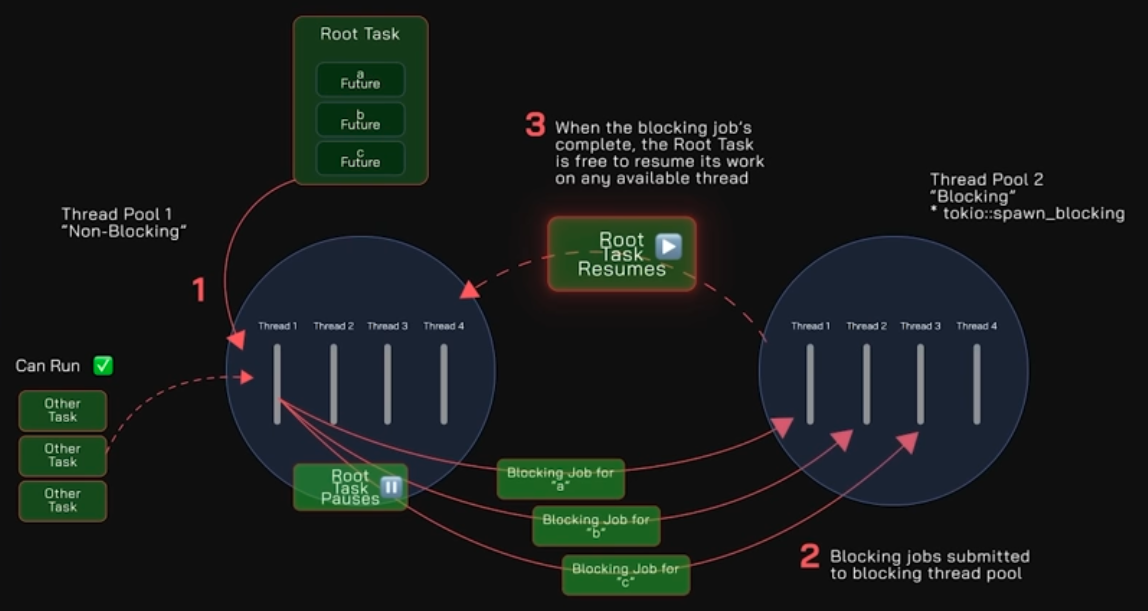
Rust Parallel/Async vs. EVM Synchronous: COURSE: Rust has become the industry standard for high-performance blockchain development. Use Rust instead of Solidity. Rust is the native language for Solana, Near, and Polkadot, and is unlocking new performance levels on EVM (Etherium Virtual Machine) chains like Arbitrum Stylus. It also underpins the logic of Starknet. Whether building next-gen DeFi or high-frequency trading dApps, a solid foundation in Rust is your gateway to these ecosystems.
Observability Frameworks
https://www.youtube.com/watch?v=1ddvwuf0YGw Hexagonal Architecture in Rust (Part 1) — Designing a Clean Telemetry Domain Fearless in Rust https://vineckie.super.site/rustpulse
Parallel/Async: Wrk framework
- VIDEO: “Python vs Rust for Machine Learning”
80,000 requests per second from FastAPI Python vs. Rust vs. 2,000 = 40x speedup running concurrently.
onnx model format
Functions & Macros
- Ultimate
- Rust println! and format! macros
- Rust Functions and Procedures
- Milford: println! and format! macros
“fn” defines
If not referencing a variable in the signature, prefix with an underline.
“impl”
Function names ending with an exclaimation mark (!), such as println!</t> are macros.
format! macro
select! macro
let mut v = Vec![1,2,3]; // vector
Module System
use statements above main() are like Python import.
Standard library: https://doc.rust-lang.org/std/… use std::collections::HashMap; instead of Solidity Mappings.
- Extropy: transition Use Hashmaps to replicate Solidity Mappings.
Crates is the registry of cargo (packages) referenced by use.
Add the random number package in the toml file under [dependencies]
rand = “0.6.5”
Utilities: Logging module
https://github.com/muhammad-fiaz/logly a Rust-powered, Loguru-like logging library for Python that combines the familiarity of Python’s standard logging API with high-…
https://github.com/open-telemetry/opentelemetry-rust The Rust OpenTelemetry implementation
Log4r for Logging ???
Thread Safety
Rust Threads are portable across platforms (macOS, Linux, etc.)
To spwan a thread to run concurrently in an allocated memory:
use std::thread;
fn mail(){
    let handle = thread::spawn(move || {
        // do stuff in a child thread
    });
    // Do stuff simultaneously in main thread.
    // Wait until thread has exited:
    handle.join().unwrap()'
}
PROTIP: Alternately, use awake.
Benchmarking with crate Criterion
Criterion crate has a separate directory and thus separate files from tests.
To benchmark non-public methods, use feature flags and wrappers.
Tokio for concurrent runtime
- VIDEO: Rust - Live coding implementation of non-blocking async agents on top of Tokio” by Boy Maas
- VIDEO: Creating a Chat Server with async Rust and Tokio by Lily Mara, author of “Refactoring to Rust” from Manning Publications
- How Rust engineered the perfect ansync runtime.
github.com/tokio-rs/tokio for concurrent runtime.
musl for cross-compilation
Memory Safety
Lifetimes
- https://www.youtube.com/watch?v=TX2ZkVPBr8g
- https://www.youtube.com/watch?v=gRAVZv7V91Q
- Closures
Other programming languages (Java, C#) don’t need lifetime annotations since they have garbage collection to remove “dangling pointers” to memory which no longer exist. Leaving them may cause a panic crash.
VIDEO: “Lifetimes are the #1 reason why developers give up on Rust.” QCon London 2026
The Rust compiler issues strange error messages.
- Navigate to my program “lifetime-error” and run it to see sample error:
string does not live long enough
fn main() {
   let x: i32 = 2;
   // let x: i32 = 4;  // reassignment not allowed.
   let r = &x;   // r borrowing x.
   println!("x: {x} = r: {r} ");
   {  // begin anonymous function:
       // Referencing r here would violoate "borrow1 does not live long enough":
       let borrow1 = &x;   // borrow1's lifetime starts here.
       println!("borrow1: {borrow1}");
   }  // compiler removes what was borrowed within generic function
   // Variable borrow1 can no longer be referenced here.
}
TODO: Code here.
They say that to understand lifetimes, you need to understand borrowing and borrow checker that is unique to Rust.
Within Rust, the ampersand such as &i invokes borrowing
The “living” issue arises within “generic” function code defined between additional { and } curly brackets. Such are also called “anonymous functions” because the code is not associated with a function name.
Rust automatically removes existance of variables defined within generics/anonymous functions unless lifetime annotations are added by the developer.
<`a>
Most of the time, lifetimes are implicit or inferred, don’t need to worry about it.
With Rust, every reference has a lifetime, which is the scope for which that scope is valid.
Lifetime annotations give a name for a scope.
Scope
Blocks.
Nested blocks.
Variables hoisted, shadowed within an inner block.
The assumption is that variables are immutable by a definition statement such as: x: i2 To make a veriable mutable: x: &mut i2
Strings
A string can be define two ways: &str or String:
fn mail() {
    let example_str: &stsr = "Howdy";  // immutable
    let example_string: String = String::from("Partner");
   }
“characters (u8s)” gives the impression that individual characters themselves are 8-bit, when inside a string, they can be 8-bit, 16-bit, 24-bit, or 32-bit depending on the character. The “u8s” specifies bytes of memory encoding the string, not individual characters.
Using “unicode.segmentation” package to handle graphemes
Scalars Tuples
Unicode (not UTF-8) scalars
Scaler types Primitives in Stack
REMEMBER: By default, variables are stored in the Stack.
// Signed: i8, i16, i32 (default), ... isize (the platform's pointer type size)
let stack_i8: i16 = -10;  // integer (whole) number.

// Unsigned: u8, u16, ..., u128, usize
let stack_f32: f32 = 20.1;  // floating point.

let stack_char: char = 'a';
let some_data bool = true; // or boolean false</a> (without quotes)
REMEMBER: So they can be fast, stack Variables are fixed in size (cannot grow).
TODO: Rust Native Types vs. Storage Slots vs. Serialisation
REMEMBER: Collections cannot be stack variables.
Mutable Heap
fn main () -> {
    let mut s = String::from("Hello");
    s.push_str(",world!");
    // let s2 = s;  // invalid
    println!("{}", s);
}
Casting
Casting enlarges a variable with the same value.
Structs & Traits
- Milford: Rust Structs, Traits and Impl
- Ultimate: structs
- Ultimate: Traits
- Let’sGetRusty: Traits
- Rust’s most complicated features explained Trait
- https://www.youtube.com/watch?v=T0Xfltu4h3A
A Trait is an Interface.
A trait is like a class, but think of them like qualifications in Rust.
A dyn-compatible trait can be the base trait of a trait object. A trait is dyn compatible if it is not an async fn which has a hidden Future type.
Generics (Abstract Types)
DEFINITION: Generics can be of one type or another type. Concrete types are consistent a particular type.
Generics reduces code duplication by adding flexibility downstream: Instead of defining structs with diffent types: placeholder types,
struct Point<T> {
    x: T,
    y: T,
}
The Rust compiler substitutes T with i32.
fn main() {
    let a = Point { x: 100, y: -1_f32 };
    println!("x = {} y = {}, a.x, a.y );

    let b = Point { x: 10.1, y: -2.3 };
    println!("x = {} y = {}, b.x, b.y );
Control Flow
Ownership and Borrowing
- Milford: Ownership and Borrowing shows coding for stack and heap (smart pointers): which houses collections which needs to grow
- Ultimate
- References and Borrowing
- VIDEO: Niko Matsakis - Rust: Putting Ownership to Use by Curry On!
- 25 Rust Ownership Examples You Must Understand
- by @YouCodeThings
- by Dev Level Up
Ownership and Borrowing is at the heart of Rust. But this can be a daunting challenge to many new to Rustlang.
coding for stack and heap (smart pointers): which houses collections which needs to grow
### Ownership: Borrow Checker
This keeps developers from spending hours or days hunting down data race conditions.
Mistaken
https://www.youtube.com/watch?v=xV46u–N-Fk
Enums
Enums make nulls unnecessary.
Null safety: Option Enum
enum Option
Explicitly handle missing
Error Handling: Result Enum
- Best built-in error handling
- https://www.youtube.com/watch?v=j-VQCYP7wyw = Rust Error Handling - Best Practices
Functions
Closures
- VIDEO: Closures - Rust by danlogs
- Ultimate
- https://vimeo.com/1154699403/97c6bd8b9a?fl=pl&fe=vl
- Ultimate: Collections
A closure is an anonymous function. Aka Lambda.
A closure gives an inner function access to an outer function’s scope, even after the outer function has returned.
A closure is a function bundled together (enclosed) with references to its surrounding state (the lexical environment).
In JavaScript, closures are created every time a function is created, at function creation time.
To use a closure, define a function inside another function and expose it.
To expose a function, return it or pass it to another function.
Traits for inheritance
Unlike Java, the Rust language does not have “class inheritance” features.
Traits were added in Rust 0.4 as a means to provide inheritance;
interfaces were unified with traits and removed as a separate feature.
Use Traits to define flexible behavior.
For interfacing with C, Rust has a foreign function interface (FFI) that can be called from, e.g., C language, and can call C. While calling C++ has historically been problematic (from any language), Rust has a library, CXX, to allow calling to or from C++, and “CXX has zero or negligible overhead.”
The type system supports a mechanism similar to type classes, called traits, inspired by the Haskell language. This facility is for ad hoc polymorphism, achieved by adding constraints to type variable declarations.
Rust Result and Option types …
Option types
“Once you’ve used them, any language with null starts to feel like a loaded gun pointed at your foot.”
Browser javascript GUI
VIDEO: Rust in the Browser for JavaScripters: New Frontiers, New Possibilities by Coding Tech
@mathewhaynesonline “AI for Web Devs”
- https://github.com/matthewhaynesonline/ai-for-web-devs/tree/main/projects
- https://youtube.com/playlist?list=PLwPYSl1MQp4FpIzn48ypesKYzLvUBQpPF&si=CvOWb9LmPnWxgJnn
Create a GUI
Rather than a programmer-centric CLI, end-users needs a GUI to authenticate (input account and passwords) and select from a map or other visual thing, etc.
The “frontend” includes several platforms: CLI, desktop app, mobile, server.
DioxusLabs.com (EU funding at https://github.com/DioxusLabs/dioxus) promises a single codebase to create cross-platform (web, desktop, mobile, server). In three lines of code. Instant reloading after code changes (unlike Android & iPhone mobile apps) “Google Flutter but better” using TailwindCSS. Render using web-sys, webview, server-side-rendering, liveview, or even with our experimental WGPU-based renderer. Embed Dioxus in Bevy, WGPU, or even run on embedded Linux! Call directly into JNI and Native APIs.
Frontend (The “Website” UI) standard NodeJs web framework like React, Vue.js, or Svelte used to create what user input and displaying responses. Using user’s operating system’s built-in webview to render keeps app size small.
Mobile app on iOS & Android would give desktop apps “eyes” to see and hear.
MCP AI agents can run on top to automate clicking and keyboard entry.
The most widely accepted frameworks in the ecosystem include:
- egui (best for rapid prototyping, simple tools, and games),
- iced (best for robust desktop apps inspired by the Elm architecture), and
- Slint or Tauri (best for highly styled, design-driven user interfaces building desktop applications,
In the AI era, we should be able to create an entire website given a “Design System” choices file.
Backend (Rust Core): This is where your application’s logic and AI integrations live. The Rust backend handles heavy processing, manages system resources, and communicates securely with the frontend via Inter-Process Communication (IPC) .
Others:
- https://www.youtube.com/watch?v=7RlVM0D4CEA&t=29s
Databases GraphQL API
https://www.youtube.com/watch?v=QXJ0wKBLt-8 Rust and GraphQL: A match made in heaven
Tutorials
Rust with AI
By the distinguished Noah Gift (US expat in Valencia, Spain), Liam Parker, Alfredo Deza at Pragmatic AI Labs: https://github.com/paiml https://github.com/noahgift/continuous-integration for .github/workflows
If you have an OReilly subscription:
A. 1h Using Rust with Python Nov ‘23
B. 5h Rust for Pythonistas Nov ‘23 creates a Python with Make file, Polars tests.
C. 4h Rust LLMOps Nov ‘23 AWS Code Whisperer Live Coding Rust Cargo Lambda using Simple Browser:
by The Dev Method
- 34 VIDEO Playlist” “Rust: Intro and setting up your first project”
Databricks
X. Rust Fundamentals Bootcamp in 6 hours over 5 weeks for $20/month.
Slint UI framework
VIDEO “you need to build a RUST desktop app!! by Travis Media” uses Slint UI framework
- Build an app with just a counter:
MYAPPNAME="myapp" cargo generate --git https://github.com/slint-ui/slint-rust-template --name "$MYAPPNAME" cd "$MYAPPNAME" cargo build - Install The Slint for Visual Studio Code Extension
References
BOOK: “The Rust Programming Language” at rust-lang.org/learn with code at https://github.com/rust-lang/rustlings/
https://doc.rust-lang.org/rust-by-example/index.html
[3] BOOK: Manning: “Rust in Action” Aug. 2021 [at OReilly.com] by Tim McNamara, with https://github.com/rust-in-action/code
At the Rust YouTube channel are recordings of meetings.
Bastian Gruber, author of VIDEO: manning.com/books/rust-web-development and https://rustwebdevelopment.com covers Logging, Error Handling, Vec, HashMap, String, Traits, https://git.sr.ht/~gruberb/onetutorial
“Rust, Wright’s Law, and the Future of Low-Latency Systems” at ScyllaDB’s P99 Conf. by Bryan Cantrill
https://www.youtube.com/watch?v=Uqi9xwlFbEc
https://medium.com/@mithi/genetic-algorithms-in-rust-for-autonomous-agents-an-introduction-ac182de32aee https://github.com/mithi/rusty-genes A Rust implementation of a genetic algorithm to solve the traveling salesman problem with animated visualizations
https://github.com/QMHTMY/RustBook from 2023/24 have functions under individual chapters. https://www.codecrafters.com/AbilityMailServer
VIDEO “Why Rust?” 2024 Fall ECE454 Section 1 (University of Toronto) by Jon Eyolfson
https://github.com/ExtropyIO/AwesomeZK https://academy.extropy.io/pages/courses/zkmaths-course.html https://maths.extropy.io https://github.com/ExtropyIO/ZeroKnowledgeBootcamp ZKP (Zero Knowledge Proofs) protocols.
- Modular arithmetic: 25 mod 3 = 1 is remainder where n mod k = 1
- Groups and fields: {a,b,…} Associativity, Identity Elements,
- Cyclic groups and generators
- Finite fields
-
Multiplicative inverses and field constraints in ZK
- Ultimate
Performance Tuning
Lifecycle:
- Measure performance
- Disk space consumption
- Latency (response time, tail latency)
- Throughput (requests per second)
- Memory (heap & stack)
- IO bottlenects (disk, network)
- CPU time
- Isolate bottlenecks
- Optimize code
Frameworks & Tools:
- log_analyze
- sharkdp/hyperfine to benchmark app run
- Cargo Flamegraph creates an .svg file to show where the program run spent CPU time.
- Dhat For Async:
- Tracing for instrumenting events
- Oha for HTTP load.
- Tokio-console
Techniques:
- Algorithms
- Parallelization (Async)
https://github.com/nnethercote/perf-book/blob/master/src/heap-allocations.md cd /Users/johndoe/github-wilsonmar/rustlang-samples/src/hello-rust && sudo cargo flamegraph –release -o flamegraph.svg 2>&1
https://docs.google.com/presentation/d/1C1XEDoqdEEMkoTE7GqfsXgTkMh2z15CwkfFVXprVCaY/edit?usp=sharing Rust container cheat sheet
https://www.udemy.com/course/data-analysis-with-polars-and-python/ $12.99 at Udemy for 22 hours on-demand video course “Data Analysis with Polars and Python” by Boris Paskhaver
https://github.com/paskhaver/data-analysis-with-polars-and-python
Clippy suggestions
response.push('\n'); // instead of response.push_str("\n");
v034 move to rustops @rustlang.md created 2021-10-03