bomonike
 Switch among multiple versions of Ruby







Overview
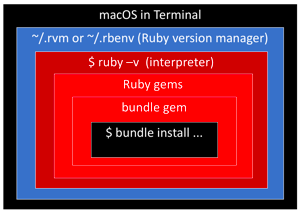 The major commands around Ruby:
- ruby
- gem - a packaged library or piece of Ruby code that can be shared and reused across projects. Installs individual gems globally or locally. It includes Ruby files, metadata, and dependencies required for the gem to function.
- bundle - Manages all gems for a specific project. Automatically resolves project dependencies. Requires Gemfile and generates Gemfile.lock.
PROTIP: There is a war going on within the Ruby community between rvm and rbenv. See http://jonathan-jackson.net/rvm-and-rbenv and Ryan McGeary who switched to rbenv.
- rvm - the most established, but also the most intrusive (difficult) shell modifications.
- rbenv version manager Partnered with Capistrano
- chruby - which doesn’t use shims nor require write access, claims to be lighter than rbenv on zsh
- asdf - the version manager for many languages
- forum
- rbfu
Some convenience images don’t support using rvm or rbenv, such as the Android image.
Versions
-
Look at the latest release among a list of prior Ruby versions at:
-
PROTIP: Rather than whatever is the “latest”, use the most recent Stable release listed at:
-
Remember the lastest (most recent) version number (such as “3.3.0” at time of writing).
System Default Ruby version
A Ruby language compiler is included in MacOS. So we can jump straight to view version information.
CAUTION: Don’t touch the system Ruby that comes with your Mac.
-
Open a Terminal Shell Window and type:
ruby -v
Alternately:
ruby --version
The response on a Sonoma 14.3 M2 Max Feb 2024:
ruby 2.6.10p210 (2022-04-12 revision 67958) [universal.arm64e-darwin23]
The response for the High Sierra default: ruby 2.3.7p456 (2018-03-28 revision 63024) [universal.x86_64-darwin17] ruby 2.5.1p57 (2018-03-29 revision 63029) [x86_64-darwin17] </tt>
The response after updating on 2016-06-16: ruby 2.3.1p112 (2016-04-26 revision 54768) [x86_64-darwin15]
The response for the Sierra default: ruby 2.3.0p0 (2015-12-25 revision 53290) [x86_64-darwin15]
The response for the Yosemite default: ruby 2.0.0p481 (2014-05-08 revision 45883) [universal.x86_64-darwin14]
CAUTION: The Apple Mac operating system makes use of Ruby, so don’t delete the .rvm folder.
-
This should return “hey”:
ruby -e "puts 'hey'"
PROTIP: The ruby command by itself will not return anything … forever.
chruby
- https://daqo.medium.com/using-chruby-as-the-default-ruby-version-manager-c11346e3cc
- https://gist.github.com/rubyandcoffee/5f15410a6c729f06b85f27cdc04cc20e
-
Install:
brew install chruby
-
Add to ~/.bashrc or ~/.zshrc file to invoke chruby on start-up:
source /usr/local/share/chruby/chruby.sh
-
To facilitate installing additional version of Rubies:
brew install ruby-install -HEAD
ruby-install -V
-
List the latest Ruby versions:
ruby-install
The response at time of writing:
>>> Downloading latest ruby versions ...
>>> Downloading latest jruby versions ...
>>> Downloading latest truffleruby versions ...
>>> Downloading latest truffleruby-graalvm versions ...
>>> Downloading latest mruby versions ...
Stable ruby versions:
  ruby:
 3.0.6
 3.1.4
 3.2.3
 3.3.0
  jruby:
 9.4.5.0
  truffleruby:
 23.1.2
  truffleruby-graalvm:
 23.1.2
  mruby:
 3.0.0
-
To install the latest version of Ruby from the web page:
ruby-install ruby 3.3.0
-
Configure shell to use chruby:
echo "source $(brew --prefix)/opt/chruby/share/chruby/chruby.sh" >> ~/.zshrc
echo "source $(brew --prefix)/opt/chruby/share/chruby/auto.sh" >> ~/.zshrc
echo "chruby ruby-3.1.3" >> ~/.zshrc
-
Optionally, install additional rubies installed in /opt/rubies/ and ~/.rubies/
https://github.com/postmodern/chruby
Ruby apps on Mac
The programs I’ve figured out how to install using my bash script:
- istats
- gitlab (command line utilities)
- ruby-jmeter
- travis
- rails
- rust (language)
Gem versions
-
You don’t really need to do the above because this more detailed command provides it as well:
gem env
The response on 2016-06-16:
RubyGems Environment: - RUBYGEMS VERSION: 2.6.4 - RUBY VERSION: 2.3.1 (2016-04-26 patchlevel 112) [x86_64-darwin15] - INSTALLATION DIRECTORY: /Users/mac/.rvm/gems/ruby-2.3.1 - USER INSTALLATION DIRECTORY: /Users/mac/.gem/ruby/2.3.0 - RUBY EXECUTABLE: /Users/mac/.rvm/rubies/ruby-2.3.1/bin/ruby - EXECUTABLE DIRECTORY: /Users/mac/.rvm/gems/ruby-2.3.1/bin - SPEC CACHE DIRECTORY: /Users/mac/.gem/specs - SYSTEM CONFIGURATION DIRECTORY: /Users/mac/.rvm/rubies/ruby-2.3.1/etc - RUBYGEMS PLATFORMS: - ruby - x86_64-darwin-15 - GEM PATHS: - /Users/mac/.rvm/gems/ruby-2.3.1 - /Users/mac/.rvm/gems/ruby-2.3.1@global - GEM CONFIGURATION: - :update_sources => true - :verbose => true - :backtrace => false - :bulk_threshold => 1000 - REMOTE SOURCES: - https://rubygems.org/ - SHELL PATH: - /Users/mac/.rvm/gems/ruby-2.3.1/bin - /Users/mac/.rvm/gems/ruby-2.3.1@global/bin - /Users/mac/.rvm/rubies/ruby-2.3.1/bin - /Users/mac/depot_tools - /Users/mac/.npm-packages/bin - /Users/mac/miniconda2/bin - /Users/mac/.rbenv/shims - /Users/mac/.rbenv/bin - /usr/local/bin - /usr/bin - /bin - /usr/sbin - /sbin - /Users/mac/gits - /Users/mac/.rvm/bin - /Users/mac/.rvm/bin -
To view each component individually:
gem --version
The response on Sonoma 14.3 on Feb 12, 2024: 3.0.3.1
The response for the High Sierra default: 2.7.6
The response for the Sierra default: 2.0.14
The response for the Yosemite default: 2.0.14
Update RubyGems and Bundler:
-
List local gems defaults:
gem list b
The response on Sonoma 14.3 on Feb 12, 2024:
*** LOCAL GEMS ***

bigdecimal (default: 1.4.1)
bundler (default: 1.17.2)
dbm (default: 1.0.0)
forwardable (default: 1.2.0)
irb (default: 1.0.0)
libxml-ruby (3.2.1)
sdbm (default: 1.0.0)
webrick (default: 1.4.4)
zlib (default: 1.0.0)
-
Update:
sudo gem update --system
The response on 2016-06-16:
Password:
Updating rubygems-update
Fetching: rubygems-update-2.6.4.gem (100%)
Successfully installed rubygems-update-2.6.4
Parsing documentation for rubygems-update-2.6.4
Installing ri documentation for rubygems-update-2.6.4
Installing darkfish documentation for rubygems-update-2.6.4
Done installing documentation for rubygems-update after 2 seconds
Parsing documentation for rubygems-update-2.6.4
Done installing documentation for rubygems-update after 0 seconds
Installing RubyGems 2.6.4
RubyGems 2.6.4 installed
Parsing documentation for rubygems-2.6.4
Installing ri documentation for rubygems-2.6.4

=== 2.6.3 / 2016-04-05
...
Minor enhancements:
...
Bug fixes:
...
RubyGems installed the following executables:
/Users/mac/.rvm/rubies/ruby-2.3.1/bin/gem

Ruby Interactive (ri) documentation was installed. ri is kind of like man
pages for ruby libraries. You may access it like this:
  ri Classname
  ri Classname.class_method
  ri Classname#instance_method
If you do not wish to install this documentation in the future, use the
--no-document flag, or set it as the default in your ~/.gemrc file. See
'gem help env' for details.

RubyGems system software updated
-
List local gems after update:
gem list b
The response on Sonoma 14.3 on Feb 12, 2024:
*** LOCAL GEMS ***

bigdecimal (default: 1.4.1)
bundler (default: 1.17.2)
dbm (default: 1.0.0)
forwardable (default: 1.2.0)
irb (default: 1.0.0)
libxml-ruby (3.2.1)
sdbm (default: 1.0.0)
webrick (default: 1.4.4)
zlib (default: 1.0.0)
A sample example (on 2016-06-16):
bigdecimal (1.3.1, 1.2.7, default: 1.2.0)
libxml-ruby (3.0.0, 2.8.0, 2.6.0)
rainbow (2.2.1, 2.1.0)
rubocop (0.47.1, 0.40.0)
bundler-unload (1.0.2)
executable-hooks (1.3.2)
rubygems-bundler (1.4.4)
ruby-progressbar (1.8.1)
rubygems-update (2.6.10, 2.6.9, 2.6.1)
...
Update Bundler:
-
If bundler is not on the list above:
gem install bundler
A sample response:
Fetching: bundler-1.12.5.gem (100%)
Successfully installed bundler-1.12.5
Parsing documentation for bundler-1.12.5
Installing ri documentation for bundler-1.12.5
Done installing documentation for bundler after 5 seconds
1 gem installed
-
Navigate:
bundle install
A sample response:
Fetching gem metadata from https://rubygems.org/
Fetching version metadata from https://rubygems.org/
Fetching dependency metadata from https://rubygems.org/
Installing rake 11.1.2
...
Bundle complete! 5 Gemfile dependencies, 39 gems now installed.
Use `bundle show [gemname]` to see where a bundled gem is installed.
-
Run
sudo gem install --no-rdoc --no-ri bundler
The response:
Fetching: bundler-1.9.4.gem (100%)
Successfully installed bundler-1.9.4
1 gem installed
-
Update latest version of gem:
sudo gem update
The response takes several minutes because it touches every gem:
   Updating installed gems
Updating CFPropertyList
...
RubyGems installed the following executables:
  /usr/local/Cellar/ruby/2.5.1/bin/gem
  /usr/local/Cellar/ruby/2.5.1/bin/bundle

Ruby Interactive (ri) documentation was installed. ri is kind of like man
pages for Ruby libraries. You may access it like this:
  ri Classname
  ri Classname.class_method
  ri Classname#instance_method
If you do not wish to install this documentation in the future, use the
--no-document flag, or set it as the default in your ~/.gemrc file. See
'gem help env' for details.

RubyGems system software updated
-
Press y and Enter if you see:
rake's executable "rake" conflicts with /usr/bin/rake
rdoc's executable "rdoc" conflicts with /usr/bin/rdoc
rdoc's executable "ri" conflicts with /usr/bin/ri
-
To rebuild any gems using native extensions:
sudo gem pristine --all
-
To uninstall gems not used:
sudo gem cleanup
The response:
Cleaning up installed gems...
Clean Up Complete
Install rbenv
CAUTION: To install rbenv, one must first remove RVM because it’s incompatible with rbenv.
brew update
   brew install rbenv ruby-build
The response:
==> Installing dependencies for rbenv: openssl, ruby-build
==> Installing rbenv dependency: openssl
==> Downloading https://homebrew.bintray.com/bottles/openssl-1.0.2k.sierra.bottl
######################################################################## 100.0%
==> Pouring openssl-1.0.2k.sierra.bottle.tar.gz
==> Using the sandbox
==> Caveats
A CA file has been bootstrapped using certificates from the SystemRoots
keychain. To add additional certificates (e.g. the certificates added in
the System keychain), place .pem files in
  /usr/local/etc/openssl/certs

and run
  /usr/local/opt/openssl/bin/c_rehash

This formula is keg-only, which means it was not symlinked into /usr/local.

Apple has deprecated use of OpenSSL in favor of its own TLS and crypto libraries

If you need to have this software first in your PATH run:
  echo 'export PATH="/usr/local/opt/openssl/bin:$PATH"' >> ~/.bash_profile

For compilers to find this software you may need to set:
    LDFLAGS:  -L/usr/local/opt/openssl/lib
    CPPFLAGS: -I/usr/local/opt/openssl/include
For pkg-config to find this software you may need to set:
    PKG_CONFIG_PATH: /usr/local/opt/openssl/lib/pkgconfig

==> Summary
🍺  /usr/local/Cellar/openssl/1.0.2k: 1,696 files, 12M
==> Installing rbenv dependency: ruby-build
==> Downloading https://github.com/rbenv/ruby-build/archive/v20170201.tar.gz
==> Downloading from https://codeload.github.com/rbenv/ruby-build/tar.gz/v201702
######################################################################## 100.0%
==> ./install.sh
🍺  /usr/local/Cellar/ruby-build/20170201: 334 files, 178.8K, built in 4 seconds
==> Installing rbenv
==> Downloading https://homebrew.bintray.com/bottles/rbenv-1.1.0.sierra.bottle.t
######################################################################## 100.0%
==> Pouring rbenv-1.1.0.sierra.bottle.tar.gz
🍺  /usr/local/Cellar/rbenv/1.1.0: 36 files, 63.2K
-
What versions of Ruby are available? See https://www.ruby-lang.org/en/downloads/releases/
-
To upgrade Ruby using rbenv, first get the semantic version from the Ruby site, then:
rbenv install 2.6.1
The response when 2.6.1 was all the rage:
ruby-build: use openssl from homebrew
Downloading ruby-2.6.1.tar.bz2...
-> https://cache.ruby-lang.org/pub/ruby/2.6/ruby-2.6.1.tar.bz2
Installing ruby-2.6.1...
ruby-build: use readline from homebrew
Installed ruby-2.6.1 to /Users/wilsonmar/.rbenv/versions/2.6.1
-
Make that version the default globally:
rbenv global 2.6.1
ruby -v
The response I got:
ruby 2.6.1p33 (2019-01-30 revision 66950) [x86_64-darwin18]
Uninstall rbenv
-
To uninstall, remember rbenv was installed using brew, so:
brew uninstall rbenv ruby-build
Install to /usr/local/bin
“You don’t have write permissions into the /usr/bin directory.” is returned because that directory requires root credentials.
This is why Homebrew installs into the /usr/local/bin folder.
To specify that folder when installing gems, for example:
gem install cocoapods -n /usr/local/bin
PROTIP: To automatically specify -n /usr/local/bin, save create file
~/.gemrc containing:
:gemdir:
   - ~/.gem/ruby
install: -n /usr/local/bin
rbenv vs rvm
Before rbenv, there was rvm.
This article describes the differences.
PROTIP: Personally, the requirement for gpg to install was a turn-off for RVM as it was difficult to get working.
Ruby Version Manager (rvm)
See https://rvm.io/support/troubleshooting
Install RVM
-
In a Terminal:
curl -L https://get.rvm.io | bash -s stable
Sample response:
  % Total    % Received % Xferd  Average Speed   Time    Time     Time  Current
                              Dload  Upload   Total   Spent    Left  Speed
100   194  100   194    0     0    544      0 --:--:-- --:--:-- --:--:--   544
100 24361  100 24361    0     0  31643      0 --:--:-- --:--:-- --:--:-- 1076k
Downloading https://github.com/rvm/rvm/archive/1.29.4.tar.gz
Downloading https://github.com/rvm/rvm/releases/download/1.29.4/1.29.4.tar.gz.asc
gpg: Signature made Sun Jul  1 13:41:26 2018 MDT
gpg:                using RSA key 62C9E5F4DA300D94AC36166BE206C29FBF04FF17
gpg: Good signature from "Michal Papis (RVM signing) <mpapis@gmail.com>" [unknown]
gpg:                 aka "Michal Papis <michal.papis@toptal.com>" [unknown]
gpg:                 aka "[jpeg image of size 5015]" [unknown]
gpg: WARNING: This key is not certified with a trusted signature!
gpg:          There is no indication that the signature belongs to the owner.
Primary key fingerprint: 409B 6B17 96C2 7546 2A17  0311 3804 BB82 D39D C0E3
  Subkey fingerprint: 62C9 E5F4 DA30 0D94 AC36  166B E206 C29F BF04 FF17
GPG verified '/Users/wilsonmar/.rvm/archives/rvm-1.29.4.tgz'
Upgrading the RVM installation in /Users/wilsonmar/.rvm/
 RVM PATH line found in /Users/wilsonmar/.mkshrc /Users/wilsonmar/.profile /Users/wilsonmar/.bashrc /Users/wilsonmar/.zshrc.
 RVM sourcing line found in /Users/wilsonmar/.profile /Users/wilsonmar/.bash_profile /Users/wilsonmar/.zlogin.
Upgrade of RVM in /Users/wilsonmar/.rvm/ is complete.
/Users/wilsonmar/.bash_profile:1:PATH=/usr/local/bin/python3:/usr/bin/python:/usr/local/bin:/usr/bin:/usr/sbin:/bin:/sbin:/opt/local/bin:/opt/local/sbin:/usr/local/share/dotnet

         * WARNING: Above files contains PATH= with no $PATH inside, this can break RVM,
 for details check https://github.com/rvm/rvm/issues/1351#issuecomment-10939525
 to avoid this warning prepend $PATH

         * No new notes to display.
View rvm version number
rvm info
-
For a smaller response:
rvm --version
The response on 2018-10-26:
rvm 1.29.4 (latest) by Michal Papis, Piotr Kuczynski, Wayne E. Seguin [https://rvm.io]
The response on 2016-06-16 had an email:
rvm 1.27.0 (master) by Wayne E. Seguin <wayneeseguin@gmail.com>, Michal Papis <mpapis@gmail.com> [https://rvm.io/]
Secure route:
See https://rvm.io/rvm/security
-
First try:
gpg --keyserver hkp://keys.gnupg.net --recv-keys 409B6B1796C275462A1703113804BB82D39DC0E3 7D2BAF1CF37B13E2069D6956105BD0E739499BDB
The response I got:
gpg: keyserver receive failed: Server indicated a failure
-
Alternatively, Since that doesn’t work:
curl -sSL https://rvm.io/mpapis.asc | gpg --import -
gpg: key 3804BB82D39DC0E3: 47 signatures not checked due to missing keys
gpg: key 3804BB82D39DC0E3: public key "Michal Papis (RVM signing) <mpapis@gmail.com>" imported
gpg: Total number processed: 1
gpg:               imported: 1
gpg: marginals needed: 3  completes needed: 1  trust model: pgp
gpg: depth: 0  valid:   2  signed:   0  trust: 0-, 0q, 0n, 0m, 0f, 2u
-
Download:
\curl -O https://raw.githubusercontent.com/rvm/rvm/master/binscripts/rvm-installer
% Total % Received % Xferd Average Speed Time Time Time Current Dload Upload Total Spent Left Speed 100 24361 100 24361 0 0 72332 0 --:--:-- --:--:-- --:--:-- 72502 -
Download:
\curl -O https://raw.githubusercontent.com/rvm/rvm/master/binscripts/rvm-installer.asc
% Total % Received % Xferd Average Speed Time Time Time Current Dload Upload Total Spent Left Speed 100 833 100 833 0 0 3368 0 --:--:-- --:--:-- --:--:-- 3372 -
Verify:
gpg --verify rvm-installer.asc
gpg: assuming signed data in 'rvm-installer'
gpg: Signature made Sat Mar 31 15:47:44 2018 MDT
gpg:                using RSA key 62C9E5F4DA300D94AC36166BE206C29FBF04FF17
gpg: Good signature from "Michal Papis (RVM signing) <mpapis@gmail.com>" [unknown]
gpg:                 aka "Michal Papis <michal.papis@toptal.com>" [unknown]
gpg:                 aka "[jpeg image of size 5015]" [unknown]
gpg: WARNING: This key is not certified with a trusted signature!
gpg:          There is no indication that the signature belongs to the owner.
Primary key fingerprint: 409B 6B17 96C2 7546 2A17  0311 3804 BB82 D39D C0E3
  Subkey fingerprint: 62C9 E5F4 DA30 0D94 AC36  166B E206 C29F BF04 FF17
-
Get on the latest version of RVM:
bash rvm-installer stable
The response run on 2018-06-22:
Downloading https://github.com/rvm/rvm/archive/1.29.3.tar.gz Downloading https://github.com/rvm/rvm/releases/download/1.29.3/1.29.3.tar.gz.asc gpg: Signature made Sun Sep 10 14:59:21 2017 MDT gpg: using RSA key E206C29FBF04FF17 gpg: Good signature from "Michal Papis (RVM signing) <mpapis@gmail.com>" [unknown] gpg: aka "Michal Papis <michal.papis@toptal.com>" [unknown] gpg: aka "[jpeg image of size 5015]" [unknown] gpg: WARNING: This key is not certified with a trusted signature! gpg: There is no indication that the signature belongs to the owner. Primary key fingerprint: 409B 6B17 96C2 7546 2A17 0311 3804 BB82 D39D C0E3 Subkey fingerprint: 62C9 E5F4 DA30 0D94 AC36 166B E206 C29F BF04 FF17 GPG verified '/Users/wilsonmar/.rvm/archives/rvm-1.29.3.tgz' Installing RVM to /Users/wilsonmar/.rvm/ Adding rvm PATH line to /Users/wilsonmar/.profile /Users/wilsonmar/.mkshrc /Users/wilsonmar/.bashrc /Users/wilsonmar/.zshrc. Adding rvm loading line to /Users/wilsonmar/.profile /Users/wilsonmar/.bash_profile /Users/wilsonmar/.zlogin. Installation of RVM in /Users/wilsonmar/.rvm/ is almost complete: * To start using RVM you need to run `source /Users/wilsonmar/.rvm/scripts/rvm` in all your open shell windows, in rare cases you need to reopen all shell windows. /Users/wilsonmar/.bash_profile:1:PATH=/usr/bin/python:/usr/local/bin:/usr/bin:/usr/sbin:/bin:/sbin:/opt/local/bin:/opt/local/sbin:/usr/local/share/dotnet * WARNING: Above files contains `PATH=` with no `$PATH` inside, this can break RVM, for details check https://github.com/rvm/rvm/issues/1351#issuecomment-10939525 to avoid this warning prepend `$PATH`. -
Do as instructed:
source /Users/wilsonmar/.rvm/scripts/rvm
No response is returned.
Get latest version of Ruby
-
Get on the latest version of RVM:
rvm get stable
The response run on 2017-07-27:
ownloading https://get.rvm.io
Downloading https://raw.githubusercontent.com/rvm/rvm/master/binscripts/rvm-installer.asc
Verifying /Users/mac/.rvm/archives/rvm-installer.asc
gpg: Signature made Sun Jul  2 16:42:38 2017 EDT using RSA key ID BF04FF17
gpg: Good signature from "Michal Papis (RVM signing) <mpapis@gmail.com>" [unknown]
gpg: Note: This key has expired!
Primary key fingerprint: 409B 6B17 96C2 7546 2A17  0311 3804 BB82 D39D C0E3
  Subkey fingerprint: 62C9 E5F4 DA30 0D94 AC36  166B E206 C29F BF04 FF17
GPG verified '/Users/mac/.rvm/archives/rvm-installer'
Downloading https://github.com/rvm/rvm/archive/1.29.2.tar.gz
Downloading https://github.com/rvm/rvm/releases/download/1.29.2/1.29.2.tar.gz.asc
gpg: Signature made Thu Jun 22 12:18:38 2017 EDT using RSA key ID BF04FF17
gpg: Good signature from "Michal Papis (RVM signing) <mpapis@gmail.com>" [unknown]
gpg: Note: This key has expired!
Primary key fingerprint: 409B 6B17 96C2 7546 2A17  0311 3804 BB82 D39D C0E3
  Subkey fingerprint: 62C9 E5F4 DA30 0D94 AC36  166B E206 C29F BF04 FF17
GPG verified '/Users/mac/.rvm/archives/rvm-1.29.2.tgz'

Upgrading the RVM installation in /Users/mac/.rvm/
 RVM PATH line found in /Users/mac/.mkshrc /Users/mac/.profile /Users/mac/.bashrc /Users/mac/.zshrc.
 RVM sourcing line found in /Users/mac/.profile /Users/mac/.bash_profile /Users/mac/.zlogin.
Upgrade of RVM in /Users/mac/.rvm/ is complete.

# Wilson Mar,
#
#   Thank you for using RVM!
#   We sincerely hope that RVM helps to make your life easier and more enjoyable!!!
#
# ~Wayne, Michal & team.

In case of problems: https://rvm.io/help and https://twitter.com/rvm_io

Upgrade Notes:

/Users/mac/.bash_profile:1:PATH=/usr/local/bin:/usr/bin:/bin:/usr/sbin:/sbin:/usr/local/share/dotnet

         * WARNING: Above files contains `PATH=` with no `$PATH` inside, this can break RVM,
 for details check https://github.com/rvm/rvm/issues/1351#issuecomment-10939525
 to avoid this warning prepend `$PATH`.

         * No new notes to display.

RVM reloaded!
Uninstall Ruby
-
Uninstall all versions of Ruby:
rvm uninstall ruby
-
Have the rvm shell configuration loaded:
source ~/.rvm/scripts/rvm
type rvm | head -n 1Alternately, wipe out the folder and start over:
rm -rf ~/.rvm
curl -L https://get.rvm.io | bash -s stableThe response should be:
rvm is a function
If so, try rvm get head again.
rvm get head
If the response is:
-bash: rvm: command not found
-
Get stable
rvm get stable --auto-dotfiles
To upgrade Ruby using RVM
-
First run:
rvm autolibs homebrew
-
Run:
rvm install ruby
The response:
Searching for binary rubies, this might take some time. No binary rubies available for: osx/10.11/x86_64/ruby-2.3.1. Continuing with compilation. Please read 'rvm help mount' to get more information on binary rubies. Checking requirements for osx_brew. Installing requirements for osx_brew. Updating system..... Installing required packages: autoconf, automake, libtool, readline, libksba, openssl........ Certificates in '/usr/local/etc/openssl/cert.pem' are already up to date. Requirements installation successful. Installing Ruby from source to: /Users/mac/.rvm/rubies/ruby-2.3.1, this may take a while depending on your cpu(s)... ruby-2.3.1 - #downloading ruby-2.3.1, this may take a while depending on your connection... % Total % Received % Xferd Average Speed Time Time Time Current Dload Upload Total Spent Left Speed 100 13.7M 100 13.7M 0 0 320k 0 0:00:44 0:00:44 --:--:-- 266k perl: warning: Setting locale failed. perl: warning: Please check that your locale settings: LC_ALL = (unset), LC_CTYPE = "en_US.utf-", LANG = "en_US.UTF-8" are supported and installed on your system. perl: warning: Falling back to the standard locale ("C"). ruby-2.3.1 - #extracting ruby-2.3.1 to /Users/mac/.rvm/src/ruby-2.3.1..... ruby-2.3.1 - #configuring......................................................| ruby-2.3.1 - #post-configuration. ruby-2.3.1 - #compiling........................................................- ruby-2.3.1 - #installing......... ruby-2.3.1 - #making binaries executable.. Installed rubygems 2.5.1 is newer than 2.4.8 provided with installed ruby, skipping installation, use --force to force installation. ruby-2.3.1 - #gemset created /Users/mac/.rvm/gems/ruby-2.3.1@global ruby-2.3.1 - #importing gemset /Users/mac/.rvm/gemsets/global.gems.............| ruby-2.3.1 - #generating global wrappers........ ruby-2.3.1 - #gemset created /Users/mac/.rvm/gems/ruby-2.3.1 ruby-2.3.1 - #importing gemsetfile /Users/mac/.rvm/gemsets/default.gems evaluated to empty gem list ruby-2.3.1 - #generating default wrappers........ ruby-2.3.1 - #adjusting #shebangs for (gem irb erb ri rdoc testrb rake). Install of ruby-2.3.1 - #complete Ruby was built without documentation, to build it run: rvm docs generate-ri -
To install the latest stable rvm release:
curl -ssL https://get.rvm.io | bash -s stable
A sample response:
Downloading https://github.com/rvm/rvm/archive/1.26.11.tar.gz Downloading https://github.com/rvm/rvm/releases/download/1.26.11/1.26.11.tar.gz.asc Found PGP signature at: 'https://github.com/rvm/rvm/releases/download/1.26.11/1.26.11.tar.gz.asc', but no GPG software exists to validate it, skipping. Installing RVM to /Users/wilsonmar/.rvm/ Adding rvm PATH line to /Users/wilsonmar/.profile /Users/wilsonmar/.mkshrc /Users/wilsonmar/.bashrc /Users/wilsonmar/.zshrc. Adding rvm loading line to /Users/wilsonmar/.profile /Users/wilsonmar/.bash_profile /Users/wilsonmar/.zlogin. Installation of RVM in /Users/wilsonmar/.rvm/ is almost complete: * To start using RVM you need to run `source /Users/wilsonmar/.rvm/scripts/rvm` in all your open shell windows, in rare cases you need to reopen all shell windows. # Wilson Mar, # # Thank you for using RVM! # We sincerely hope that RVM helps to make your life easier and more enjoyable!!! # # ~Wayne, Michal & team. In case of problems: http://rvm.io/help and https://twitter.com/rvm_io * WARNING: You have '~/.profile' file, you might want to load it, to do that add the following line to '/Users/wilsonmar/.bash_profile': source ~/.profile -
Some say at this point close the terminal and open again.
Sample Ruby Tree program
Here is a Ruby script to produce a nice Unicode tree along with metadata to its left:
#!/usr/bin/env ruby
def tree_hierarchy( root, &children )
  queue = [[root,"",true]]
  [].tap do |results|
    until queue.empty?
      item,indent,last = queue.pop
      kids = children[item]
      extra = indent.empty? ? '' : last ? '└╴' : '├╴'
      results << [ indent+extra, item ]
      results << [ indent, nil ] if last and kids.empty?
      indent += last ? '  ' : '│ '
      parts = kids.map{ |k| [k,indent,false] }.reverse
      parts.first[2] = true unless parts.empty?
      queue.concat parts
    end
  end
end
def tree(dir)
  cols = tree_hierarchy(File.expand_path(dir)) do |d|
    File.directory?(d) ? Dir.chdir(d){ Dir['*'].map(&File.method(:expand_path)) } : []
  end.map do |indent,path|
    if path
      file = File.basename(path) + File.directory?(path) ? '/' : ''
      meta = `ls -lhd "#{path}"`.split(/\s+/)
      [ [indent,file].join, meta[0], meta[4], "%s %-2s %s" % meta[5..7] ]
    else
      [indent]
    end
  end
  maxs = cols.first.zip(*(cols[1..-1])).map{ |c| c.compact.map(&:length).max }
  tmpl = maxs.map.with_index{ |n,i| "%#{'-' if cols[0][i][/^\D/]}#{n}s" }.join('  ')
  cols.map{ |a| a.length==1 ? a.first : tmpl % a }
end
puts tree(ARGV.first || ".") if __FILE__==$0
- Copy and paste the above into a text editor program.
- Save the file named tree.rb.
- In a Terminal window, navigate to the folder holding the script.
-
Mark the file as executable:
chmod +x tree.rb
This only needs to be done once.
-
Run the program:
tree.rb
ERROR: The response:
./tree.rb:24:in `+': no implicit conversion of true into String (TypeError)
  from ./tree.rb:24:in `block in tree'
  from ./tree.rb:22:in `map'
  from ./tree.rb:22:in `tree'
  from ./tree.rb:35:in `<main>'
http://superuser.com/users/57219/phrogz
Remove rvm
-
Run the program which removes the rvm/ directory and all the rubies built within it:
rvm repair
rvm cleanup
rvm implode --force
Are you SURE you wish for rvm to implode?
This will recursively remove /Users/wilsonmar/.rvm and other rvm traces?
(anything other than 'yes' will cancel) > yes
Removing rvm-shipped binaries (rvm-prompt, rvm, rvm-sudo rvm-shell and rvm-auto-ruby)
Removing rvm wrappers in /Users/wilsonmar/.rvm/bin
Hai! Removing /Users/wilsonmar/.rvm
/Users/wilsonmar/.rvm has been removed.

Note you may need to manually remove /etc/rvmrc and ~/.rvmrc if they exist still.
Please check all .bashrc .bash_profile .profile and .zshrc for RVM source lines and delete or comment out if this was a Per-User installation.
Also make sure to remove `rvm` group if this was a system installation.
Finally it might help to relogin / restart if you want to have fresh environment (like for installing RVM again).
-
Remove folders:
rm -rf /usr/local/rvm
sudo rm /etc/profile.d/rvm.sh
sudo rm /etc/rvmrc
sudo rm ~/.rvmrc
-
Check references to rvm in files (replace vim with your favorite text editor command such as subl, code, etc.):
vim ~/.bash_profile
vim ~/.bashrc
vim ~/.profile
-
Restart Terminal sessions.
See http://karloespiritu.com/replacing-rvm-with-rbenv-in-os-x/
Resources:
This also provides instructions on installation of Ruby:
https://gorails.com/setup/osx/10.14-mojave#ruby
http://www.createdbypete.com/articles/ruby-on-rails-development-setup-for-mac-osx/
https://www.digitalocean.com/community/tutorials/how-to-install-ruby-on-rails-with-rbenv-on-ubuntu-16-04
http://devopspy.com/linux/install-latest-ruby-using-rbenv/
More on OSX
This is one of a series on Mac OSX:
- MacOS Setup step-by-step, with automation
- MacOS Hardware and accessories
- MacOS dotfiles for System Preferences setup automation
- MacOS Boot-up
- MacOS Keyboard tricks
- MacOS Terminal Tips and Tricks
- Text editors and IDEs on MacOS
- MacOS Xcode.app and CommandTools (gcc)
- MacOS Command-line utilities
- Applications on MacOS
- 1password on MacOS
- Manage Disk Space on MacOS
- Screen capture on MacOS
- MacOS iPhone integration
- Linux and Windows on Apple MacOS
- Packer create Vagrant Windows image
- Python on MacOS
- Maven on MacOS
- Ruby on MacOS
- Node on MacOS installation
- Java on MacOS
- Scala ecosystem