bomonike
 Host your photos on NextCloud instead of paying Apple every money.







Overview
Community
VIDEO: NextCloud GmbH began in 2016 in Germany with 12 founders. NextCloud now has 165 employees, called “Nextclouders”:
- Frank Karlitschek, CEO
- Jos Poortvliet, VP Communications
- Arthur Schiwon, Productivity Team Lead
- Anna Larch, DevRel at Innsbruck
https://nextcloud.com/blog/nextcloud-conference-2026-call-for-speakers/ proposals by July 15, 2026 for https://nextcloud.com/conference-2026/ #NextcloudConf2026 (NextCloud Annual Conference) September 19–20, 2026 at CIC Berlin, Lohmühlenstraße 65, 12435 SE Berlin
September 21–25, 2026 is Contributor week
- https://www.youtube.com/@Nextcloud
-
https://www.linkedin.com/company/nextcloud-gmbh/posts/
- https://docs.nextcloud.com
- https://github.com/nextcloud/documentation
https://www.linkedin.com/posts/wilsonmar_even-if-news-of-europeans-switching-out-of-activity-7470233202050158592-Wdaq
$959 with free ship 58quarts holds 76 cans or 47x550ml bottles or 12x750ml bottles
Architecture
The core programming code for the server is open-sourced with 1,048 contributors at:
-
https://github.com/nextcloud/server
NOTE the types of files in the repo:
- PHP 56.8%
- JavaScript 34.3%
- Vue 3.7%
- TypeScript 3.4%
- Gherkin 1.2%
- SCSS 0.3%
- Other 0.3%
Symfony or Laravel or CodeIgniter?
NOTE: Although PHP is now an archaic language (https://pypl.github.io/PYPL.html?country) However, there is a large code base that needs maintenance work. 71% of all websites were written in PHP. And PHP runs faster than Python. Web clients for Python are clumsy. Nevertheless, AI capabilities can be called from PHP code.
- https://nextcloud.com/changelog/ shows NextCloud version 34 was released June 9, 2026.
- Identity and Access Management
- Univention
- nubus
- Microsoft Entra integration
- https://github.com/nextcloud/user_saml auth
- https://github.com/nextcloud/user_oidc
- Assistant (AI Assistant)
- https://nextcloud.com/assistant/
- Files
- https://nextcloud.com/files/
- Flow (process automation powered by Windmill)
- https://nextcloud.com/flow/
- Groupware (Calendar, Contacts, Mail)
- https://nextcloud.com/groupware/
- https://github.com/nextcloud/contacts
- https://github.com/nextcloud/calendar
-
https://github.com/nextcloud/mail
- Roundcube email webapp https://apps.nextcloud.com/apps/mail_roundcube
- Mail server dovecot
- Mail server Stalwart
- Microsoft Exchange integration
- Office (powered by Collabra & EuroOffice)
- https://nextcloud.com/office/
- Talk (video conferencing, chat, whiteboarding)
- Task
- Deck for project management
- Collectives for Knowledge Management
ISV program
- Conduction municipalities
- HKN Germany AI apps https://www.hkn.de
- VoxCloud Denmark Sharepoint-like
- Leviia.com
Licensing
Their sign-up pages do not accept Proton and other free accounts.
Up to 100 users are free, more are possible with Nextcloud Enterprise
There are Standard, Premium, Ultimate level licenses.
They take payments in Euros via Paypal. PROTIP: Use a Visa/Mastercard that does not charge extra outside the US.
Hardware
- Unraid
- VIDEO: “Effortless Nextcloud AIO Setup on Unraid – Complete Stack with Office & Talk” by Spaceinvader One
- Synology DSM - https://x.com/mariushosting?lang=en and
- TrueNAS SCALE
Office Groupware
- https://github.com/ONLYOFFICE/onlyoffice-nextcloud
- https://github.com/nextcloud/passman
- https://github.com/nextcloud/bookmarks
- https://github.com/alainm23/planify
- https://github.com/nextcloud/richdocuments = Collabra
- https://github.com/SergeyMosin/Appointments
- https://github.com/nextcloud/polls
- https://github.com/nextcloud/tasks
- https://github.com/mwalbeck/nextcloud-breeze-dark theme
- https://github.com/nextcloud/forms
- https://github.com/nextcloud/deck = 🗂 Kanban-style project & personal management tool for Nextcloud, similar to Trello
- https://github.com/nextcloud/registration
In June, 2026, Euro-Office was added to NextCloud as part of the Edit Word and Excel documents locally, with no Office 365 subscription and my documents staying on my own hardware. Euro-Office is a AGPLv3 fork of ONLYOFFICE’s editor code (in Latvia with Russian origins). BLOG:
Install
https://nextcloud.com/devices/
NextCloud provides installers for the full gamut of platforms:
- Clients: Linux, macOS, Windows, Android, iPhone
- https://github.com/nextcloud/android
- https://github.com/nextcloud/ios
- https://github.com/nextcloud/nextcloudpi for Raspberry Pi https://nextcloudpi.com/
Server:
- https://github.com/nextcloud/docker
- https://github.com/nextcloud/helm for K8s
- https://github.com/nextcloud/server is coded in JavaScript using Vue for GUI.
- https://github.com/nextcloud/app_api
- VM instance
- https://github.com/nextcloud/all-in-one (AIO) 📦 The official Nextcloud installation method.
-
https://github.com/ReinerNippes/nextcloud = Ansible playbook to install nextcloud, php, nginx or apache, mariadb or postgres, redis-server, onlyoffice or collabora office
- https://github.com/nextcloud-libraries/nextcloud-vue
- https://github.com/nextcloud/notify_push
Integrations:
- Gaia-X federated data infrastructure ecosystem for Europe since 2021.
- https://github.com/nextcloud/integration_google
- XWIKI
- OpenProject
- Miro
- Notion
- Jira
- WebEX
Apps:
- https://github.com/nextcloud/nextcloud-docker-dev = Nextcloud development environment using docker-compose
- https://github.com/nextcloud/ocsms = Nextcloud/ownCloud PhoneSync server application
- https://github.com/PaulLereverend/NextcloudVideo_Converter
- https://github.com/cbcoutinho/nextcloud-mcp-server
- https://github.com/xperimental/nextcloud-exporter
- https://github.com/nextcloud/tables
- https://github.com/nextcloud/notifications
-
https://github.com/nextcloud/activity
- 1:12:50 Week Planner app
- 1:13:45 Pantry app & Cookbook
NextCloud Server Install on macOS
These instructions are an enhanced from Community walkthrough (OrbStack on macOS) at
https://help.nextcloud.com/t/installing-aio-on-mac-os-with-orbstack/238845
PROTIP: Instead of Docker Desktop — https://www.docker.com/products/docker-desktop/
- If you have an existing Docker: Migrate from Docker Desktop: orb docker migrate
- Uninstall Docker Desktop:
brew uninstall --force docker-desktop - Install the OrbStack Docker engine for macOS (lighter, popular for AIO on Mac) — https://orbstack.dev
brew install orbstack - Stop Docker Desktop to save resources. REMEMBER: Docker Desktop doesn’t need to be uninstalled to use OrbStack - a drop-in replacement that works alongside Docker Desktop, and switching is seamless once you open OrbStack.
- Use Docker context to switch to use orbstack:
docker context use orbstackCurrent context is now "orbstack"
docker context lsNAME DESCRIPTION DOCKER ENDPOINT ERROR default Current DOCKER_HOST based configuration unix:///var/run/docker.sock desktop-linux Docker Desktop unix:///Users/johndoe/.docker/run/docker.sock orbstack * OrbStack unix:///Users/johndoe/.orbstack/run/docker.sock
- Remove the old Docker Desktop context:
docker context rm desktop-linuxREMEMBER: The default Docker context name is “docker-linux” even though it’s running on macOS because Orbstack emulates by default Linux Ubuntu.
- Start (pop-up) the OrbStack engine to finish setup:
open -a OrbStackAlternately:
orb start - In the browser window that opens up, Sign-Up/Sign-in. remember to save your assigned password in a Password Manager.
-
In the app that opens, you can switch back to the website by clicking your user name at the lower-left at https://orbstack.dev/dashboard
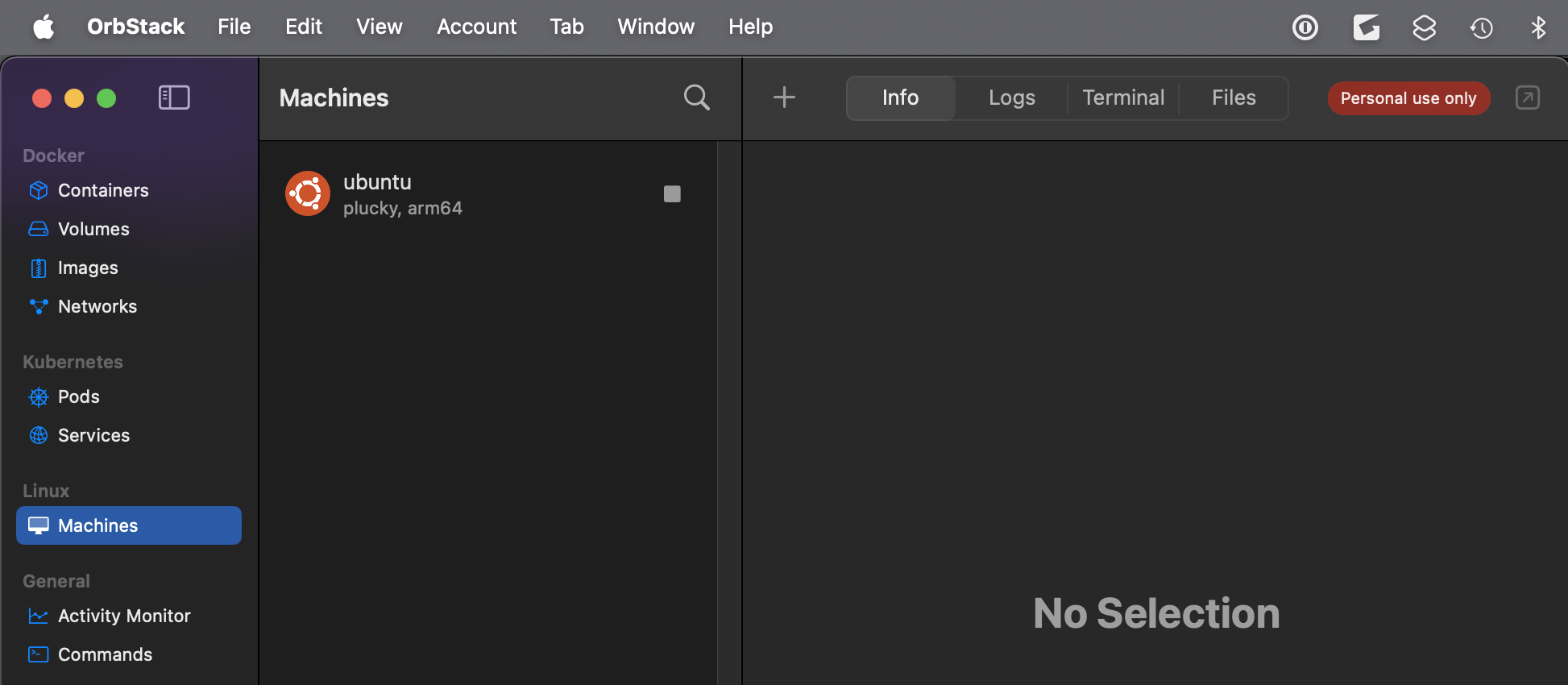
- Switch back to CLI.
- View the latest release in the browser pop-up:
open https://github.com/nextcloud/all-in-one/releases - Switch back to CLI.
- Update to latest version:
docker version orb update -
Switch to the app and click “Update”.
- Confirm OrbStack is working and data migrated: Make sure containers, images, and volumes you care about are present:
docker ps -aCONTAINER ID IMAGE COMMAND CREATED STATUS PORTS NAMES ffa432a3bf7a ghcr.io/nextcloud-releases/all-in-one:latest "/start.sh" 12 days ago Up 2 minutes (healthy) 0.0.0.0:80->80/tcp, [::]:80->80/tcp, 0.0.0.0:8443->8443/tcp, [::]:8443->8443/tcp, 9000/tcp, 0.0.0.0:8081->8080/tcp, [::]:8081->8080/tcp nextcloud-aio-mastercontainer
- List images downloaded:
docker imagesIMAGE ID DISK USAGE CONTENT SIZE EXTRA ghcr.io/nextcloud-releases/aio-domaincheck:latest e3d1e0ad5836 19MB 0B ghcr.io/nextcloud-releases/all-in-one:latest f7aa470b2456 272MB 0B U
- List images downloaded:
docker volume lsDRIVER VOLUME NAME local nextcloud_aio_mastercontainer
- Verify Docker works immediately by downloading the default getting-started image:
docker run -p 80:80 docker/getting-started - List machines:
orb list╭───────────────────────────────────────────────────────╮ │ │ │ OrbStack update available! │ │ Run "orb update" to update. │ │ │ │ Updates include improvements, features, and fixes. │ │ │ ╰───────────────────────────────────────────────────────╯ NAME STATE DISTRO VERSION ARCH SIZE IP ---- ----- ------ ------- ---- ---- -- ubuntu running ubuntu plucky arm64 704.7 MB 192.168.???.???
- Live resources:
orb topPID USER PR NI VIRT RES SHR S %CPU %MEM TIME+ COMMAND 8 root 20 0 1245640 15168 6136 S 0.0 0.1 0:00.02 orbstack-agent:
REMEMBER: Press control+C to exit.
- Create a Linux machine:
orb create ubuntu ci-runner - Restart Docker engine:
orb restart docker - Start the AIO mastercontainer using commands that differs from Linux:
/var/run/docker.sock.raw -e DOCKER_SOCKET_PATH="/var/run/docker.sock.raw" - Make a folder located at variable NEXTCLOUD_DATADIR
mkdir -p "$HOME/nextcloud-data"REMEMBER: This same folder is referenced by custom Xapps running in Docker containers containing SDK code written in Python, Rust, Typescript, Go. 1:15:39 VIDEO See https://nexcloud.com/developer
- 📦 The official Nextcloud installation method:
docker run \
--init \
--sig-proxy=false \
--name nextcloud-aio-mastercontainer \
--restart always \
--publish 80:80 \
--publish 8081:8080 \
--publish 8443:8443 \
-e DOCKER_SOCKET_PATH="/var/run/docker.sock.raw" \
-e NEXTCLOUD_DATADIR="/Users/johndoe/nextcloud-data" \
--volume nextcloud_aio_mastercontainer:/mnt/docker-aio-config \
--volume /var/run/docker.sock.raw:/var/run/docker.sock:ro \
ghcr.io/nextcloud-releases/all-in-one:latest
NOTE: Unable to find image ‘ghcr.io/nextcloud-releases/all-in-one:latest’ it would be pulled locally automatically.
- Confirm it’s running:
docker ps --filter "name=nextcloud-aio-mastercontainer" --format "table \t\t"WebUI
- Open your default browser to open the AIO web interface:
open https://localhost:8081/login -
Click “Advanced” & “Proceed to localhost (unsafe)”.
- Use the IP/localhost form (not a domain) for port 8081 to avoid HSTS issues later.
- Accept the self-signed certificate warning
- Copy the initial password shown and paste in your password manager.
-
Paste the password to log in at https://localhost:8081/containers
-
Click the Orb icon at the top of the screen for:
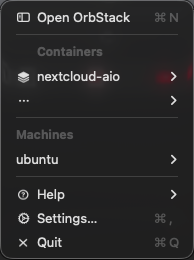 </a>
</a> -
In that, click “nextcloud-aio”, mastercontainer for:
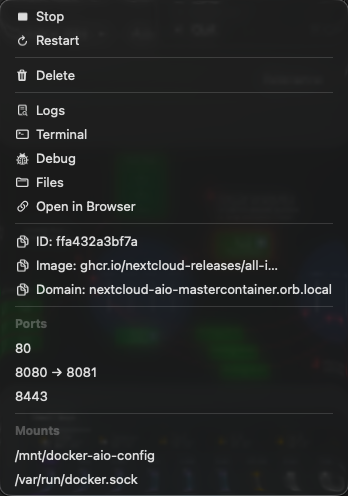
Complete the setup wizard:
-
If you don’t have a public domain, follow the local-instance guide: https://github.com/nextcloud/all-in-one/blob/main/local-instance.md
-
In the AIO interface, enter a domain (see note below for local-only use). AIO won’t accept bare IPs or localhost for the Nextcloud instance itself. So a local-only instance still needs a domain that resolves to this machine;
NOTE: AIO normally wants a real domain with a valid certificate, and it does not support self-signed certs or bare IP addresses for the Nextcloud instance itself. If you only want a local instance with no public exposure, follow the official local-instance guide, which covers setting APACHE_PORT and using a local reverse proxy:
https://github.com/nextcloud/all-in-one/blob/main/local-instance.md -
Read the README documentation at:
https://github.com/nextcloud/all-in-one -
Adjust the configuration parameters defined by system variables.
- Set your timezone.
- Install backup, database(such as PostgreSQL), integrations
-
Install optional add-ons — Office, Talk, ClamAV, Imaginary, etc.)
-
Click Start containers — downloads and starts everything (~10 min).
- In the GUI, Containers section, click the arrow to start a stopped container. Example:
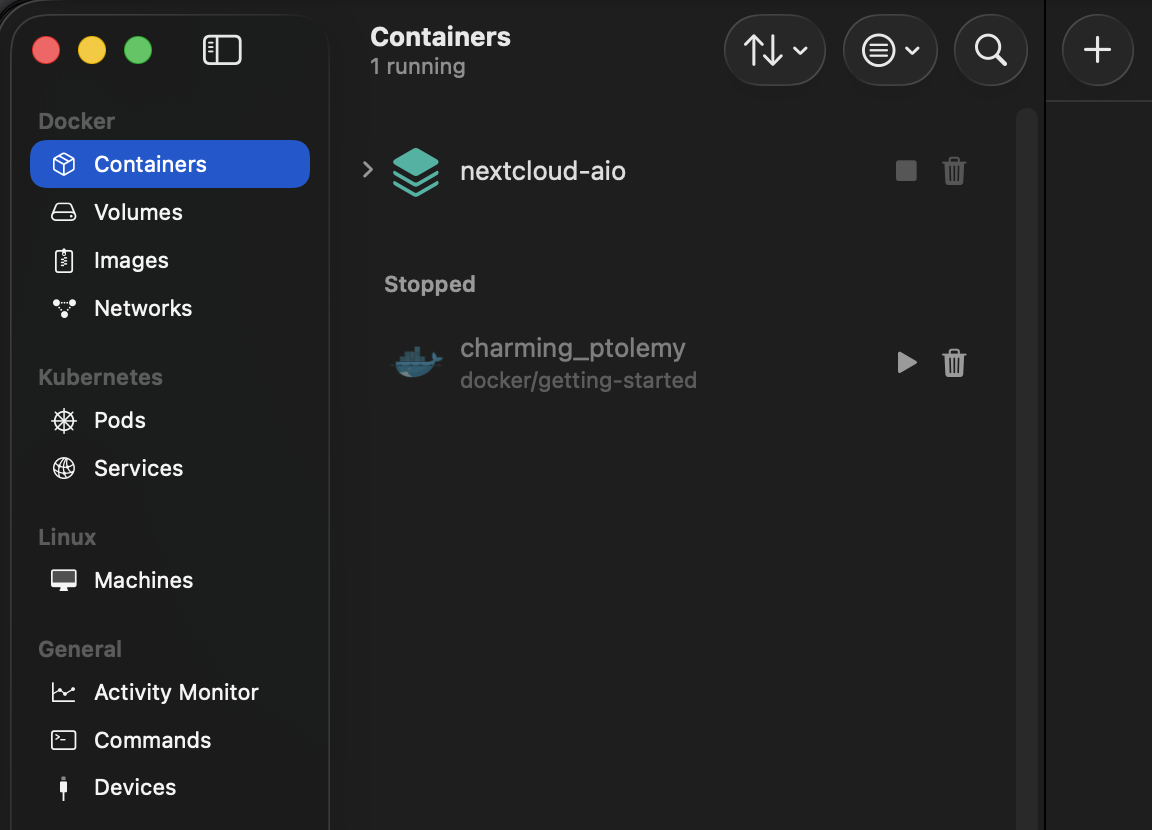
Access WebDAV
WebDAV enables real-time collaborative workspace like Google Drive, Calendar. Create new files, delete old ones, move them around into folders, and edit existing files directly on the server.
WebDAV is an extention to HTTP to over the standard web ports (80 for HTTP, 443 for HTTPS), so no special network configuration is needed. WebDAV adds new methods:
- PUT for upload
- MKCOL for mkdir: Create a new folder (collection).
- COPY / MOVE: Copy or move files from one location to another.
- LOCK / UNLOCK: Prevent other people from editing a file while you are working on it (preventing overwrites).
- PROPFIND for list: Get detailed information about a file (like its size, creation date, or author).
SETTING - VALUE
- WebDAV Endpoint /remote.php/dav/files/{username}/{path}
- Auth: Basic Auth (use App Password, not account password)
- Success Codes: 201 Created, 204 No Content
To setup:
- Edit Crate.toml to add [dependencies]:
[package] name = "nextcloud-uploader" version = "0.1.0" edition = "2021" [dependencies] reqwest = { version = "0.12", features = ["blocking", "stream"] } tokio = { version = "1", features = ["full"] } serde = { version = "1", features = ["derive"] } serde_json = "1" base64 = "0.22" mime_guess = "2" anyhow = "1" - Login to Nextcloud web UI
- Go to Settings → Security
- Under Devices & sessions, click Create new app password
- Use this password in your Rust code (more secure than your main password) WebDAV allows for file locking, which is great for collaborative work.
# Build and run:
cargo run

# Or for production, create a release:
cargo build --release
./target/release/nextcloud-uploader
Collabra
- https://apps.nextcloud.com/categories/integration apps QUESTION: Collabra?
NextCloud Talk – chat, video & audio calls
- https://apps.nextcloud.com/apps/spreed
- https://nextcloud.com/talk
- https://github.com/nextcloud/spreed
- https://github.com/nextcloud/desktop contains the source
- https://nextcloud.com/install/#desktop-talk to download or
brew install --cask nextcloud-talk
brew remove --cask nextcloud-talk
REMEMBER: This creates folder ./Nextcloud
- REMEMBER: Use double quotes because there a space in the app name:
open "$HOME/Applications/Nextcloud Talk.app" - Created with install:
ls -al "$HOME/Library/Application Support/Nextcloud Talk/config.json"
26-06-23 v003 install macos @nextcloud.md created 2025-01-25