bomonike
Make $20 of credits by using an AI foundation model using AWS Bedrock







Overview
- Why?
- AWS-certified AI Practitioner Exam
- AWS Certified Generative AI Developer - Professional (AIP-C01)
- Anthropic Claude Course
- What: Use Cases
- Establish AWS Account
- Amazon AI products & services
- IAM Permissions
- Amazon Bedrock GUI Menu
- Pricing
- Manage IAM policies for permissions
- Inference Profiles
- Well architected
- Permissions
- From Activity
- CloudTrail Troubleshooting
- Projects
- Sagemaker
- Python Boto3 in a Jupyter Notebook
- Create apps
- Evaluate models
- Share your app
- POC to Production
- Generate Documentation
- eduamota
- Notes
- References
 This tutorial aims to logically present a hands-on experience to learn how to use AI by Amazon Bedrock.
Why?
We use Amazon Bedrock because foundation models being offered are getting so large (and getting larger) that they need to live in the cloud - within Bedrock, where one can quickly switch among many models (without downloading).
BTW LLMs (Large Language Models) deal with text. Visual models deal with other modalities such images and videos.
Cloud billing is how providers monitize (make money from) the billions it took in salaries and data centers needed to create the models.
AWS-certified AI Practitioner Exam
This is not a 5 minute summary to run mindlessly, but a step-by-step guided course so you master this like a pro, enough to pass the AIF-C01 AWS Certified AI Practioner: 65 questions in 90 minutes for $100. The Exam Guide Content Domains (good for 3-years):
- 20%: Fundamentals of AI and ML
- Task Statement 1.1: Explain basic AI concepts and terminologies.
- Task Statement 1.2: Identify practical use cases for AI.
- Task Statement 1.3: Describe the ML development lifecycle.
- 24%: Fundamentals of GenAI
- Task Statement 2.1: Explain the basic concepts of GenAI.
- Task Statement 2.2: Understand the capabilities and limitations of GenAI for solving business problems.
- Task Statement 2.3: Describe AWS infrastructure and technologies for building GenAI applications.
- 28%: Applications of Foundation Models
- Task Statement 3.1: Describe design considerations for applications that use foundation models (FMs).
- Task Statement 3.2: Choose effective prompt engineering techniques.
- Task Statement 3.3: Describe the training and fine-tuning process for FMs.
- Task Statement 3.4: Describe methods to evaluate FM performance.
- 14%: Guidelines for Responsible AI
- Task Statement 4.1: Explain the development of AI systems that are responsible.
- Task Statement 4.2: Recognize the importance of transparent and explainable models.
- 14%: Security, Compliance, and Governance for AI Solutions
- Task Statement 5.1: Explain methods to secure AI systems.
- Task Statement 5.2: Recognize governance and compliance regulations for AI systems.
- 5.3
References:
- https://docs.aws.amazon.com/bedrock/latest/userguide/security.html
Tutorials to pass the exam:
- VIDEO series: CloudExpert Solutions India
- 15-hr Freecodecamp with cheat sheets from ExamPro
- VIDEO Follow Along: Create Bedrock Knowledge Base RAG from Amazon CEO’s letter to shareholders uploaded to a new S3 bucket with vector fields for Amazon Follow along OpenSearch.
- https://www.youtube.com/watch?v=gevdk7PV-s8
-
https://www.zerotocloud.co/course/ai-practitioner-notes $39 from Tech with Lucy
- COURSE: AWS Certified AI Practitioner (AIF-C01)” By Chad Smith
- BOOK: AWS Certified AI Practitioner (AIF-C01) Study Guide By Tom Taulli
- Live Crash Course by Yasir Khan Labs
- Sybex BOOK: “AWS Certified AI Practitioner Study Guide” by Vikram Elango, Vivek Gangasani and Shreyas Subramanian
Practice exams:
- Pearson IT on OReilly is automated Free:
- AWS AI Practitioner Exam Practice | 60 Realistic Practice Questions & Answers 2025 by Cloud Journey with Esther
- AWS Certified AI Practitioner Exam Prep | AIF-C01 Practice Test - Questions & Explanation by Architecture Bytes - AI
- 10 exam questions
Bragadocious “How I Passed it with little effort”:
- https://www.youtube.com/watch?v=kv0VAH6at9E&pp=ugUEEgJlbg%3D%3D
- https://www.youtube.com/watch?v=6cMLDgFrWqs
- https://www.youtube.com/watch?v=kv0VAH6at9E
- https://www.youtube.com/watch?v=kv0VAH6at9E&t=31s&pp=ugUEEgJlbg%3D%3D Digital Cloud Training
There is also exams from AWS:
- Generative AI Developer,
- Machine Learning Developer
- Machine Learning Engineer
https://skillbuilder.aws/learn/32Y249P272/aws-agentic-ai-demonstrated/TTAJ5WKYTS AWS Agentic AI Demonstrated for $29/mo or $449/year subscription. practicing with AWS SimuLearn: Generative AI Practitioner for foundational skills, or AWS SimuLearn: Generative AI Architect for more advanced troubleshooting scenarios. For an immersive game-b…
“AWS Certified Machine Learning - Specialty” retired March 31, 2026.
AWS Certified Generative AI Developer - Professional (AIP-C01)
Beta until 3/31/26. For $300 USD, answer 75 multiple choice or multiple response in 180 minutes. No prerequisites.
https://docs.aws.amazon.com/aws-certification/latest/ai-professional-01/ai-professional-01.html
showcases advanced technical expertise in building and deploying production-ready AI solutions using AWS Services like Bedrock. For organizations investing in AI initiatives, this certification provides a reliable way to identify and verify developers who can move beyond proof-of-concept to build production-grade generative AI solutions that deliver tangible business results while maintaining security and cost efficiency.
Content Domains and Task streams:
-
31% Foundation Model Integration, Data Management, and Compliance
-
<a target=”_blank” href=”https://docs.aws.amazon.com/aws-certification/latest/ai-professional-01/ai-professional-01-domain3.html’>20% AI Safety, Security, and Governance
-
12% Operational Efficiency and Optimization for GenAI Applications
-
11% Testing, Validation, and Troubleshooting
Task 5.1: Implement evaluation systems for GenAI:
-
5.1.1: Develop comprehensive assessment frameworks to evaluate the quality and effectiveness of FM outputs beyond traditional ML evaluation approaches (for example, by using metrics for relevance, factual accuracy, consistency, and fluency).
-
5.1.2: Create systematic model evaluation systems to identify optimal configurations (for example, by using Amazon Bedrock Model Evaluations, A/B testing and canary testing of FMs, multi-model evaluation, cost-performance analysis to measure token efficiency, latency-to-quality ratios, and business outcomes).
-
5.1.3: Develop user-centered evaluation mechanisms to continuously improve FM performance based on user experience (for example, by using feedback interfaces, rating systems for model outputs, annotation workflows to assess response quality).
-
5.1.4: Create systematic quality assurance processes to maintain consistent performance standards for FMs (for example, by using continuous evaluation workflows, regression testing for model outputs, automated quality gates for deployments).
-
5.1.5: Develop comprehensive assessment systems to ensure thorough evaluation from multiple perspectives for FM outputs (for example, by using RAG evaluation, automated quality assessment with LLM-as-a-Judge techniques, human feedback collection interfaces).
-
5.1.6: Implement retrieval quality testing to evaluate and optimize information retrieval components for FM augmentation (for example, by using relevance scoring, context matching verification, retrieval latency measurements).
-
5.1.7: Develop agent performance frameworks to ensure that agents perform tasks correctly and efficiently (for example, by using task completion rate measurements, tool usage effectiveness evaluations, Amazon Bedrock Agent evaluations, reasoning quality assessment in multi-step workflows).
-
5.1.8: Create comprehensive reporting systems to communicate performance metrics and insights effectively to stakeholders for FM implementations (for example, by using visualization tools, automated reporting mechanisms, model comparison visualizations).
-
5.1.9: Create deployment validation systems to maintain reliability during FM updates (for example, by using synthetic user workflows, AI-specific output validation for hallucination rates and semantic drift, automated quality checks to ensure response consistency).
Task 5.2: Troubleshoot GenAI applications:
-
5.2.1: Resolve content handling issues to ensure that necessary information is processed completely in FM interactions (for example, by using context window overflow diagnostics, dynamic chunking strategies, prompt design optimization, truncation-related error analysis).
-
5.2.2: Diagnose and resolve FM integration issues to identify and fix API integration problems specific to GenAI services (for example, by using error logging, request validation, response analysis).
-
5.2.3: Troubleshoot prompt engineering problems to improve FM response quality and consistency beyond basic prompt adjustments (for example, by using prompt testing frameworks, version comparison, systematic refinement).
-
5.2.4: Troubleshoot retrieval system issues to identify and resolve problems that affect information retrieval effectiveness for FM augmentation (for example, by using model response relevance analysis, embedding quality diagnostics, drift monitoring, vectorization issue resolution, chunking and preprocessing remediation, vector search performance optimization).
-
5.2.5: Troubleshoot prompt maintenance issues to continuously improve the performance of FM interactions (for example, by using template testing and CloudWatch Logs to diagnose prompt confusion, X-Ray to implement prompt observability pipelines, schema validation to detect format inconsistencies, systematic prompt refinement workflows).
-
Anthropic Claude Course
Anthropic provides a free “Claude with Amazon Bedrock” videod course
What: Use Cases
Eduardo Mota provides this list of why people use this tech:
A. Customer Support Automation - Intelligent chatbots, ticket routing, and automated responses
B. Data Analysis and Reporting - Automated insights, report generation, and data visualization
C. Content Generation - Marketing copy, documentation, and creative content at scale
D. DevOps Automation - Infrastructure management, deployment pipelines, and monitoring
E. Research and Information Gathering - Web scraping, document analysis, and knowledge synthesis
F. Other - Tell us about your unique use case
Establish AWS Account
Begin by following my aws-onboarding tutorial to securely establish an AWS account.
https://docs.aws.amazon.com/cli/latest/userguide/cli-authentication-user.html
Amazon AI products & services
Below is a list of the many AI-related services and brands from AWS:
Rule-Based Systems: Early AI relied on explicit programming and fixed rules.
Machine Learning: Introduced data-driven pattern recognition
- SageMaker AI (without “Amazon”) was formerly
Amazon SageMaker AI is for creating custom LLM models from scratch or fine-tune existing ones with full control over the ML lifecycle. Unlike Bedrock (which focuses on pre-built foundation models), Amazon SageMaker provides a toolset to build Machine Learning (ML) models used for “data, analytics, and AI”. Amazon SageMaker is a comprehensive machine learning platform for building, training, and deploying custom ML models. SageMaker features include Notebooks, training infrastructure, model hosting, and MLOps tools. It uess a Lakehouse architecture to hold and process data with versioning capabilities.
- Amazon SageMaker Jumpstart (solutions for common ML uses cases that can be deployed in just a few steps)
- Amazon SageMaker Ground Truth
-
Amazon SageMaker Clarify detects bias in ML models and provides explanations for model predictions.
- SageMaker Unified Studio (formerly
Amazon SageMaker Studio Lab) incorporates (SQL) analytics capabilities referencing data stored in a Lakehouse architecture in
Amazon S3 data lakes within
Amazon Redshift data warehouses plus third-party and federated data sources. - SageMaker Catalog was built on
Amazon DataZone to discover, govern, and collaborate on data and AI.
Deep Learning: Enables complex pattern processing through neural networks:
- Deep Learning Amis, Deep Learning Containers, Deepcomposer, Deeplens, Deepracer, Pytorch on AWS.
Amazon developed AI utilities:
- CodeGuru scans & profiles code to suggest security changes in GitHub Actions. VIDEO
- Codewhisperer is being folded into Amazon Q Developer Pro to suggest code based on comments, in real-time as auto completion. VIDEO
- Forecast, Kendra, Lex,
- Personalize is a recommender engine which elevates customer experience with AI-powered personalization based on timestamped interaction data in S3 datasets. BLOG
- Polly converts text to lifelike speech?
- Rekognition, Amazon Rekognition Image, Amazon Rekognition Video,
- Textract extracts text and structured data from documents like PDFs and images.
- Amazon Transcribe speech-to-text (STT) engine.
- Translate
Amazon developed a suite of industry-specific AI services sold as SaaS:
- Fraud Detector,
- Comprehend to detect customer sentiment in reviews written by customers. It’s used in
- Comprehend Medical for entity recognition in notes about patients,
- Healthimaging, Healthlake, Healnomics, Healthscribe; Lookout For Equipment, Lookout for Metrics, Lookout for Vision.
Generative AI: creates new content from learned patterns.
 Amazon Q is Amazon’s brand category name for Generative AI capabilities.
- Amazon Q Developer is “an AI-power assistant that helps developers write, debug, and understand code faster by answering questions, generating code, and offering real-time support within IDEs”. It’s used to develop Agentic AI apps (like Anthropic Claude does).
Amazon Q capabilities are (as of Jan 2026) provided within
Amazon Kiro CLI and Kiro.app created based on a fork of Microsoft’s VSCode IDE GUI app.
DEFINITION: A Prompt is the input text or message that a user provides to a foundation model to guide its response. Prompts can be simple instructions or complex examples. Prompts provided to generative AI (that works like ChatGPT) are processed within the
Amazon Bedrock GUI.
A “system prompt” defines the model’s behavior, personality, and constraints, applied to many prompts.
“fine-tuning” a LLM trains a pre-trained model on additional data (weights) for specific tasks. Used to teach the model a specific style, format, or domain expertise.
A hallucination is when a model generates plausible-sounding but factually incorrect information
- Amazon Bedrock provides access to foundation models (LLMs) from leading AI providers and run inference on them to generate text, image, video, and embeddings output through a unified API.
DEFINITION: Zero-Shot Prompting is a type of prompt that provides no examples—just a direct instruction for the model to complete a task based on its pre-trained knowledge.
DEFINITION: Few-Shot Prompting is a prompt that includes a few examples to show the model how to respond to similar inputs.
https://www.coursera.org/learn/getting-started-aws-generative-ai-developers/supplement/IOgNx/prompt-engineering-guide
https://d2eo22ngex1n9g.cloudfront.net/Documentation/User+Guides/Titan/Amazon+Titan+Text+Prompt+Engineering+Guidelines.pdf Amazon Titan Text Prompt Engineering Guidelines
https://community.aws/content/2tAwR5pcqPteIgNXBJ29f9VqVpF/amazon-nova-prompt-engineering-on-aws-a-field-guide-by-brooke?lang=en Amazon Nova: Prompt Engineering on AWS - A Field Guide
“Agentic AI” is an industry-wide term for software that exhibits agency, adapting its behavior to achieve specific goals in dynamic environments.
- Amazon Nova 2 FM/LLM are multimodal foundation models that process text, images, video, documents, and speech. It has Extended thinking capability that allows models to break down complex problems and show their step-by-step analysis before providing answers. It supports up to 1 million tokens.
- Its “Lite” variant outputs text.
- Its “Sonic” variant operates on speech and text.
-
Amazon Nova Act is in a Playground to make use of Amazon’s Nova LLM to (like RPA) chain Python action code operating on web browsers such as Google Chrome. Data scraped are put in Pydantic classes. See github.com/aws/nova-act created by Amazon AGI Labs.
-
Amazon Bedrock Agents is a fully managed service for configuring and deploying autonomous agents without managing infrastructure or writing custom code. It handles prompt engineering, memory, monitoring, encryption, user permissions, and API invocation for you. Key features include API-driven development, action groups for defining specific actions, knowledge base integration, and a configuration-based implementation approach.
- AgentCore replaces legagacy Bedrock Agents. AgentCore was designed from the ground up to run production AI agent MCP workloads cost efficiently. Its enterprise-grade security: OAuth and IAM authentication with fine-grained access control for enterprise security compliance. Its isolated Python environment for agent-generated code execution with no sandbox escape risk. But its managed web automation instances allows for browser-based interactions and scraping. It provides Serverless execution with 8-hour maximum session duration and configurable idle timeout. No infrastructure management required. Its dual-layer memory has short-term context for current sessions plus long-term insights via vector embeddings across sessions. For real-time monitoring and debugging, OpenTelemetry tracing with native CloudWatch integration.
-
Amazon Bedrock AgentCore can flexibly deploy and operate AI agents in dynamic agent workloads using any framework and model that include CrewAI, LangGraph, LlamaIndex, and Strands Agents.
-
PartyRock.aws is a FREE SaaS app builder powered by several LLMs. Apps built by it can be shared. Sign in can be with a Google, Apple accts too (but not Amazon Builder ID). VIDEO VIDEO: honest review even though he can’t get it working.
- StrandsAgents.com is a lightweight SDK (releaed in 2025) for Python & Typescript (Dec 25 with zod schema validation for type-safe tool defs). open sourced Apache 2.0 by AWS to https://github.com/strands-agent/sdk-python with MCP tools and samples. Unlike Bedrock, Strands is model agnostic (can use Anthropic Claude, OpenAI, etc.). It takes a model-driven (MCP & A2A) approach to building and running autonomous AI agents, in just a few lines of code. It emphasizes letting the LLM handle planning and reasoning rather than hardcoding workflows. It takes a model-driven approach to building AI agents.:
- Model Driven Agents - Strands Agents (A New Open Source, Model First, Framework for Agents)
- Introducing Strands Agents, an Open Source AI Agents SDK by Clare Liguori on 16 MAY 2025
- Strands Agents Framework Introduction by Avatar image
- AWS Strands Agents SDK – Agents as Tools Explained - Multi AI Agent System at Scales #aiagents
- Introducing Strands Agents, an Open Source AI Agents SDK — Suman Debnath, AWS
-
Strand workflows are graph-based, with LangSmith integration.
- AWS Inferentia AI chips designed for AI inference used by Alexa and EC2 instances.
- AWS Neuron SDK
 deploy models on new AWS Inferentia chips (and train them on AWS Trainium chips). It integrates natively with popular frameworks, such as PyTorch and TensorFlow, so that you can continue to use your existing code and workflows and run on Inferentia chips.
 - AWS Trainium are evolving AI Accelerator for cloud GenAI “UltraServer” infra used by EC2 P5e and P5en instances controlled by the AWS Neuron SDK. Trainium3 use 3nm AI chips for 2.52 petaflops (PFLOPs) of FP8 compute. BLOG
- Neuron Explorer
-
View YouTube videos about Bedrock:
https://www.youtube.com/playlist?list=PLhr1KZpdzukfmv7jxvB0rL8SWoycA9TIM
API operations for creating, managing, fine-turning, and evaluating Amazon Bedrock models.
IAM Permissions
REMEMBER: An AWS Account can do nothing without policies first being added to the account or the user group assigned to the account.
                "bedrock:ListFoundationModels",
                "bedrock:GetFoundationModel",
                "bedrock:TagResource",
                "bedrock:UntagResource",
                "bedrock:ListTagsForResource",
                "bedrock:CreateAgent",
                "bedrock:UpdateAgent",
                "bedrock:GetAgent",
                "bedrock:ListAgents",
                "bedrock:DeleteAgent",
                "bedrock:CreateAgentActionGroup",
                "bedrock:UpdateAgentActionGroup",
                "bedrock:GetAgentActionGroup",
                "bedrock:ListAgentActionGroups",
                "bedrock:DeleteAgentActionGroup",
                "bedrock:GetAgentVersion",
                "bedrock:ListAgentVersions",
                "bedrock:DeleteAgentVersion",
                "bedrock:CreateAgentAlias",
                "bedrock:UpdateAgentAlias",
                "bedrock:GetAgentAlias",
                "bedrock:ListAgentAliases",
                "bedrock:DeleteAgentAlias",
                "bedrock:AssociateAgentKnowledgeBase",
                "bedrock:DisassociateAgentKnowledgeBase",
                "bedrock:ListAgentKnowledgeBases",
                "bedrock:GetKnowledgeBase",
                "bedrock:ListKnowledgeBases",
                "bedrock:PrepareAgent",
                "bedrock:InvokeAgent",
                "bedrock:AssociateAgentCollaborator",
                "bedrock:DisassociateAgentCollaborator",
                "bedrock:GetAgentCollaborator",
                "bedrock:ListAgentCollaborators",
                "bedrock:UpdateAgentCollaborator"
The range of services for AI: BedrockCore, Sagemaker, BedrockAgentCore, Kira, etc. have dozens of actions. Knowing them means knowing the service.
PROTIP: Using Bedrock in production requires several AWS services. Auxillary services include: KMS, APIGateway, Lambda, Logging, logs, application-signals, CloudWatch, oam, rum, xray (tracing).
It’s convenient to grant to all resources:
- “AmazonBedrockFullAccess”
- ARN: arn:aws:iam::aws:policy/BedrockAgentCoreFullAccess for “bedrock-agentcore:*”
But that’s not the safest way to go.
These instructions make use of AWS policy file “aws-quickly/…/bedrocks-01-policy.json” based on: JSON policy document for BedrockAgentCoreFullAccess.
It is a subset of the required permissions for Bedrock agents
- Click the copy icon for the “JSON policy document” section to get all those lines in your OS Clipboard.
- In IAM, select a User groups.
- Click the orange “Create group” sausage.
- Name the group “Bedrocks”.
- Check the user to assign the group (to obtain permissions associated with the group).
- Click “Create Group” at the lower-right of the page.
- Select the user group. Click “Edit”. Click the “Permissions” tab.
- Click “Add permissions”. Click “Create inline policies”. Click “JSON”.
- Click in the Policy editor text “Version”. Press command+A to select all. Press delete
- Press command+V to paste from your Clipboard all 386 lines.
- “2170 characters exceeding limit”
Alternately, using CLI:
# To return an ARN like arn:aws:iam::123456789012:policy/Bedrocks-01-Policy
aws iam create-policy \
  --policy-name Bedrocks-01-Policy \
  --policy-document file://bedrocks-01-policy.json

aws iam attach-group-policy \
  --group-name MyGroupName \
  --policy-arn arn:aws:iam::123456789012:policy/Bedrocks-01-Policy
Amazon Bedrock GUI Menu
Amazon Bedrock is a service fully managed by AWS to provide you the infrastructure to build generative AI applications without needing to manage (using Cloud Formation, etc.).
-
On the AWS Console GUI web page, press Option+S or click inside the Search box.

Type enough of “Amazon Bedrock” and press Enter when that appears. It’s one of Amazon’s AI services:
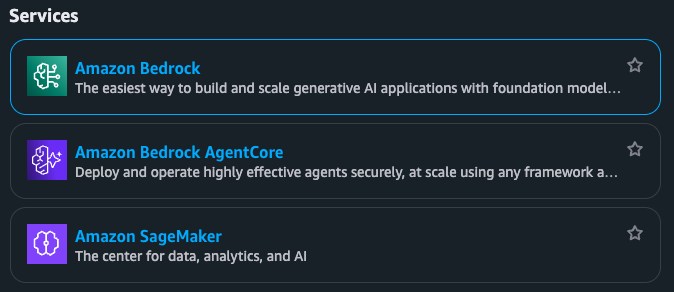
-
Cursor over the “Amazon Bedrock” listed to reveal its “Top features”:
Agents, Guardrails, Knowledge Bases, Prompt Management, Flows
DEFINITION: Guardrails are Configurable controls in Amazon Bedrock used to detect and filter out harmful or sensitive content from model inputs and outputs.
Overview Menu Model catalog
-
Click on the “Amazon Bedrock” choice for its “Overview” screen and left menu:
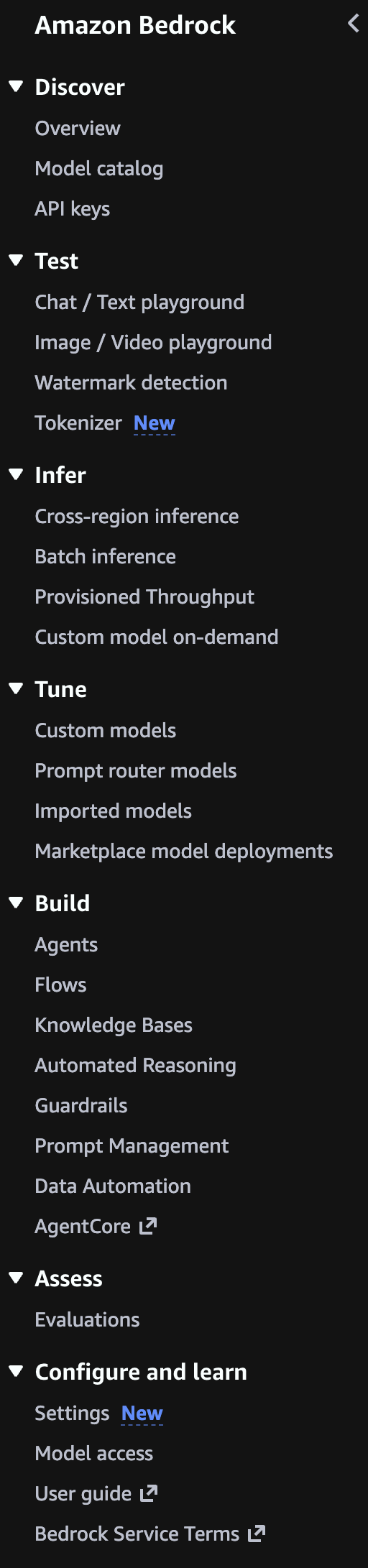
-
Notice the menu’s headings reflect the typical sequence of usage:
Discover -> Test -> Infer -> Tune -> Build -> Assess
- Although “Configure and Learn” is listed at the bottom of the Bedrock menu, that’s where we need to start.
-
Click “User Guide” to open a new tab to click “Key terminology”.
-
Scroll down to “View related pages” such as Definitions from the Generate AI Lens that opens in another tab.
Pricing
-
Click on “Amazon Bedrock pricing” from the left menu.
https://docs.aws.amazon.com/bedrock/latest/userguide/sdk-general-information-section.html
-
Click “Bedrock pricing” for a new tab.
“Pricing is dependent on the modality, provider, and model” choices. Also by Region selected.
Discover Model choice
- Click the Amazon Bedrock web browser tab (green icon ) to return to the Overview page.
-
Click on “View Model catalog” to see the Filters to select the provider and Modality you want to use.
Notice that choosing “Anthropic” as your provider involves filling out their survey, which PROTIP: Anthropic publishes as their “Economic Index” report.
VIDEO: BTW: Anthropic and AWS have a massive circular investment in AI data center build-out in Indiana that use Amazon-designed Trinium chips (rather than NVIDIA). 30 buildings will consume 2.2 gigawatts.
VIDEO: Try several models so you’re not guessing what works best. Models behave differently depending on your data and goals.
TODO: Use Ray.io to track run times and evaluate.
TODO: Add cost info to Python code to list models within Bedrock
Leaderboards
The Berkeley Function Calling Leaderboard (BFCL) at https://gorilla.cs.berkeley.edu/leaderboard.html evaluates the LLM’s ability to call functions (aka tools) accurately. This leaderboard consists of real-world data and get updated periodically. For more information on the evaluation dataset and methodology, please refer to our blogs: BFCL-v1 introducing AST as an evaluation metric, BFCL-v2 introducing enterprise and OSS-contributed functions, BFCL-v3 introducing multi-turn interactions, and BFCL-v4 introducing holistic agentic evaluation. Checkout code and data. At time of writing, “Qwen3-0.6B (FC)” is the least cost LLM and also the least latency.
See https://block.github.io/goose/docs/getting-started/providers about variables holding API keys for each LLM provider.
Amazon models
PROTIP: Explore AWS AI Service Cards which describe each of Amazon’s own models.
https://aws.amazon.com/nova/models/?sc_icampaign=launch_nova-models-reinvent_2025&sc_ichannel=ha&sc_iplace=signin
Amazon Q Developer regions
https://docs.aws.amazon.com/amazonq/latest/qdeveloper-ug/regions.html
DEFINITION: Token is a unit of text processed by the model. A token could be a word, part of a word, or punctuation. Both input prompts and output responses are measured in tokens.
DEFINITION: Max Tokens is a setting that limits the length of the model’s response by defining the maximum number of tokens (chunks of words or characters) it can generate.
DEFINITION: Temperature is a parameter used during inference to control the randomness of model output. Higher values produce more creative or varied responses; lower values yield more consistent and focused results.
Manage IAM policies for permissions
- Click “Settings” near the bottom of the menu.
- Click “Manage IAM policies” for a new tab.
AWS Bedrock IAM role
- Set up your Amazon Bedrock IAM role
- Sign into Amazon Bedrock in the console
- Request access to foundation models (Amazon Nova) by following the steps in the Amazon Bedrock user guide.
- Generate Bedrock API key (good for 30 days).
-
Make your first API call.
-
https://docs.aws.amazon.com/bedrock/latest/userguide/getting-started-api-ex-cli.html Run example Amazon Bedrock API requests with the AWS Command Line Interface
-
https://docs.aws.amazon.com/bedrock/latest/userguide/getting-started-api-ex-python.html Run example Amazon Bedrock API requests through the AWS SDK for Python (Boto3)
-
https://docs.aws.amazon.com/nova/latest/nova2-userguide/customization.html Customizing Amazon Nova 2 models
https://docs.aws.amazon.com/bedrock-agentcore/latest/devguide/agentcore-get-started-toolkit.html
Agent frameworks getting in your way?
To Develop intelligent agents with Amazon Bedrock, AgentCore, and Strands Agents by Eduardo Mota
- strands-python.md and
- agentcore_strans_requirements.md
Create a IAM user
If you used a root account email and password to sign in:
- Click “Users” on the left menu, then the orange “Create user” for a new tab (with a red icon).
- NAMING CONVENTION: Do not enter an email address, but make up ??? (up to 64 characters).
- Check “Provide user access to the AWS Management Console”.
- Leave “Custom password” unchecked.
- Leave “users must create a new password at next sign-in” unchecked.
- Click “Next”.
- Click “Attach policies directly”.
- Type “Bedrock” in the search field.
- To see long Policy names, expand the column | in front of the “Type” heading text.
-
Check “AmazonBedrockFullAccess” (not the best practice)???
“Effect”: “Allow”, “Action”: “bedrock:InvokeModel”, “Resource”: “arn:aws:bedrock:::foundation-model/”
- Click “Next”.
- Tag???
- Click “Create”.
- Click “Download .csv file” or:
- Click the icon to copy the “Console sign-in URL” value and paste that in your Password Manager entry.
- Click the icon to copy the “User name” value and paste that in your Password Manager entry.
- Click “Show”, then click the icon to copy the “Console password” value. In your Password Manager, paste the value.
- Optionally Click “Enabled without MFA”, then ???
- Click “Create access key” blue link.
- Click “Command Line Interface (CLI)”.
- Click “I understand…”
- Click “Next”, check to confirm. “Next” again.
- Type a Description. ???
- Click “Create access key” orange pill.
- Click the icon to copy the “Access key” and paste
- Click “Done”.
- Click “Generate API Key”.
- Set Expiry. ???
- Click “Generate API key”.
- Click the blue copy icon among “Variables”. Paste that in your Password Manager.
- Close.
References:
- https://learning.oreilly.com/live-events/agentic-ai-and-cybersecurity-risks/0642572186456/ Course: “Agentic AI and Cybersecurity Risks” by Dr. Petar Radanliev
- https://genai.owasp.org/2025/12/09/owasp-genai-security-project-releases-top-10-risks-and-mitigations-for-agentic-ai-security/
Inference Profiles
| Feature | System-Defined | Application |
|---|---|---|
| Management | AWS Managed | User Managed |
| Best For | High availability, global apps | Cost tracking, multi-tenant |
| Setup Required? | ✓ None | ✗ Must create |
| Cross-Region Routing | ✓ Yes | ✓ Inherits from base |
| High Availability | ✓ Yes | ✓ Inherits from base |
| Usage Monitoring | ✗ No | ✓ Yes |
| Cost Tracking | ✗ No | ✓ Yes |
| Custom IAM Policies | ✗ No | ✓ Yes |
Python code: List System-Defined vs Application Inference Profiles create_inference_profile(), Both inherit cross-region routing capabilities.
- Usage monitoring - Separate metrics for different apps
- Cost tracking - Track usage per application/team for Chargeback to business units, esp. in Multi-tenant systems
- Separate dev/staging/prod environments
- Cost allocation across teams
- Access control - IAM policies per profile
- Quota management - Separate rate limits
Chat with BedRock
Python code to Make an invoke_model(prompt) request
Python code to Make a multi-turn converse(conversation) request
Python code: generate, display and save images with model Nova Canvas (gen single or multiple images)
Python code: Text to Video Generation with model Nova Reel
// ARN: arn:aws:bedrock:us-east-1:058264544288:inference-profile/us.amazon.nova-lite-v1:0 // ID: us.amazon.nova-lite-v1:0 // Status: ACTIVE // Models: [{‘modelArn’: ‘arn:aws:bedrock:us-east-1::foundation-model/amazon.nova-lite-v1:0’}, {‘modelArn’: ‘arn:aws:bedrock:us-west-2::foundation-model/amazon.nova-lite-v1:0’}, {‘modelArn’: ‘arn:aws:bedrock:us-east-2::foundation-model/amazon.nova-lite-v1:0’}]
// Get details of a system profile: // Use system profile for inference
Manually on console:
Alternatively,
TODO: ???
Potential responses:
ValidationException Operation not allowed
Model Access Not Enabled. You need to explicitly request access to models in Bedrock
- Go to AWS Console → Bedrock → Model access
- Select the models you want to use and request access
- Access is usually granted immediately for most models
Region Mismatch:
The model you’re trying to use isn’t available in your current region Check which models are available in your region Claude models are available in us-east-1, us-west-2, ap-northeast-1, ap-southeast-1, eu-central-1, and eu-west-3
Incorrect Model ID
Make sure you’re using the correct model identifier
For Claude models, use formats like:
anthropic.claude-3-5-sonnet-20241022-v2:0
anthropic.claude-3-5-haiku-20241022-v1:0
Chat / Text playbaround”
- Click the web app green icon browser tab to return to Amazon Bedrock.
- Click “Chat / Text playbaround” menu.
- …
- Click “Run”.
Well architected
https://aws.amazon.com/architecture/well-architected/
Permissions
REMEMBER: First-time Amazon Bedrock model invocation requires AWS Marketplace permissions.
- Open the Amazon Bedrock console at https://console.aws.amazon.com/bedrock/
- Ensure you’re in the US East (N. Virginia) (us-east-1) Region
- From the left navigation pane, choose “Model access” under Bedrock configurations
- In What is model access, choose Enable specific models
- Select Nova Lite from the Base models list
- Click Next
- On the Review and submit page, click Submit
- Refresh the Base models table to confirm that access has been granted[4][5]
Your IAM User or Role should have the AmazonBedrockFullAccess AWS managed policy attached[5].
To allow use of Amazon Nova Lite v1 as the inference profile and foundation model:
{
  "Version": "2012-10-17",
  "Statement": [
    {
      "Effect": "Allow",
      "Action": [
        "bedrock:InvokeModel",
        "bedrock:InvokeModelWithResponseStream"
      ],
      "Resource": [
        "arn:aws:bedrock:*::inference-profile/us.amazon.nova-lite-v1:0",
        "arn:aws:bedrock:*::foundation-model/amazon.nova-lite-v1:0"
      ]
    }
  ]
}
From Activity
If you clicked an Activity to earn credits, you would be at:
https://us-east-1.console.aws.amazon.com/bedrock/home?region=us-east-1#/text-generation-playground?tutorialId=playground-get-started Amazon Bedrock > Chat / Text playground
VIDEO: Follow the blue pop-ups (but don’t click “Next” within them):
-
Click the orange “Select model” orange button.
PROTIP: Do not select “Anthropic” to avoid their mandatory “use case survey” and possibly thrown into https://console.aws.amazon.com/support/home hell.
-
Click the “+” at the top of your browser bar to see the difference between the various LLM models:
DOCS: Table of foundation models supported in Amazon Bedrock
PROTIP: Some models are available only in a single region. Amazon Nova Lite v1 is only available in us-east-1
See https://bomonike.github.io/aws-benchmarks
- “Google” generally has the lowest cost
- AI21 Labs
- Moonshot AI Kimi models
- Writer
- DeepSeek
- Anthropic Claude Models
-
Switch back to the Amazon Bedrock tab.
- Click “Amazon” to select a model provider. The “Cross-region” selection should appear.
-
Click “Nova Lite v1”.
PROTIP: Generally, for least cost, select the smallest number of “B” or tokens, such as “Gemma 3 4B IT v1”.
-
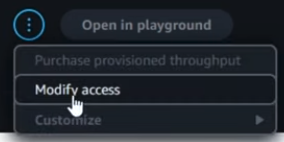 PROTIP: A lot of people miss this: Click at the upper-right the circle icon with three dots to select “Modify access”. The resulting list of models should show green “Access granted” for your model.
 - Ignore the “Inference” selections that appear.
- Click the orange “Apply”.
-
Type in a question under “Write a prompt and choose Run to generate a response.”
PROTIP: Refer to a chat template to craft a prompt. See Prompt engineering concepts:
- Task you want to accomplish from the model
- Role the model should assume to accomplish that task
- Response Style or structure that should be followed based on the consumer of the output.
- Success evaluation criteria: bullet points or as specific as some evaluation metrics (Eg: Length checks, BLEU Score, Rouge, Format, Factuality, Faithfulness).
Examples: - Create a social media post about my dog’s birthday.
- What time is it?
- Where is NYC?
- Who am I?
- When will the ISS next pass over NYC
- Click “Run”.
- Celebrate if you don’t get “ValidationException Operation not allowed” in a red box.
CloudTrail Troubleshooting
If it’s an IAM policy issue, you may be able to check the error details in the CloudTrail event history. https://docs.aws.amazon.com/awscloudtrail/latest/userguide/view-cloudtrail-events-console.html
https://docs.aws.amazon.com/cli/v1/userguide/cli_cloudtrail_code_examples.html CloudTrail examples using AWS CLI
When encountering the “ValidationException: Operation Not Allowed” error in Amazon Bedrock, there are several potential causes and solutions to consider:
Account verification: If your AWS account is new, it may need further verification. Some users have reported that creating an EC2 instance can help verify the account.
Regional availability: Verify that the models you’re trying to access are available in your selected region. Different models have different regional availability.
Model access permissions: Even with administrator rights, specific model access must be granted. Since you mentioned the “Model Access” page is no longer available, this could be part of the issue.
CloudTrail investigation: You can check CloudTrail event history for more detailed error information that might provide insights into the specific cause.
Contact AWS Support: For Bedrock access issues, you can open a case with AWS Support under “Account and billing” which is available at no cost, even without a support plan. This appears to be the recommended solution for your situation.
You can attempt to troubleshoot the issue by using the Amazon Bedrock API, construct a POST request to the endpoint https://runtime.bedrock.{region}.amazonaws.com/agent/{agentName}/runtime/retrieveAndGenerate, where {region} is your AWS region and {agentName} is the name of your Bedrock agent. The request body should follow the provided syntax, filling in the necessary fields such as knowledgeBaseId, modelArn, and text for the input prompt.
curl -X POST \
  https://runtime.bedrock.us-east-1.amazonaws.com/agent/{yourAgent}/runtime/retrieveAndGenerate \
  -H 'Content-Type: application/json' \
  -H 'Authorization: Bearer YOUR_ACCESS_TOKEN' \
  -d '{
        "input": {
            "text": "What is the capital of Dominican Republic?"
        },
        "retrieveAndGenerateConfiguration": {
            "knowledgeBaseConfiguration": {
                "generationConfiguration": {
                    "promptTemplate": {
                        "textPromptTemplate": "The answer is:"
                    }
                },
                "knowledgeBaseId": "YOUR_KNOWLEDGE_BASE_ID",
                "modelArn": "YOUR_MODEL_ARN",
                "retrievalConfiguration": {
                    "vectorSearchConfiguration": {
                        "numberOfResults": 5
                    }
                }
            },
            "type": "YOUR_TYPE"
        },
        "sessionId": "YOUR_SESSION_ID"
      }'
Projects
A. VIDEO When is the next time the ISS (International Space Station) will fly over where I am? Strand MCP Agent.
B. Add that time as an event in my Google Calendar.
Sagemaker
- https://www.youtube.com/watch?v=dbnO8ieXviY&pp=ugUEEgJlbg%3D%3D
- https://docs.aws.amazon.com/bedrock/latest/userguide/what-is-bedrock.html
-
Become a member of an Amazon SageMaker Unified Studio domain. Your organization will provide you with login information; contact your administrator if you don’t have your login details.
-
https://docs.aws.amazon.com/bedrock/latest/userguide/getting-started-api-ex-sm.html Run example Amazon Bedrock API requests using an Amazon SageMaker AI notebook in SageMaker Unified Studio
-
Find serverless models in the Amazon Bedrock model catalog. Generate text responses from a model by sending text and image prompts in the chat playground or generate and edit images and videos by sending text and image prompts to a suitable model in the image and video playground.
-
Generate text responses from a model by sending text and image prompts in the chat playground or generate and edit images and videos by sending text and image prompts to a suitable model in the image and video playground.
Python Boto3 in a Jupyter Notebook

-
Setup your CLI Jupyter Notebook environment to run Python code:
https://www.coursera.org/learn/getting-started-aws-generative-ai-developers/supplement/CABQW/exercise-invoking-an-amazon-bedrock-foundation-model
- Task 1: Install Python (Windows)
- Task 2: Install Visual Studio Code 2022 (Windows)
-
Task 3: Install AWS CLI (Windows)
- Task 1: Install Brew + Python (Mac)
- Task 2: Install Visual Studio Code 2022 (Mac)
-
Task 3: Install AWS CLI (Mac) VIDEO
- Task 4: Create an AWS Account
- Task 5: Create an IAM user and configure AWS CLI
- Task 6: Create Python environment and installing packages
- Task 7: Enable Amazon Bedrock Models
- Task 8: Create an S3 bucket for video generation
- Task 9: Using Amazon Bedrock to create videos
- Task 10: Using Amazon Bedrock for text generation
- Task 11: Using Amazon Bedrock for streaming text generation
- Task 12: Cleanup
-
View Python program code samples at: https://aws-samples.github.io/amazon-bedrock-samples/ based on coding at
https://github.com/aws-samples/aws-bedrock-samplesPROTIP: The Free tier of Pricing for Amazon Q Developer provides for 50 agentic requests per month, so try a different example each month.
Python coding files have a file extension of .ipynb because they were created to be run within a Jupyter Notebook environment.
An agentic request is any Q&A chat or agentic coding interaction with Q Developer through either the IDE or Command Line Interface (CLI). All requests made through both the IDE and CLI contribute to your usage limits.
The $19/month “Pro” plan automatically opts your code out from being leaked to Amazon for their training.
DEFINITION: Synchronous Inference is real-time interaction where the model returns results immediately after a prompt is submitted. DEFINITION: Asynchronous Inference is a delayed interaction where the prompt is processed in the background, and the results are delivered later. This is useful for long-running tasks or DEFINITION: batch inference - a method to process multiple prompts at once, often used for offline or high-volume jobs.
Notice there are code that stream
References:
Here’s how to use Bedrock’s InvokeModel API for text generation:
The InvokeModel API is a low-level API for Amazon Bedrock. There are higher level APIs as well, like the Converse API. This course will first explore the low level APIs, then move to the higher level APIs in later lessons.
import boto3
import json

# Initialize Bedrock client

bedrock_runtime = boto3.client('bedrock-runtime')

model_id_titan = "amazon.titan-text-premier-v1:0"

# Text generation example
def generate_text():
   payload = {
         "inputText": "Explain quantum computing in simple terms.",
         "textGenerationConfig": {
                "maxTokenCount": 500,
                "temperature": 0.5,
                "topP": 0.9
           }
     }
     response = bedrock_runtime.invoke_model(
           modelId=model_id_titan,
           body=json.dumps(payload)
     )

return json.loads(response['body'].read())

generate_text()
Create apps
-
Create a chat agent app to chat with an Amazon Bedrock model through a conversational interface.
-
Create a flow app that links together prompts, supported Amazon Bedrock models, and other units of work such as a knowledge base, to create generative AI workflows.
Evaluate models
- CLASS: Take Agentic AI and Cybersecurity Risks (live online course with Petar Radanliev)
- CLASS: AI Agents A-Z with Sinan Ozdemir
- BOOK: Building Agentic AI Systems (book)
-
Evaluate models for different task types.
https://docs.aws.amazon.com/sagemaker/latest/dg/autopilot-llms-finetuning-metrics.html
-
Bedrock Guardrails for Governance
See https://www.coursera.org/learn/getting-started-aws-generative-ai-developers/supplement/mJUnP/exercise-amazon-bedrock-guardrails
Amazon Bedrock Guardrails helps build trust with your users and protect your applications.
https://github.com/aws-samples/amazon-bedrock-samples/tree/main/responsible_ai/bedrock-guardrails
DEFINITION: “Transparency” means being clear about AI capabilities, limitations, and when AI is being used.
“Explainability” is the ability to understand and interpret how an AI model makes its predictions
DEFINITION: Guardrails are configurable filters that operate on both input and output sides of model interaction:
DEFINITION: Input Protection - screening user inputs before they reach the model:
-
Filters harmful user inputs before reaching the model
-
Prevents prompt injection attempts
-
Control topic boundaries
-
Blocks denied topics and custom phrases
-
Protect sensitive information
-
Ensure response quality through grounding and relevance checks
Output Safety to validate model responses before they reach users:
-
Screens model responses for harmful content
-
Masks or blocks sensitive information
-
Ensures responses meet quality thresholds
-
-
Under the “Build” menu category, click Guardrails. Notice there are also Guardrails for Control Tower (unrelated).
-
At the bottom, click “info” to the right of “System-defined guardrail profiles” for the current AWS Region selected for for routing inference.
Notice that a Source Region defines where the guardrail inference request orginates. A Destination Region is where the Amazon Bedrock service routes the guardrail inference request to process.
Guardrails are written in JSON format.
Creating policies will generate a separate and individual policy for all the AWS Regions included in this profile.
-
Click “Create guardrail”. VIDEO:
- Provide guardrail details
- Configure content filters
- Add denied topics: Harmful categories and Prompt attacks (Hate, Insults, Sexual, Violence, Misconduct, etc.)
- Add word filters (for profanity)
- Add sensitive information filters:
- Add contextual grounding check
- Review and create
Each Guardrail can be applied across multiple foundation models.
-
Production monitoring with CloudWatch
Share your app
POC to Production
Cross-Region inference with Amazon Bedrock Guardrails lets you manage unplanned traffic bursts by utilizing compute across different AWS Regions for your guardrail policy evaluations.
https://github.com/aws-samples/amazon-bedrock-samples/tree/main/poc-to-prod From Proof of Concept (PoC)
Tags for resource cost management with automatic cleanup.
Generate Documentation
https://www.coursera.org/learn/getting-started-aws-generative-ai-developers/lecture/r9sgh/demo-amazon-q-developer-documentation-agent Spring Boot
eduamota
https://www.udemy.com/course/amazon-bedrock-aws-generative-ai-beginner-to-advanced/ Generative AI on AWS - Amazon Bedrock, RAG & Langchain[2025] Build 9+ GenAI Use Cases on AWS with Amazon Bedrock, RAG, Langchain, AI Agents, MCP, Amazon Q, LLM. No AI/Coding exp req
referencing his https://github.com/eduamota/building-apps-with-bedrock
In a browser:
-
With an OReilly subscription, View their video class “AI Agents with AWS (Develop intelligent agents with Bedrock, AgentCore, and Strands Agents)” from Eduardo Mota:
https://learning.oreilly.com/live-events/ai-agents-with-aws/0642572272098/0642572272081/
- Among References, save the PDF.
-
View https://github.com/eduamota/building-apps-with-bedrock
In a Terminal:
- Make a folder to receive new github folder, such as “bomonike”.
- Download just the latest main branch with a renamed repo name:
git clone git@github.com:eduamota/building-apps-with-bedrock.git --depth 1 aws-bedrock cd aws-bedrock - Initialize project folder
aws-bedrockto contain a blank README.md, main.py, and pyproject.toml files:uv init - Use Homebrew to install utilities:
brew install certifi - Install required packages from the pypi on the internet:
uv pip install boto3 strands-agents strands-agents-tools bedrock-agentcore bedrock-agentcore-starter-toolkit -
Configure aws by following my: https://bomonike.github.io/aws-onboarding
- Confirm region:
aws configure get region - Launch the Streamlit interface to explore all capabilities:
cd UI uv pip install -r requirements.txt - Install Streamlit:
uv add streamlit # instead of python -m pip install streamlitStreamlit is now installed (version 1.54.0) in your virtual environment at /Users/johndoe/bomonike/aws-bedrock/.venv.
- Activate the virtual environment:
source ~/bomonike/aws-bedrock/.venv/bin/activate - Notebook to open http://localhost:8888/lab and a new browser tab:
uv add jupyterlab jupyter lab - Switch to a browser to open the “Bedrock Showcase” web server at: http://localhost:8501
-
At default “Chat with Model”, click the model list.
- Select Model.
-
Select Demo:
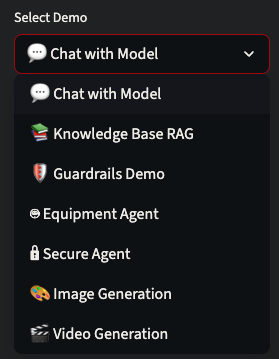
-
To prevent “AccessDenied” error within JupyterLab: ???
- Navigate to these notebooks in cd “Bedrock Agents”:
cd .. cd "Bedrock Agents" pwd - Run the Python notebook https://github.com/eduamota/building-apps-with-bedrock/blob/main/Bedrock%20Agents/5-knowledge_base_s3_vectors.ipynb
# For RAG demo: jupyter execute 5-knowledge_base_s3_vectors.ipynb - Run the Python notebook guardrails demo at https://github.com/eduamota/building-apps-with-bedrock/blob/main/Bedrock%20Agents/7-bedrock_guardrails.ipynb
jupyter execute 7-bedrock_guardrails.ipynb - Run the Streamlit app:
streamlit run app.py👋 Welcome to Streamlit! If you'd like to receive helpful onboarding emails, news, offers, promotions, and the occasional swag, please enter your email address below. Otherwise, leave this field blank. Email: _
- Type in your email.
  You can find our privacy policy at https://streamlit.io/privacy-policy

  Summary:
  - This open source library collects usage statistics.
  - We cannot see and do not store information contained inside Streamlit apps,
 such as text, charts, images, etc.
  - Telemetry data is stored in servers in the United States.
  - If you'd like to opt out, add the following to ~/.streamlit/config.toml,
 creating that file if necessary:

 [browser]
 gatherUsageStats = false


  You can now view your Streamlit app in your browser.

  Local URL: http://localhost:8501
  Network URL: http://192.168.1.8:8501
- Features:
💬 Chat with Bedrock models (Nova, Claude) 📚 Knowledge Base RAG with equipment specs 🛡️ Test guardrails in real-time 🎨 Generate images with Nova Canvas 🎬 Create videos with Nova Reel
Notes
A neural network’s activation function is how it stores training data. Activation functions introduce non-linearity into neural networks, allowing them to learn complex patterns and relationships in data. Without activation functions, a neural network would only be able to learn linear relationships, regardless of how many layers it has.
Embeddings are Numerical vector representations of data that capture semantic meaning.
The Transformer architecture’s key innovation enables efficient processing by its self-attention mechanism. This enables parallel processing and captures long-range dependencies better than recurrent networks.
References
https://aws.amazon.com/bedrock/getting-started/
- Amazon Bedrock API Reference
- AWS CLI commands for Amazon Bedrock
- SDKs & Tools
- https://github.com/aws
- https://docs.aws.amazon.com/bedrock/latest/userguide/key-definitions.html
- https://github.com/aws/amazon-sagemaker-examples
- https://builder.aws.com/build/tools
- https://builder.aws.com/content/2zYQkMbmrsxHPtT89s3teyKJh79/aws-tools-and-resources-python
SOP Why your AI agents give inconsistent results, and how Agent SOPs fix it
https://www.youtube.com/watch?v=ab1mbj0acDo Integrating Foundation Models into Your Code with Amazon Bedrock by Mike Chambers, Dev Advocate
ARTICLE: “Is Kiro IDE the First Agentic Developer? Feb 12, 2026 by by Glauco
https://aws.amazon.com/blogs/machine-learning/build-and-scale-adoption-of-ai-agents-for-education-with-strands-agents-amazon-bedrock-agentcore-and-librechat/ Build and scale adoption of AI agents for education with Strands Agents, Amazon Bedrock AgentCore, and LibreChat by Changsha Ma, Sudheer Manubolu, Mary Strain, and Abhilash Thallapally on 08 SEP 2025
26-04-01 v015 Yasir :aws-bedrock.md created 2026-01-25