bomonike
 Deep Dive tips and tricks to get certified: Step-by-step tutorials, videos, practice exams.







Overview
- Anthropic the Company
- Competition among Harnesses
- Claude Support
- Claude Products
- Quizzes
- Features Glossary
- Pricing/Billing
- Productivity: What can you do with Claude?
- Tutorials
- Hardware Needed
- Install utilities
- IDE Visual Studio Code Install
- Using Claude
- Claude Chat
- Claude Desktop Key Shortcuts
- / slash commands
- Periodic
- How Claude Code Works
- Session Management
- Custom Slash Commands
- Claude Folders and Files
- Settings menu and keyboard shortcuts
- Tengu UI Customizations
- @DESIGN.md Design System
- Agents
- Hooks
- .gitignore
- Permissions
- Connectors
- CoWork
- Python Project
- Python Prompt examples:
- Settings config
- /cost tokens spent
- Skills
- managed-settings.json
- Rules
- Vulnerability Scanning
- Create an iPhone app
- Claude Partner Network
- Certifications
- Claude Certified Architect (CCA), Foundations
- Models
- Advanced reasoning:
- Common coding tasks:
- Quick code completions and suggestions:
- Chat API call using Claude Opus
- AI Fluency Class
- Text Chat using Claude API
- External Tool Use
- Plugins
- MCP servers
- Tools
- Run in Containers
- References
NOTE: Content here are my personal opinions, and not intended to represent any employer (past or present). “PROTIP:” here highlight information I haven’t seen elsewhere on the internet because it is hard-won, little-know but significant facts based on my personal research and experience.
This article was hand-crafted to combine insights from the documents, tutorials, and videos listed below. The objective here is to combine all the wisdom into deep knowledge logically sequenced.
Anthropic the Company
- Events:
- Anthropic was founded in 2021 by seven former employees from OpenAI VIDEO
- CEO Dario Amodei was OpenAI’s Vice President of Research.
- Daniela Amodei, Co-Founder and President (sister of Dario) VIDEO
- Boris Cherny, Engineering 260502
- Katelyn Lesse, Engineering
- Cat Wu, Product
- Angela Jiang, Product
-
Social media tags: #CodeWithClaude
-
Visit https://anthropic.com/ - the corporate marketing landing page.
It says “Anthropic is a public benefit corporation dedicated to securing its benefits and mitigating its risks.”
-
Anthropic’s entry on LinkedIn classifies the company in the “Research Services” industry:
“Anthropic is an AI safety and research company working to build reliable, interpretable, and steerable AI systems.” 3M followers. 501-1K employees.
-
On Glassdoor.com, 86% of Anthropic employees would recommend to a friend, which is high praise indeed.
-
Click “Read more” at https://www.anthropic.com/research about results from Anthropic’s survey of users.
- Click “Posts” tab to view announcements.
- Click “Ads” to see videos of 2026 Superbowl commercials.
-
The history of the US Government’s use of Claude for domestic surveillance or in fully autonomous weapons is summarized in https://en.wikipedia.org/wiki/Anthropic
It says the company is headquartered in San Francisco’s Foundry Square (near the Bay Bridge) at 500 Howard and First Streets (across from Chipotle & BlackRock and close to the SalesForce tower’s BART/busses).
-
“Claude” on LinkedIn.com says “Claude is an AI assistant built by Anthropic to be safe, accurate, and secure.” in Technology, Information and Internet. 884K followers.
PROTIP: Claude is named for Claude Shannon at Bell Labs, who founded “informational theory of communication” which made AI possible.
Competition among Harnesses
Claude competes with agentic coding tools (aka coding agent IDEs and CLI) that read a codebase, edit files, and run commands:
- Amazon’s Kiro CLI & IDE for spec-driven development. But it needs to be constantly connected to AWS eating up credits. agent-skills-mcp to convert from Anthropic Agent Skills.
- warp.dev (which does a great job of detecting coding and CLI errors and suggesting fixes), now open source
- OpenAI’s Codex VIDEO
- OpenCode
- Perplexity
- Google Gemini Gemma & Antigravity IDE
- Mistral AI
- Devin by Cognition (merged)
- Temporal’s Pydantic
-
OpenCode
- Hermes
- Pi.dev by Mario Zechner.
To avoid AI vendor lock-in, Mike Faffenberger at Walmart open-sourced “Code Puppy” Claude wrapper VIDEO https://github.com/mpfaffenberger/code_puppy VIDEO It includes a DBOS plugin for durable execution that survives crashes for long agent runs.
tbench.ai (Terminal Bench)/Leaderboard provides benchmarks AI agents’ terminal mastery operating the harbor framework.
artificialanalysis.ai/models human Comparison of Models: Intelligence, Performance & Price Analysis
https://openlm.ai/chatbot-arena/ specifically for “Coding” work rates Sonnet 3.5 slightly higher than Opus 3. s based on the following benchmarks. The leaderboard presents 3 benchmarks:
- Arena - a crowdsourced, randomized battle platform for large language models (LLMs). We use 6M+ user votes to compute Elo ratings.
- AAII - Artificial Analysis Intelligence Index v3 aggregating 10 challenging evaluations.
- ARC-AGI - Artificial General Intelligence benchmark v2 to measure fluid intelligence.
QUESTION: Are ratings from proprietary models worth the money versus lower-rated MIT licenses from Chinese Z.ai, DeepSeek, Xiaomi, Kimi, MiMo, etc.?
Claude Support
WARNING: BLAH: Anthropic doesn’t offer phone or live chat support, only thru chat at support.claude.com.
- https://support.claude.com/en/articles/9015913-how-to-get-support
-
- Article by Gigi Sayfan CCDD (Claude Code Deep Dive)
-
Reddit: r/ClaudeAI https://claudecodeguide.dev/
- https://www.reddit.com/r/ClaudeAI/wiki/survivalguideweekly/ Weekly Survival for Claude Users is a must-read.
Claude Products
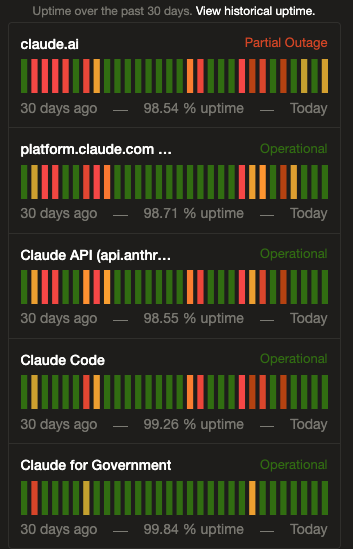 Uptime shows Anthropic’s own production environments:
-
claude.ai website reached on internet browser.
Meet Claude - Platform - Solutions - Pricing - Resources - Contact sales - Try Claude
-
platform.claude.com is the user Claude Console Dashboard, Workbench, Files, and Skills, Documentation (for each organization). Claude also creates the evaluation automation that it runs. “You Guide To Local AI - Hardware, Setup and Models”
-
Claude API refers to the endpoint listening for SDK requests from procedural programming code or via the claude-agent-sdk wrapper around claude -p commands
REMEMBER: The -p flag specifies non-interactive (aka “headless” task), No prompts, no confirmations. Runs and returns the result. The SDK spawns the Claude Code CLI as a subprocess and communicates over stdin/stdout via JSON-lines. xcompare it to the Anthropic Client SDK. Specify –allowedTools and –disallowedTools permissions.
-
Claude Code is “like talking to a capable teammate who actually does the work”. Instead of hand coding, human app designers now speak natural language conversations with Claude Code to write design specs from which both infrastructure creation and programming code are generated.
“AI will soon be writing 90 percent of all code.” — Dario Amodei, Anthropic CEO, March 10 2025
That is why instead of human employees, companies will be paying for AI tokens to do work. That’s the basis for high valuations and unpresedented investments in gigantic data centers using AI chips.
-
Claude CoWork can interact with you computer’s files, mouse, keyboard, and screen, to operate any app. VIDEO
-
Claude Artefacts are full executable apps such as games that can be published for others to use.
-
“computer use” can open native applications, click through user interfaces, test its own changes, and fix what breaks — all from a developer’s terminal. Combined with existing debugging workflows, these features move Claude Code closer to autonomous identification and resolution of bugs during development.
REMEMBER: Anththropic does not host their own models but use AWS, Azure, GCP, etc. Claude is the only frontier AI model available on all three leading cloud providers: AWS, Google Cloud, and Microsoft. Claude would also be integrated into the Databricks Data Intelligence Platform and Snowflake’s Lakehouse databases.
PROTIP: That enables us to bring costs down by using a downloaded local foundation model while using Claude Code/Work.
-
Glasswing secures software using the Mythos frontier model built using NVIDIA’s GP3 chips.
-
Claude Dispatch enables cross-device workflows where tasks move from mobile app to desktop app which stays awake (doing whatever else).
-
“Memory on Claude Managed Agents” enables agents to learn from past sessions and share what they’ve learned with other agents. The memories mounts directly onto a filesystem so developers can keep control over what these agents retain - the same bash and code execution capabilities that make it effective at agentic tasks. “With filesystem-based memory, our latest models save more comprehensive, well-organized memories and are more discerning about what to remember for a given task.”
-
Claude “Computer Use”: Computer Use utilizes the capabilities of the latest models including image reasoning and tool use to enable an LLM-based agent to use a computer. Like a human user, the model processes an image of the screen, analyzes it to understand what’s going on, and navigates the computer by issuing mouse clicks and generating keyboard strokes to get things done.
VIDEO: Fun fact: 90% of code in Claude Code is written by itself, in TypeScript, Yoga embeddable layout engine (to determine the size and position of boxes for), React, Ink (React-like library for building interactive CLI apps in JS), and BUN toolkit (acquired by Anthropic in ‘25).
VIDEO: Although Temporal is used on Claude, the leak revealed that Claude is vulnerable to the in remote access trojan from Axios 1.14.1 npm. Get rid of the vulnerability
The team works at around 5 releases per engineer each day. AI agents are used for code reviews and tests, test-driven development’s (TDD) renaissance, automating incident response, and cautious use of feature flags. “Inside Claude Code: The Architecture of AI Agents” by PY is a while loop.
Tool selection: Because raw GUI control is powerful, but also brittle, slower, and much harder to govern, the Claude ecosystem is a layered agent system where connectors (with structured contracts) via MCP apps are preferred, browser automation (of forms on websites) is secondary, and raw full-screen (difficult to govern) desktop control is the fallback layer.
References:
- https://newsletter.pragmaticengineer.com/p/how-claude-code-is-built
Claude takes to heart the “README first” philosophy popularized by Tom Preston‑Werner (co-founder of GitHub)
before the AI era in a 2010 blog post.
The software development approach is that the README be written before writing any code it describes.
To clearly articulate the purpose for coding.
The benefits he outlined include catching design flaws early, producing better documentation (since it’s written when the idea is freshest), and creating a shared vision if you’re working with others.
Quizzes
Features Glossary
Automation provided by AI agents have gone beyond auto-complete of code.
-
Connectors (under the “Customize” and Settings menu items) enable Claude to interact with external platforms GitHub, Gmail, Google Calendar, Google Drive, etc.
-
GitHub Integration: Deep integration with GitHub for PR reviews, issue management and even CI/CD.
-
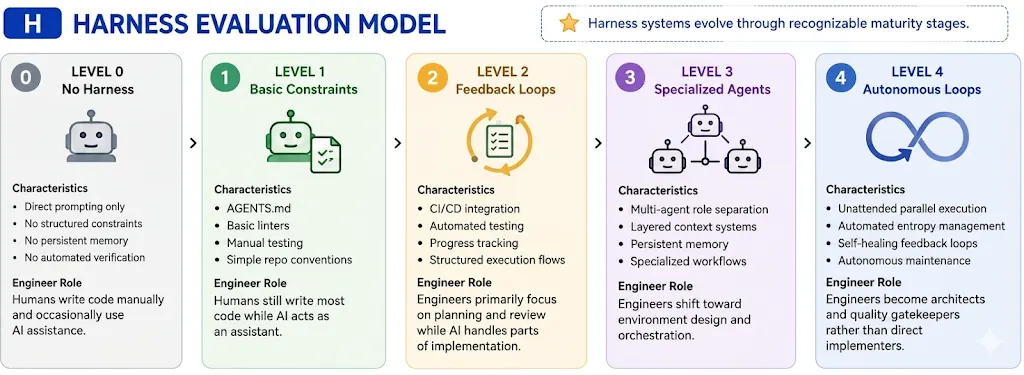
An agentic code harness is what enables an LLM to be Agentic with sandboxes, accept prompts, use tools, etc.
-
Memory system: CLAUDE.md and other files that provide persistent context across sessions.
-
Slash commands: Powerful keywords to control agent behavior. VIDEO
-
Skills (under the Customize menu item) enable new knowledge to be dynamically obtained by Claude or subagents based on minimal description and the current query as opposed to always taking up room lurking in the context memory. Skills are now integrated with commands.
-
Subagents: Create specialized subagents for different tasks with their own context window. REMEMBER: Subagents operate with isolated context and do NOT share memory with the coordinator. Every piece of its information must be passed explicitly in it.
-
MCP Support: Extend to external processing with any MCP tool to access APIs, databases and other external systems. MCP servers provide external tools and integrations
-
MCP Tools defines what MCP clients should run to take action.
-
Subagents run in isolated execution contexts isolated from the main conversation. Use them for delegated work.
-
Hooks are “event-driven” small Python (.md) and/or Bash shell (.sh) scripts (agentic workflows) that run when triggered by events: “PreToolUse” (after Read) or “PostToolUse” (after Write or Edit). REMEMBER: A hook can also block Claude from taking an action unless a specific condition has been met.
-
Plugins (under the Customize menu item) “packaged feature bundles” may include (bundle) hooks, slash commands, and skills together for sharing with others. The “plugins” folder contains a blocklist.json file, a “known_marketplaces.json” file and the marketplaces folder, starting with “claude-plugins-official”.
-
Claude Agent SDK are used to build agentic AI systems beyond coding assistance.
-
Rules ???
-
“Constitutional AI” is a training approach developed by Anthropic to help AI models self-evaluate and revise their own responses, based on a predefined set of ethical guidelines and principles (harmless, honest, etc.) rather than RLHF (Reinforcement Learning with Human Feedback). “intent classification” in Claude’s safety system
-
“Progressive disclosure” ensures only relevant content occupies the context window at any given time. Every skills-compatible agent follows the same three-tier loading strategy: REMEMBER:
Tier What’s loaded When Token cost 1. Catalog Name + description Session start ~50-100 tokens per skill 2. Instructions Full SKILL.md body When the skill is activated <5000 tokens (recommended) 3. Resources Scripts, references, assets When the instructions reference them Varies
Pricing/Billing
Ironic: corporations replace humans with AI that “work continuously and never ask for raises.” But then Claude AI hard stops after 5 hours and automatically increase prices without notice.
REMEMBER: There are several ways to pay for Claude:
-
A. Buy credits (pop-up clicking "Add funds" at the bottom of platform.claude.com. Good for 1 year to be consumed with API, Claude Code, and Workbench usage.
B. Anthropic Console Account (auto reload) at https://platform.claude.com/settings/billing for API usage. Buy credits ("credit grants" via Stripe, like Starbucks). Includes Batch for cheaper API rates.
C. Claude account with subscription (plus overage charges) when using Claude Code IDE/CLI.
D. Arrange for invoicing after consumption: contact Sales.
E. Via third-party providers Vertex or AWS Bedrock
CAUTION: Flat seat licensing obscured true token consumption costs a structural gap that usage-based pricing exposes immediately at enterprise scale.
Subscriptions
PROTIP: Use merlin.ai’s bulk purchasing costs $5/mo ($60/year) (with code AZ5) to access several LLMs (Claude Sonnet 4.5, OpenAI GPT5, etc.) instead of paying for a Claude AI subscription at https://claude.com/pricing:
- Claude Free
- Claude Max $17/month
- Claude Max $100/month for 5x or 20x more usage than Pro
- Teams $20/month
- Enterprise
REMEMBER: A paid plan is required to use Claude Code and Cowork, Projects freature, Claude for Chrome, Slack, Excel, Word, PowerPoint.
CAUTION: In April 2026 Anthropic removed the $17/month tier and requires the $100/month for use of Claude Code.
CAUTION: Rate tokens chargess for the same request prompt is not consistent over time.
CAUTION: Claude’s token charges are more complicated that figuring out your taxes.
DEFINITION: A “token” takes about 3/4 of a word to store because each token is a chunk of each word in a text file from a “corpus” of documents. Tokens are “trained” within AI models by turning chunks of each word into a numerical representation vector for each concept. The “weight” of each token refers to the numerical coordinates in each of many dimensions of meaning.
DEFINITION: “Quantization” reduces the size of an LLM by sacrificing the accuracy of its token vectors by reducing the number of decimal points. This compression technique used is called “QLoRA” fine-tuning.
PROTIP: The metric to watch is a cost per task which focuses on the productivity achieved rather than the effort.
Productivity: What can you do with Claude?
PROTIP: What outcomes are changed for customers?
Target one job that has these three qualities:
-
It wastes real time
-
It happens often (repeatedly)
-
It has multiple steps (complex)
Good first examples with a small test group:
-
turn meeting notes into action items
-
research a list of companies and make a short brief
-
respomd to support emails with draft replies
-
pull weekly numbers and write a simple report
-
check a few sources and summarize what changed
PROTIP: Improvements in net productivity can be confidently monitized when features are combined to be useful when consistently applied:
-
Customer Support Resolution Agent (Agent SDK + MCP + escalation)
-
Code Generation with Claude Code (CLAUDE.md + plan mode + slash commands)
-
Multi-Agent Research System (coordinator-subagent orchestration)
-
Developer Productivity Tools (built-in tools + MCP servers) See https://github.com/anthropics/courses/blob/master/tool_use/README.md
-
Claude Code for CI/CD (non-interactive pipelines + structured output)
-
Structured Data Extraction (JSON schemas + tool_use + validation loops)
“5 ‘Boring’ AI Workflows that Businesses Actually Want (And How to Sell them)” by Nate Herk of AI Automation
 />
/>Tutorials
Anthropic’s own tutorials are at:
- https://anthropic.skilljar.com
- https://github.com/anthropics/courses
- Anthropic is trainging the country of Iceland
Anthropic’s partner video courses on Skills (by Lewis Menelaws)
- Introduction to agent skills - Learn how to build, configure, and share Skills in Claude Code — reusable markdown instructions that Claude automatically applies to the right tasks at the right time. This course takes you from creating your first Skill to distributing them across teams and troubleshooting common issues.
- What are skills?
- Creating your first skill
- Configuration and multi-file skills
- Skills vs. other Claude Code features
- Sharing skills
- Troubleshooting skills
-
Building with the Claude API - This comprehensive course covers the full spectrum of working with Anthropic models using the Claude API.
-
Introduction to Model Context Protocol - Learn to build Model Context Protocol servers and clients from scratch using Python. Master three MCP core primitives—tools, resources, and prompts—to connect Claude with external services.
- Claude Code in Action (21 lessons) by Stephen GREGOR - Integrate Claude Code as a partner into your development workflow. Practical walkthrough of using Claude Code to accelerate your development workflow.
On Coursera, Stephen Grider of Anthropic built
- Claude Code in Action
- Building with the Claude API
- Introduction to Model Context Protocol
- Model Context Protocol: Advanced Topics
With a OReilly.com subscription:
- 2hr video course: Claude Code Masterclass: Code faster with Agentic AI by Arunprabu Nallasamy references
https://github.com/Arunprabusamy/course-explainer-app known-bad code to fix and quizzes at https://github.com/PacktPublishing/Claude-Code-Masterclass-Code-faster-with-Agentic-AI
Youtube:
- I Took All 7 Anthropic Courses in One Weekend (Honest Review) by Jas Wong
-
12 hour “Claude Code Essentials” exam released by Andrew and Gunnar Grosch referencing github.com/enthropics on March 20, 2026 via freeCodeCamp.org to plug $34 ExamPro study materials to pass ExamPro.co’s own “EXP-CLAUDECODE-01”.
- Local AI Agents In 26 Minutes by Tina Huang
- 3-hr Practical Guide by Academind by Maximilian Schwarzmüller
Articles:
- Teaching Claude Code How You Work: CLAUDE.md in Practice
- From Zero to Agentic Coding: Running Claude Code with Amazon Bedrock
YouTube videos with no subscription:
- VIDEO: “Claude Isn’t Safe. This Anthropic Whistleblower Has the Proof.” by Novara Media quoting Mrinank Sharma’s resignation letter.
- “The Ultimate Beginner’s Guide To Claude” by AI Edge on Telegram
- “Claude Code - Full Tutorial for Beginners” by Tech With Tim offering newsletter
- “Let Claude Cowork Work For You, here’s how”
- “Making Claude Code more useful with TDD and XP Techniques” by FeedbackDrivenDev
- “12 Hidden Settings To Enable In Your Claude Code Setup” by AI LABS
- “You Can Build The Craziest Things with Claudes Agent SDK” by Traversy Media
YouTube videos offering subscriptions:
- 12 hour “Claude Code Essentials” exam released by Andrew and Gunnar Grosch referencing github.com/enthropics on March 20, 2026 via freeCodeCamp.org to plug $34 ExamPro study materials to pass ExamPro.co’s own “EXP-CLAUDECODE-01”.
- YouTube by Mark Kashef pushes $64/mo Early AI-dopters
- “Claude Computer Use Just Dropped, Here’s How to Hack It” (Use the Min browsser to avoid blocking) to plug $184/mo Maker School
- “How to Build Claude Agent Teams Better Than 99% of People” by Nate Herk - AI Automation of $99/mo AI Automation Society Plus
- Zinho Automates ai-launchpad
Brock Mesarich, on the @BrockMesarich YouTube channel aifornontechies.com AI for Non Techies to pitch $47/mo AI for Non-Technies: “Dispatch” from your phone.
- Browse awesomeclaude.ai to identify what looks useful to you, in priority.
- “Claude’s Biggest Update Just Dropped… (Computer Use)”
- “How to Use Claude Cowork Projects Better Than 99% of People”
On LinkedIn Learning by Ray Villalobos:
- Getting Started with Claude 3
- 1 hr video “Claude Code 101: From Prompt to Product”
- Claude Code 4: Agentic Coding for Professional Developers
- Building with the Claude API by Anthropic
Others on YouTube:
- “Anthropic’s SECRET Model Just Leaked (INSANE)” pushing $99/yr ShippingSkool
- “Anthropic’s NEW Claude Architect Guide In 39 Minutes” by Mark Kashef to pitch $64/mo Early AI-dopters
- “The Easiest Way to Get Ahead With Claude Code” by Simon Scrapes pushing $37/mo Scrapes
- “Claude’s New AI Auto-Mode Runs Itself Now” by AI News Today - Julian Goldie Podcast” to plug $59/mo AI Profit Boardbroom
- “Claude Explained - Chat vs Cowork vs Code” by Oliur Online to plug free resources and $179/yr Digital Creator Club
- “Claude Code Just Got 10X Powerful (10 Insane Features) by The AI Growth Lab with Tom to push $500 one-time “30 day Challenge”
- “Build & Sell with Claude Code (10+ Hour Course)” by Nate Herk pushing $99/mo AI Automation Society Plus
- “CLAUDE CODE ADVANCED: Everything They Don’t Teach You” by <a target-“_blank” href=”https://nicksaraev.com/”>Nick Saraev</a> pushing $184/mo Maker School 2100.
- “5 Open Source Repos That Make Claude Code UNSTOPPABLE (March 2026)” by Chase AI $97/mo Chase AI+ 837.
- AutoResearch - https://github.com/karpathy/autoresearch
- OpenSpace - https://github.com/HKUDS/OpenSpace
- CLI-Anything - https://github.com/HKUDS/CLI-Anything
- Claude Peers MCP - https://github.com/louislva/claude-peers-mcp
- Google Workspace CLI - https://github.com/googleworkspace/cli
Others when you’re through with the above:
https://www.youtube.com/watch?v=uUGfo8QOsW0&pp=ugUEEgJlbg%3D%3D Claude Mythos 5: Most Powerful Model Ever! AGI, GLM 5.1, Claude Code Update & Codex Plugins! AI NEWS
Hardware Needed
- If you need to buy a machine, consider that Mac Mini’s have good resale value and value on mid-tier vs. PC server with NVIDIA GPU. Apple does overcharge for memory. The Apple M3 Max has more bandwidth than the newer M4 Pro.
- Buy two 2+ TB USB drives for backup. One to keep plugged in and another for daily full backups you leave in a faraday bag.
QUESTION: Can a Chromebook (with no large RAM or hard drive) be used?
About Claude Code + VS Code + Local LLM:
Install utilities
- To enable installation of utility packages on macOS, install the Homebrew package manager for macOS, from any folder:
/bin/bash -c "$(curl -fsSL https://raw.githubusercontent.com/Homebrew/install/HEAD/install.sh)"NOTE: It makes use of Ruby that comes with all macOS.
My Claude Code Template
PROTIP: Load my templates repo from GitHub, which contains a curated set from other tutorials.
- In your OS Terminal app, create a “bomonike” folder.
mkdir -p ~/bomonike - In your OS Terminal app, clone just the main branch:
git clone https://github.com/bomonike/claude-templates.git --depth 1
cd claude-templates
PROTIP: Use this as your base project when you install Claude.
aliases.sh
alias cl='claude --dangerously-skip-permissions'
alias clc='cl --continue'   # resume last session with the context/history from the previoius session
# Resume Claude with the context/history from the previoius session but still be able to get back to that point later:
alias clf='claude --resume --fork session'.
Local copy of downloads
IMPORTANT: Now that hackers are using advanced AI to identify vulnerabilities in warp speed, for recovery and for forensics comparisons, we need to be able to fallback to a previous version of each version of each Python library and brew utility you have ever downloaded.
This approach is less work than waiting for others to find issues with specific upgrades.
-
Create a folder to hold the downloads.
- PROTIP: Get my custom shell script to get brewin.sh:
https://github.com/wilsonmar/mac-setup/blob/main/brewin.sh ???Install it.
REMEMBER: brewin.sh creates a folder on the root path at /brewin to store files (bottles) if a filepath is not specified.
- For example, if you need to install PostgreSQL database for use locally, instead of the usual;
brewin.sh postgresql@17use the custom shell script brewin.sh :
brewin.sh postgresql@17brewin.sh would download the file and then save a copy of it.
- POLICY: Add utilities for vulnerability scanning, etc.
instead of pip install of utilities, have uv add it. But instead of
uv add bandit safety semgrep dynaconf --frozenNOTE: OpenAI acquired Astral on March 19, 2026.
- Install the lateszt NodeJs for Claude to run TypeScript:
brewin.sh node node --version nvm install --lts - Optionally, install an alternative to macOS native Terminal app:
brewin.sh --cask kitty
open -a kitty
PROTIP: 3rd-party Terminal apps Kitt and Ghostly natively support notification events without additional configuration (which iTerm2 does).
- To freely open apps from any folder, add the two app paths to .bash_profile:
/Applications;~/ApplicationsClaude in Chrome Connector
VIDEO: Instead of copy & Pasting or use MCP, Claude can navigate, click buttons, and fill forms on Chrome for you. Install the “Claude in Chrome” plugin from the Chrome Web Store:
- Install the latest version of Google Chrome browser from https://www.google.com/chrome/ in a Safari browser or in CLI:
brew install --cask google-chrome open -a "Google Chrome" - At https://claude.com/claude-for-chrome click “Add to Chrome”.
- Connect it to your Claude account
- Open Chrome and click the extension icon
- At the extension page click “Add to Chrome”. Confirm “Add extension”. At claude.ai, “Authorize”.
- Withdraw from install pages on Chrome.
- Switch to the Claude Desktop using Chrome:
claude --chromeAlternately, inside Claude CLI:
/chromeChoose the option to enable it by default.
- List Claude plugins installed to select the specific browser to use:
/pluginPython uv vs. pip setup
- In your repo’s .gitignore file, specify folders which should not be commited into your team Git repo:
.DS_Store
.pytest_cache
__pycache__
CLAUDE.local.md
These folder should be created for each session. .venv contains the specific version of each package desired in a virtual environment folder used to hold library files requested by import statements within Python code.
- So to start fresh with the latest version of libraries, first remove versions which may be stale.
rm -rf .venv .pytest_cache __pycache__ - Many tutorials (include Anthropic’s) still use pip commands to manage Python libraries, such as:
<strike>pip install anthropic python-dotenv</strike>However, the “cool”, tech-forward wonderkind now use a substitue:
uv which is written in Rust and thus blazing fast. - Download uv from https://github.com/wilsonmar/mac-setup/blob/main/uvadd.sh
???REMEMBER: uvadd.sh creates a folder at /uvadd to store files if a filepath is not specified. If a file already exists, it creates a folder with the filename and a datestamp.
- Install uv (instead of “python3 -m pip install uv”). On macOS:
brewin uv -
Later, to ensure archival, update uv by running “brewin uv” again rather than the “uv self update” recommended.
- Create a folder for git clone repositories to be created and download a repo containing sample code:
git clone https://github.com/wilsonmar/python-samples.git --depth 1 cd python-samples ??? - Create pyproject.toml & .python-version, pyvenv.cfg and folders bin, include, lib:
uv initThis is done instead of python -m venv .venv
The uv.lock created with pyproject.toml pins exact dependency versions, including Git dependencies, so everyone gets the same result, which prevents “works on my machine” problems.
- POLICY: In production, install project dependencies exactly as specified in the lockfile, without allowing any changes, with –no-build from source, only from pre-built .whl (wheel) executable binaries.
uv sync --frozen --no-builduv create a uv.lock file instead of Poetry creating its poetry.lock file.
- POLICY: Install Python utilities to evaluate Python code:
uvadd.sh bandit safety semgrep dynaconfThe above fails if pyproject.toml and uv.lock are out of sync.
The steps above only needs to be done once on each machine.
The steps below needs to be done at the beginning of every session.
IMPORTANT: A “session” does not mean at the beginning of each work day. A session concludes with comprehensive tests and test runs which did not identify any blockers to committing changes. So don’t wipe out session-related data until you do a commit.
- Create the uv folder again, activate it, and populate it with the latest import packages:
uv venv .venv # create folder .venv (instead of python -m venv .venv)This creates the .venv folder and within it, folders bin, include, lib, and file pyvenv.cfg.
- To modify your shell’s environment (instead of source .venv/bin/activate):
source .venv/bin/activate       # on macOS & Linux
     # ./scripts/activate       # PowerShell only
     # ./scripts/activate.bat   # Windows CMD only
This would change your CLI prompt with a “(venv)” prefix.
- CAUTION: Upgrade ALL dependencies in the pyproject.toml (declared dependency constraints) file to the latest version available publicly (including SHA-256 hashes) by creating a uv.lock file (of exact resolved versions):
<strong>uv lock --upgrade</strong> #The desired response is:
Resolved 180 packages in 3.75s
If you see a response such as:
Updated dbus-fast v4.2.6 -> v4.2.7
Noet that in your notebook of changes and update the pyproject.toml file:
uv sync --refresh - Download all packages of *.whl (wheel executables) and *.tar.gz specified in the lock file:
PYTHON_PKG_MIRROR_FILEPATH="~/mirror/python"
mkdir -p "$PYTHON_PKG_MIRROR_FILEPATH"
# Create a n inventory of python packages, with hashes for each package:
uv export --format requirements-txt > requirements.lock.txt
uv pip download -r requirements.lock.txt -d "$PYTHON_PKG_MIRROR_FILEPATH"
uv sync --offline
Example response:
Resolved 180 packages in 24ms
Checked 165 packages in 38ms
Confirm:
ls -al "$PYTHON_PKG_MIRROR_FILEPATH" -
Run tests on ALL .py programs to verify that the latest
-
Fallback to previous version if any test fails.
- To undo what pip’s activate CLI command did:
uv deactivateREMEMBER: , these commands are not needed with uv if this command is used to run python programs:
- Instead of invoking a program this way:
<strike>python whatever.py
./whatever.py</strike>
Use this command so uv to handle, behind the scenes, the environment setup and interpreter resolution itself.
uv run whatever.pyStop uv session
- REMEMBER: Before removing libraries, if you are running a temporary PostgreSQL instance, avoid corrupting the database by stopping the database using this CLI command before the libraries it depends on go away.
brew services stop postgresql@17 - AFTER a session, clean up temporary folders which will be created at the next session:
rm -rf .venv .pytest_cache __pycache__ uv.lock
IDE Visual Studio Code Install
- Install Homebrew (which is based on Ruby).
- Install VSCode and start it:
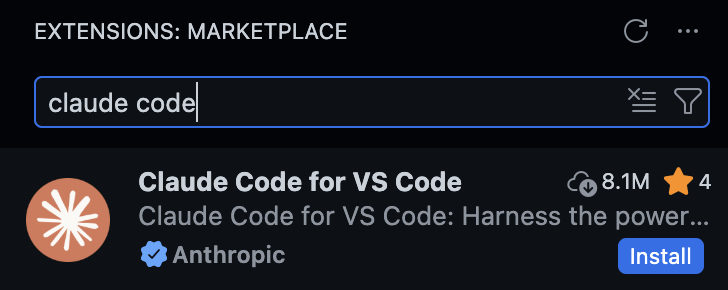
brewin.sh --cask visual-studio-code code - Click the Extensions and enter “Claude Code” in the Marketplace
-
Click “Install” to the one from “Anthropic” (marked with a blue star).
Ollama Install
To Run LLMs locally on your machine off the cloud, install Ollama (for more privacy). On a Mac Mini:
- Install Ollama: VIDEO, BLOG:
brewin ollamaThat installs folders that need to be removed to fully uninstall:
- ~/.ollama to hold models and configuration. Under that, ~/.ollama/logs contains logs.
- ”~/Library/Application Support/Ollama”
- ”~/Library/Saved Application State/com.electron.ollama.savedState”
- ~/Library/Caches/com.electron.ollama/
- ~/Library/Caches/ollama
- ~/Library/WebKit/com.electron.ollama
- On a browser, get an Ollama account and API key:
- https://ollama.com
- Click “Sign in”. This creates a client_id in the URL.
- Click “Sign Up”. Type your email address. Continue.
- Create a password using your secrets manager and switch to paste it.
- Switch to your email client and copy the code.
- Copy the code and switch back to the Ollama.com to paste it.
- Click “Sign in”. Type your email and click Continue.
- Copy your password from your secrets manager and switch to paste it.
- At ollama.com/pricing, notice the “Free” account enables you to “Run models on your hardware” and the paid subscriptions enable you to run their cloud models.
- Click “Add API Key”.
- Type a key name (using a date such as 261231 for YYMMDD). Click “Generate API key”.
- Click the copy icon to copy the API key and paste it in your secrets manager.
- Optionally, create an add your asymmetric key which starts with “ssh-ed25519 AAA”.
- At https://ollama.com/settings click “Create API key” to run models on their cloud.
- In your .env file, construct the variable by pasting the password copied from your secret manager:
OLLAMA_API_KEY="your_api_key" - Sign into Ollama CLI:
ollama signin -
In the window that opened automatically to https://signin.ollama.com/… on your default browser app, type your email and password to sign in to your paid account.
Setup auth for free use of moonshot.ai’s Kimi model downloaded for running on Ollama via local relay path.
Ollama model selection
- At https://ollama.com/search to specify “Tools” and then select a cloud model and copy its model id listed to paste in a variable. For example:
#MY_MODEL_ID="kimi-k2.5:cloud"
MY_MODEL_ID="gpt-oss:120b-cloud"
ollama show "$MY_MODEL_ID"
For example, “context length” is 131072
 Model
     architecture        gptoss
     parameters          116829156672
     context length      131072
     embedding length    2880
     quantization        MXFP4

 Capabilities
     completion
     tools
     thinking
Notice that “thinking” is among Capabilities for “kimi-k2.5:cloud” but NOT for
“kimi-k2:1t-cloud” kimi and qwen3.Model Table
model ID context
lengthembedding
lengthQuant VRAM Capabilities deepseek-v3.1:671b-cloud 163840 7168 FP8 ~128 GB completion, tools, thinking deepseek-r1:14b 131072 5120 Q4_K_M ? completion, tools, thinking gpt-oss:20b-cloud 131072 2880 MXFP4 ? completion, tools, thinking gpt-oss:120b-cloud 131072 2880 MXFP4 ? completion, tools, thinking kimi-k2.5:cloud 131072 2880 MXFP4 ? completion, tools, thinking kimi-k2.6:1t-cloud 262144 2048 INT4 ? completion, tools qwen3-coder:480b-cloud 262144 2048 FP8 ? completion, tools qwen2.5:14b 32768 5120 Q4_K_M 8.8 GB completion, tools qwen3.6:27b 32768 5120 Q4_K_M 23 GB completion, tools Qwen3.6 focuses on agentic coding and preserving thinking context for iterative work. qwen3.6:27b qwen3.6:35b has a 256K context window.
Available sizes for qwen2.5 on Ollama are: 0.5b, 1.5b, 3b, 7b, 14b, 32b, 72b
The “Quant” (Quantization Type) value is the OLLAMA_KV_CACHE_TYPE=”q8_0” (for 8-bit) in the ollama serve command. It controls the precision of how the KV cache is stored in memory. Using “q8_0” instead of the default “f16” reduces memory pressure. Quantization in AI is a way to make models smaller, faster, and cheaper to run by using lower-precision numbers for weights and activations. It’s like rounding numbers to save space.
All models started with that setting use the same cache type.
Multiply the two numbers to calculate the KV cache size
≈ embedding_length × context_length × 2 × num_layers × bytes_per_elementSince there are 2 bytes per element for fp16, VRAM for deepseek-r1:14b:
= 131072 × 5120 × 2 × 48 × 2 (fp16) ≈ ~128 GB (full context, fp16)AirLLM?
DEFINITION: The embedding length is the size of each vector representing each token internally. It is larger for more complex models. The embedding length needs to match the “dimensions=” spec to define a vector DB used to create RAG pipelines for semantic search.
- PROTIP: Use a model that has function/tool calling support, e.g.:
- llama3.1:8b, llama3.2
- mistral, mistral-nemo
- qwen2.5:27b (16GB), qwen2.5:14b (8GB), qwen2.5-coder, NOT qwen3.5:27b ?
NOTE: DeepSeek does not have model support.
 GENERAL PURPOSE & CHAT
 qwen2.5:7b     - Best all-rounder, strong reasoning & math
 llama3.2:3b    - Fast, Apple Silicon optimized, great on M-series
 mistral:7b     - Reliable classic, excellent instruction following
 gemma2:9b      - Google's model, very capable, slightly heavier
 glm4             - Strong multilingual & conversation model

 CODING
 qwen2.5-coder:7b  - Top tier for code generation & completion
 qwen2.5-coder:3b  - Lighter coding model for faster iteration
 codestral:latest  - Fast Mamba-based architecture, great for coding
 neural-chat:latest - Open weights, solid alternative for dev tasks

 VISION & MULTIMODAL
 llava:7b          - Image analysis & OCR
 bakllava          - Multimodal chat with image support
 qwen2:7b          - Supports vision prompts when needed

 SMALL / FAST / EDGE (Low RAM/VRAM)
 phi3:mini      - Tiny but surprisingly competent
 gemma:2b       - Very fast, lightweight, runs on almost anything
 qwen2:1.5b     - Extremely fast, good for quick local scripting
- PROTIP: The most conveient approach is to start Ollama and AI client from within Warp:
ollama launch hermes --model qwen3.6(Instead of hermes, it can be claude or
┌─────────────────────────────────────────────────────────┐
│             ⚕ Hermes Agent Installer                    │
├─────────────────────────────────────────────────────────┤
│  An open source AI agent by Nous Research.              │
└─────────────────────────────────────────────────────────┘

✓ Detected: macos (macos)
→ Checking for uv package manager...
✓ uv found (uv 0.11.8 (0e961dd9a 2026-04-27 aarch64-apple-darwin))
→ Checking Python 3.11...
✓ Python found: Python 3.11.14
→ Checking Git...
✓ Git 2.52.0 found
→ Checking Node.js (for browser tools)...
✓ Node.js v20.19.4 found
→ Checking internet connectivity for package install and web tools...
✓ Internet connectivity looks good
→ Checking ripgrep (fast file search)...
✓ ripgrep 15.1.0 found
→ Checking ffmpeg (TTS voice messages)...
✓ ffmpeg  found
→ Installing to /Users/johndoe/.hermes/hermes-agent...
→ Trying SSH clone...
✓ Cloned via SSH
✓ Repository ready
→ Creating virtual environment with Python 3.11...
Using CPython 3.11.14 interpreter at: /opt/homebrew/opt/python@3.11/bin/python3.11
Creating virtual environment at: venv
Activate with: source venv/bin/activate
✓ Virtual environment ready (Python 3.11)
→ Installing dependencies...
✓ Main package installed
✓ All dependencies installed
→ Installing Node.js dependencies (browser tools)...

✓ Skills synced to ~/.hermes/skills/
→ Skipping setup wizard (--skip-setup)

┌─────────────────────────────────────────────────────────┐
│              ✓ Installation Complete!                   │
└─────────────────────────────────────────────────────────┘

📁 Your files:

   Config:    /Users/johndoe/.hermes/config.yaml
   API Keys:  /Users/johndoe/.hermes/.env
   Data:      /Users/johndoe/.hermes/cron/, sessions/, logs/
   Code:      /Users/johndoe/.hermes/hermes-agent

─────────────────────────────────────────────────────────

🚀 Commands:

   hermes              Start chatting
   hermes setup        Configure API keys & settings
   hermes config       View/edit configuration
   hermes config edit  Open config in editor
   hermes gateway install Install gateway service (messaging + cron)
   hermes update       Update to latest version

─────────────────────────────────────────────────────────

⚡ Reload your shell to use 'hermes' command:

   source ~/.bashrc

Hermes installed successfully

This will modify your Hermes Agent configuration:
/Users/johndoe/.hermes/config.yaml
Backups will be saved to /var/folders/yr/24xp4b991rjg8qytrrnj4tkh0000gn/T/ollama-backups/

Hermes can message you on Telegram, Discord, Slack, and more.
Connect a messaging app now?
   (○) 📱 Telegram  (not configured)
   (○) 💬 Discord  (not configured)
   (○) 💼 Slack  (not configured)
   (○) 🔐 Matrix  (not configured)
   (○) 💬 Mattermost  (not configured)
   (○) 📲 WhatsApp  (not configured)
   (○) 📡 Signal  (not configured)
   (○) 📧 Email  (not configured)
   (○) 📱 SMS (Twilio)  (not configured)
   (○) 💬 DingTalk  (not configured)
   (○) 🪽 Feishu / Lark  (not configured)
   (○) 💬 WeCom (Enterprise WeChat)  (not configured)
   (○) 💬 WeCom Callback (Self-Built App)  (not configured)
   (○) 💬 Weixin / WeChat  (not configured)
   (○) 💬 BlueBubbles (iMessage)  (not configured)
   (○) 🐧 QQ Bot  (not configured)
   (○) 💎 Yuanbao  (not configured)
   (○) 💬 Google Chat  (not configured)
   (○) 💬 IRC  (not configured)
   (○) 💚 LINE  (not configured)
   (○) 💼 Microsoft Teams  (not configured)
The Hermes Agent landing screen should now appear.
⚕ qwen3.6 │ 4.1K/262.1K │ [░░░░░░░░░░] 2% │ 55m │ ⏲ 52m 45s
Alternately:
-
Calculate OLLAMA_CONTEXT_LENGTH:
DEFINITION: DOCS: The OLLAMA_CONTEXT_LENGTH specification is the context window size (in tokens) of how much text the model can “see” at once during inference:
Use Case Range Default if unset 2048 Chat / Q&A 2048 – 4096 Document summarization 8192 – 32768 Long-form coding/analysis 16384 – 65536 - PROTIP: Pull the model down to your machine on a poor network connection:
MY_MODEL_ID="qwen2.5:14b"
ollama pull "$MY_MODEL_ID"        # download
until ollama pull "$MY_MODEL_ID"; do
   echo "Retrying in 5 seconds..."
   sleep 5
done
Several hashes are pulled.
pulling manifest
pulling f5ee307a2982: 100% ▕███████████████████████████████████████████████████████████████▏  23 GB
pulling 5f3a3c817e78: 100% ▕███████████████████████████████████████████████████████████████▏  11 KB
pulling 86eff881e8d2: 100% ▕███████████████████████████████████████████████████████████████▏   94 B
pulling 5d1c86a949f7: 100% ▕███████████████████████████████████████████████████████████████▏  462 B
verifying sha256 digest
writing manifest
success
- REMEMBER: Files are pulled down onto your local machine as file framents such as
sha256-eabc98a9bcbfce7fd70f3e07de599f8fda98120fefed5881934161ede8bd1a41-partial-19in folders, in this sequence:
du -sh ~/.ollama/models/blobs/       # actual model weights (large files)
du -sh ~/.ollama/models/manifests/   # metadata about each model
Blobs are downloaded, then manifest files are downloaded.
1.4G /Users/johndoe/.ollama/models/blobs/
When all fragments are downloaded, they are combined into a single file
Start Ollama
- To run Ollama in the foreground, start the service using the memory specification from the Model Table above:
OLLAMA_CONTEXT_LENGTH=64000 OLLAMA_FLASH_ATTENTION="1" OLLAMA_KV_CACHE_TYPE="q8_0" /opt/homebrew/opt/ollama/bin/ollama serveAlternately, to have ollama start/restart on every login always running in the background (taking up RAM):
brew services start ollama - While running, identify the CONTEXT memory being used:
ollama psFor example:
 NAME             ID              SIZE      PROCESSOR    CONTEXT    UNTIL
 gemma3:latest    a2af6cc3eb7f    6.6 GB    100% GPU     65536      2 minutes from now
- To stop Ollma running:
osascript -e 'tell app "Ollama" to quit'Anthropic API Key .env
- To tell Claude to use Ollama locally instead: VIDEO:
export ANTHROPIC_API_KEY="" export ANTHROPIC_BASE_URL=http://localhost:11434 export ANTHROPIC_AUTH_TOKEN=ollama -
Signup for a Voyage API key (based on Pinecode docs at:
- In your .env file, construct the variable by pasting the key copied from your secret manager:
VOYAGE_API_KEY="???"voyage-embeddings.py - Generate embeddings from file content using Voyage AI API.
Claude Desktop app Install
- Install pre-requisite utilties NodeJs:
brewin node
winget install OpenJS.NodeJS.LTS   # on Windows
node --versionv20.18.0
- Click “Download desktop app” (claude.dmg to install on macOS) https://claude.ai or https://claude.com/download,
open your Terminal app and run:curl -fsSL https://claude.ai/install.sh | bashPROTIP: We do not recommend “brew install –cask claude-code” because it can be out of date, even though it’s more convenient since Homebrew installs to /opt/homebrew/bin for all apps.
Prior Claude versions
PROTIP: Since Claude is closed-source, click a prior version installer at 3rd-party website:
https://claude.en.uptodown.com/mac/versions- Click “INSTALL WITH BREW” to put into your Downloads folder file such s “claude-1-1-4088.zip”.
- In the Finder app, unzip it to create Claude.app.
- Drag and drop it in your ~/Applications folder.
- Double-click to open Claude.app. Click “Open” in the pop-up.
- Open Claude
- In Claude.app, click the Claude menu item and “Check for updates”.
- Click “INSTALL WITH BREW” to put into your Downloads folder file such s “claude-1-1-4088.zip”.
- Edit your .bash_profile or newer ~/.bashrc or .zshrc file to ensure that the program will be first in the OS $PATH folder by adding this at the bottom of the file:
echo 'export PATH="$HOME/.local/bin:$PATH"' >> ~/.bashrc && source ~/.bashrc - See start-up messages:
claude --debugReview and delete the file generated for each run, such as:
Logging to: ~/.claude/debug/1234567-1234-1234-1234-123456789.txt
- Confirm installation location:
whereis claudeClaude was not installed if you see: bash: claude:: command not found Otherwise you should see this (where ~ is replaced with /Users/your machine username/):
claude: ~/.local/bin/claude
If you used brew install (brewin.sh ) on an Apple Silicon machine:
claude: /opt/homebrew/bin/claude
Note: “claude” at the end of the path is the executable file.
Uninstall
To use Claude’s built‑in uninstaller:
claude uninstallThe file ~/.claude/uninstall does not exist. ???
- To prevent auto-update, to ~/.zshrc or ~/.bash_profile add:
export DISABLE_AUTOUPDATER=1To enable auto-update, the original default:
export DISABLE_AUTOUPDATER=0Confirm status with CLI command:
claude config get -g autoUpdates
PM OS
VIDEO: Project Manager Aakash Gupta created a set of MIT-licensed Claude-Code assets that includes pm-claude-code-setup is a production-ready standalone configuration which immediately understands PM work. It includes, in addition to LICENSE & README.md :
├── CLAUDE.md              ← Master context (Claude reads this first and every time)
├── QUICKSTART.md
├── .claude/skills/        ← 30+ 41 custom commands for 6 common PM tasks # trigger phrases:
├── templates/             ← 4: Launch checklists, roadmaps, OKRs, retros
│   ├── launch-plan.md                  # Launch planning template
│   ├── okr-template.md                 # OKR scorecard
│   ├── prd-template.md                 # Blank PRD structure
│   └── sprint-review.md                # Sprint review template
</pre>
The skills and trigger phrases that activatete them, and their analytical output:
| Stage | Skill/folder name | Trigger | Output |
|---|---|---|---|
| [1] | user-research | “synthesize research” | evidence-ranked findings |
| [3] | competitive-analysis | “analyze competitor” | smart/weak/implications framework |
| [3] | metrics-definer | “define metrics” | primary, guardrail, and anti-metrics |
| [4] | prd-writer | “write a PRD” | structured PRD with clarifying questions |
| [5] | sprint-planner | “plan sprint” | capacity-checked sprint with risks |
| [6] | launch-checklist | “launch checklist” | risk-scaled pre/post launch plan |
| [7] | ? | Code the first draft PR for the eng team |
[1] user-research consists of:
- Analyze customer feedback & data
- Survey and interview customers
- Synthesize customer & internal feedback
- Competitive Analysis
Explore the solution space?
Communication (stakeholder updates, Slack drafts, decision documents)
Meetings (transcript processing, agenda creation, batch cleanup, effectiveness tracking)
Planning (daily plans, weekly priorities, weekly reviews, all tied to your goals)
[1] User research (interview processing, JTBD guides, multi-interview synthesis, debrief loops)
[4] PRDs and specs (from rough idea to launch-ready doc, with multi-perspective AI review)
Strategy (full strategy docs, time-boxed strategy sprints, North Star definition, prioritization frameworks)
[3] Analytics (impact sizing, success metrics, activation funnels, retention cohorts, expansion revenue, experiment design)
Prototyping (AI prototype generation, wireframes, feedback loops, designer handoffs)
[6] Execution (launch checklists, ticket creation, competitive monitoring, initial implementation)
Tool integration (connect your analytics, PM tools, and communication platforms for live data)
https://github.com/aakashg/pm-github-starter-kit
├── templates/
│   ├── PROFILE-README.md      # Your GitHub profile landing page
│   └── PROJECT-README.md      # README template for every project you build
├── prompts/
│   ├── create-repo.md         # Cursor/Claude Code: create a new repo
│   ├── build-project.md       # Cursor/Claude Code: build your first agent
│   ├── commit-and-push.md     # Cursor/Claude Code: save and publish
│   └── write-readme.md        # Cursor/Claude Code: generate documentation
├── CHECKLIST.md               # Your 3-week roadmap from zero to live
└── .gitignore                 # Python project defaults
Additional skills from https://github.com/aakashg/pm-claude-skills https://www.news.aakashg.com/p/steal-6-of-my-claude-skills
├── .claude/skills/
        └── idea-validator
        └── linkdin-post-writer
        └── product-designer
        └── prompt-engineer
        └── status-update-writer
The full $49 - $250 PM OS PM Operating System has 41+ skills, 7 sub-agent perspectives, a complete context library, launch templates, and sprint planning workflows refined over 100+ iterations.
├── setup/                 ← Installation & first session checklist
├── context-library/       ← Your company info, writing styles, stakeholders
├── sub-agents/            ← 7 AI reviewers (engineer, designer, exec, legal...) perspectives
The Workflow Cheatsheet provides an important decoder to remember: | Phase | Key Output | Trigger Command / Prompt | | Strategic Alignment | product_charter.md | “Who is this for?” | | Problem Discovery | opportunity_brief.md | “Draft 5 survey Qs” | | Solution Definition | mvp_scope.md | “Prioritize MVP features” | | Feasibility & Viability | technical_feasibility.md and business_viability.md | “Assess tech risks” | | Requirements | prd.md | “Generate PRD” |
Using Claude
- Open the claude app:
Alternately, more simply since the path is within $PATH:
claudeAlternately: To begin Claude with the context/history from the previoius session:
claude --resumeAlternately, to begin Claude with the context/history from the previoius session but still be able to get back to that point later:
claude --resume --fork sessionRemember that aliases were setup.
crfREMEMBER: At the user root folder there is a .claude.json file containing settings for GrowthBook.io, a popular open-source platform for feature flagging and experimentation. named “tengu”.
- Expand your Terminal window (drag a side wider or press command+shift+minus) before listing parameters:
claude -?Usage: open [-e] [-t] [-f] [-W] [-R] [-n] [-g] [-h] [-s
][-b ] [-a ] [-u URL] [filenames] [--args arguments] Help: Open opens files from a shell. By default, opens each file using the default application for that file. If the file is in the form of a URL, the file will be opened as a URL. Options: -a Opens with the specified application. --arch ARCH Open with the given cpu architecture type and subtype. -b Opens with the specified application bundle identifier. -e Opens with TextEdit. -t Opens with default text editor. -f Reads input from standard input and opens with TextEdit. -F --fresh Launches the app fresh, that is, without restoring windows. Saved persistent state is lost, excluding Untitled documents. -R, --reveal Selects in the Finder instead of opening. -W, --wait-apps Blocks until the used applications are closed (even if they were already running). --args All remaining arguments are passed in argv to the application's main() function instead of opened. -n, --new Open a new instance of the application even if one is already running. -j, --hide Launches the app hidden. -g, --background Does not bring the application to the foreground. -h, --header Searches header file locations for headers matching the given filenames, and opens them. -s For -h, the SDK to use; if supplied, only SDKs whose names contain the argument value are searched. Otherwise the highest versioned SDK in each platform is used. -u, --url URL Open this URL, even if it matches exactly a filepath -i, --stdin PATH Launches the application with stdin connected to PATH; defaults to /dev/null -o, --stdout PATH Launches the application with /dev/stdout connected to PATH; --stderr PATH Launches the application with /dev/stderr connected to PATH to --env VAR Add an enviroment variable to the launched process, where VAR is formatted AAA=foo or just AAA for a null string value. </pre> - Confirm installation success:
claude --versionThis should reflect the latest release at https://github.com/anthropics/claude-code/release which was, at time of this writing:
2.1.86 (Claude Code)
PROTIP: Notice that Claude is updated daily. So end your day with a backup and start your day with an update.
Start Ollama
REMEMBER: You can specify what model (LLM) to use when you start Claude.
- PROTIP: In a CLI, define your model id variable such as:
MY_MODEL_ID="deepseek-v4-pro:cloud"CAUTION: Do not insert spaces to the left/right of “=” such CLI commands.
Using a variable enables you to copy commands below and switch tot he CLI to paste them (with command+V):
- Chat with the model like Google & ChatGPT Question & Answer:
ollama run "$MY_MODEL_ID" - To use DeepSeek-V4-Pro with Claude Code, run:
ollama launch claude --model "$MY_MODEL_ID" - For use with OpenClaw:
ollama launch openclaw --model "$MY_MODEL_ID" - For use with Hermes Agent:
ollama launch hermes --model "$MY_MODEL_ID"### /login = First-time Authentication
-
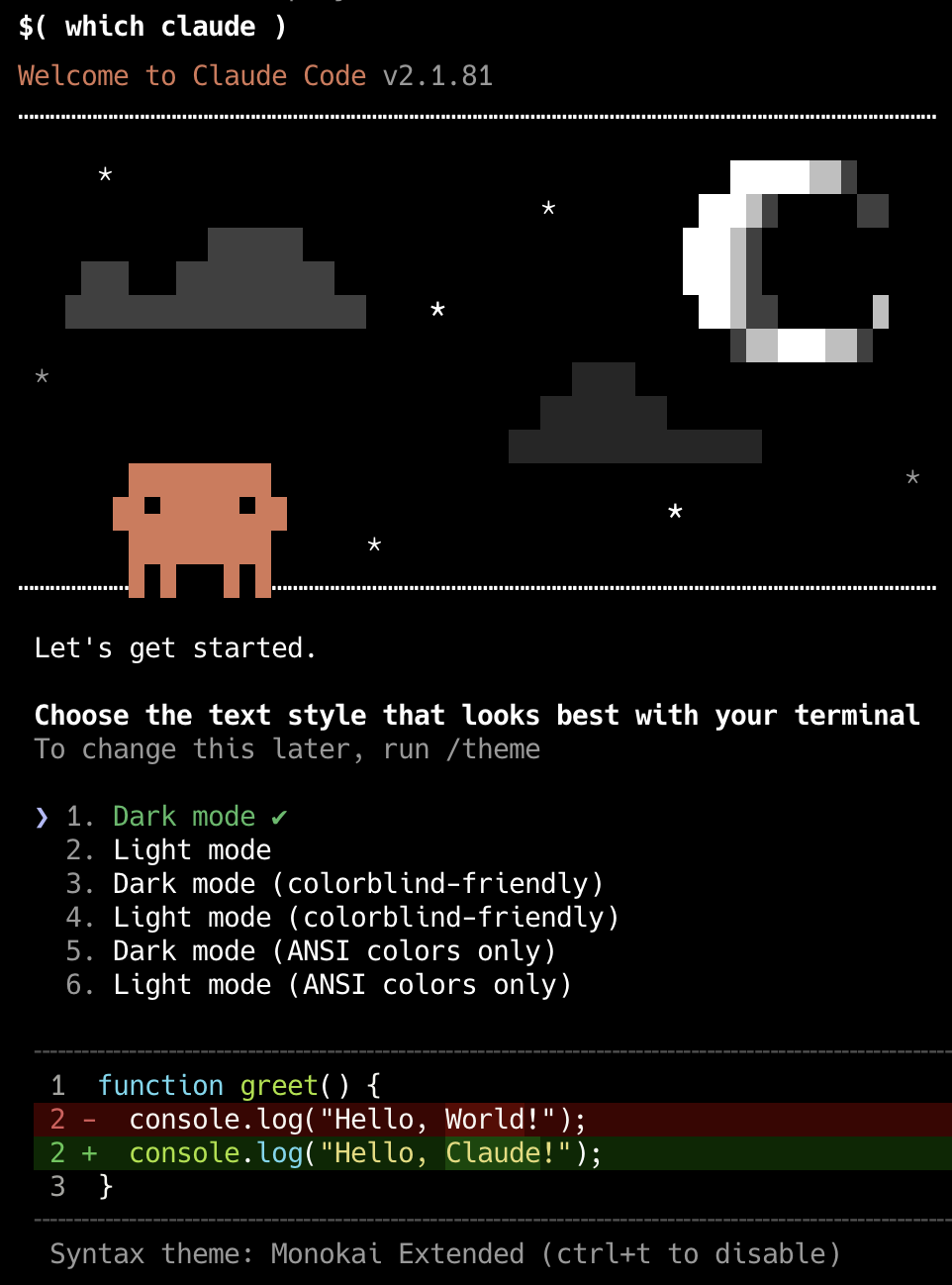
The first time that Claude runs:
???
- Continue to browser.
- Claude Code would like to connect to your Claude chat account
- Click “Authorize”.
- Press command+W to close the browser window.
- Click “Copy Code”. Press command+tab to switch to VSCode.
- Click on the entry until the orange border appears.
-
Press command+V to paste. Click “Authorize”.
PROTIP: Press shift+command and - or + to make fonts larger or smaller. But that adjusts for all panes. So many prefer to view Claude Code standalone rather than within VSCode.
PROTIP: Ideally, use three monitor screens: Terminal for Claude Code, Visual Studio (vertical view), Tutorial screen.
- Check Authentication status:
claude auth status - To disable Authentication:
claude auth logoutREMEMBER: Logout auth before setting up auth for 3rd-party clouds (Amazon, GCP, Microsoft, etc.)
From Google VertexAI after installing gcloud cli:
export ANTHROPIC_???_API_KEY="..."
export CLAUDE_CODE_USE_???=1
From Micrsoft Foundry Project API Key:
export ANTHROPIC_FOUNDRY_API_KEY="..." export CLAUDE_CODE_USE_FOUNDRY=1 -
If Claude opens with a blank screen,
Model Cost Comparison
- Consider the model to use:
MY_MODEL="kimi-k2.5:cloud"
ollama pull "$MY_MODEL"  # on Claude's cloud (AWS)
OLLAMA_CONTEXT_LENGTH=64000 ollama serve
claude --model "$MY_MODEL"
CAUTION: “cloud” in the model ID means access in the cloud and loss of privacy.
The model features a 1T-parameter Mixture-of-Experts (MoE) Transformer architecture with 32B activated parameters. It supports image, video, PDF, and text inputs up to 256K tokens and excels in benchmarks like MMMU-Pro (78.5), SWE-Bench Verified (76.8), and AIME 2025 (96.1). Trained on approximately 15 trillion mixed visual and text tokens, it enables native multimodality, cross-modal reasoning, and efficient tool use grounded in visual data.
Using a free model means that you can use automatic /loop to iterate through many results, then select the best, like a Monte Carlo simulation.
- Using the “DeepSeek V4 Flash (high)” (from China) yields 75% of performance at 1% of the cost.
- Using the “DeepSeek V4 Pro” is the best price/performance
WARNING: models from China (Kimi, DeepSeek, etc.) was created (stolen) by (adversarial) distillation of Anthropic’s models. Michael Kratsios @mkratsios47
- The LM Studio GUI using the MLX backend can produce 20 to 30 percent faster generation for the same model on the same hardware.
VIDEO: Instead of “Download” at
https://lmstudio.ai/blog/claudecodebrew install --cask lm-studio
https://www.youtube.com/watch?v=S_oN3vlzpMw “How AI agents & Claude skills work (Clearly Explained)” by Greg Isenberg interviewing Ras Mic
Start Claude
-
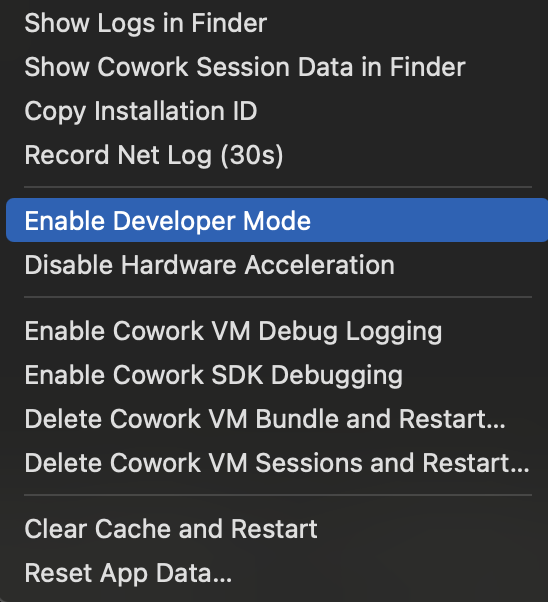 To set Claude to use alternative models other than Anthropic’s own, when Claude prompt appears, click the Help top menu, then “Enable Developer Mode”.
 -
Select model???
Claude Chat
From your Finder app, drag a file and drop it on Claude Chat. Refer to the file with a prompt such as:
“Analyze key findings from the data in a report published as an artifact.”
REMEMBER: In Claude Chat, 30 MB per file max and up to 20 files per chat. However, Claude Code has no file limits.
Screen shot in a prompt
To take a screen shot on macOS, press the usual command + Shift + 4 which changes the cursor to crosshairs. Position it on the screen and press your mouse to drag and drop to the opposite corner of the box to capture the section to your computer’s invisible clipboard. Click the Claude input field and press control + V to paste. “[Image #1]” would appear to confirm. To the right of that, type a sentence to specify what you want done based on that image.
Claude Desktop Key Shortcuts
PROTIP: Instead of moving your mouse and clicking the icons, it’s faster to hold down the command key and press the key indicated.

QUESTION: How to get shortcut keys for other menu items?
/ slash commands
- Type just the / slash character for a menu:
/init
/batch    # orchestrates large-scale changes across your entire codebase — decomposing work into 5 to 30 independent units, presenting a plan for approval, then spawning one background agent per unit in an isolated git worktree.

/claude-api  # loads Claude API reference material for your project's language. These are like bundled skills but built-in.
/compact     # summarize the conversation and replace the current context with that summary. Saves space.
/context     # token usage by each system component
/debug   # Shows config loading details and full context composition.
/extra-usage
/heapdump
/loop
/pr-comments
/release-notes
/review
/security-review
/simplify
/update-config
/schedule
Others:
/help # menu below: /connect # establish connection /start # Begin a new session /terminal-setup # ??? /memory # /statusline # below the prompt defined in customizable ~/.claude/statusline.sh /settings # menu /clear # (aka /reset) is faster than exiting and starting Claude Code again. /search # through the database /upload # files exit # from Claude UI/CLI program
/cost# Now at tokens spent in /usage/stats# Now at tokens spent in /usage /status # overview of your current Claude Code setup /config # configuration /loop /doctor /ultrareview launches reviewer agents in a remote sandbox to analyze a developer's branch or pull request, independently reproducing and verifying each finding to focus on real bugs rather than style suggestions./help for Shortcuts
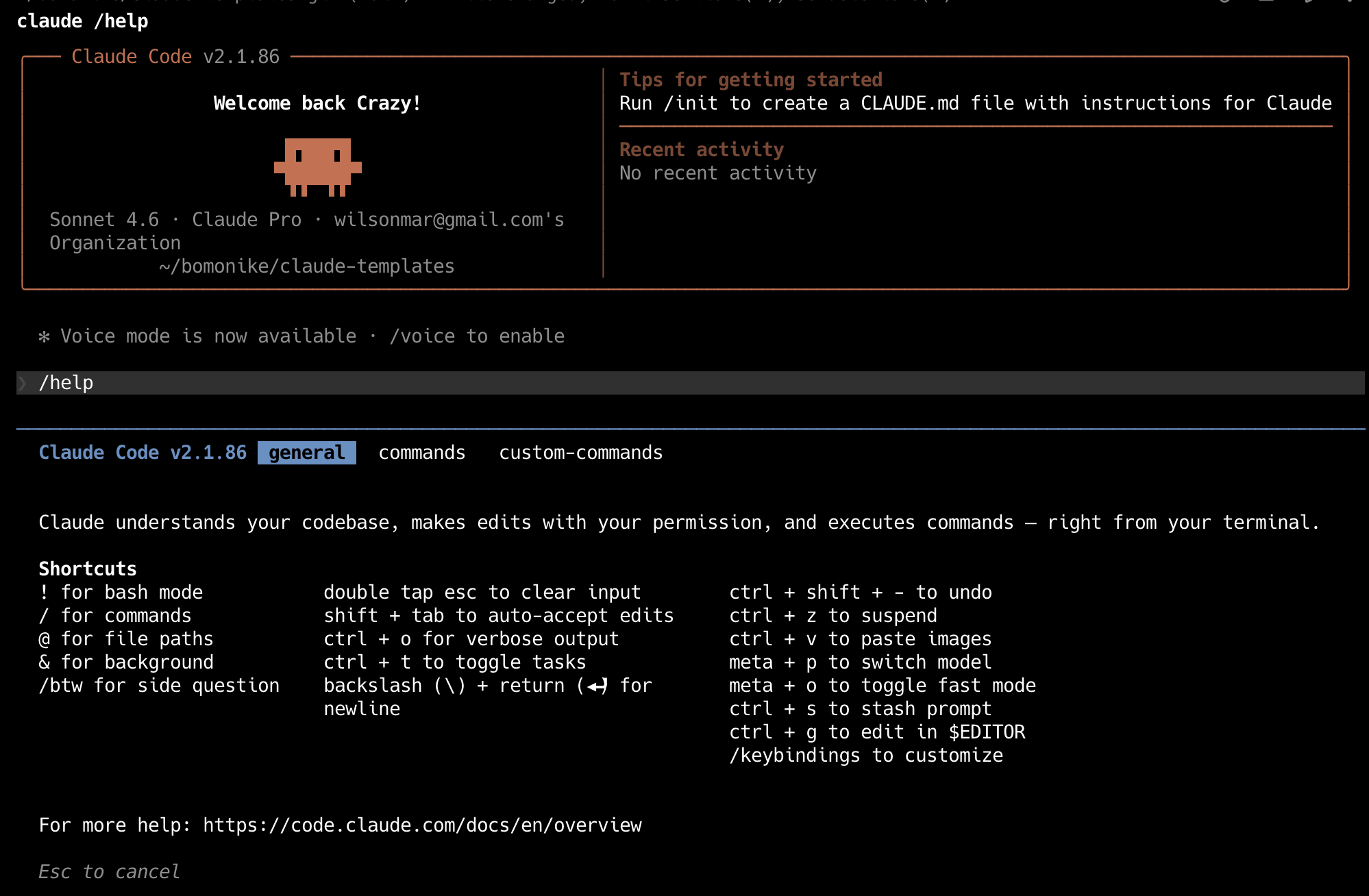
REMEMBER: Just as within Jupyter Notebook, run shell commands prefixed with the ! modifier. For example, ! pwd will run the pwd command and insert the output right into the conversation.
/model switch
/model default   # to switch to the sonnet model
/model haiku     # to switch to using the latest Haiku model.
/model sonnet (1M context)  # to switch to using the latest Opus model.
/model opus (1M context)    # to switch to using the latest Opus model.
/model mythos               # new Capybarra March 28, 2026 to Cyber Defenders.
/fast                       # to speed up Opus model execution.
Periodic
PROTIP: A great first project to really leverage the capabilities of Claude is an action management system that integrates task lists, calendars, metrics, dashboards – as if you’re managing a production process for money (because you actually are). Such an approach create mechanisms:
- Signon (Morning) “news since yesterday”, priorities for today
- Signoff (Evening) cleanup, backups
- Weekly Dashboard review
- Monthly process (/insights)
- Quarterly (like filing tax)
- Annual (like doing taxes)
/insights
/insights create @file://$HOME/.claude/usage-data/report.html from
   /effort   # previously "think harder" Effort Level Control <>a target="_blank" href="https://www.youtube.com/watch?v=brLhhkUqcn4&t=18618s">max for Opus only. high, medium, low, auto.
   /remote-control   #
   /batch   # Batch Tasks & PRs
   /simplify   # Code Review
   /loop   # Schedule Prompts
   /btw   # side question
How Claude Code Works
Anthropic has issued dozens of take-down requests to “claw back” its leak. But https://github.com/oboard/claude-code-rev has restored some functionality using the bun JavaScript package manager and testing utility. bun replaces Node + npm + ts-node + jest + esbuild with a single binary.
The “Deep Dive Claude Code app” presents its analysis of the leak’s 960+ files, 50+ integrated tools, 380K+ lines of code. These 13 chapters take you from the core loop to the full engineering picture, layer by layer. r/LocalLaMA reimplemented https://github.com/JackChen-me/open-multi-agent
REMEMBER: The revolution Claude (and other GenAI products) is that instead of typing precise programming code, you type English sentences to describe how Claude generates programming code, in markdown format files (with “.md” at the end of file names).
Press # (for “memory mode”) instructions for Claude Code to update CLAUDE.md files which define your preferences.
Press Shift + Tab to toggle from “Standard” to “Planning Mode” where Claude expands its planning of changes to md files it will make based on your specification. Claude Code offers three planning tiers:
- Simple Plan handles short tasks in a single file.
- Visual Plan maps out multi-file changes where structure matters.
- Deep Plan handles multi-service changes and risk-bearing refactors. Deep Plan uses subagents for risk assessment and architecture review. The planning subagent is read-only by design. It is explicitly denied write and edit permissions. It cannot accidentally mutate your codebase while it maps the dependencies.
https://medium.com/data-science-collective/i-spent-6-months-tuning-claude-code-heres-the-exact-setup-that-finally-worked-b41c67628478
Type ULTRATHINK ahead of requests to use a Claude “Thinking mode” which applies the maximum depth of reasoning at planning. This invokes Claude to break down complex problems step by step.
WARNING: Additional planning and thinking require additional tokens to be charged.
REMEMBER: Press the Esc key to interrrupt Claude.
Within prompts, type @ to begin specifying a file’s path pointing to contents to retrieve in your request to Claude.
Session Management
REMEMBER: Each session is a 5-hour rolling window (at time of this writing).
- /clear between unrelated tasks. Context bleed is the #1 quality killer.
- Cap conversations at ~50 exchanges. Quality degrades past this.
- Use handoffs. Before ending a long session: “Write a HANDOFF.md.” Next session: “Read @HANDOFF.md and continue.”
- Run parallel sessions. Multiple terminals, each with its own Claude instance and context window.
-
Resume sessions. claude –continue for last session, claude –resume to pick from history.
Models reset ???
Custom Slash Commands
- VIDEO: Create a commands folder to hold all custom commands:
md -p ~/.claude/commands - VIDEO: In that folder, create a markdown file for each custom command, such as “audit.md” containing:
Your goal is to update any vulnerable dependencies for $ARGUMENTS
Do the following:
- Run
npm auditto find vulnerable installed packages in this project. - Run
npm audit fixto apply updates. - Run tests and verify the updates didn’t break anything.
</pre>
- Run
- Restart Claude.
-
Type command /audit, which is the same name as the markdown file name.
General skills being specific, verifiable, battle-tested, and minimal, which is more about general agent skills design and does not clearly describe a concrete, practical benefit of using custom commands such as automating repetitive tasks, ensuring consistent workflows, or adding project-specific context.
-
VIDEO: View Addy Osamni’s Agent Skills at
github.com/addyosmani/agent-skills
REMEMBER: The essence of the 2026 revolution in GenAI is this diagram: instead of Q&A style prompting to generate code (then making changes later), progressively define your work into several separate stages in a development lifecycle:
DEFINE        PLAN          BUILD         VERIFY        REVIEW        SHIP
┌──────┐      ┌──────┐      ┌──────┐      ┌──────┐      ┌──────┐      ┌──────┐
│ Idea │ ───▶ │ Spec │ ───▶ │ Code │ ───▶ │ Test │ ───▶ │  QA  │ ───▶ │  Go  │
│Refine│      │  PRD │      │ Impl │      │Debug │      │ Gate │      │ Live │
└──────┘      └──────┘      └──────┘      └──────┘      └──────┘      └──────┘
/spec         /plan         /build        /test         /review       /ship
Use the custom slash command at the bottom of the box for each stage.
/build has AI generate/implement all the code.
People collaborate by revising .md files that are consolidated into a “PRD” (Product Requirements Document) a short document that defines a “high level” description of what a product should do, why it exists, and what “done” looks like. It keeps product, design, engineering, and stakeholders aligned on the same goal.
AI generation can be repeated with slight variations so the AI has additional opportunities to get it right, based on the PRD specification.
The sample skills github is by Google cloud leader Addy Osmani, who has examples for several clients:
- Claude Code (recommended)
- Cursor
- Gemini CLI
- Windsurf
- OpenCode
- GitHub Copilot
- AWS Kiro IDE & CLI *
- Codex / Other Agents
The 20 skills in the repo include a “/code-simplify” step for more clarity over cleverness.
What’s really special are Pre-configured specialist personas for targeted reviews by the “security-auditor” persona.
Each skill file contains:
- Overview → What this skill does
- When to Use → Triggering conditions
- Process → Step-by-step workflow
- Rationalizations → Excuses + rebuttals
- Red Flags → Signs something’s wrong
- Verification → Evidence requirements
Addy advises “Skills should be specific (actionable steps, not vague advice), verifiable (clear exit criteria with evidence requirements), battle-tested (based on real workflows), and minimal (only what’s needed to guide the agent).”
Claude Folders and Files
REMEMBER: Two folders are created:
Root .claude folder
- Navigate to .claude at the root (above User folders), where Claude keeps its internal folders and files:
- backups
- cache
- downloads
- file-history
- histor.jsonl file
- ide
- session-env file
- sessions
- shell-snapshots
- telemetry
User ~/.claude folder
-
Navigate to ~/.claude = $HOME/.claude = /Users/username/.claude
-
Folders copied from my templates:
- agents folder
- commands folder (merged with skills folder)
- hooks folder
- rules folder
- skills folder
My github has 3 different CLAUDE.MD files for each
- ~/.claude/CLAUDE.md - loaded with all prompts for all projects of the user
- ~/.claude/projects/project_id/CLAUDE.md - applicable to a specific project (/init)
PROTIP: Examples of project divisions: frontend/, backend/, migrations/, docker/
TODO: Checkout:
*.md Markdown YAML files
-
Files copied from my templates:
REMEMBER: Each .md (Markdown) file begins with “frontmatter” between “—” that is not parsed (YAML format).
--- name: explain-code.md description: Explains code with visual diagrams and analogies. Use when explaining how code works or when the user asks "how does this work?" ---- name: value should reflect the file name of the file.
-
The description consumes room in context memory because Claude uses the text to decide when to load the file.
PROTIP: Begin descriptions with an active verb such as “Fetches”.
- argument-hint (No) — Hint shown during autocomplete, e.g., [issue-number].
- disable-model-invocation (No) — true prevents Claude from auto-loading. Manual /name only.
- user-invocable (No) — false hides from / menu. Claude-only background knowledge.
- allowed-tools (No) — Tools Claude can use without asking when skill is active.
- model (No) — Model override when skill is active.
- context (No) — fork runs in an isolated subagent context.
- agent (No) — Subagent type when context: fork. Options: Explore, Plan, general-purpose, or custom.
- hooks (No) — Hooks scoped to this skill’s lifecycle.
- permissions:
PROTIP: Keep each line below 80 characters so that it’s readable on narrow panes.
Under the frontmatter are markdown content that contains instructions, examples, file references. It is loaded only when the skill is triggered.
REMEMBER: Claude Code has no memory. On every new single session, it wakes up with zero context about your project. So history and preferences must be added added as context.
CLAUDE.md file
CLAUDE.md is read to provide context at the start of every session.
-
Begin from Karpathy’s 4 lines, enhanced:
Principle Problem to Solve Karpathy’s One-Liners in CLAUDE.md Think Before Coding Wrong assumptions, hidden confusion, missing tradeoffs Don’t assume. Don’t hide confusion. Surface tradeoffs. Simplicity First Overcomplication, bloated abstractions Minimum code that solves the problem. Nothing speculative. Surgical Changes Orthogonal edits, touching code you shouldn’t Touch only what you must. Clean up only your own mess. Goal-Driven Execution Vague plans with no verification Define success criteria. Loop until verified. -
Copy in files from ???
- CLAUDE.md referenced by
- state.md — current state of the project
- architecture.md — how everything fits together
- terraform-CLAUDE.md
- python-CLAUDE.md
- MEMORY.md
- Integrate from those who shared theirs:
- https://github.com/anthropics/courses/blob/master/tool_use/README.md from 2024
- https://github.com/citypaul/.dotfiles/blob/main/claude/.claude/CLAUDE.md
-
https://github.com/jarrodwatts/claude-code-config
- https://github.com/centminmod/my-claude-code-setup?tab=readme-ov-file#alternate-read-me-guides
- Git Worktrees (for Parallel Sessions in Claude Code via Claude Desktop apps
- https://github.com/Piebald-AI/claude-code-system-prompts?tab=readme-ov-file
-
etc. ???
- https://github.com/Piebald-AI/claude-code-system-prompts?tab=readme-ov-file#system-reminders
-
Customize System prompts using https://github.com/Piebald-AI/tweakcc
- Look at the file which Claude /init references to create an initial CLAUDE.md:
package.json/pyproject.toml/Makefile/README.md - IMPORTANT: Instead of editing your CLAUDE.md, have Claude itself generate a starter CLAUDE.md file:
/init - List folders and files as a tree 3 levels down from ~/.claude/, using a utility:
brewin eza
eza -T -G -L 3 ~/.claude/
TODO:
 ├── api
 ├── web
 ├── .editorconfig
 ├── .env.example
 ├── .gitignore
 ├── CLAUDE.md
 ├── README.md
 └── docker-compose.yml
-
Edit file CLAUDE.md, the long-term memory file.
The file guides Claude Code (claude.ai/code) when working with code in this repository.
REMEMBER: At the start of each agent session, Claude looks for a CLAUDE.MD file in each GitHub repository root, in parent directories for monorepo setups, or in your home folder for universal application across all projects. So the file must be named with uppercase “CLAUDE”, lowercase “.md” (like GitHub looks for “README.md”). Providing this context up front helps agents avoid running incorrect commands or introducing architectural or stylistic inconsistencies when implementing new features.
Each CLAUDE.md file holds markdown-formatted project-specific context that should be repeated in every prompt: Project context (basic rules), About this project, Key directories, Standards, structure, conventions, workflows, style, domain-specific terminology. Example:
- PROTIP: Make your setup multi-framework to be used easily by Windsurf, Cursor, Codex CLI, Aider, and others) by specifying inline inclusion of contents from another file that the other platforms reference:
@AGENTS.mdREMEMBER: This means your CLAUDE.md would contain additions unique to Claude tools.
-
PROTIP: Keep CLAUDE.md files to a maximum of 100–200 lines. Long files are a code smell and take up precious context. CLAUDE.md should be a routing file, not a knowledge dump.
Point to .claude/rules/*.md for detailed specs and docs/ for architecture. Otherwise it gets so long that Claude skims it and misses the important stuff.
Delete what you don’t need — deleting is easier than creating from scratch.
- “Creating the Perfect CLAUDE.md for Claude Code” by Ivan Kahl January 15, 2026
- https://medium.com/@CodeCoup/i-wasted-8-minutes-per-change-in-claudes-code-heres-what-fixed-it-4baeeef1c07f
- https://github.com/ArthurClune/claude-md-examples which is based on:
- https://github.com/modelcontextprotocol/python-sdk/blob/main/CLAUDE.md
- https://github.com/p33m5t3r/vibecoding/blob/main/conway/CLAUDE.md
- https://github.com/saaspegasus/pegasus-docs/blob/main/CLAUDE.md
- https://github.com/centminmod/my-claude-code-setup
-
Claude CoWork - “Hand off tasks to Claude and come back to finished work.” VIDEO: “Brainstorm in Claude, build in Cowork”
-
Claude.com/skills says “turn expertise, procedures, and best practices into reusable capabilities.” To ensure output follows proven patterns (rather than guessing) for handling PowerPoint pptx files, pptx/SKILL.md is defined. Try this prompt: “Based on my rcent sessions, what tasks am I doing repeatedly that should be skills instead of one-off prompts? For each one, suggest a skill name and what context it would need.”
Settings menu and keyboard shortcuts
-
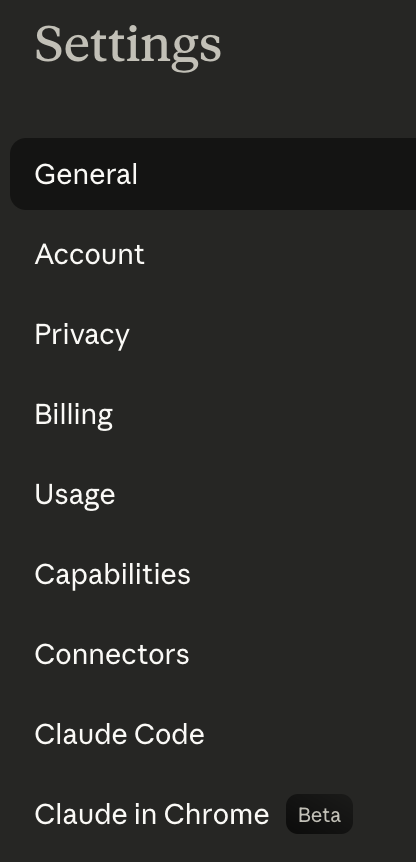 Click the Toggle sidebar (squarish) icon to collapse and expand the sidebar menu.
REMEMBER: The “Usage” Settings menu item does not appear until you have a paid subscription.
-
PROTIP: From anywhere in Claude, press shift+command+, (comma) for Claude’s Settings at https://claude.ai/settings/general
But switch off the “AWS Extend Switch Roles” browser extension if that comes up instead.
-
PROTIP: To chat from any screen, switch to a New Chat prompt by pressing shift+command+O (the letter) and start typing. For the pop-up, press command+K or shift+command+I for incognito (for the prompt to not appear among Recents).
REMEMBER: When your cursor is within the chat box, use these keyboard shortcuts:
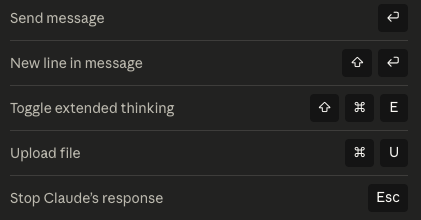
/statusline
By default, there are two lines in the “status line” below the Claude Code prompt:
[Sonnet 4.6] | User
Context .... 0%
REMEMBER: To determine what it displays on its Status Line, Claude references JSON file:
~/.claude/statusline.sh which can be changed by Plugins from the Claude Marketplace.Among StatusLine Plugins making use of Claude Code’s native statusline API:
-
VIDEO: Optionally install jarrodwatts/claude-hud for the HeadsUpDisplay (HUD) plugin to add up to 4 lines below your input prompt to know if it’s still making progress or is stuck. $80/yr Masterclass
/plugin marketplace add jarrodwatts/claude-hud
/plugin install claude-hud
/reload-plugins   # to activate
/claude-hud:setup
/restart Claude Code
code ~/.claude/plugins/claude-hud/config.json
The “add” downloads to folder ~/.claude/plugins/marketplaces/claude-plugins-official
Claude references ~/.claude/plugins/claude-hud/config.json
The Updates every ~300ms.
Projects
References:
- “Upload materials, set custom instructions, and organize conversations in one space.”
- VIDEO
REMEMBER: Unless you go incognito, every time you run Claude in a directory, a Claude Code Project is created under ~/.claude/projects. So review and remove.
-
Click the “Project” on the left menu to provide a way for Claude to remember your preferences and customize its responses to your preferences. So you don’t to repeat yourself.
PROTIP: If you work with different companies or clients, isolate each by creating a different project containing different information.
-
Click “+ New Project”
TODO: ???
Team/Enterprise subscribers can share a Project among themselves.
Tengu UI Customizations
“Tengu” is the internal codename for Claude Code CLI. The word is a transliteration of (天狗) who are supernatural beings from Japanese folklore, often depicted as skilled warriors and mischievous spirits known for their cleverness and ability to shape-shift.
When there’s no officially config option to customize your Claude Code experience (the team behind cross-platform $20/mo Piebald.ai) open-sourced a CLI tool toin tweakcc (system prompts, add custom themes, create toolsets, and UI personalizations).
As Claude “thinks”, it distracts you with one of 200 whimsical “spinner” verbs (Schlepping, Noodling, Smooshing, Reticulating, etc.) (previously thought 90+).
@DESIGN.md Design System
- On April 21, 2026 Google open-sourced a DESIGN.md file from Stitch, across platforms: “A format specification for describing a visual identity to coding agents. DESIGN.md gives agents a persistent, structured understanding of a design system.”
In your CLAUDE.md file, @DESIGN.md causes Claude to load the DESIGN.md file at the start of every session to specify visual standards of your brand.
## Design System
This project uses a design system defined in @DESIGN.md.
Follow strictly the rules defined in @DESIGN.md for all UI generation.
Do not invent colors, fonts, or spacing values outside the design system.
Match component states (hover, focus, active, disabled) to patterns in @DESIGN.md.
My DESIGN.md example within my claude-templates repo says it’s for “Acme Corp” but was open-sourced based on Google Labs’ Stitch Design System and AI tool.
The VoltAgent/awesome-design-md repo contains 69+ ready-to-use DESIGN.md files with HTML previews (light and dark mode).
DESIGN.md combines technical tokens (exact values agents parse) with qualitative rationale (context agents use for judgment) in a single file that every major AI coding tool can read.
Between — fencing YAML front matter are the machine-readable: specs of exact colors as hex codes, typography as font families and sizes, spacing as pixel values, components as token references.
In the body, ## sections explain design philosophy, when to use which tokens, and what to avoid.
- Overview (alias: “Brand & Style”): holistic product description, brand personality, emotional tone
- Colors: palettes with semantic roles and usage guidelines
- Typography: type scale, font pairings, hierarchy rules
- Layout (alias: “Layout & Spacing”): grid models, spacing strategy, responsive behavior
- Elevation & Depth (alias: “Elevation”): shadow and depth techniques
- Shapes: border radius, corner treatments, decorative geometry
- Components: style guidance for UI atoms (buttons, cards, inputs, navigation)
- Do’s and Don’ts: guardrails and common pitfalls
From here, reference the design system in your prompts: “Build a primary button component using the design system in DESIGN.md.” Claude Code reads the tokens, applies the values, and generates code that matches your brand.
Agents
- codebase-search.md
- media-interpreter.md
- open-source-librarian.md
- tech-docs-writer.md
Hooks
- Hooks & Automation Rules
- https://dev.to/gunnargrosch/automating-your-workflow-with-claude-code-hooks-389h
Conceptually, Claude hooks are like Git hooks: “run this script whenever X happens,” but for your AI coding workflow. Hooks are small, user-defined scripts (shell commands, HTTP calls, or model prompts) that run automatically at specific points in a Claude Code session, such as:
- SessionStart - Runs when starting or resuming a session
- SessionEnd - Runs when a session ends
-
Stop - Runs when Claude Code has finished responding
- UserPromptSubmit - Runs when the user submits a prompt, before Claude processes it
- When Claude edits a file
- When a session starts or ends
- When a command is about to run or just finished
- Notification - Runs when Claude Code sends a notification, which occurs when Claude needs permission to use a tool, or after Claude Code has been idle for 60 seconds
- SubagentStop - Runs when a subagent (these are displayed as a “Task” in the UI) has finished
- PreCompact - Runs before a compact operation occurs, either manual or automatic
They give deterministic control: you can enforce rules (code formatting, security checks, linting, notifications) without relying on Claude’s model to “remember” to do them.
Look at my claud-templates repo containing these (.py Python, .sh shell files, etc.):
- check-comments.py # checks for for excessive comments.
- keyword-detector.py
- skill-reminder.sh
- todo-enforcer.sh
When a hook command executes, Claude sends JSON data through standard input containing details about the proposed tool call to provide the basis for decising whether to allow or block the operation:
{
  "session_id": "2d6a1e4d-6...",
  "transcript_path": "/Users/sg/...",
  "hook_event_name": "PreToolUse",
  "tool_name": "Read",
  "tool_input": {
    "file_path": "/code/queries/.env"
  }
}
REMEMBER: The stdin input to your commands changes based upon the type of hook being executed (PreToolUse, PostToolUse, Notification, etc) and the matcher used (in the case of PreToolUse and PostToolUse). The tool_input contained in that will differ based upon the tool that was called (in the case of PreToolUse and PostToolUse hooks).
Your command reads this JSON from standard input, parses it, based on the tool name and input parameters.
Exit Code 2 - Block the tool call (PreToolUse hooks only)
.gitignore
I my claud-templates repo is a sample .gitignore file which
# Exclude runtime/generated files from hooks executed:
hooks/*.log
hooks/debug.log
hooks/todo-enforcer.config.json
Permissions
- https://www.youtube.com/watch?v=brLhhkUqcn4&t=12194s
shift+tab cycles through the permissions modes, so auto-accept edits is displayed just because currently I’m in the bypass permissions mode. There is one more permission mode plan, in which Claude Code will discuss and plan, but will not make changes to your files.
### Plan mode workflow
REMEMBER: The revolution to productivity from AI comes from “Plan Mode”, which uses AI to generate a plan rather than “vibe coding” prompts thtat generate results directly. Generating code from plans is more repeatable and enables several people to review and collaborate.
- Cycle to plan mode by pressing shift+tab twice (switching):
⏸ plan mode on (shift+tab to cycle)
- Write your goals. Build your ability to define objectives clearly.
- Let Claude break it into steps.
- Review and iterate the plan. Ask Claude improve the plan (in a loop).
-
Ask Claude to add tests to evaluate whether its solution is complete and valid.
- Switch to auto-accept edits mode.
- Setup a container during dev.
- Have Claude execute the plan end-to-end.
- Review output - Refine if needed.
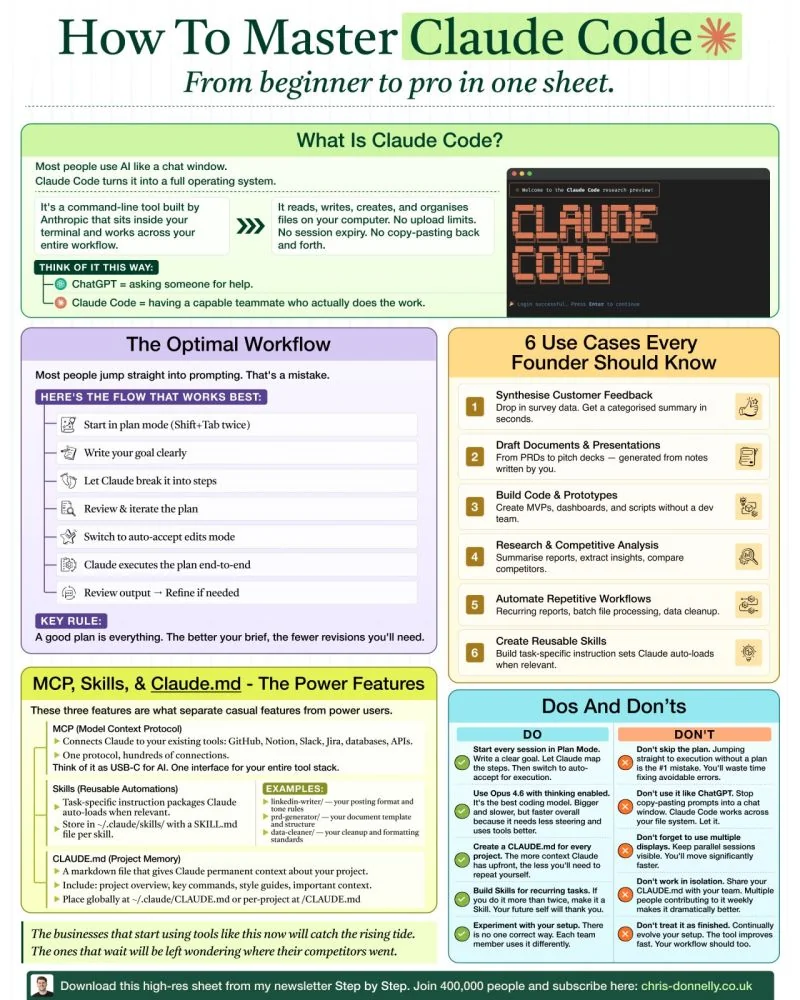
Prompts
-
Type your question or command on top of “How can I help you today?”
REMEMBER, there is a cutoff for when information has been loaded in the model.
Artifacts
-
Click “+ New artifacts”. Claude Artifiacts are separate dedicated panel (workspace) that display self-contained working outputs from a small app, HTML page, document, code, diagram (interactive component) you can preview, revise, and reuse without digging through the conversation.
- Click “Artifacts” on the menu and under its “Inspiration” tab, try:
- Click “QR code generator”.
- Click “CSV Data Visualizer”.
- click “Flashcards” and provide a CSV file.
- Click “Trivia” game.
- Click “Better than very” to find more expressive words.
-
To create your own automations, consider the “Cowork” button at the top of the Claude app.
Cowork and Projects both require a Pro Plan subscription.
TODO: Stats from your own Weather station
Connectors
-
Click one Category at a time to see what’s available already: Code, Communication, Data, Design, Development, Financial Services, Health, Life sciences, Productivity, Sales and Marketing.
REMEMBER: Most services at the end of the connector (such as Zapier) charge money.
- PROTIP: Instead of clicking “Download” for “Desktop” within “Claude Code environments”,
Setting up Claude Code...
✔ Claude Code successfully installed!
Version: 2.1.81
Location: ~/.local/bin/claude
Next: Run claude --help to get started
⚠ Setup notes:
• Native installation exists but ~/.local/bin is not in your PATH. Run:
echo 'export PATH="$HOME/.local/bin:$PATH"' >> ~/.bashrc && source ~/.bashrc
✅ Installation complete!
WARNING: Installing using curl would require adding to the $PATH in your ~/.zshrc or ~/.bashrc file this line:
export PATH="$HOME/.claude/bin:$PATH"RECOMMENDED: In a Terminal, install Claude Code:
brewin claude-codeTerminal-based AI coding assistant install: 170,173 (30 days), 390,990 (90 days), 585,358 (365 days) ==> Moving App 'Claude.app' to '/Users/johndoe/Applications/Claude.app'
- Confirm app folder location:
tree ~/.claudefolders:
backups
cache
downloads
-
REMEMBER: The free Claude.ai plan does not include Claude Code access. Upgrade to a Claude Pro, Max, Teams, Enterprise, or Console account.\
Select the subscription level:
Claude Code can be used with your Claude subscription or billed based on API usage through your Console account.

Select login method:

❯ 1. Claude account with subscription · Pro, Max, Team, or Enterprise

   2. Anthropic Console account · API usage billing

   3. 3rd-party platform · Amazon Bedrock, Microsoft Foundry, or Vertex AI
Documentation:
- Amazon Bedrock: https://code.claude.com/docs/en/amazon-bedrock
- Microsoft Foundry: https://code.claude.com/docs/en/microsoft-foundry
- Google Vertex AI: https://code.claude.com/docs/en/google-vertex-ai
CoWork
CoWork automates the use of Connectors to 3rd-party apps.
Default connectors are to:
- Microsoft Word for .docx documents
- Microsoft Excel for .xlsx spreadsheets
- Microsoft Powerpoint for pptx presentation files.
- PDF .pdf
The “Higgsfield Cowork Pack” enables, within a single Claude Cowork MCP, content-creator workflow automation that Cowork does not do. Running “setup-higghsfield-project” asks 7 questions about your brand to create a project-level CLAUDE.md spec file. It then installs skill that saves creators from needing to bounce out. Open a browser tab, switch to Midjourney, design something there, download it, drag it back into Cowork. 7 Skills Everyone Needs for the Future Economy
- “character-looker” to save reusable characters,
- “product-to-ad” to scrape product URLs for product images for saved characters to “/outputs/ads”
- “url-to-ad” to generate UGC ads into “/outputs/ads”
- “overnight-content” to schedule overnight runs to “/outputs/morning”
- “ig-carousel” to build cinematic Instagram carousels to “/outputs/carousels”
??? edit a custom goals.md file which contains the priorities I want to achieve in my own life.
Progress made toward those goals is what CoWork automatically reports on when it’s asked for a “Progress Report”.
Purpose -> Setup -> Skills -> Scheduling
scheduled
CAUTION: Cowork activity is not captured in audit logs or Compliance APIs today, which is why it is not for regulated workloads.
### Session Log analysis
- PROTIP: Install utility program ccusage to analyze session logs. See ccusage.com/guide/session/reports
-
To remove orphaned auto-installed dependencies: …bash claude plugin prune now ```
-
validate accepts $schema, version, and description fields.
Plugins pinned by another plugin’s version constraint auto-update to the highest satisfying git tag.
Plugin error handling distinguishes between conflicting dependencies, invalid versions, and overly complex version requirements.
/status
Example:
❯ /status
Version: 2.1.3
Session name: /rename to add a name
Session ID: 4eb36de6-c9f2-4c22-8ad3-a8232ea6c078
cwd: /Users/gigi
Auth token: none
API key: /login managed key
Organization: Perplexity AI
Email: gigi.sayfan@perplexity.ai

Model: opus (claude-opus-4-5-20251101)
MCP servers: notion ✔, linear ✔, datadog ✔
Memory: user (.claude/CLAUDE.md)
Setting sources: User settings, Shared project settings, Project local settings
Python Project
BLOG: Plan > Scope > Execute > Verify
Plan: “Explain how you’d solve X. No code yet.”
From uv init using prompt:
my-python-app/
├── .claude/
│   ├── settings.json     # Your Python/macOS config here
│   └── claude.md         # Optional: project instructions
├── src/
│   └── app.py
├── tests/
│   └── test_app.py
├── pyproject.toml
├── requirements.txt
└── README.md
Python Prompt examples:
-
“Refactor src/app.py for better error handling.”
-
“Add type hints and docstrings to src/app.py.”
-
“Run pytest and fix failures.”
-
“Lint with ruff and apply fixes.”
/config
/config inside Claude Code’s interactive REPL to edit settings through a UI instead of editing JSON directly. See https://code.claude.com/docs/en/settings
   ❯ /config
      Auto-compact                              true
      Show tips                                 true
    > Thinking mode                             true
      Prompt suggestions                        true
      Session recap                             true
      Rewind code (checkpoints)                 true
      Verbose output                            false
      Terminal progress bar                     true
      Default permission mode                   Accept edits
      Respect .gitignore in file picker         true
      Auto-update channel                       latest
      Theme                                     Dark mode
      Local notifications                       Auto
      Push when actions required                false
      Push when Claude decides                  false
      Output style                              default
      Language                                  Default (English)
      Editor mode                               normal
      Model                                     opus
Settings config
- ~/.claude/settings.local.json — your personal project overrides (gitignored).
- /.claude/settings.json — global user defaults (see below).
- /.claude/settings.json — project-level, commit to github for sharing on each team member’s setup.
- managed-settings.json — enterprise-enforced, can’t be overridden by standard user.
VIDEO: Anthropic’s Claude Managed Agents provides developers production-grade execution env in a sandbox and a framework orchestration for an extra 8 cents per session hour $700/year.
PROTIP: Take a full backup before you make changes to conditions after install.
respectGitignore: true keeps file picking from surfacing ignored files by default.
- Limit use of “latest” which means beta:
"autoUpdatesChannel": "stable", - Lock Claude’s response language:
"preferredLanguage": "english", - Set default to less expensive model than “opus” with medium usage vs. high:
"model": "claude-sonnet-4-6",
"effortLevel": "medium",
~/.claude/settings.json config
Configuration choices are stored by Claude in its file ~/.claude/settings.json
REMEMBER: Indent two spaces per level.
- No comma after last item in a list.
- “allow” pre-approves tools so you’re not prompted every time
- “deny” hard-blocks sensitive reads (env files, keys) and destructive commands
- true and false are not encased between quote marks.
- Colons (:) separate each folder specification.
global user defaults:
- At the top, for autocomplete in editors like VS Code:
}
  "$schema": "https://json.schemastore.org/claude-code-settings.json",
NOT “https://json-schema.org/claude-code-settings.json”,
- Disable MCP server tool descriptions loaded for use by web chat, but should not needed but still take up tokens on Claude CLI:
"env": { "ENABLE_CLAUDEAI_MCP_SERVERS": "false", - Environment variables set basis for rules by what enviornment (vs prod). Examples of additional custom variables include: xamples:
"NODE_ENV": "development", "GIT_MAIN_BRANCH": "main", "PYTHONPATH": "./src:./tests" "REPOSITORY_NAME": "data-ai-tickets-template", "DATABASE": "ANALYTICS", "WAREHOUSE": "DATA_ANALYSIS", "SCHEMA": "REPORTING", "DATABRICKS_PROFILE_PROD": "production", "DATABRICKS_PROFILE_DEV": "development" }, - Set shell program (not zsh) for compatibility:
"defaultShell": "bash", - Set the default model to Sonnet 1-million token context rather than more expensive Opus :
"model": "sonnet[1m]", - For stronger command isolation, especially in higher-risk environments.:
"sandbox": { "enabled": true, "autoAllowBashIfSandboxed": true, "network": { "allowedDomains": [ "pypi.org", "files.pythonhosted.org", "github.com" ] } }, - Enable attribution:
"respectGitignore": true, "attribution": { "commits": true, "pullRequests": true } - Deny access (like .gitignore for Claude) so tokens are not wasted reading what Claude should not:
"permissions" : { "deny": [ "Read(node_modules/**)", "Read(dist/**)", "Read(.next/**)", "Read(coverage/**)", "Read(*.lock)", "Read(**/.DS_Store)", "Read(**/__pycache__/**)", "Read(**/.mypy_cache/**)", - Deny access to secrets - use calls thru secrets manager instead:
"permissions" : { "deny": [ "Read(.env)", "Read(.env.*)", "Read(**/.env)", "Read(**/.env.*)", "Read(./.env)", "Read(./.env.*)", "Read(./secrets/**)" "Read(credentials/**)", "Read(**/*.key)", "Read(**/*.pem)", ] - Deny mass destructive operations:
"permissions" : { "deny": [ "Bash(sudo:*)", "Bash(su:*)", "Bash(rm -rf *)" "Bash(curl *)", "Bash(wget *)", "Delete", "Bash(git push --force:*)", "Bash(git push -f:*)", "Bash(git reset --hard:*)", ] - Allow MCP servers:
"permissions" : {
 "allow": [
   "mcp__playwright",
REMEMBER: The two underlines (“__”) in the name allows Claude to use Playwright tools without asking for permission every time.
- Under permissions -> allow to not need user confirmation:
"Read", "Write(./projects/**)", "Write(./documentation/**)", "Write(./videos/**)", "Bash(brew install *)", "Bash(brew upgrade *)", "Bash(cat *)", "Bash(echo *)", "Bash(pwd)", "Bash(tree:*)", "Bash(git add *)", "Bash(git branch:*)", "Bash(git commit *)", "Bash(git diff *)", "Bash(git show:*)", "Bash(git status)", "Bash(git log *)", "Bash(git push)", "Bash(ls *)", "Bash(npm run *)", "Bash(npx *)", "Bash(poetry install)", "Bash(poetry run *)", "Bash(python -m *)", "Read(**/requirements*.txt)", "Read(**/pyproject.toml)" "Bash(uv *)", "Bash(ruff check:*)" "Read(**/*.py)", "Glob", "Grep" ] - Useful for debugging if hooks are misbehaving:
], "disableHooks": true, - When running a shell command, to prevent silent truncation and wasted retries, set a higher number than the default 30-50,000:
"BASH_MAX_OUTPUT_LENGTH": "150000", - In reality, output quality degrades before the default, so trigger before the default 83%:
"autocompact_percentage_override": 75, - Turn off Claude’s distracting spinner text:
"spinnerTipsEnabled": false, - Highlight:
"syntaxHighlightingDisabled": false, - Define extent of thinking output:
"showThinkingSummaries": true, - Adjust frequency of cleanup instead of default 30 days:
"cleanupPeriodDays": 20, - Disable writing chat history to disk if you want privacy:
"sessionPersistenceDays": 0, - Force push of feature branch instead of main branch: VIDEO from Kyle Chalmers’ Github:
"hooks": {
   "PreToolUse": [
      {
      "matcher": "Bash(git commit:*)",
      "hooks": [
         {
            "type": "command",
            "command": "bash -c 'if [ $(git branch --show-current) = \"main\" ]; then echo \"ERROR: Cannot commit to main branch. Create a feature branch first.\" && exit 1; fi'"
         }
      ]
      }
   ]
}
References:
Confirm validity of JSON
Make sure a comma is at the end of each entry, except the last one of each section.
cat ~/.claude/settings.json | python3 -m json.tool
A sample error message:
Expecting ',' delimiter: line 35 column 7 (char 741)
Illegal trailing comma before end of array: line 44 column 21 (char 942)
/doctor or CLI claude doctor
Token /context usage
https://github.com/getagentseal/codeburn
Claude’s context window is 200K, meaning it can ingest 200K+ tokens (about 500 pages of text or more) when using a paid Claude plan. The Claude API can ingest 1M tokens when using Claude Opus 4.6 or Sonnet 4.6.
PROTIP: Take action when token usage is above 50%. See Rewind Mode (Escape x2)
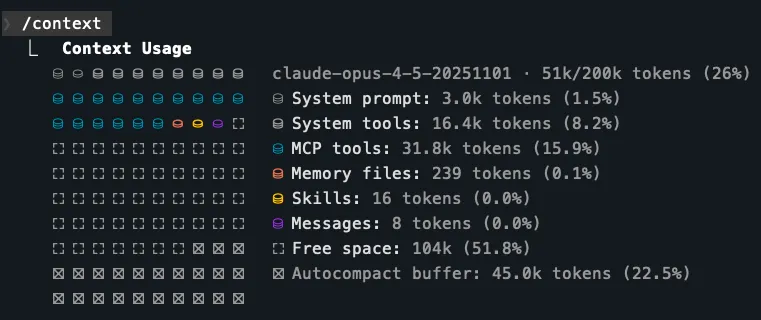
The first line in the example above:” 51k tokens (26%)” is what is currently used. Users on Claude Code with a Max, Team, or Enterprise plan, Claude Opus 4.6 have a 1M token context window.
REMEMBER: The Autocompact Buffer: 45k tokens (22.5%) is reserved for autocompaction. When your conversation approaches the context window limit, Claude summarizes earlier messages to make room for new content. Claude Code does this automatically when the context window fills up, but here’s the thing - automatic compaction might keep less important stuff and throw away useful insights. But that takes time and require work space. The context window limit applies to input + output combined. When autocompaction triggers, the model needs room to generate the summary. Without reserved space, a full context would leave no room for output. So right off the bat, you only have about half the context window for your actual conversation.
System Overhead: The system prompt and tools reserve almost 20k tokens (~10%).
- Disable unused MCP servers per session. Unused servers burn context silently via tool descriptions.
claude mcp listREMEMBER: The list includes those set in the browser-based Claude.ai workspace:
claude.ai Notion: ✓ Connected
claude.ai Gmail: ! Needs authentication
claude.ai Google Calendar: ! Needs authentication
claude.ai Slack: ! Needs authentication
claude.ai Atlassian: ! Needs authentication
claude.ai Asana: ! Needs authentication
claude.ai GitHub MCP: ! Needs authentication
... 33 servers total
CAUTION: The tool descriptions of every MCP server active loads into Claude’s system prompt, your first message. This also widens your attack surface — every connected server is one more thing that could break, leak, or be misused.
The more MCP servers are used, the more “MCP Tools” tokens are used. Each tool within an MCP server consumes token before it even starts. Each of several tools are usually a part of each MCP server. For example, Notion has a tool for
- create-pages
- create-comment
- update-page
- update-database
/cost tokens spent
   ❯ /cost
  ⎿  Total cost:            $2.69
      Total duration (API):  5m 12s
      Total duration (wall): 9h 39m 12s
      Total code changes:    10 lines added, 1 line removed
      Usage by model:
             claude-haiku:  42.1k input, 790 output, 0 cache read, 11.9k cache write ($0.0609)
          claude-opus-4-5:  3.4k input, 10.7k output, 1.7m cache read, 235.3k cache write, 1 web search ($2.63).  x          ```
## /loop
The /loop command parses natural language specifications into three parameters of a CronCreate call , which is not just a repetitiive “Ralph loop”. It can also schedule a task that fires based on a timer, in the current Claude Code session. Close the terminal, exit Claude, or lose your connection, and all scheduled tasks vanish.
   {
   "cron": "*/10 * * * *",
   "prompt": "Check the CI status on PR #42 and summarize any failures",
   "recurring": true
   }
Skills
- VIDEO: Skills reduce the pain from copy-and-paste prompting. Skills compound.
- VIDEO: What are skills?
WHen Claude starts, it looks for skills the might be requested from within these four folders: VIDEO:
- managed-settings.json provided by enterprise administrators to Claude users under its charge.
- $HOME/.claude/skills # personal folder $HOME such as “/Users/JohnDoe/…” in a git repo
- project/.claude/skills # project
- project/.claude-plugin/plugin.json # plugins
The above defines the precedance of a lower skill being “shadowing” if that same skill name is in different levels. The top one is used.
REMEMBER: Skill folders under ~/.claude/skills/… are reusable by all projects.
View, evaluate, and download skill folders from these marketplace such as:
- claudemarketplaces.com has skills, plugins, MCP)
- atcyrus.com/skills
- 1,419,713 skills to Search with AI semantics or keywords, filter by occupation, sort by stars popularity. All skills use the open SKILL.md standard and are ready to install.
- github ???
- skillsmp.com
- claudeskills.info/skills
- github.com/anthropics/skills/tree/main/skills to process pdf, Word, PowerPoint, Excel Spreadsheet
REMEMBER: VIDEO: The agentskills.io standard says each Claude skill is defined by a folder named for the skill plus a SKILL.md file within that folder. DOC:
skill-name/
├── SKILL.md           # Required: metadata + main instructions
├── assets/            # Spec: templates, resources
│   └── onboarding.md
├── examples/
│   └── sample-output.md   # What good output looks like
├── reference.md       # Detailed docs (loaded on demand)
├── references/        # Spec: documentation
│   └── api-spec.md    # Detailed specs Claude reads when communicating using APIs
│   └── architecture.md    # Architectural pattern (use of technologies such as MVC, REST API, microservices, etc.)
│   └── deep-dives.md  # Detailed technical tours referencing visual diagrams on the page
│   └── example-fas.md # Detailed specs Claude reads when needed
├── scripts/           # Spec: exectable code
│   └── validate.sh    # Executable bash scripts
└── templates/
    └── output.md      # Template Claude fills in at run-time
Default skills
https://claudeskills.info/skill/skill-creator/ Anthropic’s guide for creating effective skills that extend Claude’s capabilities
Project skills should be committed to version control alongside your code, for the whole team to use.
The three main distribution methods — repository commits, plugins, and enterprise managed settings.
Skills shared aross projects are cloned from folder .claude/skills where team standards live, like your company’s brand guidelines, preferred fonts, and colors for web design.
The entry point for each skill is a SKILL.md file in its own directory.
POLICY: The SKILL.md file should contain a link to each file under it, and be under 500 lines.
SKILL.md can contains other metadata such as:
- allowed-tools: Read, Grep, Glob, Bash
- model: sonnet
Skills provide guidelines that affect Claude’s reasoning.
When a file is uploaded but its content isn’t visible in context yet, the “file-reading” skill acts as a router to the right reading approach per file type.
Default skills described in markdown filesClaud.com docs provide handlers for each type of file:
Skills encode environment-specific constraints (available libraries, output paths, rendering quirks) that improve output quality beyond what training data alone provides.
- The “product-self-knowledge” skill deliver facts about Anthropic’s products (Claude Code, API details, claude.ai plan limits, pricing).
- The “frontend-design” skill handles Web UIs, React components, HTML/CSS layouts, dashboards, landing pages.
- The “skill-creator” skill is invoked when creating, editing, or evaluating skills themselves.
https://claudeskills.info/skill/template-skill/
For example, in each SKILL.md file the skill name is repeated within the header:
---
name: pr-review
description: Reviews pull requests for code quality. Use when reviewing PRs or checking code changes.
---
REMEMBER: “Use when” begins the sentence Claude uses to select the skill for the task it needs to fulfill.
REMEMBER: Ensure that Claude actually invokes the skill with a prompt such as “Create a PR”.
Another example:
---
name: backend-review
description: Reviews backend code for security issues and compliance mishaps.
tools: Bash, Glob, Grep, Read, WebFetch, WebSearch, Skill...
skills: accessibility-audit, performance-check
---
REMEMBER: The skill name must be in lower case and be a maximum of 64 characters. The description has a maximum of 1,024 characters in only one line.
VIDEO: “Good descriptions names the document types output format the skill produces. It includes trigger phrases to invoke the skill.
REMEMBER: Built-in Claude agents (like Explorer, Plan, and Verify) can’t access skills at all. When a subagent starts, explicitly listed custom Skills for them are loaded. This is a way to enforce standards in delegated work without relying on prompts.
Claude collects skill descriptions in SKILL.md files within each skill folder to compile an index of skills. Claude traverses that index to complete each task it needs to do.
Skills provide specialized knowledge that applies to specific tasks:
- Code review standards your team follows
- Commit message formats you prefer
- Brand guidelines for your organization
- Documentation templates for specific types of docs
- Debugging checklists for particular frameworks
REMEMBER: Unlike slash commands which users deliberately type in, each skill is opened and viewed automatically by Claude only when needed.
So mastery of custom skills lies in part to proper crafting of those descriptions in each SKILL.md markdown file.
So keep primary instructions in SKILL.md concise while still giving Claude access to rich supporting material when it needs it.
Custom skills can be created, such at git@github.com:jarrodwatts/claude-code-config.git
- planning-with-files
- rigorous-coding
- web-design-guidelines
- react-useeffect
- vercel-react-best-practices
VIDEO: Agent Skills makes use of OpenAI’s “open agent skills standard” (released on December 18, 2025), written in OpenAI Codex CLI, IDE Extension, Codex app. Google Gemini and DeepMind adopted it too. They’s on skillsmp.com marketplace
VIDEO: Troubleshooting skills.
Try “skills-ref”, the Agent Skills Verifier, using uv (written in Rust).
managed-settings.json
The managed-settings.json file is meant for corporate-level admin-controlled settings that cannot be overriden by project or user level settings.
REMEMBER: Unlike other settings.json files, the managed-settings.json file is stored in a folder outside of /Users folders.
- Mac: /Library/Application Support/ClaudeCode/managed-settings.json
- Linux or WSL: /etc/claude-code/managed-settings.json
- Windows: C:\ProgramData\ClaudeCode\managed-settings.json
PROTIP: Enterprises use MDM/Jamf-style policy controls on macs to require standard users to provide an admin password to view/modify.
View managed-settings.com to craft secure claude code settings.json and managed-settings.json enterprise security policy.
- cleanupPeriodDays
Example: VIDEO: Share skills.
{
    "permissions": {
        "defaultMode": "deny",
        "onlyAllow": [
            "Read(*)",
            "Search(*)"
            "Write(*)"
        ]
    },
    "askBeforeRunningTool": true
          ],
        "deny": [
           "Edit(/etc/*)",
           "Bash(rm *)",
           "Bash(curl *)",
           "Read(./.env.*)",
           "Read(./secrets/**)"
        ]
    },
    "forceRemoteSettingsRefresh": true
    "env": {
        "ANTHROPIC_API_KEY": "redacted",
        "CLAUDE_CODE_ENABLE_TELEMETRY": "1",
        "OTEL_METRICS_EXPORTER": "otlp"
    },
    "companyAnnouncements": [
        "Welcome! Review our code guidelines.",
        "Our new security policies are now active."
    ],
    "strictKnownMarketplaces": [
        {
            "source": "github",
            "repo": "acme-corp/approved-plugins"
        },
        {
            "source": "npm",
            "package": "@acme-corp/compliance-plugins"
        }
    ]
}
strictKnownMarketplaces control where plugins can be installed from.
Rules
In the rules folder, from git@github.com:jarrodwatts/claude-code-config.git
- comments.md
- forge.md
- testing.md
- typescript.md
https://www.gitguardian.com/files/secrets-management-maturity-model
Vulnerability Scanning
Because Claude understands context and logic, it can catche vulnerabilities that rule-based tools miss — like flawed business logic, insecure flows, or misuse of libraries.
| Category | Examples |
|---|---|
| Injection | SQL injection, command injection, LDAP injection |
| Secrets | Hardcoded passwords, API keys, tokens |
| Crypto | Weak hashing (MD5/SHA1), insecure random |
| Auth | Broken auth, missing rate limiting |
| Input validation | Missing sanitization, path traversal |
| Dependencies | Outdated/vulnerable imports |
| Deserialization | Unsafe pickle, yaml.load() |
| SSRF / XSS | In web frameworks like Flask/Django |
Create an iPhone app
VIDEO: Chris Raroque runs Claude Code Opus inside a Warp client referencing a [paid] mobbin.com design template. Voice dictates changes. Breaks down generation section by section. No hand edits.
Anthropic provides free tutorials at https://anthropic.skilljar.com/
Claude Partner Network
“Anthropic invests $100 million into the Claude Partner Network” (announced Mar 12, 2026) mentions “technical” Claude Certified Architect (CCA) Foundations certification.
Anthropic’s Claude Partner Network includes Accenture, Deloitte, PwC, and other consulting and systems integration firms.
In May 2026, Anthropic, Blackstone, Hellman & Friedman, and Goldman Sachs announced the formation of a new AI services company to bring Claude into mid-sized companies’ core operations. The company is also backed by General Atlantic, Leonard Green, Apollo Global Management, GIC, and Sequoia Capital.
#CAExamPrep
- https://anthropic.skilljar.com/claude-certified-architect-foundations-access-request
“A significant proportion of our $100 million investment will go directly to our partners as direct support for training and sales enablement, and for market development (including work to make customer deployments successful) and co-marketing for joint campaigns and events. “
The Partner Portal at https://partnerportal.anthropic.com/s/login/ provides Academy training materials, sales playbooks used by our own go-to-market team, and other co-marketing documentation.
At the Services Partner Directory, enterprise buyers can find firms with Claude implementation experience.
Partners get priority access to new certifications as they roll out.
Additional certifications for sellers, architects, and developers.
Certifications
-
Use your personal email to sign up for their newsletter.
-
Use your personal email to sign In to https://anthropic.skilljar.com
Claude Certified Architect (CCA), Foundations
Exam Domains from Anthropic’s Exam Guide.pdf:
- 27% Agentic Architecture & Orchestration - how agents loop, coordinate with subagents, and enforce rules with hooks vs prompts. STARTER
- The Agentic Loop
- Hub-and-Spoke Architecture
- Prompts vs. Hooks
- Anti-patterns: natural language parsing to determine loop termination; arbitrary iteration caps as the primary stopping mechanism; checking for assistant text as a completion indicator.
- How to design multi-agent systems?
- How coordinator delegates to sub-agents?
- What happens when a sub-agent fails?
- How to avoid anti-patterns that blow up in production?
- 18% Tool Design & MCP Integration - how Claude connects to external systems and how tool descriptions
determine routing.
- MCP Scoping
- Tool overload
- Standard to connect AI systems to external tools and data sources?
- How to write Tool Descriptions that don’t confuse the model
- How to configure MCP servers correctly.
- How to return structured errors that a coordinate can use to recover?
- 20% Claude Code Configuration & Workflows - skills, commands, plan mode, and CI/CD.
- Configuration Hierarchy
- When to Use What
- CI/CD Integration
- How CLAUDE.md files work at different levels - user, project, and profile?
- How to run Claude code in CI/CD pipelines without it hanging?
- 20% Prompt Engineering & Structured Output - structured output with JSON schemas, and validation
loops.
- Few-Shot Advantage
- Guaranteed structured output with JSON schemas
- Validation Loop
- 15% Context Management & Reliability
- Context Window Problem (‘lost in the middle’ effect)
- When to Escalate (escalation patterns)
- Error Propagation
- domain5-starter.md
- Building Agents with the Claude Agent SDK covers context management, error propagation, and escalation design
- Agent SDK session docs for resumption, fork_session, /compact
- Everything Claude Code repo by Affaan Mustafa for battle-tested context management patterns, scratchpad files, and strategic compaction. Tools and Tips.
References:
- “Claude Certified Architect - Full Breakdown” by Tech With Deepanshu for K21
- VIDEO by Paul Larionov referencing github.com/paullarionov/claude-certified-architect, https://github.com/paullarionov/claude-code-best-practice, https://github.com/paullarionov/claude-code-commands-cheatsheet, https://github.com/paullarionov/claude-code-ultimate-guide, https://github.com/paullarionov/everything-claude-code https://github.com/paullarionov/magic-resume
- “Claude Certified Architect Exam Explained Before It Goes Public” by Baleelo
The community confirms is the exam’s focus areas: fallback loop design, Batch API cost optimization, JSON schema structuring to prevent hallucinations, and MCP tool orchestration.
IBM AI Engineering (Coursera) ML/DL concepts and model deployment Conceptual + hands-on Cloud-agnostic
Anthropic Academy is at https://www.anthropic.com/learn
https://anthropic.skilljar.com/claude-certified-architect-foundations-access-request
References:
- @hoeem’s X post “I want to become a Claude architect (full course)” provides a set of prompts.
- https://dev.to/mcrolly/inside-anthropics-claude-certified-architect-program-what-it-tests-and-who-should-pursue-it-1dk6
- https://github.com/BayramAnnakov/claude-reflect - A self-learning system for Claude Code that captures corrections, positive feedback, and preferences — then syncs them to CLAUDE.md and AGENTS.md.
Models
Claude Model Family:
| Claude Opus | Claude Sonnet | Claude Haiku | Mythos | |
|---|---|---|---|---|
| Description | Highest level of intelligence | Balance of quality, speed, cost | Most cost-efficient and latency-optimized model | |
| capabilities (Best used for) |
advanced reasoning | Common coding tasks | Quick code completions and suggestions | |
| Cost: | Highest | Medium | Lowest | |
| Input/Output $/MTok | $5/$25 | $3/$15 | $1/$5 | |
| Prompt caching Read/Write $/MTok | $0.50/$6.25 | $0.30/$3.75 | $0.10/$1.25 | |
| max_input_tokens (Context window) | 1M tokens | 1M tokens | 200k tokens | |
| max_tokens (Max output) | 128k tokens | 64k tokens | 64k tokens | |
| Tokens/min Input & Output | 30K/8K | 30K/8K | 50K/10K | |
| Comparative Latency: | Moderate | Fast | Fastest | |
| Supports Reasoning & Adaptive Thinking |
Yes | Yes | No! |
REMEMBER: Each model used has a different ID and version on each cloud: See DOCS: API codes for each Claude Model version list or GET https://api.anthropic.com/v1/models
On AWS, the full model_id = “us.anthropic.claude-3-7-sonnet-20250219-v1:0”
| Feature | Claude Opus 4.6 | Claude Sonnet 4.6 | Claude Haiku 4.5 |
|---|---|---|---|
| Claude API ID | claude-opus-4-6 | claude-sonnet-4-6 | claude-haiku-4-5-20251001 |
| Claude API alias used by API calls | claude-opus-4-6 | claude-sonnet-4-6 | claude-haiku-4-5 |
| GCP Vertex AI ID | claude-opus-4-6 | claude-sonnet-4-6 | claude-haiku-4-5@20251001 |
| AWS Bedrock ID | anthropic.claude-opus-4-6-v1 | anthropic.claude-sonnet-4-6 | anthropic.claude-haiku-4-5-20251001-v1:0 |
| Reliable knowledge cutoff: | - | - | February 2025 |
| Training data cutoff: | - | - | July 2025 |
TODO: Microsoft Foundry?
REMEMBER: The Reliable knowledge cutoff is the date through which knowledge is most extensive and reliable.
Training Data Cutoff is the broader range of data used.
Advanced reasoning:
- Advanced software development, especially large-scale architecting
- Long-running tasks that require sustained focus
- Strategic planning with multi-step problem solving
Common coding tasks:
- Document creation and editing
- Content marketing and copywriting
- Data analysis and visualization projects
- Image analysis
- Process automation
Quick code completions and suggestions:
- Content moderation and filtering
- Data extrction and categorization
- Language translation
- Q&A Systems and knowledge retrieval
- Most high-volume, straightforward text processing tasks
Chat API call using Claude Opus
- Based on https://platform.claude.com/docs/en/get-started
- Get your API key from the Claude Console API keys page.
- Save the value in your Password Manager.
- In a Terminal app, set environment variable:
export ANTHROPIC_API_KEY='sk...your-api-key-here' -
For API usage, buy $5 of credits from https://platform.claude.com/settings/billinghttps://platform.claude.com/settings/keys
- Run the simple-msg.py from https://github.com/bomonike/claude-templates/??? ‘'’python import anthropic client = anthropic.Anthropic() message = client.messages.create( model=”claude-sonnet-4-6”, max_tokens=1024, messages=[{ “role”: “user”, “content”: “Hello, Claude” }] ) print(message.content[0].text) ```
-
Run the curl-model-info.sh from https://github.com/bomonike/claude-templates…
curl https://api.anthropic.com/v1/messages \
-H "Content-Type: application/json" \
-H "x-api-key: $ANTHROPIC_API_KEY" \
-H "anthropic-version: 2023-06-01" \
-d '{
   "model": "claude-opus-4-6",
   "max_tokens": 1000,
   "messages": [
      {
      "role": "user",
      "content": "What are the capabilities of Claude Opus 4.5 and its Reliable knowledge cutoff date and Training data cutoff dates?"
      }
   ]
}'
An example of the response: ???
{ "id": "msg_01HCDu5LRGeP2o7s2xGmxyx8", "type": "message", "role": "assistant", "content": [ { "type": "text", "text": "Here are some effective search strategies to find the latest renewable energy developments:\n\n## Search Terms to Use:\n- \"renewable energy news 2024\"\n- \"clean energy breakthrough\"\n- \"solar/wind/battery technology advances\"\n- \"green energy innovations\"\n- \"climate tech developments\"\n- \"energy storage solutions\"\n\n## Best Sources to Check:\n\n**News & Industry Sites:**\n- Renewable Energy World\n- GreenTech Media (now Wood Mackenzie)\n- Energy Storage News\n- CleanTechnica\n- PV Magazine (for solar)\n- WindPower Engineering & Development..." } ], "model": "claude-opus-4-6", "stop_reason": "end_turn", "usage": { "input_tokens": 21, "output_tokens": 305 } } - Review Claude token usage at https://platform.claude.com/usage
Multi-Provider
The “AI-6 framework” at February 2026 Packt BOOK: “Design Multi-Agent AI Systems Using MCP and A2A” (on OReilly.com) by Gigi Sayfan referencing his book GitHub repo https://github.com/Sayfan-AI/ai-six.
AI Fluency Class
https://www.anthropic.com/learn/claude-for-you
AI Fluency 11-video playlist on YouTube
01Introduction to AI Fluency
02The AI Fluency Framework
03Deep Dive 1: What is Generative AI?
04Delegation
05Applying Delegation
06Description
07Deep Dive 2: Effective Prompting Techniques
08Discernment
09The Description-Discernment Loop
010Diligence
Text Chat using Claude API
https://platform.claude.com/docs/en/get-started
curl https://api.anthropic.com/v1/messages \
  -H "Content-Type: application/json" \
  -H "x-api-key: $ANTHROPIC_API_KEY" \
  -H "anthropic-version: 2023-06-01" \
  -d '{
    "model": "claude-opus-4-6",
    "max_tokens": 1000,
    "messages": [
      {
        "role": "user",
        "content": "What should I search for to find the latest developments in renewable energy?"
      }
    ]
  }'
Making a request
Multi-Turn conversations work by you maintaining your own chat history.
- REMEMBER: Alternate between message roles User and Assistant (the AI).
Chatbot
PROTIP: By default, Chat returns message with code between backticks so its explanation text can be added. To retrieve just the code returned with “stop sequences”:
import json

# Parse as JSON to validate and format
parsed_data = json.loads(text.strip())

# Or just strip whitespace for other data types
clean_text = text.strip()

messages = []
add_user_message(messages, "Generate a very short event bridge rule as json")
add_assistant_message(messages, "```json")
text = chat(messages, stop_sequences=["```"])
System prompts
Temperature
Streaming
Controlling model output
Structured data
External Tool Use
DEFINITION: Tool use is also known as function calling, refers to the ability to extend/enhance Claude’s functionality by defining and invoking external tools or functions. Examples are send_mail() and send_sms_message(). Tool use is about Claude calling defined functions to accomplish tasks. Tools allow us to write code that can perform specific tasks or computations that Claude wouldn’t be able to do otherwise.
Claude can be given access to a set of predefined tools that it can invoke at any point. Default tools:
- Agent - Launch a subagent to handle a task
- Bash - Run a shell command
- Edit - Edit a file
- Glob - Find files based upon a pattern
- Grep - Search the contents of a file
- LS - List files and directories
- MultiEdit - Make several edits at the same time
- NotebookEdit - Write to a cell in a Jupyter notebook
- NotebookRead - Read a cell
- Read - Read a file
- TodoRead - Read one of the created to-do’s
- TodoWrite - Update the list of to-do’s
- WebFetch - Fetch from a URL
- WebSearch - Search the web
- Write - Write to a file
Claude’s AskUserQuestion tool can be invoked used to produce a detailed specification document for spec-based development with a prompt such as: “read this @SPEC.md and interview me in detail using the AskUserQuestionTool about anything: technical implementation, UI & UX, concerns, tradeoffs, etc. but make sure the questions are not obvious. Be very in-depth and continue interviewing until it’s complete, then write the spec to the file.”
https://github.com/jarrodwatts/claude-code-config/blob/main/commands/interview.md ???
Plugins
-
Explore Claude Plugin Marketplace of Curated plugins, agent skills, and MCP servers for Claude Code: https://claudemarketplaces.com/learn
- PROTIP: ultra-doc (by Jonathan Edwards) auto-syncs two sets of documentation to solve “Context Rot”.
- context_for_humans/: Readable, narrative-driven docs for humans.
- context_for_llms/: Optimized, token-efficient, rigid Markdown for Claude.
- Consider claude-reflect a self-learning system (/reflect-skills) for Claude Code that captures corrections, positive feedback, and preferences — then syncs them to CLAUDE.md and AGENTS.md.
MCP servers
PROTIP: MCP Servers and tool use are complementary but different concepts.
Consider MCP servers for:
- Database interactions
- API testing and monitoring
- File system operations
- Cloud service integrations
- Development tool automation
-
To reduce the development work required on your end, use the MCP Servers defined by https://github.com/punkpeye/awesome-mcp-servers and others to provide tool schemas and function code implemented as MCP Servers.
MCP GitHub Action
- VIDEO: A popular MCP server to install is GitHub Actions CI (Continuous Integration). Install the Claude GitHub app from github.com/apps/claude using a built-in command:
/install-github-appFIXME: ??? That creates under your cwd folder/file ~/.github/workflows/claude.yml
Instead of using a browser to get the GitHub API key and then scheduling a rotation of that key according to your corporate security standards. GitHub does not provide an API to automatically create or rotate new Personal Access Tokens (PATs) for a user account. PAT creation is intentionally manual for security reasons.
-
GitHub explicitly recommends GitHub Apps for automation use cases. A GitHub App can generate short-lived installation tokens automatically via API. See https://docs.github.com/en/apps/creating-github-apps/authenticating-with-a-github-app/authenticating-as-a-github-app-installation
MCP Playwright
Another common MCP server to install is Microsoft Playwright. It gives Claude Code structured DOM access with a browser’s accessibility tree, element attributes, network requests, and page state directly. So Playwright is more precise and efficient for web-specific tasks than Computer Use.
- Install MCP Playwright:
claude mcp add playwright npx @playwright/mcp@latest -
To avoid needing to confirm the next command, edit your .claude/settings.local.json file to add permissions: to allow “mcp_playwright”.
- Prompt in Claude UI to use MCP Playwright, the default control of browsers:
open the browser and navigate to localhost:3000Alternately:
Use playwright mcp to open a browser to example.com -
Accessing the browser and controlling it with Playwright enables Claude can see the actual visual output, not just the code, so it can make decisions about improving styling.
Computer Use
Claude Computer Use works through screenshots and mouse/keyboard simulation, treating the browser like a visual interface. So it can be used for anything that runs on a desktop, including apps outside the browser.
- Install
Tools
Tools are like giving Claude hands to take action out in the world:
- control a browser (“computer use” type of tool clicking and typing on your desktop)
- web search (using Anthropic’s built-in tool)
- send an email via Connectors MCP servers
- query a database and other custom tools
- run Python code in a sandbox (such as read a file to analyze its data)
MCP lets tools be defined once and reused across many apps, rather than reimplementing per project.
Key point: Claude does not execute the tool itself — it tells you what to call and with what arguments. You run it and return the result. The intelligence (deciding when and how to use a tool) stays with Claude; the execution happens in your infrastructure.
user text → [Claude] → call a function/API → get result → text response
- You define tools and pass them in the API request. Example:
{ "tools": [ { "name": "get_weather", "description": "Get current weather for a location", "input_schema": { "type": "object", "properties": { "location": { "type": "string", "description": "City name, e.g. Seattle" } }, "required": ["location"] } } ] } - Claude decides whether to use a tool.
- Claude returns a tool_use block (not final text yet)
Claude’s response when it wants to use it:
{ "type": "tool_use", "name": "get_weather", "input": { "location": "Seattle" } } - YOUR code executes the actual function
- You send the result back to Claude
- Claude formulates its final response
Run in Containers
- https://www.youtube.com/watch?v=brLhhkUqcn4&t=20061s
- https://www.youtube.com/watch?v=brLhhkUqcn4&t=15403s Sandboxing
Instead of sitting around monitoring every prompt like a hall monitor just in case a rogue rm -rf slips by.
So consider a Code Container to mount every project into an isolated container where I can let my harness run loose with full permissions while the actual machine stays untouched.
- Install container in NodeJs:
npm install -g code-containerHowever, although actions within a container can’t affect your real system, it breaks when it needs network access, host filesystem access, or anything that crosses the sandbox boundary. Most real workflows need at least one of those.
So auto mode lets an AI classifier decide what’s safe, block what isn’t, and ask you only when it’s genuinely unsure. Auto mode runs two separate security systems. One watches what goes into the agent’s context.A server-side detector scans content for prompt injection attempts.
The second line of defense evaluates what the agent wants to do before it does it. Before the agent executes any action with real consequences, the “transcript classifier” built on Claude Sonnet 4.6 classifier evaluates the action against a set of decision criteria using full chain-of-thought reasoning.
This BLOG by Marco Kotrotsos reports a 17% false negative which allowed dangerous actions, including 5.7% data exfiltration attack success rate. But that’s still better that letting everything through when using the time-saving:
–dangerously-skip-permissions
Auto mode is not a replacement for judgment on high-stakes operations.
- To see the complete default configuration for customization:
claude auto-mode defaultsReferences:
-
Enabling claude sanbox mode (bubblewrap)b “is finicky”.
300ms startup time!
References:
-
https://medium.com/gitconnected/stop-babysitting-claude-code-get-work-done-10x-faster-with-code-container-fcd515381751
-
https://medium.com/@the.gigi/claude-code-deep-dive-lock-him-up-ea142fc8246b by Gigi Sayfan CCDD (Claude Code Deep Dive)
“Agent Skills: Code Beats Markdown (Here’s Why)” by Sam Witteveen
“How I Review AI-Generated Code” by Owain Lewis
https://www.youtube.com/watch?v=89bhDV0FBSM Coding in VS Code with Gemma 4 and Ollama by Zero to MVP
BOOK: $19 Claude Code: Practical Guide for Product Designers by Nick Babich
- “Why devs are OBSESSED with Claude Code” by Alberta Tech mentions
To reduce output tokens: https://github.com/JuliusBrussee/caveman
You are a minimal-output assistant.

Rules:

Use the fewest tokens possible.

No explanations unless explicitly asked.

No filler, transitions, or politeness.

Prefer short, direct sentences or fragments.

Prioritize results over reasoning.

If a tool/action is used, state it in 1–3 words.

Avoid repetition.

პასუხ format: answer only.

Style:

Simple, compressed language (caveman-like if helpful).

Example: "Search done. Result: X."

If more detail is needed, user will ask.
https://github.com/AnastasiyaW/claude-code-config/blob/main/CLAUDE.md
https://brockster6202.gumroad.com/
- Claude Routine Setup Guide
- 5 Live Artifacts Prompts
- The Leaked Prompts Vault
- Claude Cowork Plugins - Free Resource Guide
- 5 Claude Code Hacks (Cheat Sheet)
- GStack: The YC CEO’s AI Engineering Team
- HTML Over Markdown Explained
- 380+ Free Claude Cowork Skills
- 9 Claude Cowork Skills I Can’t Live Without (steal them)
- Claude Cowork x Higgsfield Plugin
References
VIDEO How To Use Claude Code In Vscode - Learn AI In 5 Minutes Series by Jonathan Acuña - Doctor AI
VIDEO Claude Code in VS Code Full Course: Build & Deploy apps to Railway in 60 Minutes
v052 url fixes @anthropic-claude.md created 2026-03-19